
WordPress Deployment on AWS: The 2026 Comprehensive Expert Guide
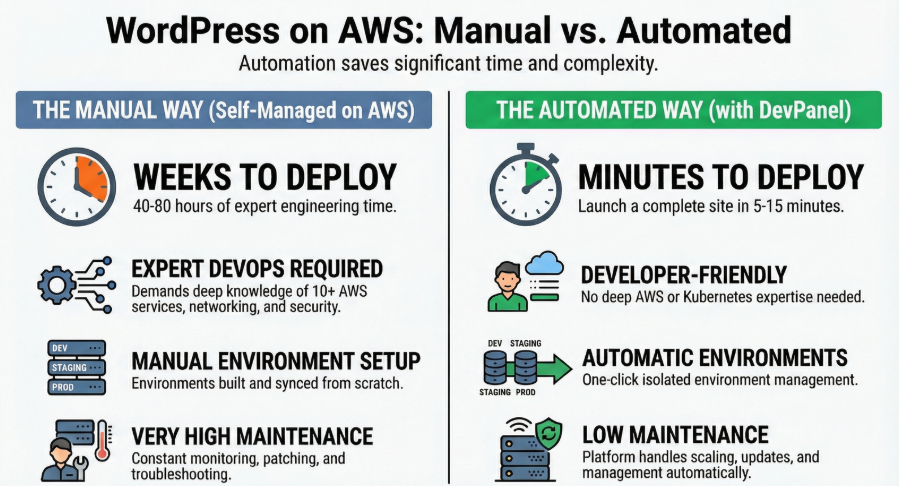
Selecting the right architecture for WordPress deployment on Amazon Web Services (AWS) is a high-stakes decision that dictates your team’s operational velocity and your site’s reliability. While AWS offers unrivaled power, its complexity can lead to significant technical debt if not managed correctly.
This guide provides an expert-level analysis of every major deployment method—from manual “DIY” infrastructure to the automated DevPanel platform.
📺 Watch the Masterclass
Prefer a visual walkthrough? Check out our deep-dive video:Understanding BYOC: Running WordPress on Your Own AWS with DevPanel. We cover the architectural differences between EC2, EKS, and DevPanel in real-time.
1. Manual & Self-Managed AWS Infrastructure
The Foundation of Absolute Control
For organizations requiring total architectural sovereignty, the manual approach involves assembling individual AWS services into a bespoke stack.
Core Components and Orchestration
- Compute: EC2 instances are configured with a LAMP or LEMP stack. You must manually handle the installation of web servers (Apache or Nginx) and PHP with the necessary extensions (e.g.,
php-mysql,php-gd). - Database: Amazon RDS provides managed MySQL or MariaDB. While RDS handles some overhead, teams must still manage parameter groups and backup policies.
- Storage: Amazon EFS (Elastic File System) acts as the shared storage for WordPress files and media, enabling horizontal scaling across multiple EC2 instances.
- Networking: An Application Load Balancer (ALB) distributes traffic and manages SSL/TLS certificates via AWS Certificate Manager.
The Reality of the “DIY” Path
Cost Profile: Monthly costs range from $140 to $2,700+, not including the significant labor cost of ongoing management.
Advantages: You get complete architectural control and the ability to optimize costs through Reserved Instances or Spot Instances.
Disadvantages: The operational complexity is massive. Teams require expert-level DevOps skills to manage security patches, OS updates, and horizontal scaling manually.
2. AWS Blueprints: Lightsail and Bitnami
Simplified Entry Points with Long-Term Trade-offs
AWS provides pre-configured options to lower the barrier to entry, but these often sacrifice the flexibility required for business-critical sites.
Amazon Lightsail WordPress
Lightsail is a simplified VPS offering designed for low-traffic environments.
- The Architecture: It uses a monolithic approach where the web server, database, and files are co-located on a single instance.
- The Limitation: Lightsail relies on burstable T2/T3 instances. Once CPU credits are exhausted, performance degrades severely, often causing sites to become unresponsive during traffic spikes.
- Verdict: Ideal for small portfolios or testing, but not recommended for production business applications.
Bitnami WordPress AMI
Bitnami packages WordPress as a pre-configured image in the AWS Marketplace.
- The Problem: Bitnami uses a non-standard filesystem layout (under
/opt/bitnami/) that diverges from standard Linux conventions. - Permission Fatigue: Users frequently report frustrating permission issues that require constant command-line intervention for routine tasks like plugin updates.
- Verdict: Often abandoned for production use due to the technical debt created by its non-standard configurations.
🎙️ Listen to the Debate
On our latest podcast episode, we interview DevOps experts about why “easy” blueprints like Bitnami often fail in production. Scaling WordPress on AWS The Four Paths
3. Containerized Orchestration: ECS and EKS
Modernizing WordPress with Docker
Containerization aims to provide consistency across environments, but it introduces substantial architectural friction for a monolithic application like WordPress.
Amazon ECS with Fargate
This “serverless container” approach eliminates EC2 instance management.
- Challenges: Integrating EFS for persistent storage is complex, and managing file permissions between container users and the filesystem is a common failure point.
- Maintenance: While AWS patches the infrastructure, you must still manage container image updates and complex CI/CD pipelines.
Amazon EKS (Kubernetes)
EKS provides the most sophisticated orchestration available, offering self-healing and advanced auto-scaling.
Verdict: Only suitable for organizations with existing Kubernetes expertise and dedicated DevOps teams.
Complexity: The learning curve is notorious. Teams must master pods, ingress controllers, CSI drivers, and RBAC.
Cost: Beyond worker nodes, the EKS control plane alone costs roughly $73/month.
4. The DevPanel Revolution: Automated Full-Stack Management
Managed Automation with Full Cloud Ownership
DevPanel is a DevOps automation platform that provisions and manages high-performance WordPress infrastructure directly in your own AWS account. It bridges the gap between the simplicity of managed hosting and the control of self-managed AWS.
Core Capabilities of DevPanel
- Automated Infrastructure: DevPanel connects to your AWS account and automatically provisions a complete stack: VPC, Kubernetes cluster, RDS database, EFS storage, and Load Balancers.
- Full SDLC Environments: Every site automatically receives isolated Development, Staging, and Production environments.
- Branch-Based Preview Apps: Integrated with Git (GitHub/GitLab/Bitbucket), DevPanel creates temporary preview environments for every feature branch, allowing stakeholders to review changes before they are merged.
- In-Browser IDE: Developers can access a browser-based VS Code instance with integrated WP-CLI and database tools.
📊 Download the Technical Deep-Dive
Want to see the infrastructure diagrams and cost-breakdown tables?[ The Modern way To Deploy WordPress on AWS]
Why DevPanel Outperforms Manual EKS and Managed Hosting
Unlike traditional managed hosts (like WP Engine or Kinsta), DevPanel is a “Bring Your Own Cloud” (BYOC) model.
| Feature | Manual AWS / EKS | Managed Hosting | DevPanel |
| Infrastructure Owner | You | The Vendor | You |
| Time to Deploy | Weeks | Minutes | Minutes |
| Dev/Test/Prod | Manual | Limited | Automatic |
| Preview Apps | DIY | Rarely | Built-in |
| Root/SSH Access | Yes | No | Yes |
5. What DevPanel Replaces in Your AWS Workflow
Manually architecting a professional WordPress workflow on AWS requires dozens of hours of engineering. DevPanel automates these components out of the box:
- Replaces Manual CI/CD: You don’t need to build complex pipelines in AWS CodePipeline or GitHub Actions; DevPanel handles the build and deployment logic automatically.
- Replaces Kubernetes Complexity: DevPanel uses Kubernetes for scaling and self-healing but abstracts it behind a simple dashboard. You get the power of EKS without needing to be a Kubernetes expert.
- Replaces Manual Database Syncing: Moving data from Production to Staging is reduced to a single click, replacing manual
mysqldumpand URL search-replace procedures.
6. Comparing Managed Hosting: WP Engine, Kinsta, and Pantheon
While these platforms are popular, they come with significant constraints compared to the DevPanel/AWS model.
- WP Engine & Kinsta: These are “closed-box” systems. You do not own the infrastructure, you cannot access the underlying server configuration, and you are subject to high markups on resources.
- Pantheon: Offers good workflow tools (Dev/Test/Live), but is still a proprietary platform. If you want to move away, the migration is manual and complex.
- The DevPanel Advantage: It offers the same (or better) workflow automation as Pantheon but keeps the sites in your cloud account, giving you 100% data sovereignty and lower long-term costs.
7. Final Recommendations: Which Path is Right for You?
For Growing Teams and Agencies
Recommended: DevPanel. Agencies benefit from the ability to host unlimited sites within their own cluster, dramatically reducing the per-site cost compared to managed hosting. The automated staging and preview environments allow your developers to focus on code rather than infrastructure toil.
For Enterprise Organizations
Recommended: DevPanel or AWS Reference Architecture. If you have a dedicated 24/7 DevOps team, you may choose a manual reference architecture for ultimate customization. However, most enterprises find that DevPanel provides 95% of the same control with 90% less operational overhead.
For Solo Developers
Recommended: Lightsail (for simple projects) or DevPanel (for career growth). While Lightsail is cheap for a single blog, using DevPanel teaches you modern DevOps and Kubernetes workflows that are standard in the professional world.
Conclusion: The Future of WordPress on AWS
The days of choosing between “easy but restricted” managed hosting and “powerful but painful” manual AWS are over. DevPanel provides a third way: enterprise-grade Kubernetes orchestration with the simplicity of a dashboard, all while maintaining complete ownership of your data and infrastructure.