
11 Best Browser-Based Cloud IDE Features Teams Actually Need In 2026
Local dev environments used to be the only option, but they are now holding teams back. Shares.io reports saving 0.5 days per engineer per week after moving to standardized cloud development environments, which shows how much time traditional setups waste on configuration and troubleshooting. In this article, we explain what makes the best browser-based cloud IDEs for teams and why platforms like DevPanel give modern Drupal and WordPress teams a serious advantage over old‑school local setups.
Key Takeaways
| Question | Answer |
|---|---|
| What is the main benefit of a browser-based cloud IDE for teams? | Teams get identical, on-demand environments accessible from any browser, which eliminates “works on my machine” issues and cuts onboarding from days to minutes. Platforms like DevPanel Cloud IDEs focus on exactly this. |
| How do cloud IDEs compare to local dev environments? | Local setups require powerful laptops, manual installs, and constant maintenance. Cloud IDEs only need a browser and can run large containers in the cloud, as explained in DevPanel’s Dev Environments overview. |
| Are there cost advantages for agencies and product teams? | Yes. With solutions like DevPanel Community Edition, Cloud IDEs are free with every application, unlike vendors that charge per developer or per environment. |
| Can cloud IDEs support Drupal and WordPress hosting workflows? | Modern cloud IDE platforms ship with prebuilt apps and templates for CMS projects, so Drupal and WordPress teams can start from working site templates instead of building stacks manually, as highlighted on DevPanel Apps & Templates. |
| How do teams manage collaboration and access? | Workspace concepts centralize projects, permissions, and resources in one place. DevPanel’s Workspaces feature lets admins group projects, invite developers, and control access per workspace. |
| What about deployment and cloning environments? | Leading platforms provide one‑click deployment and cloning of branches, databases, and files, so teams can spin up realistic test and review environments quickly, as shown on DevPanel Deploy & Clone. |
| Where can we see a full demo of a browser-based cloud IDE platform? | You can watch guided demos of a full cloud IDE and environment orchestration experience on the DevPanel demos page. |
1. Why Local Dev Environments Are Now a Liability For Teams
Local development environments used to be the default, but they create hidden costs for modern teams. Each developer maintains their own stack, so every laptop is a slightly different snowflake and debugging often starts with “what version are you on?” instead of the actual bug.
Running multiple Drupal or WordPress projects locally requires beefy laptops with large SSDs and lots of RAM. For agencies and distributed teams, this hardware cost multiplies quickly. On top of that, developers lose hours installing PHP, databases, web servers, and tools every time they join a new project or replace a machine.
When things break, rebuilding a local environment is painful. Anyone who has spent days chasing a corrupted Docker image or mismatched PHP extension knows how fragile local setups are. For complex hosting stacks that mirror production, it can take weeks to reassemble a reliable dev environment.
From a business perspective, this is wasted time and budget. Teams get blocked on tooling instead of delivering features, and every onboarding or laptop refresh resets the clock.
2. How Browser-Based Cloud IDEs Change the Game
Browser-based cloud IDEs remove these bottlenecks by moving the dev environment into the cloud. Developers work in a full-featured IDE that runs in the browser, backed by a container that is provisioned for each project or branch. All they need is a browser and a network connection.
Instead of buying high-end laptops, teams can use affordable devices like Chromebooks and let the cloud handle CPU, RAM, and storage. A 32 GB dev container in the cloud can be allocated to a lightweight machine with no hassle. Resource allocation becomes dynamic and centrally managed instead of tied to individual devices.

One of the biggest advantages is consistency. Every developer on the team works against the same container image, the same PHP version, the same database configuration, and the same services. If an application runs in one developer’s environment, it behaves the same in everyone else’s cloud IDE and in staging.
Even better, teams can make the cloud IDE mirror production hosting closely. That alignment drastically reduces deployment issues caused by configuration drift between dev and production. For Drupal and WordPress teams, having the same extensions, PHP modules, and database settings in dev and prod means far fewer surprises at release time.
3. DevPanel Cloud IDEs: In-Browser Coding Built For Teams
DevPanel focuses on giving teams a powerful, consistent browser-based IDE that they can use from anywhere. Developers get a VS Code experience in the browser, with common tools and helper apps already preinstalled and configured. There is no need to install anything locally besides a browser.
From our own work with teams, we see that DevPanel’s Cloud IDEs are especially useful when projects span multiple frameworks, such as a Drupal site that integrates with microservices or a WordPress multisite network. The IDE provides a central place to manage code, run tools, and debug across these stacks without local configuration headaches.
Unlike some vendors that charge extra for cloud IDE access, DevPanel includes Cloud IDEs free with every application in its Community Edition. Other platforms, including well-known Drupal hosting providers, treat cloud IDEs as an add-on and bill per developer or per environment, which increases costs quickly for agencies and larger teams.
Because DevPanel’s IDEs are container-backed and ephemeral, when something goes wrong you simply rebuild. A fresh, fully configured environment is ready in about five minutes. Teams do not waste days or weeks debugging broken local stacks, and contractors can jump in without a lengthy setup checklist.
Did You Know?
Quizlet reduced onboarding time for new engineers to 10 minutes using cloud development environments, demonstrating how quickly teams can get to a first commit without wrestling with local setup.
4. Building Standardized Dev Environments In The Cloud
The best browser-based cloud IDEs for teams go beyond simple in-browser editing. They give you a full cloud-based development environment per project or branch, including the web server, database, cache, and other services. DevPanel’s “Build Dev Environments” capability is designed for exactly this.
Instead of manually configuring Docker files or local stacks, you work with a point-and-click interface to build and clone environments. You can create a branch, attach a Cloud IDE, and have the full stack ready with the right PHP version, database, and tools in minutes.
Key features that matter for teams include:
- Branch-based environments so each feature branch has its own isolated dev stack.
- PhpMyAdmin included for quick database inspection and management from the browser.
- VS Code IDE included so every environment has a ready-to-use Cloud IDE attached.
- One source of truth because your code stays in your git repository and branches stay in sync.
This model is especially useful for Drupal and WordPress hosting workflows. Each site or multisite can get its own cloud dev environment, and complex migrations or version upgrades can be tested in disposable environments without risking the main project.
5. Templates, Prebuilt Apps, And CMS-Specific Stacks
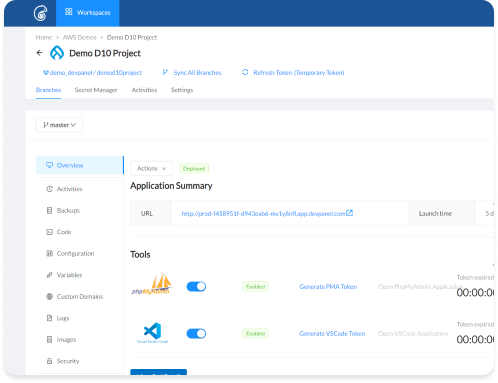
Another must-have for the best browser-based cloud IDEs is support for reusable templates and prebuilt applications. DevPanel ships with Prebuilt Applications and Preconfigured Templates, which are especially valuable for Drupal and WordPress projects where a lot of setup is repetitive.
Instead of installing a CMS from scratch, configuring themes, enabling modules or plugins, and loading sample content each time, teams can start from an application template that already includes a tuned stack. This shortens the path from idea to working site that developers can access via the Cloud IDE.
For agencies, reusable templates mean teams can standardize on secure, battle-tested Drupal and WordPress baselines and still give each client their own Cloud IDE environment. Developers and contractors join a project and instantly see a familiar structure, not a custom one-off stack.
On the backend, DevPanel supports containerized frameworks and connects with CI/CD and blue/green deployment strategies. That combination makes it easy to go from Cloud IDE to fully hosted production, using the same code and a similar runtime across environments.

6. One-Click Deployments, Cloning, And Git Branch Flows
For collaborative teams, a cloud IDE must be tightly integrated with deployments and git workflows. DevPanel’s “Deploy and Clone” capabilities show how this works when done well. You can deploy from scratch using default databases and settings, or clone an existing application with its database and files to create a new environment.
Every git provider branch, whether from GitHub, GitLab, or Bitbucket, can correspond to its own cloud development environment. This model encourages short-lived, branch-based work, since developers can spin up environments on demand instead of sharing long-lived staging servers.
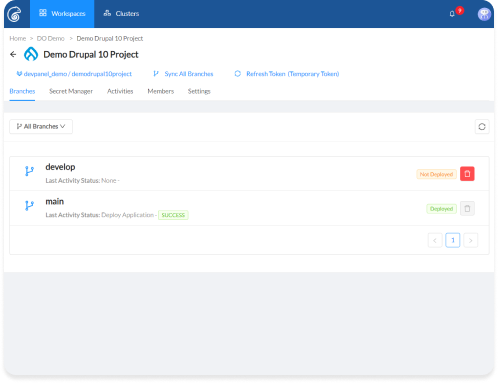
DevPanel also highlights security during deployments. Teams can lock down access and file permissions, configure applications, and then run through a review and deploy flow that takes only a few minutes. Once a deployment has run, the dashboard for the Cloud IDE and environment gives teams control over restarts, configuration changes, and additional clones.
For Drupal and WordPress hosting scenarios, clonable environments are invaluable. A production site can be cloned to a new environment for debugging a complex bug or testing a major upgrade such as moving from Drupal 9 to Drupal 10, all without putting the main site at risk.
Did You Know?
Shares.io reports 0.5 days saved per engineer per week thanks to standardized ephemeral cloud development environments, showing how small daily efficiencies add up to big gains in delivery speed.
7. Workspaces, Access Control, And Team Management
Beyond environments and IDEs, teams need a way to organize projects, control access, and support multiple clients or business units. DevPanel uses Workspaces as the central organizing concept for this layer.
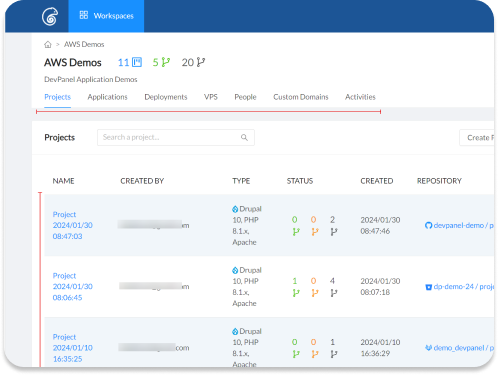
A workspace groups applications, environments, and resources for a team. Users only see the workspaces they are invited to, and roles like “admin” or “developer” control what each person can do. This structure works well for agencies managing many Drupal or WordPress hosting clients, or for enterprises with multiple internal product teams.
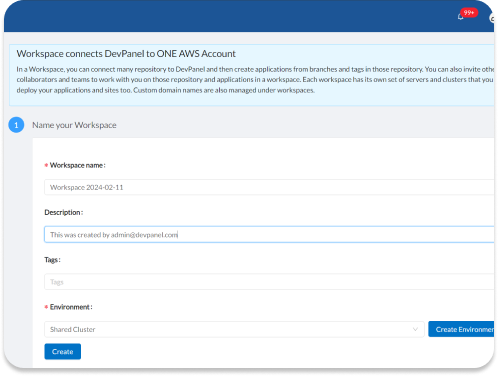
Inside a workspace, admins can:
- View all projects and associated resources.
- Invite developers individually or via open invites.
- See custom domains and activities across projects.
- Connect multiple clusters or clouds if needed.
This structure keeps governance clear while still supporting flexible collaboration. A developer can be an admin in one workspace and a contributor in another, without mixing environments or access rights between clients or departments.
8. Collaboration, Live Debugging, And Shared Cloud IDE Sessions
The best browser-based cloud IDEs are built around collaboration, not just individual productivity. DevPanel emphasizes real-time collaboration with features that let teams debug together and share environments easily, instead of pushing logs back and forth or trying to reproduce issues on different machines.
Because the application runs in the cloud, everyone on the team can point their browser to the same environment URL. A support engineer, a backend developer, and a front-end specialist can all see the same state and log output, which shortens debugging sessions significantly.
Onboarding becomes largely a collaboration problem rather than a technical setup problem. New developers can be invited to a workspace, given access to a project, and immediately open a Cloud IDE configured for that project. Instead of losing days to local installs, they can pair with a teammate on live code within minutes.
For CMS teams, this means a new Drupal or WordPress developer can explore a working site, inspect configurations, and run tests almost instantly. Contractors and short-term contributors no longer require a full day of setup work from senior engineers just to get a local site running.
9. Security, Compliance, And Production-Like Environments
Security is a major concern when centralizing development in the cloud. The top browser-based cloud IDEs address this by running environments inside secure, isolated containers, enforcing access control via workspaces and roles, and aligning closely with production hosting security practices.
DevPanel’s platform features emphasize secure-by-design architecture. It includes support for web application firewalls, encryption, automated backups, and compliance readiness for regulated sectors. For organizations working with government, higher education, or non-profit projects, having these capabilities tied directly to their development environments is essential.

An overlooked benefit is how closely a cloud IDE environment can mirror production. Because everything runs in the same cloud context and can use similar container images, differences between dev and live hosting are minimized. That reduces configuration drift and the number of “it worked in dev” incidents.
For Drupal and WordPress hosting, this means that security modules, caching layers, and PHP configurations can be tested in the cloud IDE before deployment. When combined with CI/CD and blue/green deployments, teams can ship changes with more confidence and fewer late-night rollbacks.
10. Pricing, Value, And Why “Free Cloud IDE Per App” Matters
Many cloud IDE vendors bill based on seats, hours, or environments, which can make cost forecasting difficult as teams grow. DevPanel takes a different approach with its Community Edition, which is 100% free to use with unlimited users, projects, and sites across AWS, Azure, and DigitalOcean.
Cloud IDEs are included at no additional cost with every application, which contrasts with providers like Acquia that charge separately for Cloud IDE access. For Drupal and WordPress agencies, this difference is significant because they can add contractors, QA engineers, and client stakeholders without worrying about per-seat IDE charges.
For organizations that need stricter SLAs, enterprise features, and managed support, DevPanel also offers enterprise plans with options for self-managed or fully managed deployments in their own cloud accounts. That flexibility lets teams start for free and scale up their governance model as requirements evolve.
From a total cost perspective, moving away from heavy local dev environments also removes the need for high-end laptops and long onboarding processes. Combine that with free Cloud IDEs and standardized dev containers, and the value proposition of browser-based cloud IDEs for teams becomes clear.
11. Comparing Browser-Based Cloud IDEs To Last-Century Local Setups
When we compare modern browser-based cloud IDEs with traditional local development, the contrast is stark. Local environments require manual setup, ongoing maintenance, and hardware investment, while cloud IDEs give teams identical, ready-to-use environments per project and branch.
| Aspect | Local Dev Environment | Browser-Based Cloud IDE (e.g., DevPanel) |
|---|---|---|
| Setup time | Hours to weeks per developer, especially for complex Drupal / WordPress stacks | Minutes, via templates and preconfigured containers |
| Hardware requirements | Expensive, high-spec laptops per developer | Any device with a browser, cloud handles CPU/RAM |
| Consistency | Each machine is different, frequent “works on my machine” issues | Identical environments aligned with production hosting |
| Recovery | Rebuilds can take days or weeks after serious breakage | Rebuild container in ~5 minutes from a known-good template |
| Onboarding | Days to get new hires productive | Contractors and new devs onboard in minutes |
| Cost model | Hardware + manual time + tooling licenses | Centralized cloud costs, with options like DevPanel CE at $0 |
For teams working on Drupal, WordPress, and other web applications, the move to browser-based cloud IDEs is not just an incremental improvement. It is a structural change in how development, hosting, and collaboration work together. The old model of local dev environments belongs to the last century.
Conclusion
The best browser-based cloud IDEs for teams are more than code editors in a tab. They combine in-browser coding, standardized cloud dev environments, workspace-based collaboration, and production-aligned security into a single workflow. When implemented well, they shorten onboarding from days to minutes, reduce environment-related incidents, and remove the need for high-spec laptops.
Platforms like DevPanel show how this approach works in practice for Drupal, WordPress, and other web applications by offering free Cloud IDEs with every application, prebuilt templates, and integrated deployment flows. For teams still relying on local dev environments, now is the right time to evaluate a move to cloud-based development. The productivity, cost, and reliability benefits are too significant to ignore.