
Kubernetes Resource Overcommit: The Ultimate Guide to Optimizing Infrastructure Efficiency and Costs
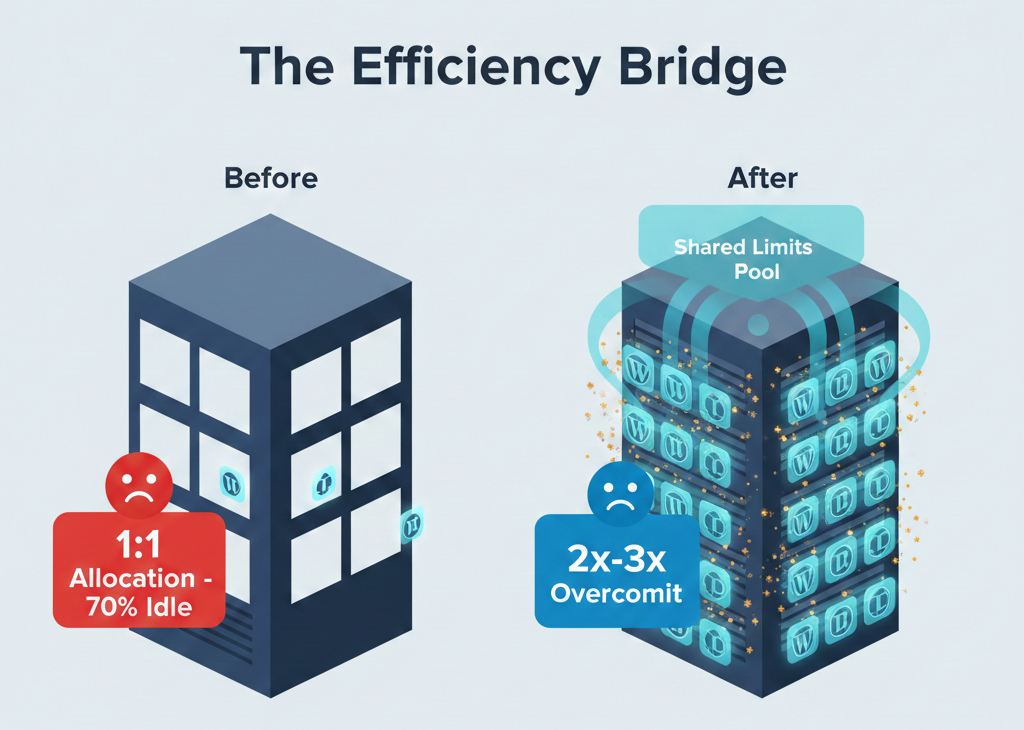
In the evolving world of cloud-native development, platform operators are constantly seeking the “holy grail” of infrastructure: the perfect balance between high performance and low cost. For many years, Kubernetes users relied on a 1:1 resource allocation strategy to ensure stability. However, this often leads to significant waste, especially for bursty applications.
Kubernetes resource overcommit represents a fundamental shift in how we approach infrastructure efficiency. By allowing the allocation of more virtual resources to Pods than physically exist on cluster nodes, Kubernetes enables dramatic cost reductions while maintaining service reliability.
This capability is a game-changer for DevPanel users, particularly agencies and freelancers managing large numbers of WordPress and Drupal sites. For a deep dive into the strategic implications of these configurations, you can explore this Perplexity research report on overcommit patterns.
Understanding the Foundation: Requests vs. Limits
Before diving into overcommit, we must understand the two critical concepts at the heart of Kubernetes resource management: Requests and Limits. These mechanisms control how the scheduler assigns Pods and how the kubelet enforces consumption boundaries.
CPU and Memory Requests
A resource request is the guaranteed minimum amount of CPU or memory a container will receive.
- Scheduling: The Kubernetes scheduler uses requests as the primary criterion for Pod placement decisions.
- Guarantees: If a node cannot satisfy a Pod’s request, the Pod will not be scheduled there.
- Predictability: Requests ensure that workloads receive their baseline resource needs even under contention.
CPU and Memory Limits
A resource limit is the absolute maximum amount of CPU or memory a container can consume. Limits act as hard boundaries that prevent any single workload from monopolizing node resources.
- CPU Limits (Compressible): When a container exceeds its CPU limit, Kubernetes throttles the container by reducing its CPU time allocation. The container continues running but performs more slowly.
- Memory Limits (Incompressible): If a container exceeds its memory limit, the Linux kernel’s Out of Memory (OOM) killer terminates the process. Kubernetes then restarts the container based on its restart policy.
The Quality of Service (QoS) Hierarchy
The ratio between your requests and limits determines your Pod’s Quality of Service class:
- Guaranteed (Requests = Limits): Highest priority and the last to be evicted during resource pressure.
- Burstable (Requests < Limits): Can consume resources beyond their request up to their limit when node capacity is available.
- BestEffort (No Requests or Limits): The first to be evicted when the node experiences resource pressure.
How Kubernetes Overcommit Actually Works
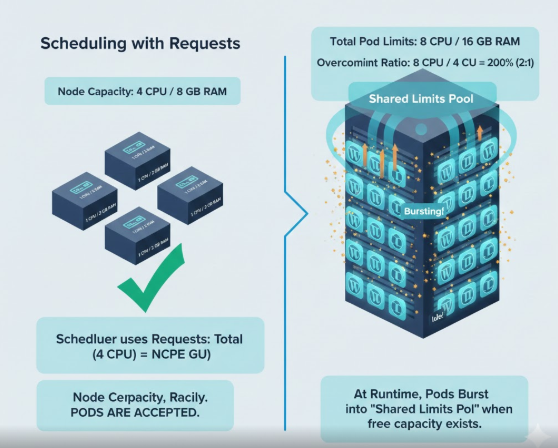
Kubernetes overcommit occurs when the sum of all Pod resource limits across a node exceeds the node’s physical capacity. Note that this is different from requests—request-based scheduling never allows the sum of requests to exceed node capacity.
Calculating the Overcommit Ratio
The overcommit ratio is calculated by dividing the total allocated limits by the node’s actual capacity.
Example Scenario:
- Node Capacity: 4 CPU cores / 8 GB RAM.
- Total Pod Limits: 8 CPU cores / 16 GB RAM.
- Ratio: 200% (or 2:1).
In this case, the node is running at 2x overcommit. Kubernetes schedules the Pods based on their lower requests, but allows them to burst into the limits layer if other Pods aren’t using that space.
Why Overcommit is Safe for Bursty Workloads
Overcommit works because most applications exhibit bursty resource consumption patterns rather than sustained peak usage. This is due to statistical multiplexing.
Research shows that web applications, including WordPress and Drupal sites, typically use only 10-30% of their allocated resources during normal operation, with occasional spikes to 60-80%. The probability of every single site on a node hitting its peak limit at the exact same time is extremely low.
For more visual insights into how Kubernetes manages these resources and the intricacies of cluster orchestration, check out this deep dive:
Watch: Kubernetes Resource Management Explained
Enterprise-Grade Overcommit Strategies
How much should you overcommit? Production implementations demonstrate specific ratios that balance efficiency with stability:
| Strategy | Ratio | Best For |
| Conservative | 125-150% | Organizations prioritizing stability while improving utilization. |
| Moderate | 150-200% | The “Sweet Spot” for most production environments. |
| Aggressive | 200-300% | High-density scenarios with large numbers of small, bursty workloads. |
Why DevPanel is Bringing Overcommit to You
DevPanel has historically prioritized the strict requirements of enterprise DevOps teams, who require 99.9% to 99.999% uptime and guaranteed resources. However, the landscape is shifting to serve a broader segment with different economic constraints.
The Economics of Agency Hosting
Agencies managing 20-200+ client sites face unique pressures. For these users, traditional dedicated hosting or conservative Kubernetes configurations can consume 20-40% of revenue in infrastructure costs.
Cost Savings Analysis (100 Client Sites):
- No Overcommit: Requires 3-4 nodes ($280-$360/month on AWS).
- 2x Overcommit: Requires 1-2 nodes ($140-$250/month on AWS).
- 3x Overcommit: Requires 1 node ($125-$140/month on AWS).
By implementing 2-3x overcommit, agencies can achieve annual savings of $1,200-$2,000 for a 100-site portfolio. To hear more about the business impact of these savings, listen to our latest Podcast Episode on Infrastructure Economics.
Enhancing the DevPanel Value Proposition
Overcommit doesn’t just save money; it amplifies the core features of DevPanel:
- SDLC Efficiency: Development and staging environments usually have even lower utilization than production. Overcommit allows you to run full environment replicas for every client without tripling your costs.
- GitOps Optimization: Higher Pod density means more workloads fit on existing nodes, leading to faster site provisioning and fewer node-scaling events.
- Cloud Dev Environments: Coding sessions are intensely bursty. Using overcommit can reduce development environment costs by 70-90%.
Stability Protections: How We Keep It Safe
DevPanel is implementing overcommit not as a forced change, but as an optional, configurable feature. To ensure stability, we are integrating several protective mechanisms:
- Per-Cluster Configuration: Users can run some clusters with guaranteed resources and others with overcommit.
- Resource Quotas: Namespace-level quotas prevent any single tenant from consuming excessive resources.
- Monitoring and Alerting: Integration with Prometheus and Grafana provides real-time visibility into CPU throttling and memory pressure.
- Autoscaling Safety Valves: Horizontal Pod Autoscaling (HPA) and Node Autoscaling work together to manage capacity.
Roadmap to Success
We are rolling this out carefully to ensure production-grade reliability:
- Q4 2024 – Q1 2025: Beta testing with select agency customers.
- Q2 – Q3 2025: Limited availability release with conservative defaults (150-200%).
- Q4 2025: General Availability (GA) with self-service configuration and ratios up to 300%.
Conclusion: Efficiency Without Compromise
Kubernetes resource overcommit is a powerful tool for the modern web professional. For agencies and freelancers, it offers a path to 50-70% cost reductions while maintaining acceptable performance for naturally bursty CMS workloads.
Whether you are an enterprise user requiring guaranteed 1:1 performance for SLA compliance or an agency looking to maximize your margins, DevPanel’s upcoming overcommit support provides the flexibility to choose the strategy that fits your business.
Key Takeaway: Overcommit is like the “airline overbooking” model for the cloud—when done with historical data and the right safeguards, it maximizes revenue and efficiency while maintaining professional service quality