
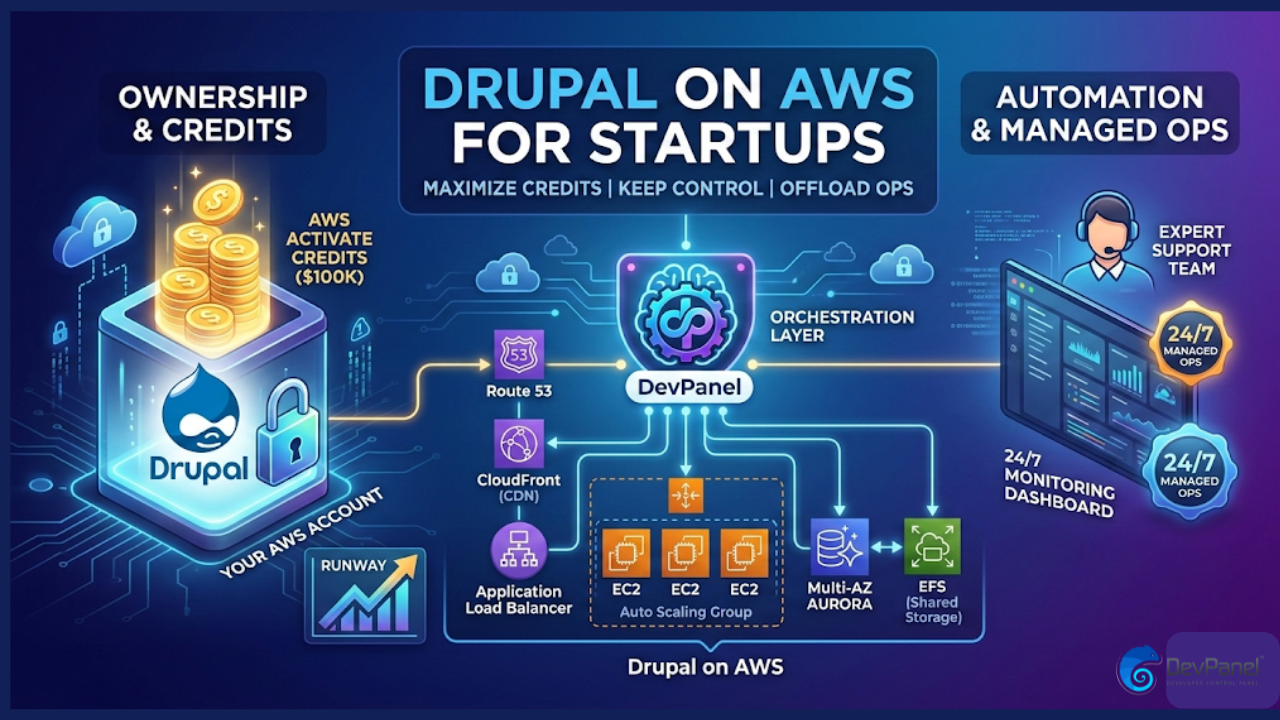
Drupal on AWS for Startups: The “Private PaaS” Strategy to Maximize Credits and Control
In the high-stakes world of early-stage startups, “runway” is more than a buzzword—it is the literal measurement of your company’s life expectancy. For many founders, a major part of that runway comes in the form of cloud credits. Landing $25,000, $100,000, or even $200,000 in AWS Activate credits feels like winning the lottery.
But here is the hard truth: Most startups accidentally set their credits on fire.
They do this by falling into one of two traps. Either they attempt a “DIY” AWS build that consumes hundreds of expensive engineering hours, or they move to a fully managed Platform-as-a-Service (PaaS) where their AWS credits are useless because the infrastructure doesn’t live in their own account.
If you are building on Drupal, there is a third way. This guide explores the “Private PaaS” model—using your own AWS account, an orchestration layer like DevPanel, and 24/7 managed operations—to ensure you never have to choose between financial efficiency and operational sanity.
1. The Startup Credit Goldmine: Understanding AWS Activate
Before deciding how to host, you need to know what you’re working with. AWS Activate is arguably the most generous startup program in the cloud ecosystem, but it is tiered based on your company’s stage and affiliations.

The Founders Track
For bootstrapped startups that haven’t yet taken institutional funding, the Activate Founders program typically offers around $1,000 in credits. While this sounds modest, when paired with architectural efficiency (like auto-pausing development environments), it can cover your hosting costs for nearly a year.
The Portfolio Track
This is where the real scale happens. If you are part of an accelerator (like Y Combinator or Techstars) or backed by a recognized VC, you can unlock $25,000 to $100,000+. Recently, AWS has even begun doubling these credits for certain Series A companies, offering up to $200,000 to fuel growth.
The “Credit Trap”
The most important thing to understand about these credits is their billing boundary. AWS credits are applied to the owner of the account.
- If you use a traditional managed Drupal host (like Acquia or Pantheon), you are paying their company. Even though they run on AWS, you cannot use your credits to pay their invoice.
- To use your credits, the “Bill-To” entity on the AWS account must be Your Startup, Inc.
2. The Three Paths to Drupal on AWS
As highlighted in the DevPanel strategy video, startups generally face three choices when it comes to hosting their Drupal application.
Path A: The DIY “Hosting Project”
Technical founders often think, “We have engineers; why pay for a platform? Let’s just spin up some EC2 instances.” This is a dangerous path. As the video points out, “Running Drupal on AWS isn’t a hosting solution—it’s a hosting project.” To do it right, your team has to build:
- High Availability: Load balancers (ALB) and Auto-scaling groups.
- Database Management: RDS or Aurora with Multi-AZ failover.
- Storage: EFS for shared files across multiple web nodes.
- Content Delivery: CloudFront for global edge caching.
- Security: WAF, VPC peering, and constant OS patching.
The Result: You spend 100% of your credits but lose 40% of your engineering time to “plumbing” instead of product features.
Path B: The Fully Managed PaaS (The Walled Garden)
Platforms like Acquia, Pantheon, and Platform.sh offer incredible Drupal-specific tools. They handle the updates, the scaling, and the security.
The Result: You get 100% operational sanity but 0% credit utilization. You are writing checks for hosting every month while $100k of AWS credits sit idle in your account until they expire.
Path C: The Orchestrated “Private PaaS” (The Winner)
This is the hybrid model. You use an orchestration layer (like DevPanel) that connects to your own AWS account.
- The platform “reaches in” and builds a best-practice AWS architecture for you.
- You get the dashboard, the “one-click” deployments, and the dev/stage/prod workflows.
- Crucially: Because the servers are in your account, AWS automatically deducts the cost from your Activate credits.
3. Why Drupal Startups Need Orchestration
If you’ve decided to keep things in your own account to save money, why do you need a platform like DevPanel at all? Why not just use the AWS Console?
Eliminating the DevOps Salary
A mid-level DevOps engineer in the US costs $140,000–$180,000 per year. Most startups cannot justify this hire in the first 24 months. An orchestration platform acts as a “DevOps-in-a-box,” automating the 80% of tasks (backups, environment cloning, SSL management) that usually require a specialist.
Developer Experience (DX)
Your Drupal developers shouldn’t need to know how to configure a VPC or an IAM policy. They should be focusing on Twig templates, custom modules, and GraphQL queries. Orchestration provides a “PaaS-like” experience where developers can:
- Create a feature-branch environment with one click.
- Pull production data down to a local dev environment securely.
- Monitor logs without logging into the AWS CLI.
Cost Optimization via “Auto-Pause”
One of the most effective ways to stretch AWS credits is Auto-Pause. Most development and staging environments sit idle 16 hours a day. DevPanel can automatically “sleep” these resources when they aren’t in use, potentially tripling the lifespan of your credits.
4. Addressing the 24/7 Operations Gap
There is a common fear with the “Private PaaS” model: “If the site goes down at 3:00 AM, who do I call?”
When you are on a fully managed PaaS, you call their support. When you are DIY, you wake up your Lead Engineer.
The professional startup path is to pair Orchestration with a Managed Services Provider (MSP). Companies like DevPanel offer enterprise-tier support that provides 24/7 monitoring and emergency response. This creates a “Support Sandwich”:
- AWS handles the physical data center and hardware.
- DevPanel handles the automation and infrastructure orchestration.
- The Managed Services Partner provides the “human” layer—Drupal experts who are on-call to fix application-level issues.
This model is significantly cheaper than a full-time hire and more flexible than a locked-in PaaS.
5. Case Study: Maximizing a $100k Credit Grant
Imagine a Seed-stage startup with 4 Drupal developers and a $100,000 AWS Activate grant.
- Option 1 (PaaS): They pay $2,000/month for a managed high-availability plan. Over two years, they spend $48,000 in cash. Their $100k credits expire, unused.
- Option 2 (DIY): They spend $0 in cash for hosting, but their lead developer spends 10 hours a week on “server stuff.” Over two years, that’s ~1,000 hours of diverted engineering time. At a $100/hr internal rate, that’s $100,000 in lost opportunity cost.
- Option 3 (DevPanel + Managed Ops): They pay a small platform fee and a support retainer (let’s say $800/month). Their hosting costs are $0 (covered by credits). Their developers spend 0 hours on infra.
- Total Cash Savings: $29,000 compared to PaaS.
- Total Time Savings: 1,000 hours compared to DIY.
6. Strategic Comparison: At a Glance
Based on the detailed research regarding Drupal for Startups, here is how the models compare across the dimensions that matter most to a founder:
| Feature | Manual DIY | DevPanel (Orchestrated) | Managed PaaS |
| AWS Credit Usage | 100% | 100% | 0% |
| Infrastructure Ownership | Full | Full | None |
| DevOps Burden | Heavy | Minimal | None |
| 24/7 Support | No (Unless hired) | Yes (Optional Add-on) | Yes (Included) |
| Scalability | Manual Config | Automated | Automated |
| Cost (TCO) | High (Labor) | Lowest (Efficiency) | High (Subscription) |
7. How to Get Started: A 3-Step Playbook
If you are ready to stop “building a hosting project” and start building a product, follow this path:
Step 1: Secure Your Credits
Don’t wait. If you are a startup, apply for AWS Activate today. Even if you have already started your account, you can often apply credits retroactively to your balance. Check with your VC or accelerator for their specific OrgID to get the $25k–$100k packages.
Step 2: Choose Your “Private PaaS” Layer
Connect your AWS account to an orchestration platform like DevPanel. This ensures that from Day 1, your architecture follows AWS Well-Architected guidelines. You won’t have to worry about security groups, VPC CIDR blocks, or RDS snapshots—the platform handles the “scaffolding.”
Step 3: Offload the “On-Call”
As you approach your production launch, sign up for a managed operations tier. Knowing that a team of experts is monitoring your site 24/7 allows your developers to focus on what they do best: building features that your customers love.
Conclusion: Don’t Trade Ownership for Convenience
The greatest asset a startup has is its agility. For a long time, the only way to get “hosting convenience” was to give up “infrastructure ownership” and move to a third-party cloud.
But the landscape has changed. With the rise of application orchestration, you can now have the best of both worlds. You can own your AWS account, utilize every penny of your Activate credits, and still provide your developers with a world-class, automated Drupal workflow.
Stop building a hosting project. Start building your startup.