
Cloud Hosting vs Shared Hosting: Which Actually Costs You More in 2026?
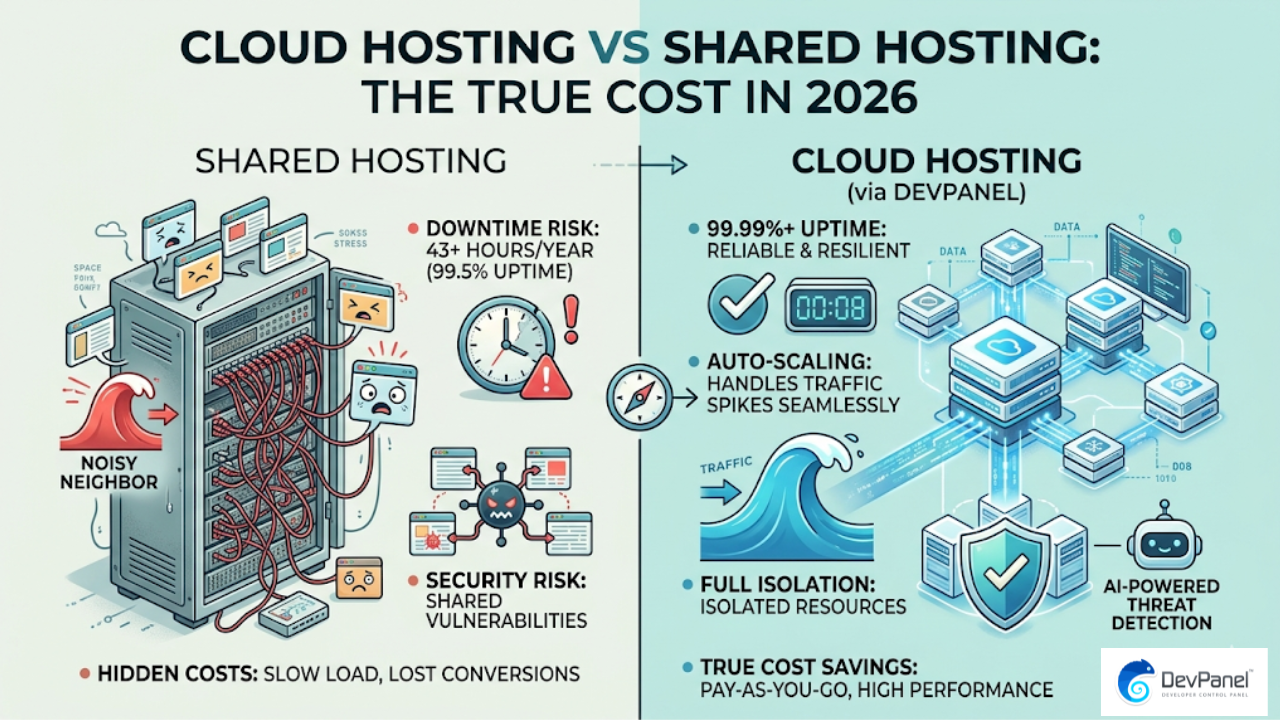
If you’re trying to decide between cloud hosting vs shared hosting, the answer isn’t just about the monthly invoice. Shared hosting maintains an average uptime of only 99.5%, which sounds acceptable until you do the math: that’s nearly two full days of downtime per year, an unacceptable risk for any site generating real revenue. The gap in performance, security, and true total cost between cloud hosting and shared hosting has never been wider, and in 2026, choosing the wrong foundation is a decision that costs far more than most site owners realize.
Key Takeaways
| Question | Quick Answer |
|---|---|
| What is the main difference between cloud hosting and shared hosting? | Shared hosting puts your site on one physical server with hundreds of others. Cloud hosting distributes your site across multiple virtual servers, giving you isolated resources and auto-scaling. |
| Is cloud hosting faster than shared hosting? | Yes. Cloud hosting consistently delivers lower Time to First Byte (TTFB) and handles traffic spikes without degrading performance, something shared environments cannot do reliably. |
| Is cloud hosting more expensive than shared hosting? | Entry-level shared hosting is cheaper per month, but when you factor in downtime costs, maintenance time, and performance penalties on conversions, cloud hosting is often the more cost-effective choice. |
| Which is better for WordPress: cloud hosting or shared hosting? | Cloud hosting on AWS, particularly when managed through a platform like DevPanel’s managed AWS hosting, gives WordPress sites the performance and scalability they need to grow. |
| What is the uptime difference between cloud and shared hosting? | Cloud hosting consistently achieves 99.99%+ uptime. Shared hosting averages 99.5%, which translates to roughly 43 hours of potential downtime per year. |
| Is Pantheon cloud hosting or shared hosting? | Pantheon is a managed cloud platform, but it hosts your site in Pantheon’s own infrastructure. You don’t own the underlying cloud account, which limits control and increases long-term cost. |
| Can I get cloud hosting performance without a big DevOps team? | Yes. Platforms like DevPanel let you link your own AWS or Azure account and automate the entire setup without needing a dedicated infrastructure team. |
What Is Shared Hosting and Who Actually Uses It?
Shared hosting places your website on a single physical server alongside hundreds, sometimes thousands, of other websites. Everyone on that server shares the same CPU, RAM, and bandwidth pool.
When a neighboring site gets a traffic spike, your site slows down. This is the “noisy neighbor” problem, and it’s a fundamental architectural flaw, not a configuration issue that can be patched.
Shared hosting made sense when websites were simple brochures. In 2026, when sites need to handle dynamic content, e-commerce transactions, and personalized user experiences, that model is showing its age.
- Typical price range: $3 to $15 per month
- Average uptime: 99.5% (roughly 43 hours of downtime per year)
- Scalability: None on demand. You submit a ticket and wait.
- Security isolation: Limited. One compromised site on the server can affect others.
- Best for: Personal blogs, student projects, low-traffic landing pages
What Is Cloud Hosting and Why It Dominates in 2026?
Cloud hosting runs your website across a network of virtual servers. If one node fails, your site automatically moves to another. Resources scale up or down based on actual demand, not a fixed allocation set when you signed up.
The major cloud providers, AWS, Azure, and Google Cloud, now power the majority of the commercial internet. The performance gap between cloud hosting and shared hosting is not incremental; it’s structural.
Cloud hosting also gives you a critical advantage: you only pay for what you actually use. During low-traffic hours, costs drop automatically. During a product launch or viral moment, resources scale without you lifting a finger.
- Typical price range: $10 to $100+ per month depending on usage
- Average uptime: 99.99% or higher
- Scalability: Instant, automated, and demand-driven
- Security isolation: Full. Your environment is isolated by default.
- Best for: Business sites, WordPress agencies, e-commerce, SaaS applications, nonprofits
Cloud Hosting vs Shared Hosting: Performance and Uptime Compared
Performance is where the cloud hosting vs shared hosting debate stops being theoretical and starts hitting your bottom line. A site loading in under one second on cloud infrastructure might take three to five seconds on a congested shared server.
Migrating to an autoscaled WordPress setup on AWS has been shown to improve Time to First Byte (TTFB) from 135ms to 55ms, a 2.5x performance boost under load. That’s not a marginal improvement; it’s the difference between a site that converts and one that doesn’t.
“Bounce rates increase by more than 30% when load times shift from just 1 second to 3 seconds. With user expectations in 2026 at an all-time high, the margin for error on shared hosting has virtually disappeared.”
| Metric | Shared Hosting | Cloud Hosting (AWS) |
|---|---|---|
| Average Uptime | 99.5% | 99.99%+ |
| Average TTFB | 300ms to 800ms | 55ms to 135ms |
| Traffic Spike Handling | Site slows or crashes | Auto-scales seamlessly |
| Resource Isolation | Shared with hundreds of sites | Fully isolated instances |
| Hardware Access | Fixed, often older hardware | Latest gen (e.g., AWS Graviton4) |
Did You Know?
For every 1-second delay in page load time, websites experience an average 7% reduction in conversions. “Cheap” shared hosting with high latency can cost a business far more in lost sales than the price difference with cloud hosting.
Source: devpanel.com
Cloud Hosting vs Shared Hosting: Security Differences That Matter
Security on shared hosting is a collective problem. When one site on a shared server gets compromised by malware, the infection can spread laterally to other accounts on the same machine. You’re only as safe as your weakest neighbor.
Cloud hosting environments are isolated by architecture. Your containers or instances don’t share file system access with anyone else’s workloads. AI-powered security tools in cloud environments can identify novel malware patterns with up to 300% more accuracy than the traditional signature-based systems that shared hosts typically rely on.
For industries with compliance requirements, healthcare, government, higher education, and finance, shared hosting is simply not an option. Cloud infrastructure gives you the audit trails, access controls, and encryption that regulated industries require.
We’ve built our entire platform around the principle that you should own and control your infrastructure. When your site runs in your own AWS account, security events are visible in your own logs, and you’re never dependent on a vendor’s opaque security posture.
Cloud Hosting vs Shared Hosting: The Real Cost Breakdown
The “$4 per month” shared hosting pitch is one of the most effective pieces of marketing in the web industry. It’s also misleading, because it doesn’t account for the real cost of ownership.
Managed WordPress hosting saves an average of $2,148 per year in maintenance time compared to unmanaged shared hosting setups. Every hour spent debugging a slow server, managing security patches, or recovering from unexpected downtime is money your team isn’t spending on client work.
Here’s a more honest total cost of ownership comparison:
- Shared hosting: $4 to $15/month base cost, plus 3 to 5 hours/month maintenance time, plus potential revenue loss from downtime and slow page loads
- Managed cloud hosting (via Pantheon): $50 to $500+/month with significant markup for the platform layer
- Your own AWS cloud via DevPanel: AWS infrastructure costs only, with DevPanel’s Community Edition being 100% free, plus no per-site or per-agency fees
The traditional managed hosting “simplicity tax” is real. Platforms like Pantheon charge a 200% to 500% markup just for a user interface on top of commodity cloud resources. We built DevPanel specifically to eliminate that tax by running the same automation layer inside your own AWS, Azure, or DigitalOcean account.
WordPress on Pantheon vs AWS: The Cloud Hosting Decision Most Agencies Get Wrong
This is where the cloud hosting vs shared hosting conversation gets specific for WordPress agencies. Most teams jump from shared hosting to a managed platform like Pantheon, thinking they’ve solved the problem. They’ve traded one set of constraints for another.
Pantheon is cloud hosting, but it’s cloud hosting in Pantheon’s account. You don’t own the infrastructure. You can’t leverage AWS credits. You can’t use AWS Graviton4 instances, which provide a 40% better price-performance ratio for WordPress workloads. You pay Pantheon’s pricing tier whether your site uses 10% of the allocated resources or 100%.
Running WordPress on AWS directly, with DevPanel as the management layer, gives you the performance and isolation of true cloud hosting without the vendor lock-in. You keep your data in your own account. You choose your region. You control your backup strategy.
For nonprofits specifically, this distinction is significant. AWS offers $5,000 per year in cloud credits through their nonprofit program. Those credits work inside your own AWS account. They cannot be used to pay a Pantheon or similar managed platform bill. We’ve built specific workflows around the AWS Nonprofit Credit Program so organizations can host for nearly $0 while maintaining full cloud-grade performance.
How DevPanel Changes the Cloud Hosting vs Shared Hosting Equation
The traditional barrier to cloud hosting for small agencies and growing businesses has always been complexity. Raw AWS is powerful, but configuring CloudFormation stacks, setting up auto-scaling groups, and managing Kubernetes (EKS) requires a dedicated DevOps engineer.
DevPanel abstracts all of that into a clean interface that runs inside your cloud account. You connect your AWS, Azure, or DigitalOcean account once, and DevPanel handles the rest: provisioning, configuration, automated backups, Blue/Green deployments, and CI/CD pipelines.
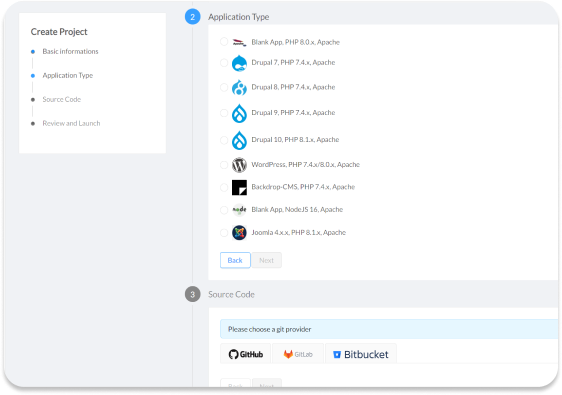
Our Cloud Development Environments (CDEs) eliminate the “works on my machine” problem entirely. Every developer on your team works in an identical, cloud-based environment that mirrors your production setup. No more environment configuration drift, no more surprise deployment failures.
You get managed hosting automation with full infrastructure sovereignty. That’s the middle path most agencies have been looking for.
Did You Know?
Organizations running WordPress on AWS via DevPanel report 75% to 80% lower hosting costs compared to legacy enterprise platforms like Pantheon — delivering the same cloud performance without the platform markup.
Cloud Hosting vs Shared Hosting for Agencies Managing 50 or More Sites
If you manage a handful of sites, the difference between cloud hosting and shared hosting is meaningful but manageable. If you manage 50 or more sites, the difference is operational survival.
Shared hosting at scale means 50 separate cPanel accounts, 50 separate update cycles, 50 separate security audits, and 50 separate support tickets when something breaks. A single engineer can manage approximately 30 WordPress sites using DevPanel automation, compared to the enormous operational burden of manual setups on shared or raw cloud infrastructure.
Our Workspaces feature gives agencies a central hub for managing all client sites from one dashboard. Deployments, clones, environment spins, and updates happen at scale with a few clicks, not a full day of SSH sessions.

Don’t build it from scratch every time you land a client. Our prebuilt application templates and preconfigured frameworks let you spin up a new client WordPress environment in minutes, fully configured and running in your own cloud account.
Cloud Hosting vs Shared Hosting: Which Industries Need to Move Now?
Not every website has the same risk profile. But several industries have moved past the point where shared hosting is a defensible choice.
E-commerce: Every second of downtime or slow load has a direct revenue impact. A 7% conversion drop per second of delay adds up fast when you’re processing hundreds of orders per day.
Healthcare and government: Compliance requirements around data sovereignty and audit trails make shared hosting a non-starter. Our healthcare and government solutions run in your own compliant AWS environment.
Higher education: University sites face massive, unpredictable traffic spikes during enrollment periods and major events. Cloud auto-scaling handles those spikes automatically; shared hosting crashes under them.
Digital agencies: Your reputation is built on your clients’ sites performing well. Putting client work on shared hosting is a liability, not a cost saving.
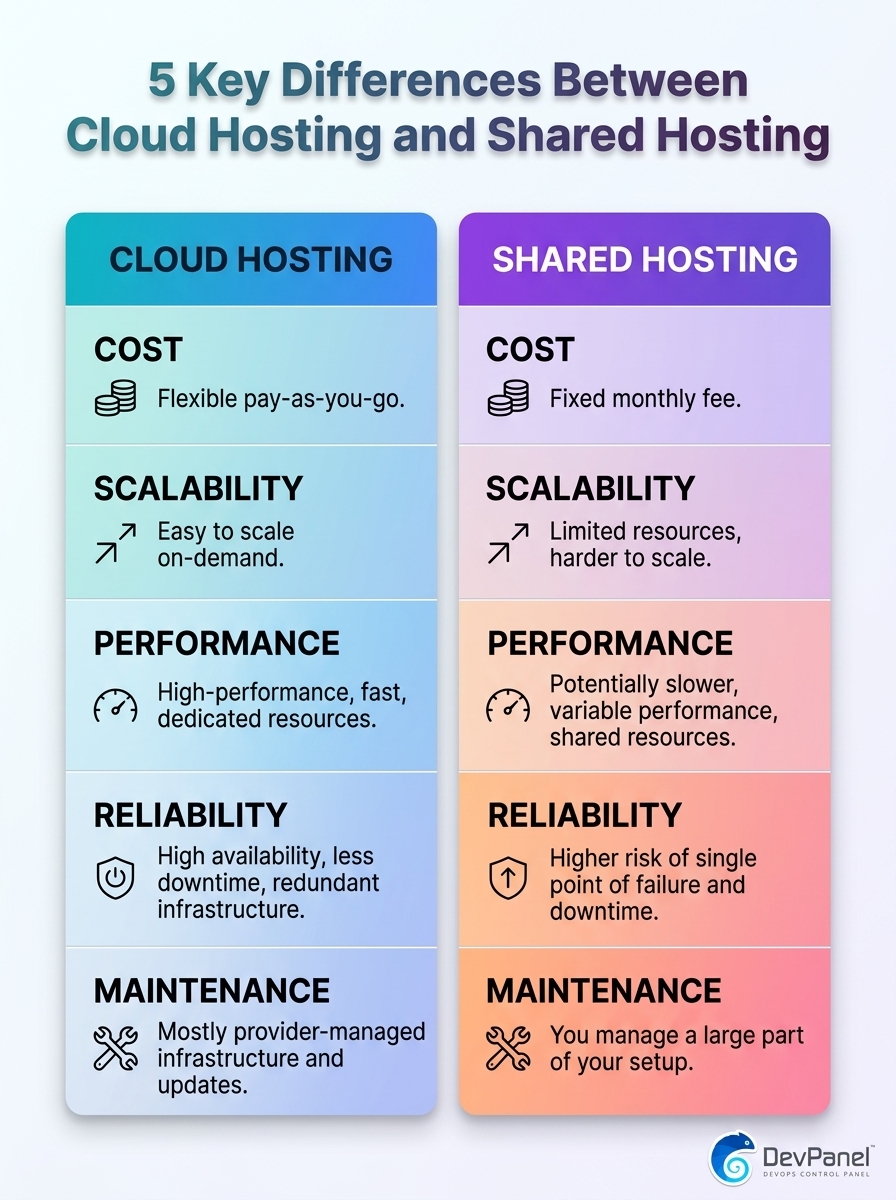
A quick visual guide to the five key differences between cloud hosting and shared hosting.
Making the Switch: From Shared Hosting to Cloud Hosting Without the Pain
The biggest reason agencies and businesses stay on shared hosting isn’t price. It’s the fear that migrating to cloud infrastructure requires a DevOps engineer, weeks of downtime, and a steep learning curve.
That fear was valid three years ago. In 2026, platforms like DevPanel eliminate every one of those barriers. You link your cloud account once, choose from prebuilt templates, and your WordPress site is running on AWS infrastructure inside your own account within minutes.
Our browser-based Cloud IDEs mean your developers can start working in the new environment immediately, from any machine, without installing anything locally. The “works on my machine” problem disappears on day one.
The DevPanel Community Edition is 100% free. You only pay for the cloud resources you actually consume in your own AWS or Azure account. There are no per-site fees, no subscription tiers, and no “success tax” when your sites grow.
Conclusion: Cloud Hosting vs Shared Hosting in 2026 Is Not a Close Call
When you compare cloud hosting vs shared hosting honestly, considering uptime, performance, security, scalability, and total cost of ownership, cloud hosting wins decisively for any site that matters to a business.
The remaining question isn’t whether to move to cloud hosting. It’s which cloud hosting model gives you the most value. Paying a 200% to 500% markup to a managed platform like Pantheon for the convenience of not owning your own infrastructure is the “simplicity tax” we think you should stop paying.
The middle path, cloud performance with real infrastructure ownership, is exactly what we’ve built at DevPanel. You bring your own cloud account, we automate everything inside it, and you keep full digital sovereignty over your data and your infrastructure.
For WordPress sites of every size, from a single nonprofit landing page to an agency portfolio of 200 client sites, the combination of AWS and DevPanel delivers better performance, better security, and significantly lower cost than either shared hosting or traditional managed platforms. Explore our managed AWS hosting approach and see exactly what that looks like for your specific use case.
Frequently Asked Questions
Is cloud hosting worth it for a small WordPress site in 2026?
Yes, particularly if you use a platform like DevPanel that runs cloud hosting inside your own free-tier or credit-funded AWS account. For small sites, the cost difference between cloud hosting and shared hosting can be near zero, while the performance and uptime benefits are substantial.
What is the actual cost difference between cloud hosting and shared hosting per month?
Shared hosting typically costs $4 to $15 per month, while cloud hosting on AWS can start as low as $5 to $20 per month for small sites when you manage your own account. When you add in the maintenance time shared hosting requires, cloud hosting vs shared hosting often reverses in favor of cloud on total cost.
Is Pantheon better than AWS for WordPress hosting?
Pantheon is easier to start with, but AWS gives you more control, better hardware, and significantly lower costs at scale. With DevPanel managing your AWS environment, you get the same ease of use as Pantheon while keeping 75% to 80% more of your hosting budget and owning your own infrastructure.
Can I migrate from shared hosting to cloud hosting without technical expertise?
In 2026, yes. Platforms like DevPanel automate the entire provisioning and deployment process inside your own cloud account. You don’t need to understand CloudFormation, Kubernetes, or Linux server administration to run a professional WordPress site on AWS.
How does cloud hosting handle traffic spikes compared to shared hosting?
Cloud hosting auto-scales resources in real time when traffic increases, keeping your site fast and available. Shared hosting has no auto-scaling; when your server hits its resource ceiling, your site slows to a crawl or goes offline entirely.
What is the best cloud hosting option for nonprofits in 2026?
AWS with DevPanel is the most cost-effective cloud hosting option for nonprofits, because nonprofits can apply for $5,000 per year in AWS credits through Amazon’s grant program. Those credits cover your actual cloud infrastructure costs, making cloud hosting essentially free, something that is impossible on traditional managed platforms like Pantheon.
Is shared hosting secure enough for a business website in 2026?
For most business websites in 2026, shared hosting presents unacceptable security risks due to the “noisy neighbor” problem and lack of environment isolation. Cloud hosting puts your site in a fully isolated environment, and when combined with AI-powered security tools available on platforms like AWS, your threat detection capability increases dramatically compared to shared infrastructure.