

What Is a Cloud IDE? The Complete Guide to Browser-Based Development in 2026
A cloud IDE (cloud integrated development environment) is a fully browser-based coding environment that runs on remote servers instead of your local machine, and in 2026, the shift is no longer optional for competitive teams. 60% of developers now use a cloud IDE as their primary workspace, marking a definitive transition away from traditional, heavy local setups that slow teams down and create endless configuration headaches.
Key Takeaways
| Question | Answer |
|---|---|
| What is a cloud IDE? | A browser-based development environment hosted on remote servers, letting you code from any device without local installation. |
| Is a cloud IDE free? | DevPanel’s Community Edition is 100% free forever with unlimited users and sites inside your own cloud accounts. |
| Can I use VS Code in a cloud IDE? | Yes. Platforms like DevPanel include VS Code in the browser as a core part of the cloud IDE experience, with no installation needed. |
| How does a cloud IDE help teams collaborate? | It gives every developer the same environment in real time, enabling pair programming, shared debugging, and collaborative code reviews from anywhere. |
| What cloud providers work with cloud IDEs? | Leading platforms support AWS, Azure, and DigitalOcean through BYOC (Bring Your Own Cloud) configurations. |
| How fast is cloud IDE onboarding? | Managed cloud IDEs can reduce new developer onboarding from several weeks to the same day, according to research in 2026. |
| Where can I see a cloud IDE in action? | You can watch a live demo of DevPanel’s cloud IDE features, including in-browser VS Code and collaborative workspaces. |
What Is a Cloud IDE and How Does It Work?
A cloud IDE replaces everything that used to live on your laptop, including your code editor, terminal, compiler, and dev server, and moves it to a remote, containerized environment accessible through any browser.
When a developer opens a cloud IDE, they connect to a pre-configured container with all the tools, dependencies, and configurations already installed. There is no setup, no version conflicts, and no waiting around.
The core components of a cloud IDE typically include:
- A browser-based code editor (most commonly VS Code core)
- A containerized runtime environment with preinstalled tools
- Git integration for branch management and version control
- SSH and SFTP access for deeper system control
- A real-time collaboration layer for team-based development
Platforms like DevPanel’s cloud IDE go further by bundling all of this with BYOC support, preconfigured templates, and instant deployment pipelines, all from a single browser tab.
Cloud IDE vs. Local IDE: What’s the Real Difference?
The biggest difference between a cloud IDE and a local IDE is where the compute happens. With a local setup, your CPU, memory, and disk do the work. With a cloud IDE, remote servers handle everything, and your device just renders the interface.
This matters more than it sounds. Local IDEs require every developer to independently manage runtime versions, dependencies, and configuration files. Cloud IDEs standardize all of that at the environment level.
| Feature | Local IDE | Cloud IDE |
|---|---|---|
| Setup time | Hours to days | Minutes |
| Environment consistency | Varies per machine | Identical for all developers |
| Collaboration | Limited (file sharing, screen share) | Real-time, built-in |
| Access from any device | No | Yes |
| Security management | Managed per developer | Centralized and enforced |
| IT overhead | High | Minimal to none |
For distributed teams, remote contractors, and fast-scaling organizations, the cloud IDE wins on every dimension that matters operationally.
5 Key Benefits of a Cloud IDE Every Team Should Know
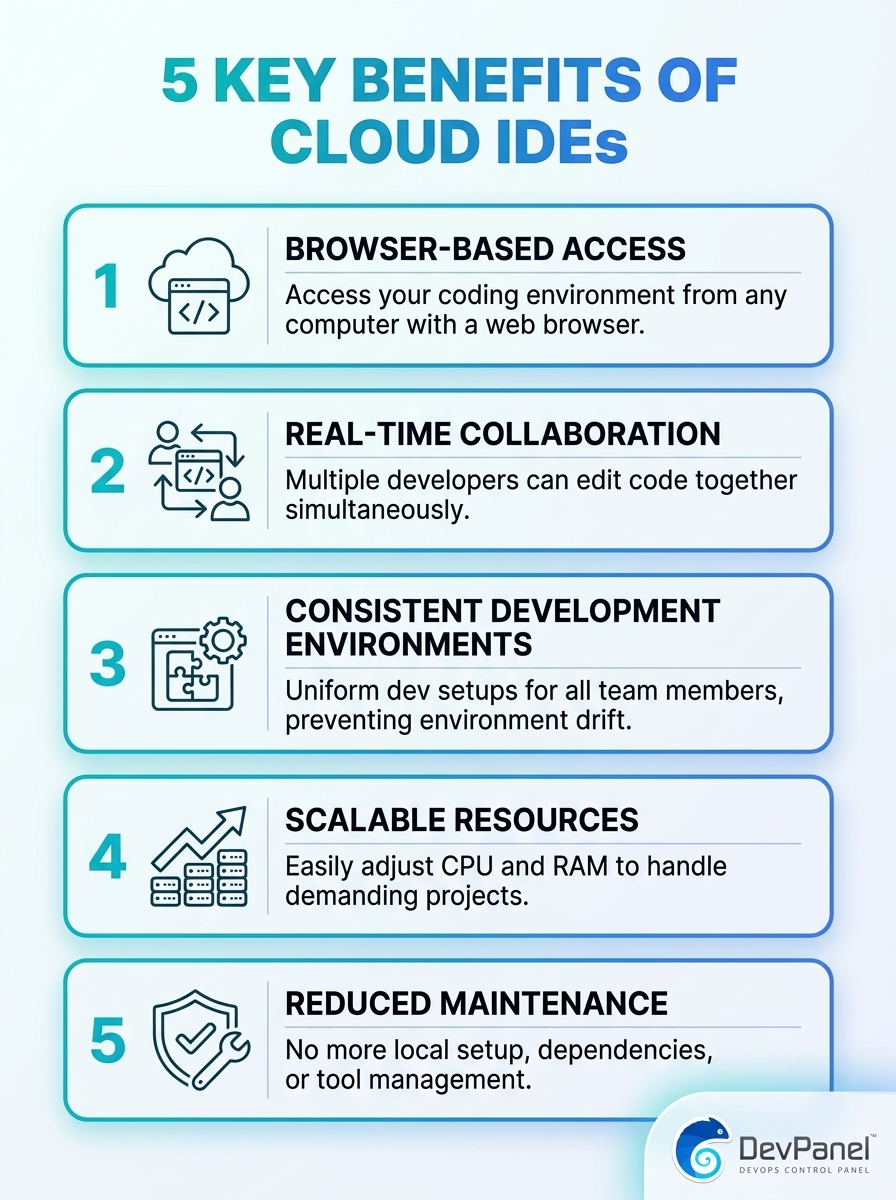
This infographic highlights the five key benefits of cloud IDEs, including accessibility, real-time collaboration, scalability, cost savings, and easier maintenance. It explains why teams are adopting cloud-based development environments.
The advantages of a cloud IDE extend well beyond eliminating local setup. Here are the five benefits that make the biggest real-world difference for development teams in 2026:
- Accessibility from anywhere: Code from any device, any operating system, and any location with an internet connection. No VPN requirements, no dedicated hardware.
- Real-time collaboration: Multiple developers can work in the same environment simultaneously, enabling pair programming and instant code reviews without context-switching.
- Scalability on demand: Cloud environments scale compute resources up or down based on project needs, without touching any physical infrastructure.
- Lower total cost: Eliminate the cost of high-end developer laptops, local server licenses, and IT maintenance hours by centralizing everything in managed cloud environments.
- Effortless maintenance: Environment updates, security patches, and dependency upgrades happen at the platform level, not on 12 different developer machines.
Did You Know?
Development teams report 70% faster onboarding times when using cloud IDEs compared to traditional manual environment configurations.
Source: appfire.com
How a Cloud IDE Eliminates “Works on My Machine” Problems
The phrase “it works on my machine” has cost development teams millions of hours in debugging time. It exists because each developer’s local environment is slightly different, with different OS versions, runtime configurations, installed packages, and file path structures.
A cloud IDE solves this at the root. Every developer connects to the same containerized environment, meaning there is literally only one machine to debug. What works for one developer works for all of them.
This standardization also means you can create reusable environment templates. Need a new developer to start on a PHP project with a specific stack? One click and they have the exact same environment every other developer on that project uses.
DevPanel’s cloud-based dev environments are built around this principle. Clone branches, sync databases, and spin up identical working environments across your entire team without any manual configuration work.
Real-Time Collaboration Inside a Cloud IDE
Collaboration in a cloud IDE goes far beyond sharing a screen. Developers can code together in the same environment simultaneously, debug in real time, and review each other’s changes without ever leaving the editor.
This is particularly valuable for distributed and remote-first teams. A developer in Berlin and a senior engineer in Chicago can debug the same issue inside the same environment, in real time, without any extra tooling.
Key collaboration features built into modern cloud IDEs include:
- Pair programming sessions inside a shared browser-based editor
- Shared terminal access for collaborative command-line debugging
- Branch preview environments that anyone on the team can access via a URL
- Detailed audit trails tracking who changed what and when
- Granular access control so collaborators get exactly the permissions they need
DevPanel’s team workspaces are designed around this kind of structured collaboration. You can invite developers as Administrators or as standard Developers, share open invite links, and get a unified view of all activity across every project in the workspace.
Cloud IDE Security: Built-In, Not Bolted On
Security is one of the most underappreciated advantages of using a cloud IDE. With local development environments, security depends entirely on the habits and discipline of individual developers. Credentials get stored in plain text files, dependencies go unpatched for months, and sensitive data ends up on personal laptops.
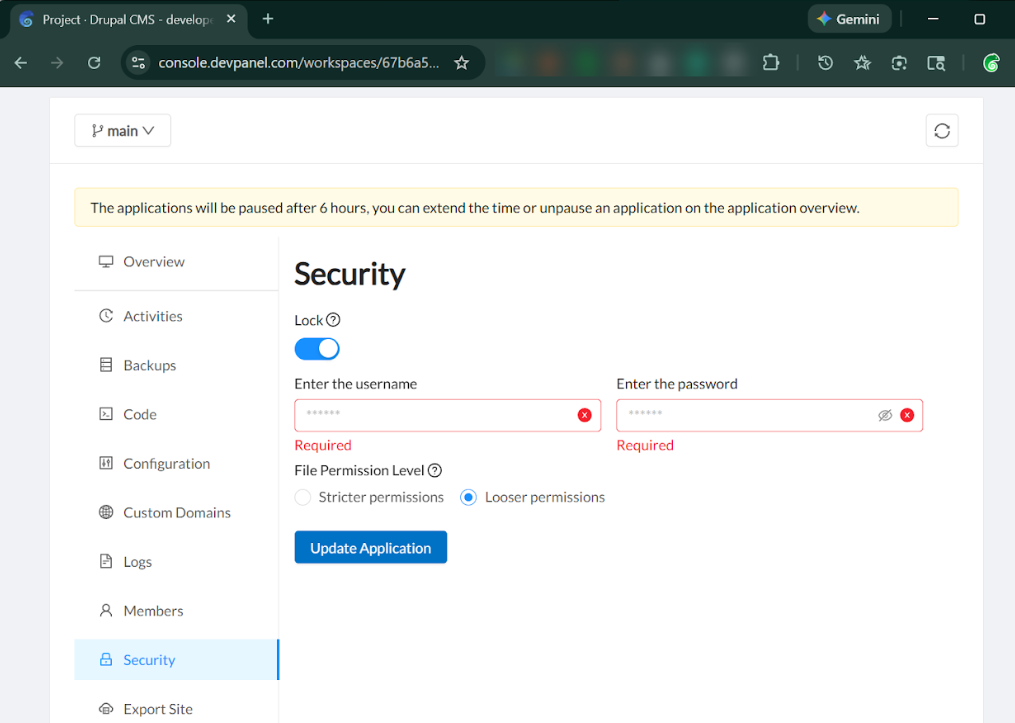
Cloud IDEs centralize and enforce security at the environment level. Access controls, audit logging, and secure file permissions are built into the platform, not left up to individual developers to configure.
DevPanel’s platform includes several security features that matter for professional teams:
- Secure file permissions configured at the deployment level
- Access locks that prevent unauthorized users from accessing environments
- SSO (Single Sign-On) for centralized developer identity management
- DDOS protection and Web Application Firewall (WAF) for production environments
- Automated backups to protect against accidental data loss
- Compliance support for FedRAMP, GDPR, CCPA, and more
For teams working in regulated industries or handling sensitive data, a cloud IDE that enforces security at the infrastructure level removes a massive operational risk.
Cloud IDE Onboarding: Get New Developers Productive Faster
One of the most immediate ROI arguments for a cloud IDE is what it does for onboarding. Traditional onboarding for a new developer involves setting up a local environment, installing the right versions of runtimes, configuring database connections, resolving dependency conflicts, and spending days troubleshooting before writing a single line of production code.
With a cloud IDE, onboarding is reduced to: receive an invite link, open a browser, start coding.
This speed is especially critical when working with contractors, agencies, and remote hires. DevPanel lets you onboard contractors and agencies in days, not weeks, using pre-configured workspace templates and email-based team invitations.
“Onboard developers in minutes. Grant and revoke access with Single Sign-On. Develop anytime from anywhere using any device.”
– DevPanel
When a project ends or a contractor moves on, access revocation is equally fast. One action in the dashboard removes their access completely, with no risk of orphaned credentials or lingering local copies of sensitive code.
Did You Know?
80% of development teams saw a significant drop in environment-related bugs (“it works on my machine”) after switching to cloud IDEs.
Source: techradar.com
DevPanel’s Cloud IDE: VS Code in Your Browser, Fully Configured
DevPanel offers one of the most complete cloud IDE implementations available in 2026. It brings the full VS Code experience into the browser without requiring any installation, configuration, or local dependency management.
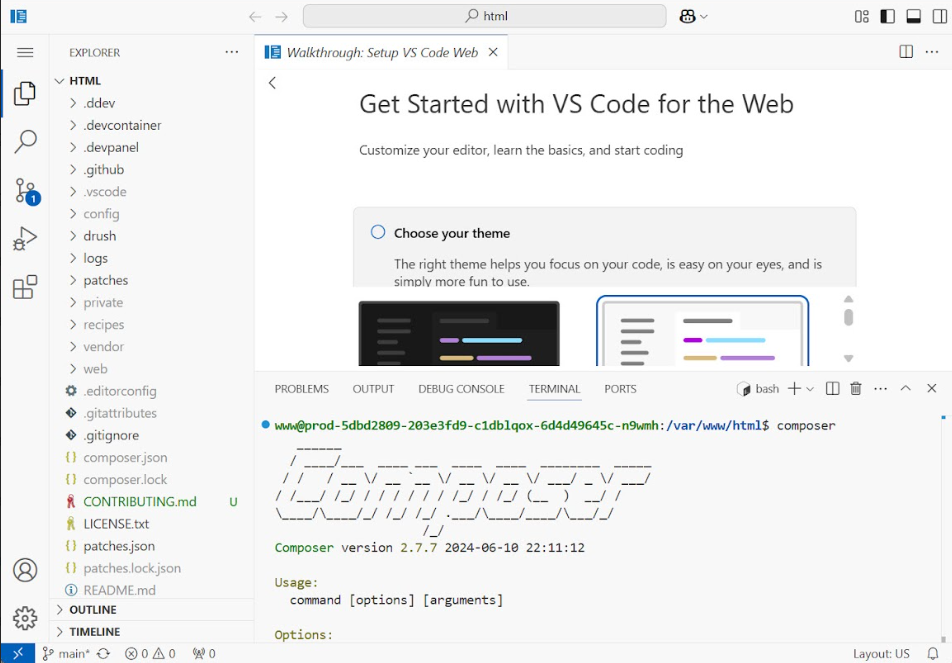
Here is what comes included with DevPanel’s cloud IDE out of the box:
- VS Code in a browser with full core functionality and extension support
- Preconfigured tools so essential development dependencies are ready before you write line one
- Preinstalled apps relevant to your project type, tested for security and compatibility
- PhpMyAdmin included for PHP-based projects without any separate setup
- SSH and SFTP access for developers who need direct server interaction
- Git-driven workflows with branch syncing across any Git provider
The platform also supports BYOC (Bring Your Own Cloud), meaning your cloud IDE and all associated environments run inside your own AWS, Azure, or DigitalOcean account. You get the usability of a managed cloud IDE with full ownership and control of the underlying infrastructure.
You can explore the full set of platform capabilities on the DevPanel features page, which covers everything from CI/CD integrations to advanced Git flow management.
Cloud IDE for Teams: Templates, Apps, and Streamlined Deployments
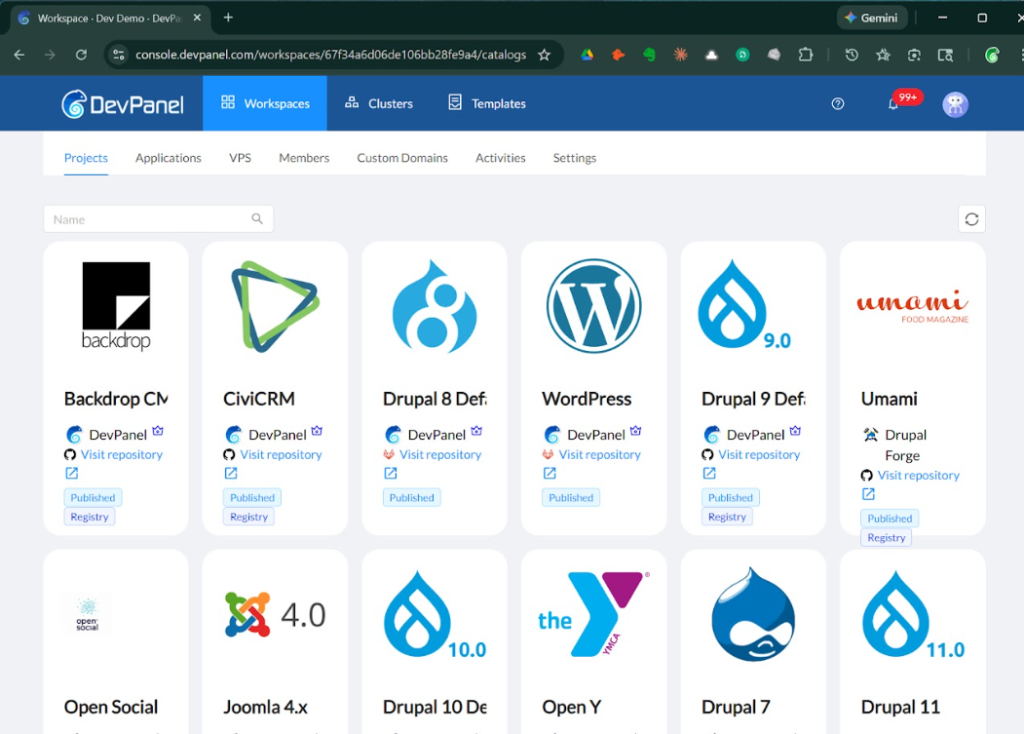
A cloud IDE is most powerful when it sits inside a structured development workflow. DevPanel connects the IDE to a full ecosystem of apps, templates, and deployment pipelines so teams can move from writing code to shipping it without changing tools.
DevPanel’s apps and templates library includes prebuilt applications, preconfigured templates with themes and sample content, and framework support for containerizable stacks running on Kubernetes-backed infrastructure.
For deployment, the deploy and clone workflow lets teams:
- Start a new project from scratch or clone an existing one in a few clicks
- Sync branches with any Git provider and deploy new branches as full cloud-based development environments
- Configure security settings, file permissions, and access controls before going live
- Deploy to your own cloud infrastructure with one-click rapid deployment
This tight integration between the cloud IDE and the deployment pipeline means fewer handoff steps, fewer opportunities for human error, and faster delivery cycles overall.
Cloud IDE Pricing: What Does It Actually Cost?
Cost is one of the most common concerns teams raise when evaluating a cloud IDE. The good news is that in 2026, the barrier to entry has dropped significantly. DevPanel offers a Community Edition (CE) that is 100% free, with no user limits and no site limits, as long as you run it inside your own cloud accounts.
Here is a summary of what you can expect from DevPanel’s pricing structure:
| Plan | Cost | Best For |
|---|---|---|
| Community Edition (CE) | Free forever | Communities, startups, nonprofits, individual developers |
| Enterprise / Custom | Contact for pricing | Larger organizations needing SLA, compliance, and dedicated support |
Both plans use the BYOC model, meaning you connect your own AWS, Azure, or DigitalOcean account. The cloud costs you pay go directly to your cloud provider, not through DevPanel, which is how teams save up to 80% on hosting costs compared to traditional managed hosting platforms.
For teams who want to see the platform in action before committing, a full platform overview is available along with guided demos.
Conclusion
A cloud IDE is no longer an experimental tool for early adopters. In 2026, it is the standard way professional development teams build, test, and ship software, and for good reason. It eliminates environment inconsistencies, accelerates onboarding, enables real-time collaboration across time zones, and centralizes security without adding IT overhead.
Whether you are a solo developer looking for a portable coding environment, a team lead trying to reduce your onboarding time from weeks to hours, or an enterprise organization standardizing your development infrastructure, a cloud IDE gives you the tools to focus on building, not configuring.
DevPanel’s cloud IDE platform combines browser-based VS Code, preconfigured tooling, team workspaces, BYOC infrastructure support, and a free-forever Community Edition into one coherent platform. It is designed to remove the friction between your team and the work that actually matters.
Ready to see it in action? Take a guided tour of DevPanel and explore how cloud-based development environments can change the way your team works, starting today.