
Why DevPanel Outperforms Pantheon for High-Traffic WordPress Sites (2026 Comparison)
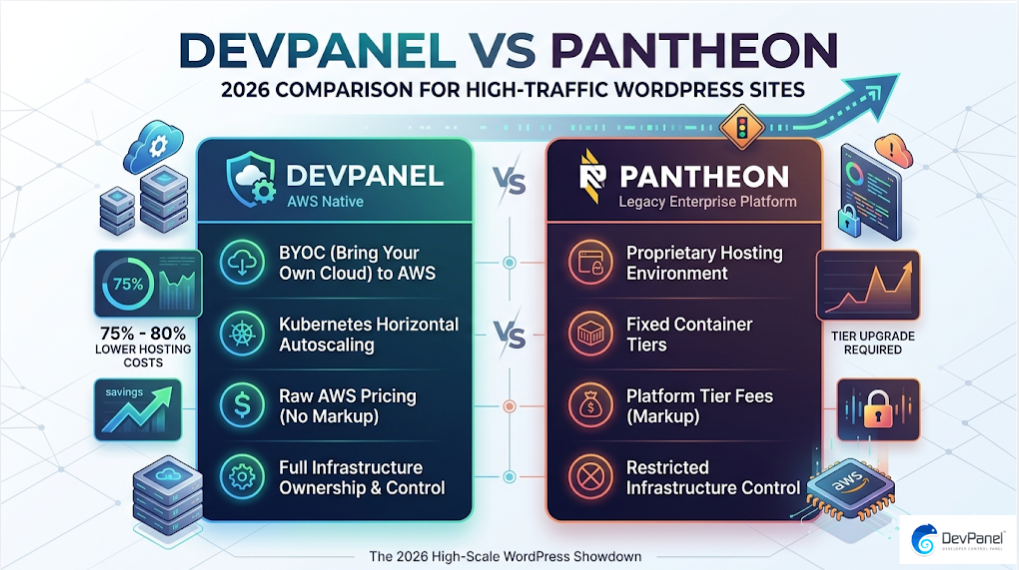
When it comes to understanding why DevPanel outperforms Pantheon for high-traffic WordPress sites, the numbers speak for themselves: organizations running WordPress on AWS via DevPanel report between 75% and 80% lower hosting costs compared to legacy enterprise platforms like Pantheon. But cost is only one dimension of the story. The real difference lies in infrastructure ownership, true autoscaling, developer freedom, and the ability to run your sites on raw cloud hardware without paying a platform premium at every traffic spike.
Key Takeaways
| Question | Answer |
|---|---|
| Does DevPanel cost less than Pantheon for WordPress? | Yes. DevPanel’s Community Edition is free, and you pay only your direct AWS cloud costs with no platform markup. Pantheon charges fixed tier fees regardless of actual usage. |
| Can DevPanel handle high-traffic WordPress sites on AWS? | Absolutely. DevPanel leverages AWS native autoscaling, multi-AZ failover, and Kubernetes-based containers that scale horizontally on demand, far beyond Pantheon’s fixed container model. |
| Is DevPanel a Pantheon alternative for agencies? | Yes. DevPanel is purpose-built for agencies managing multiple client sites with template provisioning, workspace isolation, and predictable costs. |
| Does DevPanel support WordPress on AWS Graviton hardware? | Yes. Unlike Pantheon’s locked container environment, DevPanel lets you choose specific AWS instance types including Graviton4, which delivers 40% better price-performance for WordPress workloads. |
| What is the main reason DevPanel outperforms Pantheon? | DevPanel runs in your own cloud account (BYOC), giving you full infrastructure ownership, root-level access, and zero vendor lock-in. Pantheon hosts everything in their proprietary environment. |
| Is there a free way to host WordPress using DevPanel? | Yes. DevPanel Community Edition is 100% free to self-manage in your own AWS account with no subscription fees or hidden charges. |
| Does DevPanel work for small WordPress sites as well as enterprise sites? | Yes. DevPanel scales from individual developers on free Community Edition all the way to enterprise teams with SSO, SLA, compliance, and dedicated support included in the Enterprise plan. |
What Makes High-Traffic WordPress Hosting a Different Problem Entirely
Running a low-traffic WordPress site on Pantheon is a manageable experience. Running a high-traffic WordPress site on Pantheon is where the model starts to break down.
High-traffic sites experience unpredictable spikes: viral content, flash sales, product launches, and press coverage. These events require infrastructure that responds in seconds, not in minutes waiting for a container tier upgrade to process.
Pantheon uses a fixed container model. You buy a container size, and that container is your ceiling until you manually upgrade. For high-traffic WordPress sites, this “success tax” is a structural problem, not a configuration issue.
DevPanel takes a fundamentally different approach. It runs inside your own AWS account, using Kubernetes-native autoscaling to expand horizontally the moment traffic demands it. There is no container ceiling. There is no tier to upgrade. Your site just scales.
Pantheon vs AWS: The Real Infrastructure Cost Comparison
Pantheon’s pricing model is straightforward on the surface: fixed tiers with predictable monthly fees. The problem is that predictability works against you when traffic grows.
Every tier jump on Pantheon means a jump in your bill, regardless of whether you actually used all of that capacity. You are paying for ceiling space, not actual consumption.
AWS billing is the opposite. You pay for what you use. Spot instances, Reserved Instances, and Savings Plans can cut raw compute costs by 40-70% compared to on-demand pricing. Pantheon’s architecture does not allow you to access any of these savings mechanisms because they control the infrastructure layer.
DevPanel connects directly to your AWS account. Your billing goes directly to AWS. DevPanel adds a flat management layer with no percentage markup on your cloud spend. The result is that a site that costs $1,000/month on Pantheon can often be run for $250/month or less using DevPanel on AWS.
Did You Know?
A single high-traffic WordPress site costing $1,000/month on a managed PaaS can be run for as low as $250/month using an AWS + DevPanel automation approach.
Source: devpanel.com
Why DevPanel Outperforms Pantheon on Infrastructure Ownership and Control
This is the core of the argument. Pantheon runs your WordPress site inside Pantheon’s infrastructure. You do not own the servers, the network, the database configuration, or the Kubernetes layer. You configure what Pantheon allows you to configure.
DevPanel flips this completely. The entire stack runs in your AWS account. Your servers. Your VPC. Your database. Your billing. Your rules.
This matters enormously for high-traffic WordPress sites because infrastructure ownership means you can optimize at every layer. You can choose the right EC2 instance family for your workload. You can configure RDS read replicas for database-heavy WordPress installs. You can place CloudFront distributions exactly where you need them.
With Pantheon, those decisions are made for you. With DevPanel, you make them, and DevPanel automates the execution. That is why DevPanel outperforms Pantheon for high-traffic WordPress sites that have specific performance requirements.
Why DevPanel Outperforms Pantheon on Scalability for Traffic Spikes
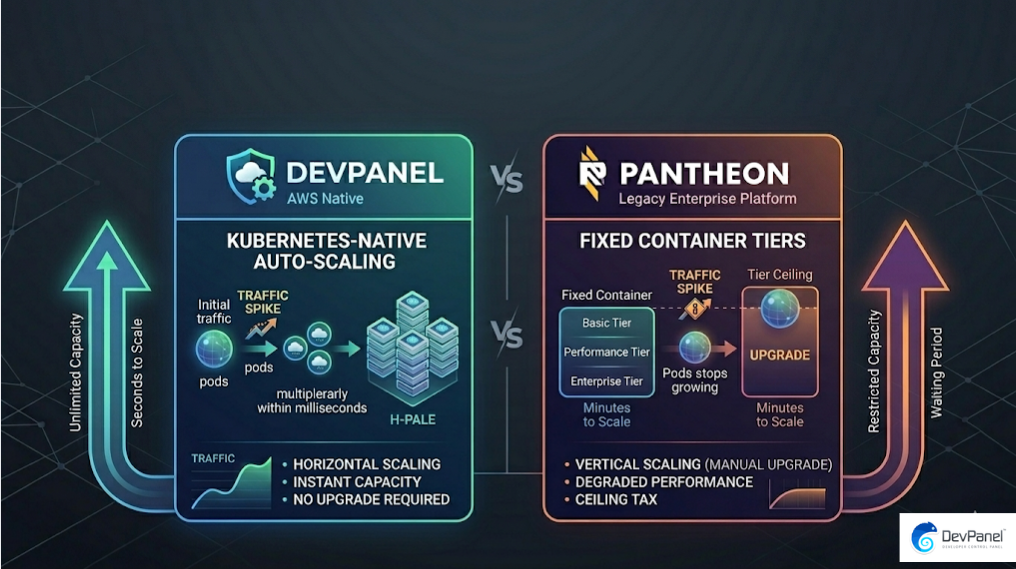
Pantheon uses a container-per-environment model with predefined sizes. When you exceed your container’s capacity, performance degrades until you upgrade manually or until Pantheon’s autoscaling kicks in, which operates within their platform’s constraints.
DevPanel runs your WordPress sites on Kubernetes. Kubernetes autoscaling is horizontal: it spins up additional pods within seconds of detecting increased load. There is no container ceiling. There is no tier to upgrade. There is no manual intervention required.
For high-traffic WordPress sites that experience unpredictable spikes, this is not a minor technical detail. It is the difference between staying online and going down during your most important traffic moments.
Combined with AWS multi-AZ deployment, your WordPress site continues serving traffic even if an entire AWS availability zone experiences issues. Pantheon’s redundancy model does not offer the same level of granular multi-region control that native AWS infrastructure delivers.
Performance Comparison: DevPanel on AWS vs Pantheon’s Container Model
Performance for WordPress is determined by three factors: compute speed, database speed, and CDN efficiency. DevPanel gives you direct control over all three. Pantheon gives you control over none of them at the infrastructure level.
AWS Graviton4 instances deliver a 40% better price-performance ratio for WordPress workloads compared to traditional x86-based containers. Because DevPanel runs in your AWS account, you can simply select Graviton4 instance types during setup. Pantheon runs on their own container hardware, and you have no visibility or control over what that hardware is.
For database performance, DevPanel supports direct RDS configuration, including read replicas, Aurora Serverless, and custom parameter groups. Pantheon uses a shared database layer that is optimized for their average workload, not your specific one.
The practical result is that high-traffic WordPress sites on DevPanel plus AWS consistently outperform equivalent sites on Pantheon at peak load, while costing significantly less during normal operations.
DevPanel’s Developer Workflow vs Pantheon: GitOps, CI/CD, and Speed
Pantheon has a Git-based workflow that developers are familiar with. DevPanel does not just replicate that, it extends it with more flexibility and fewer constraints.
With DevPanel, you connect your existing Git provider (GitHub, GitLab, Bitbucket) and your branches automatically create corresponding cloud development environments. No manual environment setup. No waiting for an admin to provision. A new branch means a new live preview URL within minutes.
Pantheon limits your ability to run custom CI/CD pipelines outside of their Quick Silver workflow system. DevPanel integrates natively with any CI/CD toolchain. Your GitHub Actions, your Jenkins pipelines, your Bitbucket Pipelines: they all connect directly to DevPanel’s deployment layer without workarounds.
DevPanel also provides browser-based IDEs with VS Code, SSH, and SFTP access with root-level permissions. Pantheon restricts root-level access by design. For development teams that need direct system access to debug WordPress performance issues, Pantheon’s restrictions create real bottlenecks that DevPanel simply does not have.
- Branch environments spin up automatically on new Git pushes
- Per-branch preview URLs for UAT and client reviews
- Root-level SSH access for deep WordPress debugging
- Native integration with any CI/CD pipeline
- Blue/green deployments with automated rollback
- VS Code in the browser with full terminal access
WordPress on Pantheon vs AWS for All Site Sizes: Small, Medium, and Enterprise
The mandatory question here is whether DevPanel is only advantageous for large enterprise deployments or whether it delivers benefits for all site sizes. The answer is all site sizes.
Small WordPress sites: DevPanel’s Community Edition is free. A small site running on a t3.micro or t3.small AWS instance costs less than $10/month in raw infrastructure. There are no Pantheon Basic tier fees ($35-$50/month) on top of that. For small sites, DevPanel on AWS is the most cost-efficient option available in 2026.
Medium WordPress sites: Pantheon’s Performance tiers start at $100-$200/month. A comparable DevPanel plus AWS setup on a t3.medium or c6g instance with RDS costs $40-$80/month in raw cloud fees. The savings are consistent and compounding.
Enterprise WordPress sites: This is where DevPanel’s advantage becomes most dramatic. Enterprise Pantheon contracts run $2,000-$10,000/month or more. DevPanel’s Enterprise plan adds SSO, SLA, compliance support, and dedicated DevOps engineering at a fraction of that cost, while the underlying infrastructure runs at raw AWS pricing.
Did You Know?
53% of mobile users will abandon a WordPress site if it takes longer than 3 seconds to load, making high-scale infrastructure critical for every site owner.
Source: colorlib.com
Why DevPanel Outperforms Pantheon on Security for High-Traffic WordPress
High-traffic WordPress sites are high-value targets. The security architecture of your hosting platform matters significantly when your site attracts tens of thousands of daily visitors.
Pantheon provides platform-level security, including their proprietary firewall and malware scanning. It is adequate for many use cases. The problem is that it is Pantheon’s security posture applied uniformly to your site, not a security configuration built for your specific threat model.
DevPanel deploys within your AWS VPC with full access to AWS-native security services. This includes AWS WAF with custom rule groups, AWS Shield Advanced for DDoS protection at the network layer, Security Groups configured specifically for WordPress, and AWS GuardDuty for threat detection.
For enterprises handling customer data, financial transactions, or regulated content on WordPress, native AWS security tooling combined with DevPanel’s compliance support (SOC 2, HIPAA, PCI-DSS configurations) provides a security posture that Pantheon’s shared infrastructure simply cannot match.
- AWS WAF with custom WordPress-specific rule groups
- DDoS protection at the network and application layer
- Private VPC deployment with no shared tenancy concerns
- Full compliance configuration for HIPAA, SOC 2, and PCI-DSS
- Root-level access for security auditing and hardening
- Intrusion detection via AWS GuardDuty integration
Team Collaboration and Multi-Site Management: DevPanel Workspaces vs Pantheon Dashboards
For agencies and enterprises managing multiple WordPress sites, the management interface is not a secondary concern. It is a daily operational tool.
Pantheon’s dashboard provides a reasonably functional multi-site view, but it operates within Pantheon’s data model. You see what Pantheon shows you. Access control is managed through Pantheon’s role system. Adding sites means adding Pantheon billing items.
DevPanel’s Workspace model is structurally different. Each Workspace is an isolated environment with its own access controls, its own cloud resources, and its own team members. You can create separate Workspaces for separate clients without any data or billing bleed between them.
Team onboarding via DevPanel takes minutes. Invite a developer by email or open invite link, assign them to a Workspace, and they have access to exactly the environments they need via SSO. No Pantheon support ticket required. No waiting period. No manual environment provisioning on your part.
For agencies running 20 or 200 WordPress client sites, this operational difference compounds significantly over time. DevPanel’s Workspace model is purpose-built for multi-site management at scale.
Migrating from Pantheon to DevPanel on AWS: What the Process Looks Like
Migrating an existing WordPress site from Pantheon to DevPanel on AWS is a practical concern for teams already invested in the Pantheon ecosystem. The good news is that the migration path is well-defined and significantly less complex than migrating between incompatible hosting architectures.
DevPanel supports cloning and deployment from existing application states. You export your WordPress database and files from Pantheon, import them into a new DevPanel environment, and configure your DNS to point to your new AWS infrastructure. DevPanel’s deploy-and-clone feature preserves database integrity throughout the process.
For teams that need hands-on migration support, DevPanel’s professional services team provides dedicated migration assistance. A DevOps Engineer engagement starts at $150/hour, and a Cloud Architect engagement is available at $250/hour for complex multi-site or high-availability migrations.
The migration investment typically pays for itself within one to two billing cycles given the cost reduction from moving off Pantheon’s tier-based pricing to raw AWS consumption billing via DevPanel.
Pricing Comparison: DevPanel vs Pantheon for WordPress in 2026
Let’s put the numbers side by side clearly. This is the comparison that matters most for any team evaluating both platforms.
| Factor | Pantheon | DevPanel + AWS |
|---|---|---|
| Base Plan Cost | $35-$50/month (Basic) | $0 (Community Edition is free) |
| Infrastructure Billing | Included in Pantheon tier (marked up) | Direct AWS billing, no markup |
| High-Traffic Scaling | Container tier upgrade required | Kubernetes autoscaling, automatic |
| Root-Level Access | No | Yes |
| Infrastructure Ownership | Pantheon’s infrastructure | Your own AWS account |
| Enterprise Cost (High Traffic) | $2,000-$10,000+/month | $250-$2,500/month (raw AWS + flat fee) |
| AWS Reserved Instance Savings | Not accessible | Fully accessible via your AWS account |
| Compliance Support | Platform-level, limited customization | Full AWS-native compliance configurations |
Conclusion: Why DevPanel Outperforms Pantheon for High-Traffic WordPress Sites
The case for why DevPanel outperforms Pantheon for high-traffic WordPress sites is built on four pillars: infrastructure ownership, true autoscaling, cost transparency, and developer freedom.
Pantheon is a capable managed platform for many use cases. But its architecture, fixed containers, platform-controlled infrastructure, and tier-based pricing, creates a ceiling that high-traffic WordPress sites will inevitably hit. When they do, the cost and performance consequences are significant.
DevPanel removes that ceiling entirely. Your WordPress sites run in your own AWS account, on your own hardware, with Kubernetes autoscaling that responds to real traffic in real time. You pay raw AWS rates with no platform markup. You retain root-level access and full control over every infrastructure decision.
For small sites, the free Community Edition means zero platform overhead. For medium sites, direct AWS billing cuts costs by 60-75% compared to Pantheon tiers. For enterprise high-traffic WordPress sites, the combination of native AWS scalability, DevPanel automation, and enterprise compliance support creates a platform that simply outperforms Pantheon at every level that matters.
Your cloud. Your account. Your rules. That is why DevPanel outperforms Pantheon for high-traffic WordPress sites in 2026 and beyond.
Explore the full DevPanel platform or get started with the free Community Edition today.
Frequently Asked Questions
Is DevPanel really better than Pantheon for high-traffic WordPress sites in 2026?
Yes. DevPanel outperforms Pantheon for high-traffic WordPress sites primarily because it uses Kubernetes-native autoscaling on AWS, which responds to traffic spikes automatically without tier upgrades. Pantheon’s container model has fixed capacity ceilings that can cause performance degradation during traffic surges.
How much cheaper is DevPanel compared to Pantheon for WordPress hosting?
Organizations running WordPress on AWS via DevPanel report 75-80% lower hosting costs than Pantheon. A site that costs $1,000/month on Pantheon can often run for $250/month using DevPanel on AWS because you pay direct AWS rates with no platform markup.
Can I use DevPanel for WordPress on AWS without DevOps expertise?
Yes. DevPanel’s Community Edition is free and designed to abstract away DevOps complexity. For teams that need hands-on help, DevPanel offers professional services starting at $85/hour, with DevOps Engineers at $150/hour and Cloud Architects at $250/hour available for setup and migration.
Does Pantheon or DevPanel handle WordPress traffic spikes better?
DevPanel handles WordPress traffic spikes better because it uses Kubernetes horizontal pod autoscaling within your own AWS account, which scales in seconds. Pantheon uses a container model that requires manual tier upgrades, creating a window of degraded performance during unexpected spikes.
What is the best Pantheon alternative for WordPress agencies managing multiple client sites?
DevPanel is a leading Pantheon alternative for agencies in 2026, offering Workspace-based isolation for client projects, template provisioning, granular access controls, and direct AWS billing. It scales from small agency setups to large multi-site deployments without tier-based pricing penalties.
Is DevPanel free to use as a Pantheon alternative?
DevPanel Community Edition is 100% free to use in your own cloud account with no subscription fees or hidden charges. You pay only your direct AWS infrastructure costs. Optional paid support and enterprise features are available if you need SLA, SSO, or dedicated compliance configurations.
Can I migrate my WordPress site from Pantheon to DevPanel without downtime?
Yes. DevPanel’s deploy-and-clone features support WordPress migrations with database integrity preserved throughout the process. For complex migrations, DevPanel’s professional services team provides dedicated support to ensure a smooth transition from Pantheon with minimal disruption to live traffic.