
The Definitive Guide to Hosting Drupal on DigitalOcean: 9 Deployment Strategies Analyzed
Introduction: The “Drupal on DigitalOcean” Paradox
When teams decide to deploy Drupal on DigitalOcean, they are often driven by a desire for cost-efficiency and performance. DigitalOcean is famous for its developer-friendly Droplets starting at just $6/month and its robust managed databases. However, a paradox quickly emerges: the cheaper the infrastructure, the higher the operational labor cost becomes.
Choosing the right approach requires a brutal evaluation of technical complexity versus operational burden. As our comprehensive analysis of nine distinct deployment methods reveals, the “cheaper” infrastructure option often proves significantly more expensive when engineering hours are factored in.
🎧 Audio Deep Dive: The Hosting Paradox
Prefer listening on the go? Tune into our podcast episode where we discuss the hidden trade-offs of these deployment models: Listen to the Episode: https://www.buzzsprout.com/2409496/episodes/18305509
In this guide, we will dissect every major method for running Drupal on DigitalOcean—from bare-metal manual setups to fully automated platforms like DevPanel. We will expose the hidden costs of self-management and help you decide whether you should invest in infrastructure complexity or operational automation.
The Spectrum of Hosting Drupal on DigitalOcean
There is no single “best” way to host Drupal. Instead, there is a spectrum of solutions ranging from total manual control to fully managed automation. We have categorized the nine paths to Drupal on DigitalOcean into three distinct tiers: The DIY Tier, The Managed Infrastructure Tier, and The Platform Tier.
Tier 1: The “Do It Yourself” (DIY) Approaches
These methods offer the lowest raw infrastructure costs but the highest operational risk.
1. Manual Droplet Deployment
This is the “bare-metal” approach. You provision a fresh Ubuntu or Debian Droplet and manually install the LAMP (Linux, Apache/Nginx, MySQL, PHP) stack.
- The Process: You SSH into the server, run
apt-getcommands, configure firewalls, and manually push code via Git or SFTP. - The Hidden Cost: You own 100% of the responsibility. This includes OS patch management, security hardening (Firewall, Fail2Ban), and disaster recovery. Scaling is manual, and there is no automatic failover.
- Verdict: Best suited for solo developers with zero budget and high risk tolerance.
2. DigitalOcean Marketplace Images (One-Click)
This is a pre-configured Droplet image that gets you a running Drupal site in minutes.
- The Reality: While it saves 30 minutes of setup time, it lacks production hardening. It does not include caching layers, monitoring, or automated backups.
- Verdict: Excellent for rapid prototyping or learning, but dangerous for production use.
3. Docker Compose on Droplets
A step up in developer experience, this method uses a docker-compose.yml file to define Drupal services on a single Droplet.
- The Limitation: It lacks orchestration. If a container crashes, it doesn’t automatically heal like it would in Kubernetes. Furthermore, it is limited to a single host, making horizontal scaling difficult.
- Verdict: Great for local development parity, but functionally similar to a manual Droplet in production.
Production-Grade Architectures for Drupal on DigitalOcean
When “uptime” becomes a financial requirement, the single-Droplet approach fails. This leads us to more complex, redundant architectures.
The DigitalOcean Recommended Pattern (Load Balancers)
This is the standard for high-availability Drupal on DigitalOcean. It involves multiple Droplets behind a Load Balancer, a Managed Database, and Block Storage for files.
- Why It Works: It provides redundancy. If one web Droplet dies, the Load Balancer routes traffic to the survivors. The Managed Database handles backups and failover.
- The Operational Burden: DigitalOcean manages the hardware, but you manage the software. You are still responsible for OS patches, Drupal updates, Redis configuration, and CI/CD pipelines.
- Cost vs. Effort: While infrastructure might cost $20-50/month, the “hidden cost” is the 30-60 hours per month of DevOps labor required to maintain it.
DigitalOcean Kubernetes Service (DOKS)
For large-scale applications, Kubernetes (K8s) is the industry standard. DOKS provides a managed K8s control plane.
- The Power: DOKS offers self-healing containers, rolling updates (zero downtime deployments), and auto-scaling.
- The Complexity: Kubernetes introduces massive abstraction complexity. You must manage Docker images, Helm charts, Ingress controllers, and Persistent Volumes.
- The Breakeven Point: DOKS is generally overkill for budgets under $10k/month. It requires a dedicated platform engineer with K8s expertise, making it financially viable only when consolidating 10+ sites.
DigitalOcean App Platform (PaaS)
This is a Platform-as-a-Service where you push code, and DigitalOcean deploys it.
- The Drupal Problem: App Platform containers have ephemeral storage. Any files uploaded to the local filesystem disappear on redeploy.
- The Verdict: While great for Node.js or static sites, it is generally a poor fit for traditional Drupal sites unless they are fully decoupled (headless).
Managed Hosting vs. DevPanel: The “Drupal on DigitalOcean” Solution
For teams that want the stability of the “Production Pattern” without the nightmare of manual maintenance, the market offers Managed Hosting and Infrastructure-as-Code platforms.
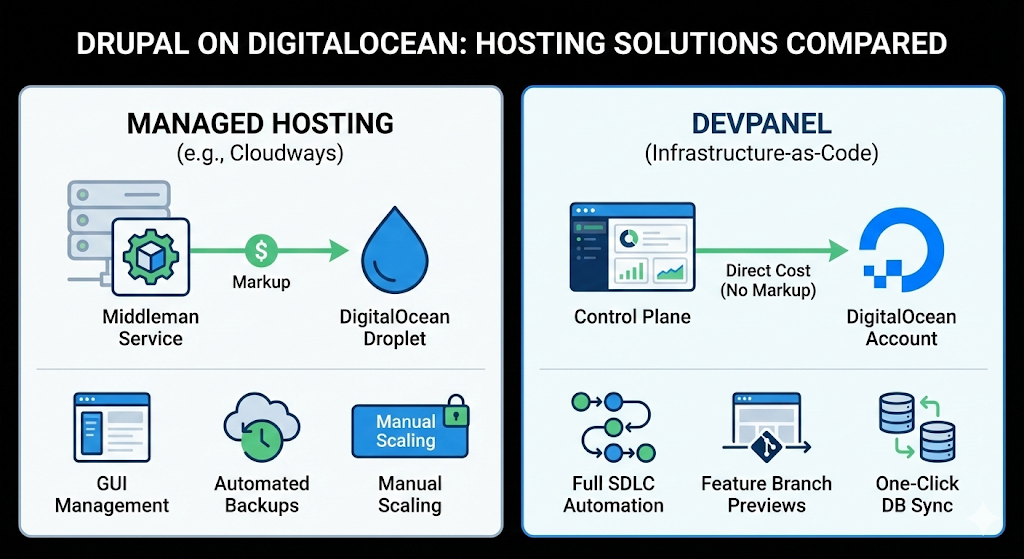
Managed Hosting (Cloudways, Cloud Panels)
Services like Cloudways act as a middleman. They provision DigitalOcean Droplets for you and provide a GUI for management.
- Pros: They handle OS patching, SSL renewal, and backups. Support is available 24/7.
- Cons: You pay a markup on the infrastructure. A $6 Droplet becomes $10-12. More importantly, you are often restricted in how you can tune the infrastructure, and “horizontal scaling” is often manual.
DevPanel – The Infrastructure-as-Code Platform
DevPanel represents a paradigm shift. It is not a hosting provider; it is a control plane that automates your DigitalOcean account using Infrastructure-as-Code.
- Total Ownership: You pay DigitalOcean directly for the infrastructure (no markup), but DevPanel orchestrates it.
- Full SDLC Automation: Unlike Cloudways, DevPanel manages the entire software development lifecycle. It creates separate Development, Staging, and Production environments automatically.
- Feature Branch Previews: Every Git branch gets a temporary URL. This allows stakeholders to test features before they merge—a capability usually reserved for massive enterprise teams.
- One-Click Database Sync: Developers can pull production databases to staging or dev environments instantly, ensuring tests run against real data.
Cost Analysis: The Hidden Price of “Cheap” Droplets
One of the most revealing parts of our analysis is the Total Cost of Ownership (TCO). Many teams choose manual Droplets to “save money,” but the math tells a different story.
📊 Access the Full Data
We conducted a comprehensive analysis of all nine deployment methods, comparing costs, labor, and feature sets. You can view the full research report here: Read the Research: https://www.perplexity.ai/page/comprehensive-analysis-all-the-6Cvv2mo1QSGa.XJ6UwOlNQ
1. Manual Droplet Setup
- Infrastructure: $50 – $150/month.
- Labor: $300 – $600/month (assuming just a fraction of an FTE’s time).
- Hidden Risk: Emergency response burnout and potential security breaches due to missed patches.
- Total: $550 – $1,150/month.
2. Managed Hosting (Cloudways)
- Infrastructure: $150 – $300/month (includes markup).
- Labor: $200 – $400/month (You still own Drupal updates and custom code).
- Total: $350 – $700/month.
3. DevPanel (Platform + Support)
- Infrastructure: $150 – $300/month (Paid directly to DO, no markup).
- Support: $200 – $500/month (Optional expert tier).
- Labor: $100 – $200/month (Drastically reduced because SDLC is automated).
- Total: $450 – $1,000/month.
The Takeaway: Manual hosting is only “cheaper” if your time is worth $0. For professional teams, DevPanel or Managed Hosting usually costs less than the manual approach when labor is accounted for.
Operational Reality: Who Fixes It at 2 AM?
The most critical factor in choosing a Drupal on DigitalOcean strategy is not the setup cost—it is the support model during a crisis.
The “Raw Infrastructure” Scenario
If your site goes down at 2 AM on a Saturday while using manual Droplets or DOKS:
- DigitalOcean’s Role: They confirm the server is “on.” If the hardware is working, their job is done.
- Your Reality: You must wake up your DevOps engineer. They must SSH in, parse logs, identify that a Drupal module is leaking database connections, and fix it.
- Result: High stress, long downtime, and potential revenue loss.
The DevPanel Expert Support Scenario
If the same crash happens on DevPanel:
- Proactive Monitoring: DevPanel’s automated monitoring detects the high CPU usage or error rate immediately.
- Expert Intervention: A DevPanel engineer (who understands Drupal) investigates. They identify the specific module causing the leak.
- Resolution: They contact you with a diagnosis and a request to disable the module. With your authorization, they fix it.
- Result: The issue is often resolved before your team even wakes up.
Recommendations: Which Path is Right for You?
Based on our analysis of the nine deployment paths, here are our specific recommendations based on your team size and goals.
📺 Watch the Visual Breakdown
Before making a decision, watch our team break down these strategies visually to understand the workflow differences: Watch the Video: https://youtu.be/frzMn1dyndY
For Solo Developers & Hobbyists
Recommendation: Cloudways or GridPane. If you are running a single low-traffic site, the overhead of a full platform might be unnecessary. Cloudways offers a good balance of managed support and ease of use for small-scale projects.
For Small to Mid-Sized Teams (3-10 Developers)
Recommendation: DevPanel. The value of SDLC automation cannot be overstated here. The ability to have automatic Preview Environments for every Pull Request saves hours of code review time every week. The “Clone to Staging” feature ensures your QA process is reliable. The cost is easily justified by the hours saved.
For Agencies Managing 10+ Sites
Recommendation: DevPanel or DOKS. If you have a dedicated DevOps team, building a custom Kubernetes (DOKS) platform can be cost-effective at scale. However, if you want to focus on client deliverables rather than maintaining Kubernetes clusters, DevPanel allows you to manage dozens of sites with a unified workflow and consistent tooling.
Conclusion: Stop Managing Servers, Start Managing Code
The comprehensive research into deploying Drupal on DigitalOcean leads to one clear conclusion: self-managed infrastructure is a time-shifting trap. You save money upfront on the server bill, but you pay it back with interest in engineering hours, security risks, and 2 AM wake-up calls.
DigitalOcean provides incredible raw infrastructure. But to run Drupal successfully on it, you need an orchestration layer.
- If you are a hobbyist, use a Managed Panel.
- If you are a professional team building business-critical applications, use DevPanel.
By adopting an Infrastructure-as-Code platform, you gain the power of Kubernetes and the flexibility of the cloud without the steep learning curve. You get to focus on what matters: building great Drupal experiences.
FAQ: Drupal on DigitalOcean
Q: Is DigitalOcean good for Drupal? A: Yes, DigitalOcean is an excellent provider for Drupal due to its high-performance SSDs and reliable Managed Databases. However, it is an “Infrastructure as a Service” provider, meaning you are responsible for the software layer unless you use a management platform like DevPanel.
Q: How do I install Drupal on DigitalOcean?
A: You can use the One-Click Marketplace app for testing. For production, it is highly recommended to use a load-balanced architecture with a managed database, or an automation platform like DevPanel to provision the infrastructure for you.
Q: What is the cost of hosting Drupal on DigitalOcean?
A: A basic setup can start at $15/month ($6 Droplet + Backup + Storage). A production-grade setup with redundancy typically starts around $50-$100/month for infrastructure, plus the cost of management tools or labor.
Q: Can I use Kubernetes for Drupal on DigitalOcean? A: Yes, DigitalOcean Kubernetes Service (DOKS) is robust. However, it requires significant expertise to manage persistent storage and stateless Drupal containers effectively.
One Comment
Comments are closed.