
The Nonprofit Hosting Hack Every Organization Should Know: AWS + Cloudflare + DevPanel
For most nonprofits, hosting is just another unavoidable line item in the budget. But what if that $3,900 annual expense could be reduced to just $95 per year—without giving up performance, security, or reliability?
That’s exactly what happened for Parents Helping Parents (PHP), a 501(c)(3) organization that runs a high-traffic WordPress website serving families of children with disabilities. Their story reveals a hosting strategy that every nonprofit should know about—and it’s surprisingly simple.
Below is a breakdown of how PHP transformed its hosting architecture using AWS, Cloudflare, and DevPanel, resulting in over 90% cost savings while improving uptime, performance, and operational workflow.
Watch the short explainer video here: https://youtu.be/HyKRX2AEjLA
The Challenge: A $3,900 Annual Hosting Bill
Before migrating, PHP was paying:
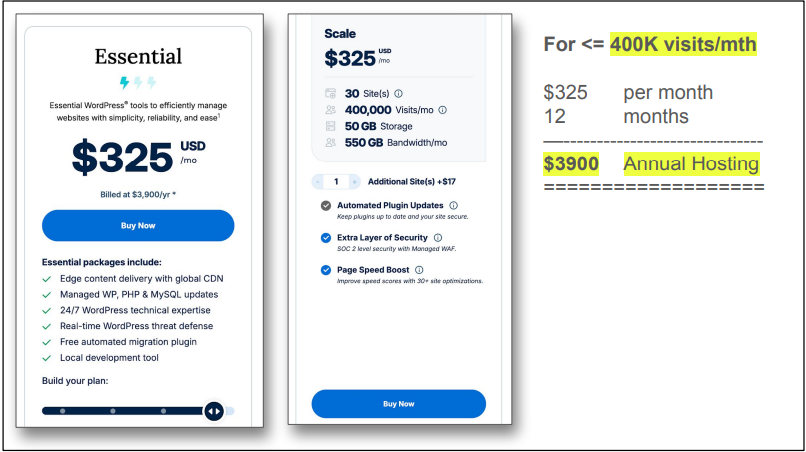
- $325/month (billed annually at $3,900)
- For a plan supporting up to 400,000 visits/month
- With no advanced CDN, no WAF, and limited dev environments
Like many nonprofits, PHP accepted these costs as “the price of doing business.” But the plan wasn’t flexible, didn’t offer full control, and was far more expensive than necessary.
They needed a hosting solution that was:
- Affordable
- Secure
- Scalable
- Easy to maintain
- Friendly for developers and non-technical staff
They found it—by rethinking the hosting stack entirely.
The Solution: AWS + DevPanel + Cloudflare
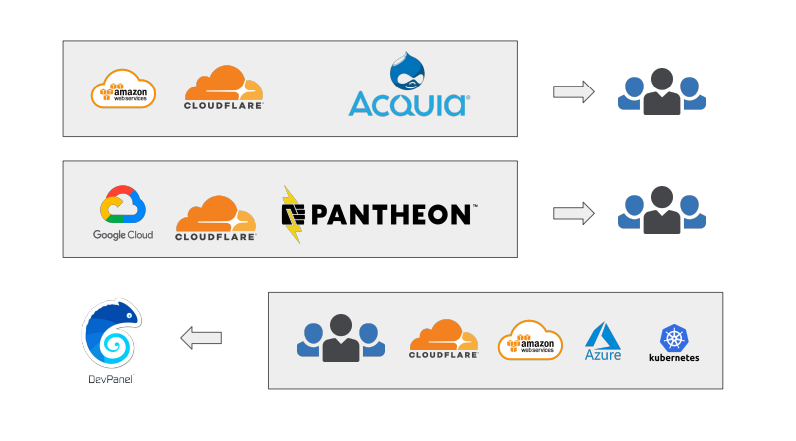
PHP moved to a modern, cloud-native architecture built around three components:
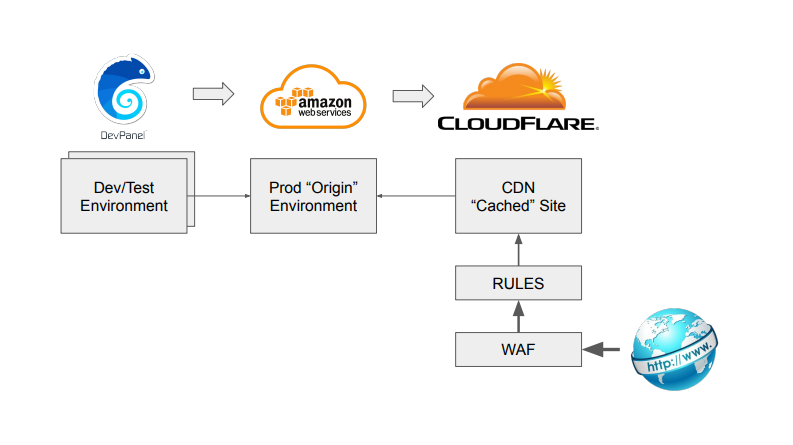
1. AWS Lightsail (Server + Backups)
An 8GB RAM, 2vCPU Lightsail server with 5TB bandwidth—more than enough for PHP’s traffic.
2. Cloudflare CDN & Web Application Firewall
Cloudflare blocked bad bots, cached frequently accessed pages, and prevented DDoS attacks. After the migration:
👉 Only 10% of PHP’s traffic reached the AWS server.
👉 Cloudflare handled 90% of total requests.
The site became faster, safer, and dramatically cheaper to run.
3. DevPanel for Dev/Test/Prod + Deployment Workflow
DevPanel provided PHP with:
- Cloud-based development environments (VS Code in the browser)
- Automated server provisioning
- Dev/Test/Prod environments
- Git-based deployments
- One-click cloning and backups
- Full control inside their own AWS account
DevPanel essentially replaced expensive “managed WordPress hosting” with a self-managed, automated platform—without requiring PHP’s team to be AWS experts.
The Secret Ingredient: $95 AWS Credits from TechSoup
This is the real “nonprofit hosting hack.”
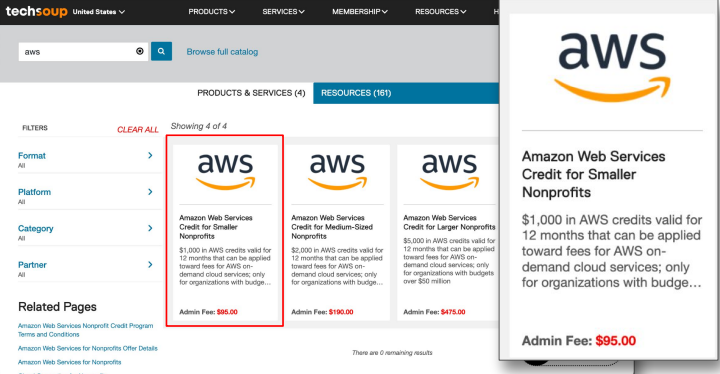
Through TechSoup, U.S. 501(c)(3) nonprofits can purchase:
- $1,000/year in AWS credits for just $95
- Up to $5,000/year depending on need
And because Cloudflare offloaded ~90% of their traffic…
👉 PHP never used more than a fraction of those credits.
👉 Their AWS bill dropped to $0/month.
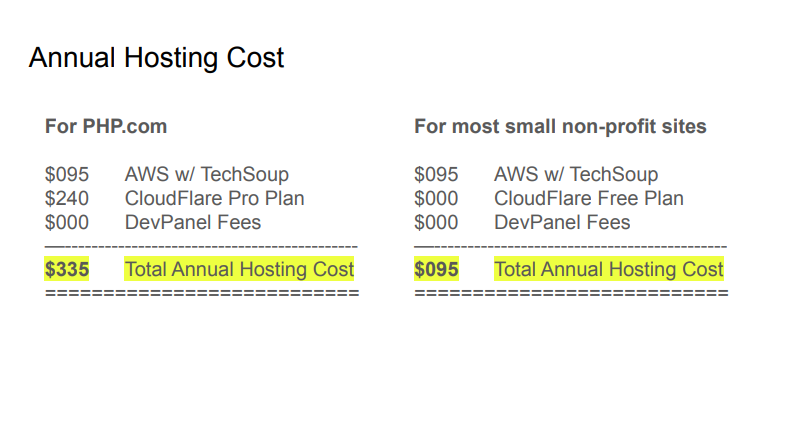
The math speaks for itself:
| Cost Item | Before | After |
|---|---|---|
| Hosting | $3,900/year | $95/year |
| Cloudflare | Not included | Free (or $240/year for Pro) |
| DevPanel | N/A | Free to use |
| Total | $3,900/year | $95–$335/year |
Even with Cloudflare Pro, PHP’s new hosting bill is:
👉 $335/year
👉 A 91% reduction in cost
Why DevPanel Was Critical for This Migration
Moving to AWS typically requires:
- Deep cloud expertise
- Manual configuration
- DevOps knowledge
- Ongoing monitoring
- Infrastructure management
But PHP didn’t have an AWS engineer.
They didn’t need one.
DevPanel handled everything:
- Provisioning AWS servers
- Setting up WordPress environments
- Integrating Cloudflare
- Managing DNS records
- Creating dev/test/staging sites
- Streamlining code deployments
- Providing backups and rollbacks
- Offering VS Code in the browser for developers
All inside PHP’s own AWS account, with full transparency and zero vendor lock-in.
For nonprofits, agencies, and small teams, DevPanel is the “easy button” for running WordPress or Drupal in the cloud.
Results: Faster, Cheaper & More Secure
After migrating:
Performance Improved
Cloudflare delivered cached content from edge locations, reducing load times across the world.
Security Strengthened
- Cloudflare WAF blocked malicious traffic
- Cloudflare Pro improved firewall rules
- PHP’s AWS server received only a small percentage of requests
- DDoS risk dropped dramatically
Costs Plummeted
$3,900/year → $95/year ($335/year with Cloudflare Pro).
Developer Workflow Modernized
Instead of relying on a single staging environment, PHP can now create unlimited:
- Dev environments
- Testing environments
- Preview sites
- Feature-branch sandboxes
All automatically deployed via DevPanel.
Should Your Nonprofit Do This Too?
If your organization meets these criteria:
- You’re a U.S.-based 501(c)(3)
- You spend more than $500/year on hosting
- You run WordPress or Drupal
- You want dev/test/prod environments
- You rely on an agency or freelancers
- You’re paying for hosting + CDN + WAF separately
Then you can probably reduce your hosting bill by 80–95% immediately.
Most nonprofits don’t know this is even possible.
Watch the Video + Download the Case Study
Video: Nonprofit Hosting Hack
https://youtu.be/HyKRX2AEjLA
📄 Full Case Study PDF
(https://drive.google.com/file/d/17FIbXJGn-frnmU6wCGIzsOnKBIIv14vK/view)
Want to Implement This Architecture for Your Nonprofit?
DevPanel can help your agency or team set this up in:
- AWS
- Azure
- DigitalOcean
- Kubernetes
…all without needing cloud expertise.
If you want to explore your options or see if your nonprofit qualifies for similar savings:
👉 Schedule a 1:1 call
https://tidycal.com/devpanel
👉 Email us
contact@devpanel.com
3 Comments
Comments are closed.