
PaaS vs Cloud Hosting in 2026: How To Choose The Right Stack For WordPress On Pantheon Or AWS
In 2026, teams are not just choosing between PaaS and cloud hosting in theory, they are deciding whether to live inside platforms like Pantheon or run WordPress directly on AWS, where DevPanel users have reported about 75% hosting cost savings compared with some legacy enterprise platforms.
Key Takeaways
| Question | Short Answer |
|---|---|
| What is the core difference between PaaS and cloud hosting for WordPress? | PaaS like Pantheon abstracts most infrastructure, while cloud hosting on AWS gives you raw control that you can manage through tools like our DevPanel platform. |
| When does a managed PaaS such as Pantheon make more sense? | When you want an opinionated WordPress stack, limited infrastructure choices, and simplified workflows for small to mid-sized sites without deep cloud skills. |
| When does AWS cloud hosting win? | When you need scale, cost control, compliance, and direct ownership of infrastructure, especially if you can automate with tools like our DevPanel features. |
| Can we get a PaaS-like experience on our own AWS account? | Yes, you can build PaaS-style workflows inside your cloud account using cloud dev environments and cloud IDEs from DevPanel. |
| How do costs compare in 2026 for Pantheon vs AWS with DevPanel? | Pantheon bundles infrastructure and platform fees, while DevPanel uses a zero-markup model where you pay AWS directly, as explained on our pricing page. |
| Is vendor lock-in a risk with PaaS? | Yes, control is limited on closed PaaS platforms, while solutions that run in your cloud account, like the Link My Cloud Account feature, keep you in control. |
1. PaaS vs Cloud Hosting: What You Are Really Choosing In 2026
When teams compare Pantheon with AWS, they are actually choosing between a closed PaaS ecosystem and open cloud hosting that can be automated into a PaaS-like experience.
Platform as a Service hides most infrastructure choices, while cloud hosting exposes instances, networks, and services that you manage directly or through automation tools like DevPanel.
How PaaS Works For WordPress (Pantheon)
PaaS gives you a curated stack with fixed deployment workflows, shared tooling, and tight boundaries around what you can and cannot configure.
Pantheon optimizes this experience for WordPress and Drupal, which can be great if your needs match the pre-defined environment and scaling model.
How Cloud Hosting Works For WordPress (AWS)
Cloud hosting on AWS means you own the infrastructure, including EC2 instances, RDS, load balancers, and networks that power WordPress.
On its own, this requires DevOps skills, but with DevPanel, our platform turns that raw power into managed workflows similar to PaaS, while staying inside your AWS account.
2. Comparing Use Cases: Pantheon PaaS vs AWS Cloud Hosting With DevPanel
Before looking at prices and performance, you need to map PaaS and cloud hosting to your real workloads, from tiny blogs to billion-pageview government sites.
We see three broad buckets, small marketing sites, growing multi-site portfolios, and high scale or compliance heavy workloads.
When Pantheon PaaS Fits Best
Pantheon tends to fit when your team wants a single vendor for WordPress or Drupal, predictable monthly bills, and minimal cloud decision making.
For small to medium projects that do not need complex networking, regional compliance, or deep AWS services, the trade off of control for simplicity can be acceptable.
When AWS Cloud Hosting Fits Best
AWS fits when your organization already uses AWS for other systems, needs strict security and compliance, or expects traffic patterns that PaaS pricing cannot handle efficiently.
In these cases, DevPanel lets you build development environments, manage deployments, and standardize workflows inside your own AWS account, so you avoid juggling multiple platforms.
| Scenario | Better Fit | Reason |
|---|---|---|
| Single brochure site, small team | Pantheon PaaS | Low operational overhead, fixed tooling |
| Dozens of WordPress sites, shared codebase | AWS + DevPanel | Centralized control, cost optimization, templates |
| Government or public sector portals | AWS + DevPanel | Compliance, security controls, account ownership |
| Agency hosting client WordPress sites | AWS + DevPanel or Pantheon | Choice depends on control vs simplicity priorities |
3. Cost Models: Pantheon Plans vs AWS + DevPanel’s Zero Markup Approach
In 2026, cost is one of the main reasons teams move from PaaS hosting to AWS, especially when traffic and site counts grow aggressively.
With Pantheon, you pay a blended fee for platform plus infrastructure, while with AWS and DevPanel you pay AWS directly and our automation layer separately.
Understanding DevPanel’s Zero Markup Model
We use a zero markup approach, which means AWS bills your infrastructure costs directly, and we only charge for our platform and expert services.
This is how customers have achieved hosting savings like dropping from about $1M/year to under $200K/year in some large migration scenarios when moving off legacy PaaS setups.
How This Compares To PaaS Pricing
PaaS vendors bundle cloud resources, support, and margin into each plan tier, which simplifies billing but hides optimization levers.
On AWS with DevPanel, you can right size instances, tune auto scaling, and leverage savings plans while still having a managed experience for your developers.
- PaaS model: Per site or per environment, bundled infrastructure, limited visibility.
- Cloud + DevPanel model: Direct AWS pricing, transparent resource usage, optional expert support from $85 to $250 per hour tiers.
A visual summary of the five key considerations when choosing between PaaS and cloud hosting.
4. Control, Governance, And Vendor Lock In
Control is where PaaS and pure cloud hosting diverge most sharply, and it matters more as your WordPress footprint grows.
With Pantheon, core infrastructure and many security controls are abstracted away, while AWS hosting with DevPanel keeps that infrastructure inside your account.
Control In A PaaS World
On Pantheon, you control code, content, and some configuration, but you do not control the underlying AWS services, regions, or network architecture.
This can limit how you meet internal security policies or regulatory frameworks that require direct visibility into infrastructure.
Control With AWS + DevPanel
When you connect your AWS account using features like Link My Cloud Account, every resource is deployed inside your cloud, with full auditability.
We provide automation and guardrails, but you retain root level transparency, which significantly reduces vendor lock in risk.
- Use your own security controls and IAM policies.
- Integrate with existing VPCs and private networking.
- Move workloads between tools without data migration pain.
Did You Know?
DevPanel on AWS delivered about 75% hosting cost savings vs a legacy Acquia-hosted setup for a government-News site with 1–2 billion monthly pageviews.
5. Performance And Scalability For All Site Sizes
On Pantheon, you get a tuned performance environment with caching and a published uptime SLA that targets sub second load times for optimized sites.
AWS, on the other hand, lets you design exactly how you want to scale WordPress, from small EC2 instances to massive auto scaling fleets behind global load balancers.
PaaS Performance Profile
Pantheon benchmarks show sub 0.8 second load times and high uptime for sites that fit within their architecture and caching model.
This is often good enough for small and mid sized sites that do not experience extreme spikes or complex global traffic patterns.
AWS Performance Profile With DevPanel
On AWS, you can combine CloudFront, Aurora or RDS, and dedicated EC2 or container clusters to support both tiny microsites and billion pageview portals.
DevPanel organizes this into workspaces and projects, so whether you run a single WordPress site or hundreds, you keep a consistent way to manage builds, deployments, and resources.
6. Developer Experience: PaaS Tooling vs DevPanel Workspaces On AWS
Developers care about git workflows, branches, staging, and how quickly they can onboard to a new project.
PaaS platforms provide their own environment management, while DevPanel recreates that experience on AWS through workspaces, environments, and templates.
DevPanel Workspaces And Projects
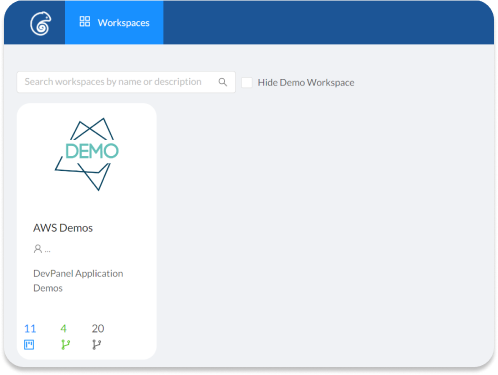
In DevPanel, a workspace isolates teams, projects, and resources so you can organize WordPress and other apps by client, department, or environment.
Each workspace lets you invite developers, manage custom domains, and view activities across all projects in one central hub.
Cloud Dev Environments And Cloud IDEs
We provide cloud based dev environments with VS Code IDE in the browser, so developers can start coding in minutes without local setup.
Branches, sites, and databases can be cloned with a few clicks, which closely mirrors or surpasses typical PaaS developer workflows.
- Dev, Test, and Live environments for each project.
- Central workspaces for teams and clients.
- Browser based IDE for remote and global teams.

7. Security, Compliance, And Enterprise Requirements
Security is a shared story across Pantheon and AWS, but the control points sit in different places.
PaaS vendors secure the platform on your behalf, while AWS expects you to design and operate your own controls, which is exactly where DevPanel focuses on helping teams.
PaaS Security For WordPress
On Pantheon, platform security, OS patching, and infrastructure hardening are handled centrally, and you focus on application level best practices.
This works well until you hit specific regulatory or data residency requirements that PaaS providers may not cover in your region or account structure.
AWS Security With DevPanel Guardrails
With DevPanel, you can leverage AWS services, security groups, IAM, and encryption directly, while our platform standardizes how environments are provisioned and updated.
Features like secret management, role based access, and integration with SSO help you meet enterprise security expectations without custom scripting for every project.

Did You Know?
DevPanel provides root access and transparency inside the customer’s AWS account, enabling direct control over infrastructure and reducing vendor lock-in.
8. Real World Example: Migrating Many Sites To AWS From Traditional PaaS
Migrations are where theory meets reality, especially for organizations with dozens or hundreds of WordPress and Drupal sites.
We have seen this first hand in migrations like the Academy of Model Aeronautics, where more than 30 sites moved to AWS via DevPanel.
Why Organizations Move From PaaS To AWS
Common triggers include rising PaaS costs as traffic grows, limited regional options, strict security requirements, or the desire to standardize on AWS across all workloads.
Operational teams also want one playbook for networking, monitoring, and disaster recovery instead of juggling multiple proprietary platforms.
How DevPanel Simplifies These Migrations
Our platform lets you create templates for WordPress and Drupal, then clone or deploy them repeatedly across new AWS environments with consistent settings.
Git integration, environment cloning, and automated deployments turn what used to be manual rebuilds into repeatable, low friction workflows.
For agencies and enterprises that host many customer sites, having a reusable, tested cloud template matters more than any single feature on a PaaS dashboard.
9. Feature Comparison: Pantheon PaaS vs DevPanel On AWS
When you look at daily workflows, both Pantheon and DevPanel on AWS aim to make development, testing, and deployment straightforward.
The key difference is where those features live, inside a closed platform or inside your cloud account with open standards.
Core Workflow Features
DevPanel covers workspaces, dev environments, deployment pipelines, and cloud IDEs similar to a PaaS, but it does so using your AWS infrastructure.
This includes building from scratch or cloning existing apps, syncing with GitHub, GitLab, or Bitbucket, and managing secrets and file permissions.
High Level Feature Matrix
| Capability | Pantheon PaaS | AWS + DevPanel |
|---|---|---|
| Dev / Test / Live environments | Yes, platform defined | Yes, configurable in your AWS account |
| Cloud IDE | Limited or external | Built in browser IDE with VS Code |
| Root infrastructure control | No | Yes, in your AWS account |
| Multi framework support | WordPress and Drupal focused | WordPress, Drupal, and other frameworks via templates |
10. Decision Framework: How To Choose Between PaaS And Cloud Hosting In 2026
By 2026, most teams are not asking whether PaaS or cloud hosting is better in general, they want a concrete decision path for their own situation.
You can use a simple framework that scores your priorities around control, cost, scale, and operational capacity.
Key Questions To Ask
- How many sites do we host today, and how many in two years.
- What compliance obligations do we have, such as government, healthcare, or financial regulations.
- Who manages infrastructure, and do we want that skill in house or in a partner.
- How much lock in are we comfortable with for platform features.
Quick Rules Of Thumb
If you want maximum simplicity and your footprint is relatively small, PaaS like Pantheon is often enough.
If you care about cost at scale, infrastructure ownership, and long term flexibility, AWS hosting with a platform like DevPanel usually wins.
Conclusion
Choosing between PaaS and cloud hosting for WordPress in 2026 is really a choice between convenience today and flexibility for tomorrow.
Pantheon gives you a focused PaaS for WordPress, while AWS combined with DevPanel gives you a PaaS like experience that lives in your own cloud account, with cost control, governance, and scalability ready for whatever your next project demands.