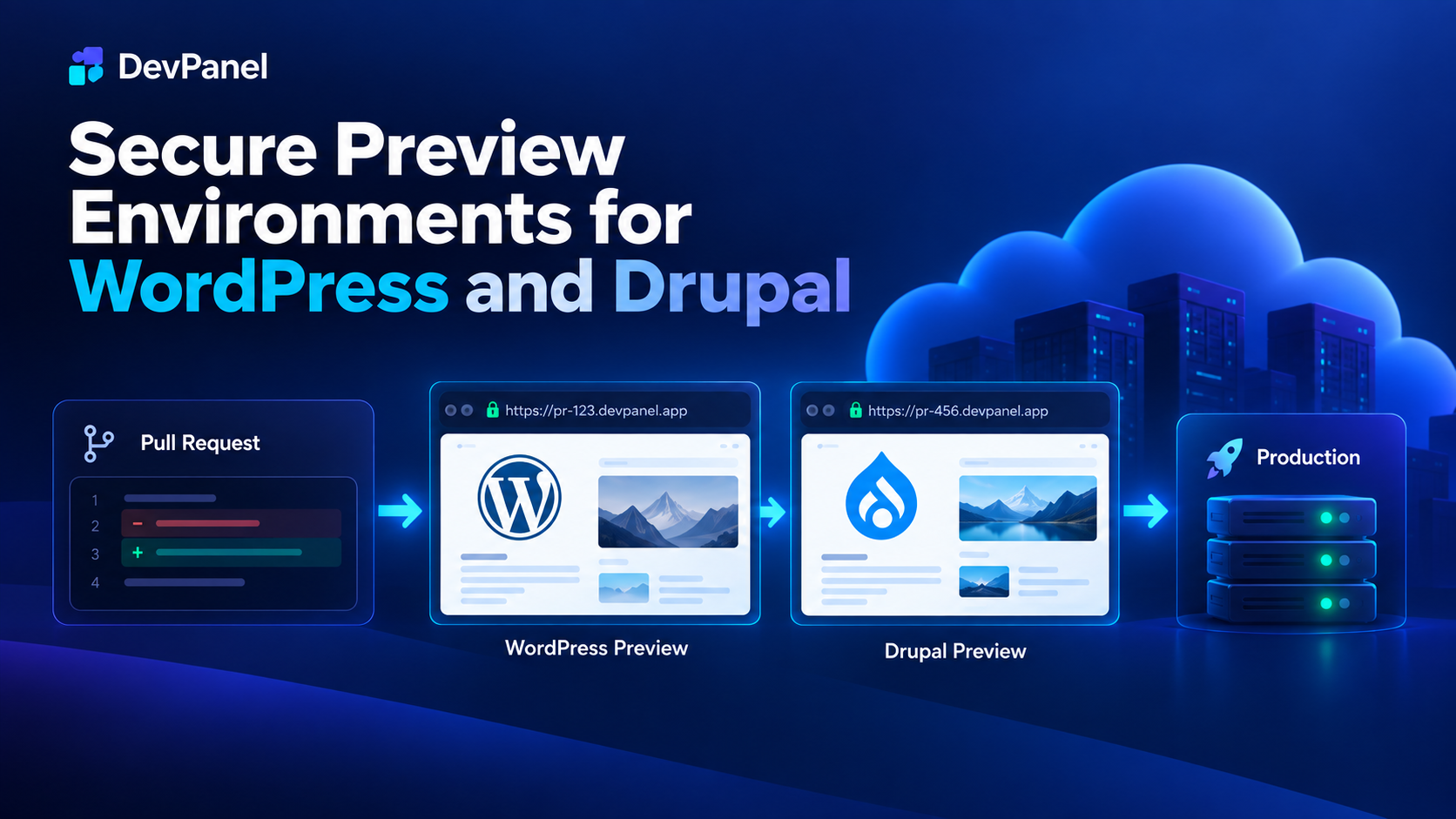
Secure Preview Environments for WordPress and Drupal
WordPress and Drupal teams need a safe way to show work before it goes live.
A developer may need to share a new page layout. An agency may need client approval on a feature. A Drupal team may need reviewers to test a configuration change. A WordPress team may need QA to approve a plugin or theme update before production.
The problem is that unfinished work often gets exposed too casually.
A temporary URL gets shared.
A staging site stays open.
A test environment gets indexed.
Production data is copied without enough cleanup.
A preview site becomes a long-lived public surface that nobody remembers to close.
That creates risk.
Preview environments are useful because they help teams review changes before production. But they need to be secure by design. A preview environment should give the right people access to the right branch, for the right amount of time, without exposing unfinished work to the wider internet.
For WordPress and Drupal teams, secure preview environments create a better path between development and production.
They make reviews faster.
They reduce staging confusion.
They help clients approve work earlier.
They give developers better feedback.
They reduce the risk of unfinished features, sensitive data, or misconfigured environments becoming public.
DevPanel helps teams create and manage these preview environments through cloud development environments, branch-based workflows, application cloning, access controls, and customer-owned cloud infrastructure.
The result is a safer way to move from pull request to approval to production.
Why Preview Environments Matter
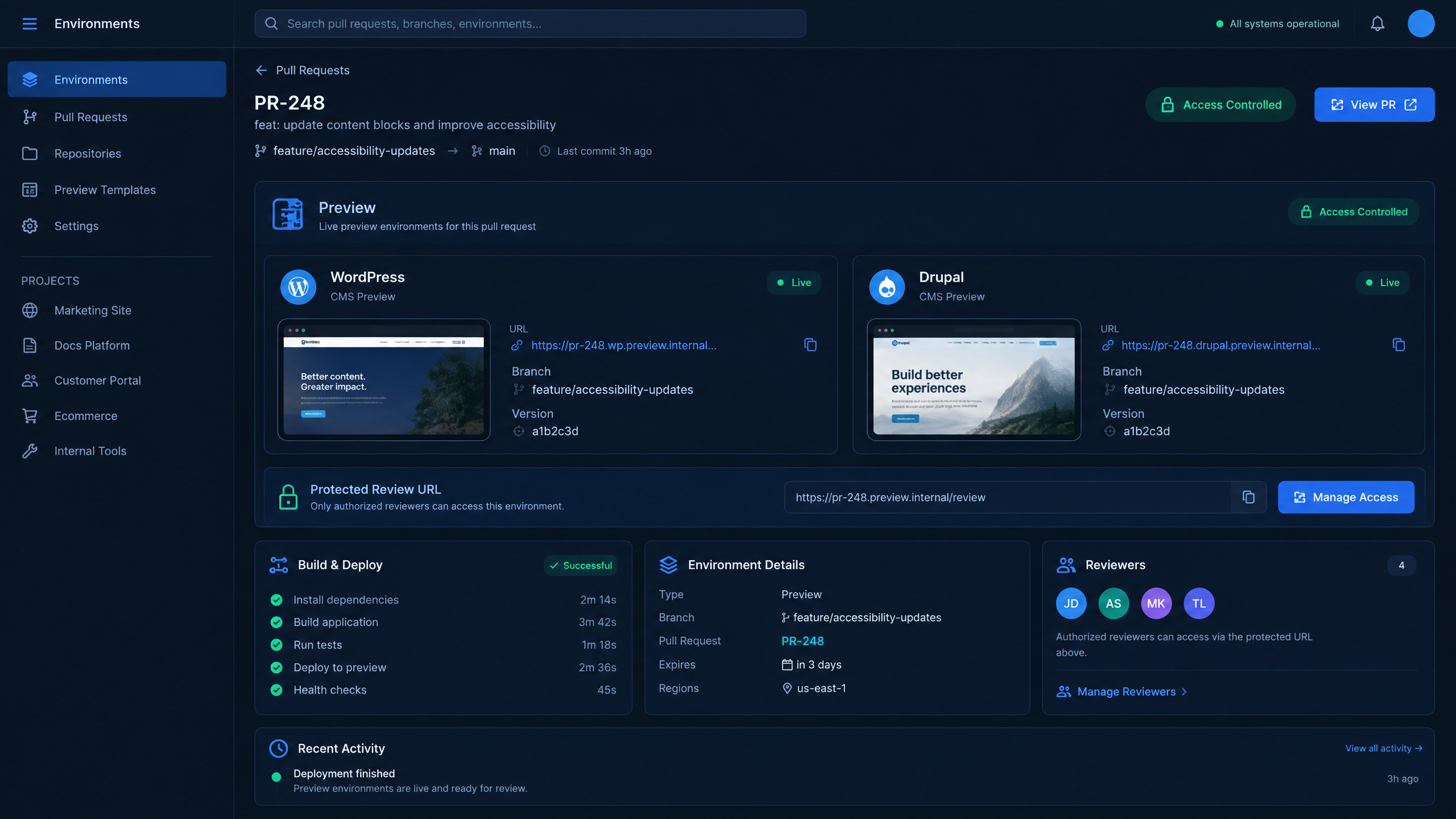
A branch-specific preview gives approved reviewers a safer place to inspect unfinished CMS work.
Most teams do not expose unfinished work on purpose.
They do it because collaboration needs a URL.
A designer wants to review the layout.
A client wants to approve the page.
A developer wants to confirm behavior in a real environment.
A QA reviewer needs to test the feature before it moves forward.
A stakeholder wants to see progress without waiting for a formal staging release.
That is normal.
The problem is when teams use public or poorly controlled environments for work that is not ready.
A shared staging site may contain multiple unfinished features. A branch environment may use real data. A test site may be reachable by anyone with the URL. A preview may remain online after the project is complete.
These small issues can become serious as teams grow.
Secure preview environments solve this by creating isolated review spaces for specific branches, features, or pull requests. Instead of pushing every change into one shared staging site, teams can review work in a controlled environment tied to the work being approved.
That makes the review process cleaner and safer.
Staging and Preview Environments Are Not the Same
Many teams use the word “staging” for every non-production environment.
That creates confusion.
Staging is usually a longer-lived environment used for final validation before production. It may represent the next release candidate. It may be shared by QA, developers, project managers, and stakeholders.
A preview environment is different.
A preview environment is usually tied to a specific branch, pull request, feature, or client review cycle. It exists so people can inspect one change or one set of changes before those changes move forward.
A secure preview environment should be:
•Isolated from production
•Tied to a specific branch or pull request
•Access controlled
•Protected from indexing
•Configured with separate credentials
•Safe for client or stakeholder review
•Temporary or easy to remove
•Clear about what change it represents
Staging still matters.
But staging should not become the place where every unfinished feature, every client request, and every experiment collide.
Secure preview environments give teams a more precise workflow.
They let reviewers inspect work earlier without turning the main staging environment into a dumping ground.
The Risks of Unsecured Preview Sites
Unsecured preview sites create several kinds of risk.
The first risk is visibility. If a preview URL is public, it may be discovered, shared, cached, crawled, or indexed. Even if the site is temporary, the content may not disappear as quickly as the team expects.
The second risk is data exposure. Teams often clone production data into development or staging environments to make testing realistic. If that data is not sanitized, the preview environment may contain information that should not be available outside production controls.
The third risk is configuration leakage. Preview environments sometimes contain environment variables, service credentials, admin paths, debug output, or integration settings that should not be exposed.
The fourth risk is accidental activity. A test environment may send real emails, trigger webhooks, submit forms to live systems, or process payment-like flows if safeguards are not in place.
The fifth risk is lifecycle drift. A preview environment may be created for one task but remain online long after it is needed.
These risks are not limited to large enterprises.
Agencies, nonprofits, universities, small businesses, and enterprise teams all face them when preview workflows are informal.
A secure preview strategy reduces the blast radius by controlling who can access the environment, what data is available, how long the environment exists, and how it connects to the rest of the application stack.
What Makes a Preview Environment Secure?
A secure preview environment is not just a hidden URL.
It needs real controls.
At a minimum, teams should think about six areas.
1. Access Control
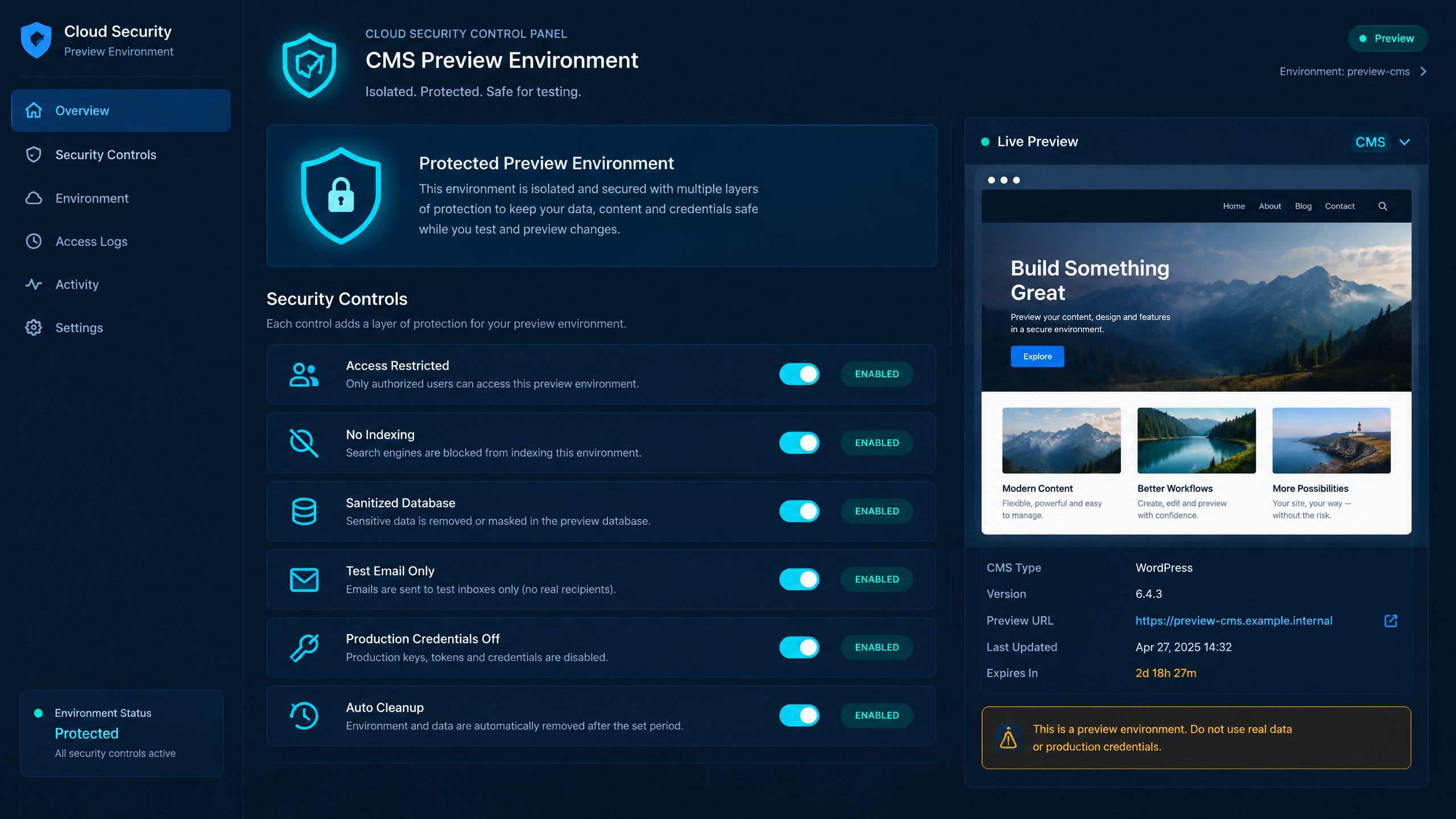
Secure previews need real controls—not just an unlisted URL.
Only approved users should be able to reach the preview.
That may include developers, QA reviewers, project managers, clients, or internal stakeholders. Access should be easy to grant and easy to revoke.
A preview URL should not be treated as the security boundary by itself.
2. Environment Isolation
The preview environment should not share production credentials, production service accounts, or production runtime settings.
Each environment should have its own configuration where possible.
This reduces the chance that a mistake in preview affects production.
3. Data Safety
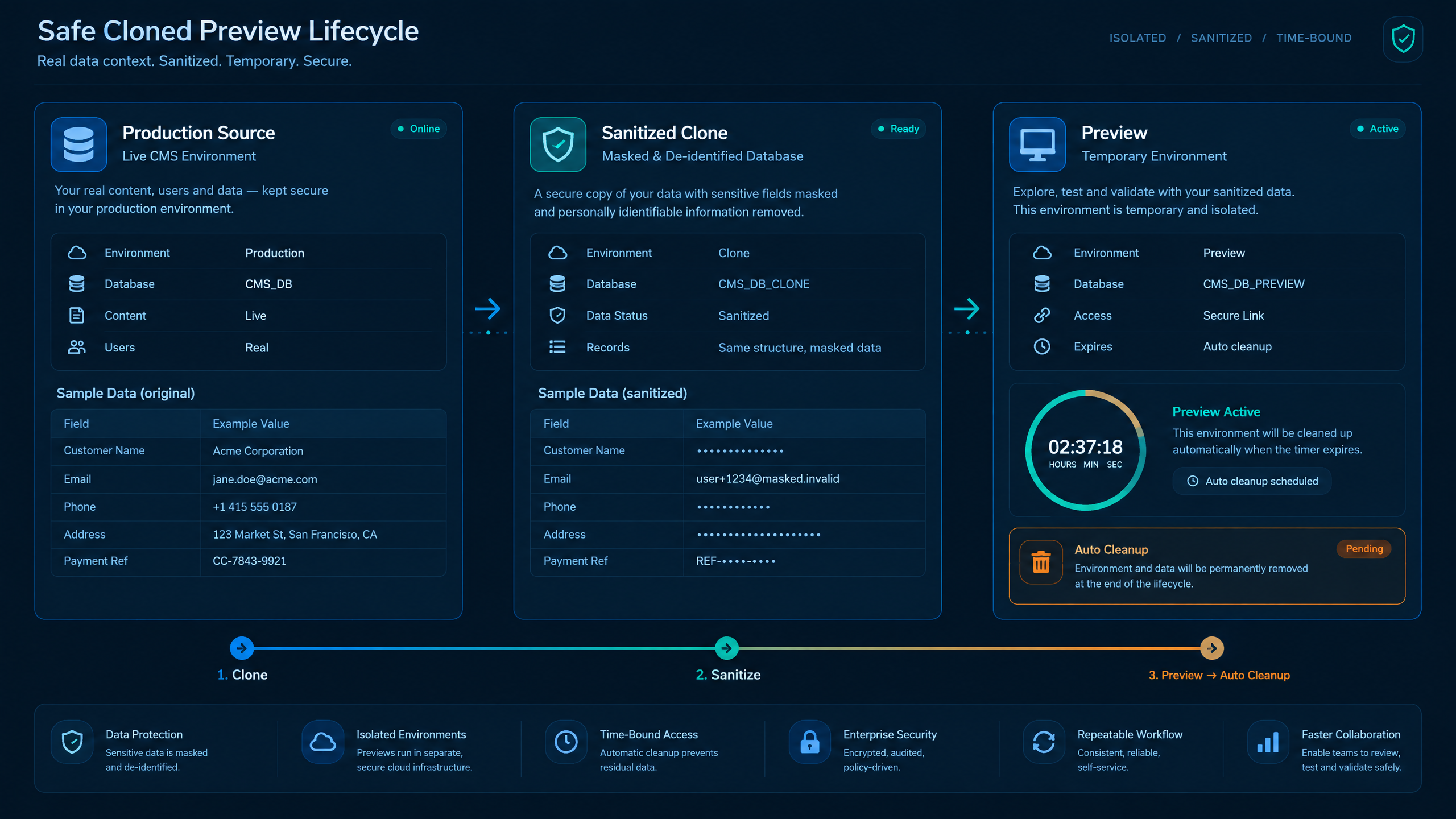
Sanitized clones and lifecycle controls reduce the exposure created by realistic test data.
Production data should be sanitized before it is used in preview environments.
Teams should remove or mask sensitive information, avoid copying secrets, and limit datasets to what is needed for review.
Realistic testing is valuable, but it should not come at the cost of unnecessary exposure.
4. Indexing Protection
Preview environments should not be indexed by search engines.
Teams should configure the environment to discourage crawling and verify that public discovery is limited.
This is especially important for client work, campaign pages, unpublished content, and projects under review.
5. Safe External Behavior
Preview environments should not send real customer emails, trigger production webhooks, or process live transactions.
Outgoing behavior should be controlled.
Emails can be disabled or routed to a safe testing inbox. Payment flows should use test credentials or be blocked entirely.
6. Lifecycle Management
Preview environments should not live forever.
When a pull request is merged, closed, rejected, or no longer needed, the environment should be removed, paused, or locked.
This reduces the number of exposed surfaces the team has to manage.
Branch-Based Previews Improve Review Quality
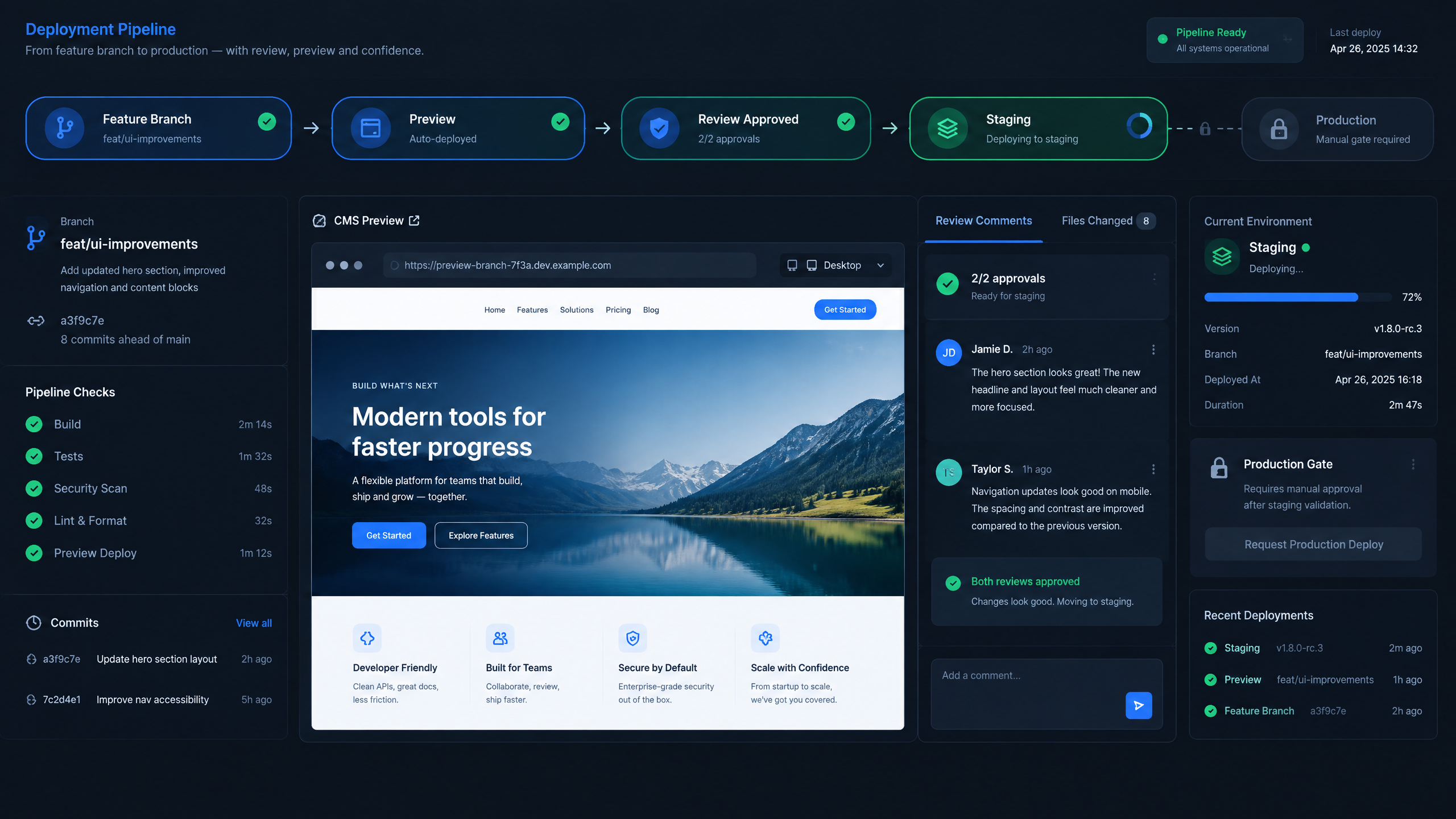
Branch previews keep review tied to the exact change before it moves into staging.
Branch-based preview environments connect a live preview to the exact work being reviewed.
That is powerful.
Instead of asking reviewers to look at a shared staging site and guess which changes are included, the team can provide a preview URL tied to a specific branch or pull request.
That creates a clearer review process.
A developer opens a pull request.
The platform creates a preview environment.
QA tests the change.
A project manager reviews the workflow.
A client approves the design or functionality.
The team updates the branch if changes are requested.
Once approved, the change moves through staging and production using the normal release process.
This model reduces confusion because the preview represents a specific change.
It also reduces conflict because multiple features can be reviewed separately instead of colliding inside one shared staging environment.
For WordPress and Drupal teams, this is especially useful because CMS projects often include visible changes that stakeholders need to review before release.
Secure WordPress Preview Environments
WordPress preview environments are useful for reviewing themes, plugins, custom blocks, landing pages, WooCommerce changes, membership workflows, forms, and editor experiences.
But WordPress teams need to be careful.
A WordPress preview may include plugins that connect to email platforms, CRMs, payment processors, analytics tools, marketing automation systems, or third-party APIs. If those integrations are not isolated, a test action can affect a live system.
A secure WordPress preview workflow should include:
•Separate environment configuration
•Safe plugin settings for non-production
•Disabled or redirected emails
•Protected preview URLs
•Test payment credentials
•Sanitized database copies
•Controlled user access
•Review-specific branch environments
•Clear cleanup after approval
The goal is to let reviewers see the real behavior of the site without giving the preview environment unnecessary access to production systems.
DevPanel helps by giving teams a structured way to work with branch-based environments, application cloning, access controls, and deployment workflows.
Secure Drupal Preview Environments
Drupal preview environments are valuable for reviewing configuration changes, modules, themes, content types, views, workflows, permissions, and integrations.
Drupal teams often have a more structured configuration management process, but preview security still matters.
A Drupal preview may involve database updates, configuration imports, Composer dependencies, custom modules, and environment-specific settings.
A secure Drupal preview workflow should include:
•Branch-specific environments
•Controlled configuration imports
•Separate service credentials
•Sanitized database clones
•Protected access
•Review and approval gates
•Testing before staging and production
•Cleanup when the environment is no longer needed
This is especially useful for agencies and enterprise teams managing multiple Drupal projects.
Instead of pushing every change into shared staging, teams can review configuration and code changes in isolated environments before they move forward.
DevPanel supports this kind of workflow by helping teams create and manage environments that align with Git-based delivery.
Why Shared Staging Becomes a Bottleneck
Shared staging often starts as a practical solution.
Everyone knows where it is. Everyone can test there. It looks like production. It becomes the default place to preview work.
But shared staging becomes a bottleneck when many changes are in progress at once.
One feature overwrites another.
A bug appears, but nobody knows which branch caused it.
A client reviews a page that includes unrelated work.
QA tests against a state that keeps changing.
A developer delays deployment because staging is being used by another team.
Staging is still important, but it should be used for final validation, not every feature review.
Branch-based previews reduce pressure on staging.
They let teams review work earlier and separately.
Then staging can be reserved for validating approved changes before production.
This gives teams a cleaner release path.
DevPanel as the Orchestration Layer for Secure Previews
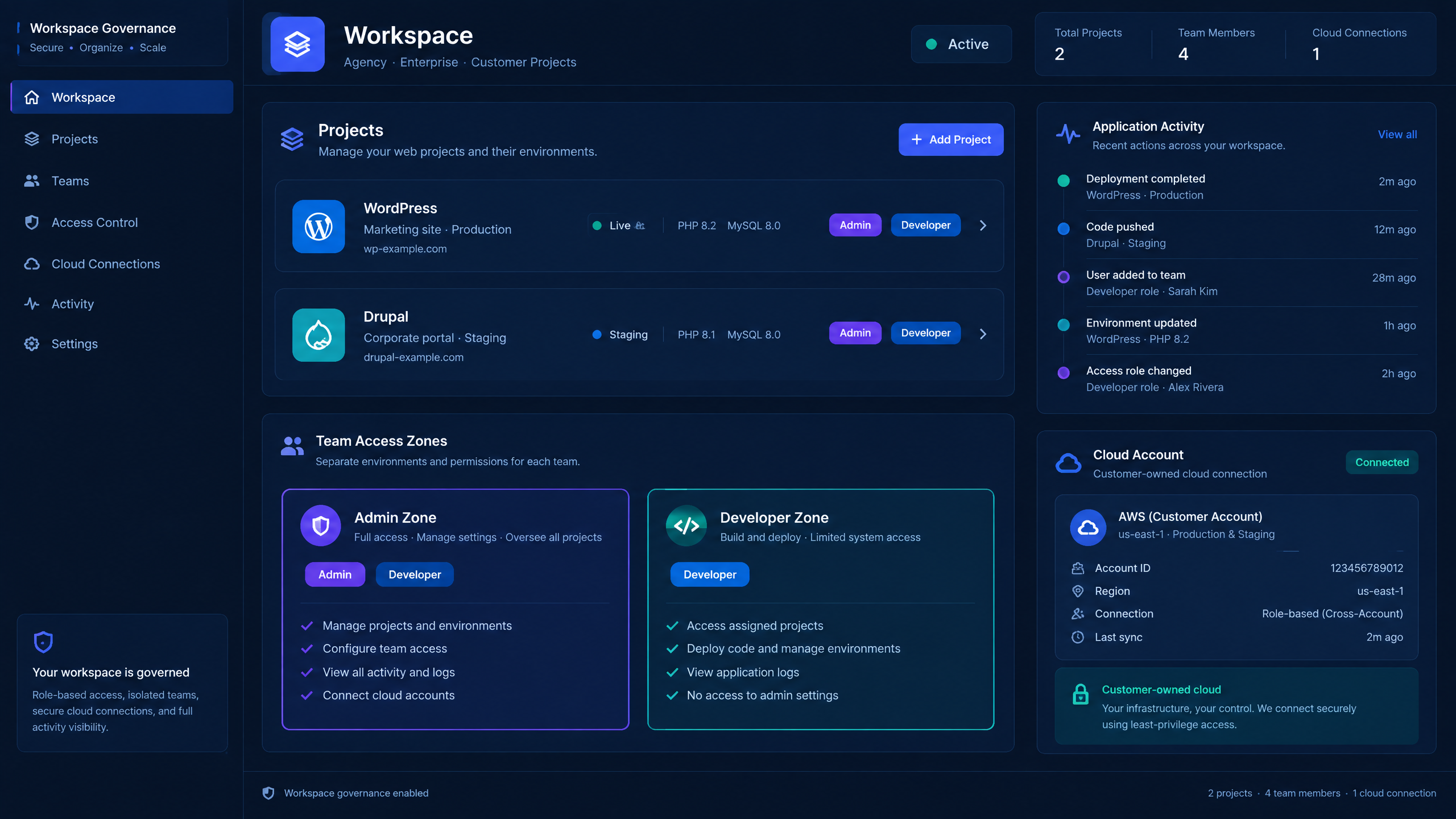
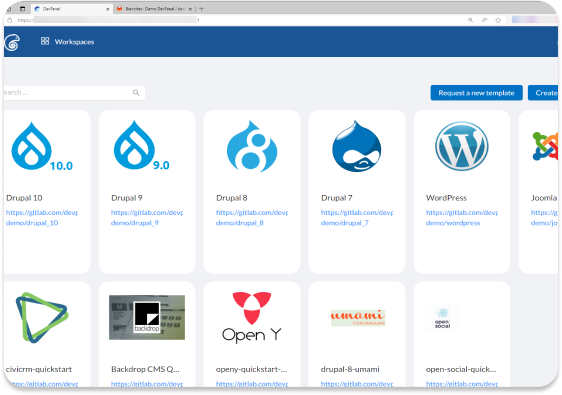
Workspaces help agencies and enterprise teams organize projects and control who can access previews.
Secure preview environments require more than a place to host a test site.
They require orchestration.
The platform needs to connect Git branches, application environments, deployment workflows, access control, data cloning, and environment lifecycle management.
That is where DevPanel fits.
DevPanel helps WordPress and Drupal teams create and manage branch-based environments in customer-owned cloud infrastructure.
Teams can use DevPanel to support:
•Cloud development environments
•Branch-specific application environments
•Git-based workflows
•Application cloning
•Database cloning for realistic testing
•Access controls for previews
•Shareable review URLs
•Workspaces for team and project organization
•Deployment workflows from review to production
•Customer-owned cloud infrastructure
This gives teams a repeatable way to create secure previews instead of handcrafting temporary environments for each feature.
DevPanel helps make secure previews part of the normal delivery workflow.
Customer-Owned Cloud Strengthens Control
Secure preview environments become easier to govern when the infrastructure model is clear.
DevPanel is built around customer-owned cloud.
That means the customer, agency, or organization can run the infrastructure in its own AWS, Azure, DigitalOcean, or other cloud account while using DevPanel as the control layer.
This matters because preview environments often touch sensitive workflows.
Teams need to know where data lives.
They need to understand which cloud account owns the infrastructure.
They need control over access, networking, credentials, and integrations.
They need flexibility when requirements change.
A customer-owned cloud model supports that control.
It also gives agencies and organizations a better long-term foundation than a closed hosting model where the provider owns the underlying infrastructure.
For teams managing secure previews, ownership matters.
The preview workflow should not create a new kind of lock-in.
It should improve control.
Secure Previews for Agencies
Digital agencies need secure preview environments because client review is part of the delivery process.
Clients want to see progress before launch.
They want to approve designs, layouts, forms, content structures, and functionality.
The agency needs to share work quickly without exposing unfinished features publicly.
A secure preview workflow helps agencies:
•Share branch-specific review URLs
•Keep client feedback tied to the right change
•Avoid mixing multiple features in shared staging
•Protect unfinished client work
•Reduce manual environment setup
•Move approved changes into staging and production more cleanly
This improves the client experience.
It also improves agency operations.
Instead of spending time creating one-off review environments, the agency can use a repeatable workflow that scales across many clients.
DevPanel supports this model through Workspaces, cloud development environments, cloning, and branch-based deployment workflows.
Secure Previews for Enterprise Teams
Enterprise teams need secure previews for a different reason.
They need governance.
Large organizations often have multiple teams working on websites, portals, intranets, microsites, documentation hubs, and campaign pages.
Marketing wants speed.
IT wants control.
Security wants visibility.
Developers want clean workflows.
Stakeholders want review access.
A secure preview workflow helps balance these needs.
It gives teams a safe place to review changes before staging and production. It allows approvals to happen earlier. It reduces pressure on shared staging. It creates a clearer path from branch to review to release.
For enterprise WordPress and Drupal teams, secure previews are not just a developer convenience.
They are part of operational governance.
DevPanel helps by making preview environments easier to create, manage, control, and remove.
A Practical Secure Preview Workflow
A practical workflow may look like this.
A developer creates a feature branch.
The branch is pushed to Git.
A pull request is opened.
DevPanel creates or supports a branch-specific environment.
The environment uses isolated configuration.
The team clones only the data needed for review.
Sensitive data is sanitized.
Access is limited to approved users.
The preview URL is shared with QA, stakeholders, or clients.
Feedback is collected.
The developer updates the branch if needed.
The change is approved.
The branch is merged.
The approved change moves through staging and production.
The preview environment is removed, paused, or locked.
This workflow gives teams a safer review model without slowing collaboration.
Preview Environment Security Checklist
Before sharing a WordPress or Drupal preview URL, teams should confirm the basics.
Is the preview tied to a specific branch or pull request?
Is access restricted to approved reviewers?
Are production credentials excluded?
Is the database sanitized?
Are outgoing emails disabled or redirected?
Are payment flows blocked or using test credentials?
Is indexing prevented?
Are logs and analytics separated from production?
Is the environment clearly labeled as non-production?
Is there a plan to remove or lock the environment?
Does the preview represent the exact change being reviewed?
Has the team confirmed what happens after approval?
These questions help teams avoid treating previews as casual test sites.
A secure preview is a controlled review environment, not a public sandbox.
Templates Can Make Secure Previews Repeatable
Teams that manage many WordPress or Drupal projects should not rebuild preview workflows from scratch every time.
Templates help standardize the process.
A template can include approved environment settings, access patterns, deployment steps, plugin or module policies, safe configuration defaults, and review workflows.
For agencies, templates can speed up new client onboarding.
For enterprise teams, templates can enforce consistent governance.
For universities and nonprofits, templates can help smaller teams follow safer delivery patterns without needing deep DevOps expertise on every project.
DevPanel can support this platform approach by helping teams build repeatable application workflows and environments.
Secure previews should become part of the platform model, not a custom setup for every site.
What Teams Should Look For in a Preview Platform
A strong preview platform for WordPress and Drupal should support more than temporary URLs.
Teams should look for:
•Branch-based environments
•Git workflow integration
•Cloud development environments
•Environment cloning
•Database cloning with safe data practices
•Access controls
•Shareable review URLs
•Easy environment cleanup
•Workspace or project organization
•Multi-cloud flexibility
•Customer-owned cloud support
•Deployment paths from preview to staging to production
These capabilities help teams move from informal staging habits to a more secure review process.
DevPanel brings these capabilities together as part of a broader application orchestration platform for WordPress, Drupal, and other web applications.
FAQ
What are secure preview environments for WordPress and Drupal?
Secure preview environments are isolated review environments created for a specific branch, pull request, feature, or approval cycle. They let teams review WordPress and Drupal changes before production while using access controls, isolated configuration, sanitized data, and safer environment lifecycle practices.
How are preview environments different from staging?
Staging is usually a shared environment used for final validation before production. Preview environments are usually branch-specific or pull-request-specific, making them better suited for reviewing individual changes before they are merged.
Why are secure preview environments important?
They help teams review unfinished work without exposing it publicly. They also reduce staging conflicts, improve client approvals, support safer testing, and give developers a more reliable workflow before production deployment.
Can DevPanel create preview environments for WordPress and Drupal?
DevPanel helps teams create and manage branch-based environments, cloud development environments, application clones, shareable review URLs, and deployment workflows for WordPress and Drupal projects.
Should preview environments use production data?
Preview environments should only use production data when necessary, and that data should be sanitized. Teams should remove or mask sensitive fields, avoid copying secrets, and use separate credentials for preview environments.
How can teams prevent preview environments from being indexed?
Teams should configure preview environments to discourage crawling, restrict access, and verify that public discovery is limited. Access controls are stronger than relying only on indexing rules.
Are secure previews useful for agencies?
Yes. Agencies can use secure previews to share client review URLs, collect feedback, avoid shared staging conflicts, and move approved changes into production through a controlled workflow.
Are secure previews useful for enterprise teams?
Yes. Enterprise teams can use secure previews to support governance, review, QA, and approval workflows without slowing down development or exposing unfinished work.
Conclusion: Secure Previews Make CMS Delivery Safer
WordPress and Drupal teams need fast reviews, but fast reviews should not mean public exposure.
Secure preview environments give teams a better way to share unfinished work, collect feedback, test changes, and approve releases before production.
They reduce the pressure on shared staging.
They keep branch-specific work isolated.
They help protect data, configuration, and access.
They give agencies a cleaner client approval workflow.
They give enterprise teams stronger governance.
DevPanel helps make secure previews practical by orchestrating branch environments, cloud development environments, application cloning, access controls, Workspaces, and customer-owned cloud infrastructure.
For teams managing serious WordPress and Drupal projects, secure preview environments are not just a convenience.
They are part of a safer, more professional delivery model.