
How to Reduce WordPress Hosting Costs by 80% in 2026
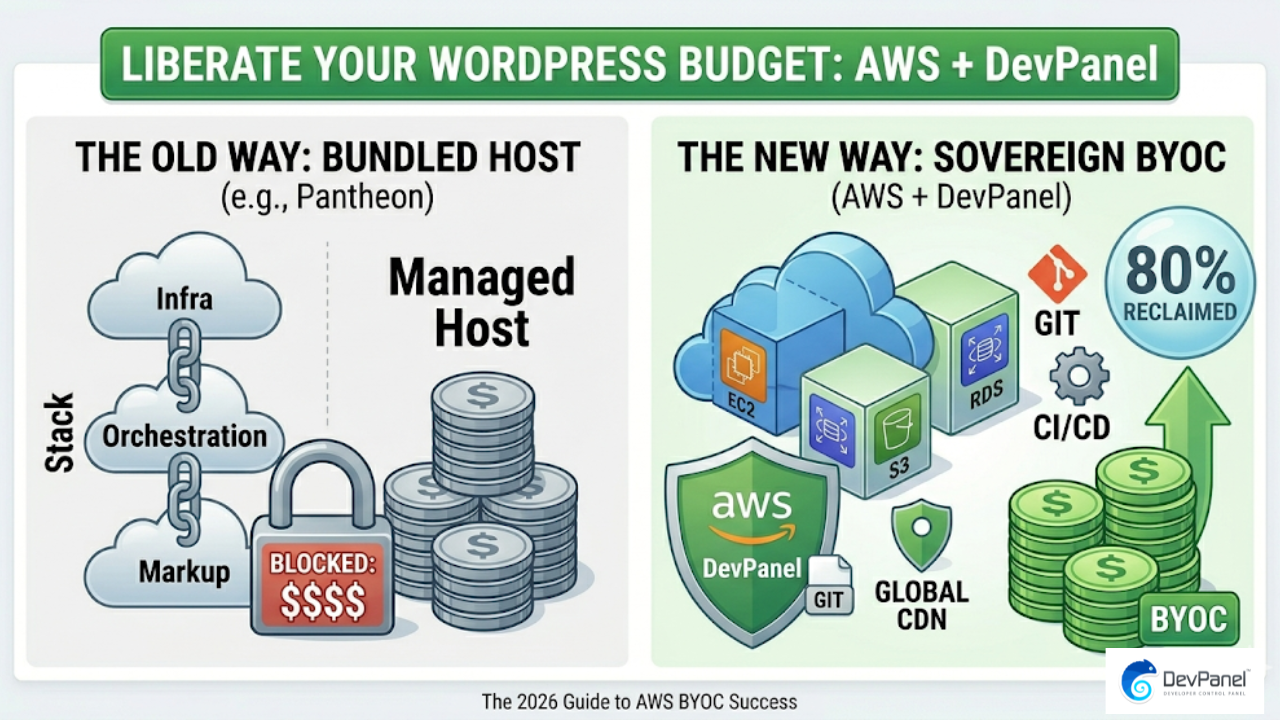
If you’re serious about learning how to reduce WordPress hosting costs by eighty percent, the platform decision you make today will either drain your budget for years or free up serious resources to grow your business. In 2026, the comparison between Pantheon, raw AWS, and AWS managed through DevPanel tells a very clear story—and the numbers are impossible to ignore.
Managed hosting has long been the “safe” choice, but as cloud technology matures, the “convenience tax” associated with platforms like Pantheon has become a significant financial burden. By shifting to a model that leverages raw cloud power with an automated management layer, organizations are discovering they can achieve enterprise-grade performance at a fraction of the cost.
Key Takeaways: Cost Reduction at a Glance
| Question | Quick Answer |
| Can you really save 80%? | Yes—by moving from Pantheon to AWS + DevPanel, teams utilize SPOT instances and auto-pause to slash bills. |
| Why is Pantheon expensive? | You pay for bundled margins and proprietary orchestration, not just the raw compute. |
| Is raw AWS the answer? | Infrastructure is cheaper, but “hidden” labor costs for manual DevOps can erase those savings. |
| What does DevPanel solve? | It provides the Pantheon-like UI and automation on top of your own AWS account for $0. |
| Who benefits most? | Agencies, Higher Ed, and Enterprises with multi-site portfolios see the highest ROI. |
The Structural Problem: The “Black Box” Cost of Pantheon

Pantheon is a polished, high-performance platform. For years, it has been the go-to for Drupal and WordPress developers who want a seamless Dev-Test-Live workflow. However, in 2026, its pricing model remains tied to a legacy “bundled” approach that creates a massive cost ceiling.
1. The Platform Markup
When you pay Pantheon, you aren’t just paying for a server. You are paying for their staff, their marketing, their proprietary dashboard, and their profit margins. Because they sit between you and the cloud provider (Google Cloud or AWS), you are paying a significant retail markup on every gigabyte of RAM and every CPU cycle.
2. Lack of Infrastructure Sovereignty
With Pantheon, you don’t own the cloud layer. This means:
- No Cloud Credits: You cannot apply AWS or Google Cloud non-profit/startup credits to your bill.
- No Reserved Instances: You cannot commit to long-term usage to lower costs.
- No SPOT Instances: You cannot use “spare” cloud capacity for non-production environments, which is the single biggest lever for cost reduction.
3. Per-Site Scaling Penalties
Pantheon’s pricing is largely per-site or per-resource-tier. For an agency managing 50 sites, the costs compound linearly. There is no economy of scale where 50 sites share a large, optimized cluster. You are effectively paying for 50 individual “islands” of infrastructure.
Raw AWS for WordPress: The “DIY” Trap
The natural reaction to Pantheon’s high costs is to go directly to the source: Amazon Web Services (AWS). By spinning up EC2 instances and RDS databases, you can immediately see the raw infrastructure cost drop by 60–70%.
However, “Raw AWS” comes with a hidden tax: Operational Complexity.
The DevOps Burden
AWS is a collection of “primitives.” It gives you the bricks, but you have to build the house. To run WordPress securely and at scale on raw AWS, you must manually handle:
- Security Patching: Keeping the OS and PHP versions updated.
- Backups: Scripting and testing database and file snapshots.
- CI/CD: Building your own pipelines to move code from GitHub to production.
- Scaling: Manually configuring Auto Scaling Groups and Load Balancers.
For many teams, the money saved on the hosting bill is immediately spent on hiring a DevOps engineer or paying a high-priced consultant to manage the “spaghetti” of manual configurations. This is why many stay with Pantheon despite the cost—they are trading money for time.
The 80% Solution: AWS + DevPanel (The BYOC Model)
The breakthrough in 2026 is the Bring Your Own Cloud (BYOC) model. This approach combines the low cost of raw AWS with the automated workflow of Pantheon.
DevPanel acts as the management layer that sits on top of your AWS account. It provides the dashboard, the Dev-Test-Live environments, and the automation, but it does so without marking up the infrastructure.
How the Savings Break Down
To reach an 80% reduction, DevPanel leverages three specific AWS features that managed hosts typically keep for themselves:
1. Leveraging SPOT Instances
AWS SPOT instances allow you to use spare capacity at a 60–90% discount. While these instances can be reclaimed by AWS with short notice, DevPanel’s orchestration makes them perfect for Dev and Staging environments. By running your non-production sites on SPOT, you eliminate the bulk of your hosting spend.
2. The Power of “Auto-Pause”
On Pantheon, you pay for your dev and test environments 24/7, even when your developers are asleep. DevPanel includes an Auto-Pause feature. If an environment hasn’t been accessed in 30 minutes, it “sleeps.” The moment a developer clicks a link, it wakes up. Since AWS bills by the second, you only pay for the hours the environment is actually being used.
3. True Auto-Scaling (No Over-Provisioning)
Managed hosts often force you into a “Performance 2” or “Elite” tier based on your peak traffic. You pay for that peak capacity all month long, even if 95% of the time your traffic is low.
With AWS + DevPanel, your infrastructure expands during a traffic spike and shrinks immediately afterward. You pay for the “average,” not the “peak.”
Comparison Table: 2026 Hosting Landscape
| Feature | Pantheon | Raw AWS | AWS + DevPanel |
| Monthly Platform Fee | High (Bundled) | $0 | $0 (Community Ed.) |
| Infrastructure Ownership | No | Yes | Yes (BYOC) |
| SPOT Instance Support | No | Manual/Difficult | Automated |
| Auto-Pause Idle Sites | No | Complex Scripting | Built-in |
| Unlimited Projects | No (Per-site) | Yes | Yes |
| Vendor Lock-in | High | Low | Zero |
Industry-Specific Impact: Who Saves the Most?
Digital Agencies
Agencies often face a “profit squeeze” where hosting costs eat into their maintenance margins. By using the DevPanel Community Edition, an agency can host an unlimited number of client sites on a single AWS cluster. Instead of paying $50/site to a managed host, they might pay $200 total for 50 sites on AWS.
- Estimated Savings: 75%–85%
Higher Education & Government
Universities and government agencies (like the Voice of America) manage massive portfolios of WordPress sites. These organizations require strict compliance (GDPR, FedRAMP).
DevPanel allows these entities to keep data inside their own VPC (Virtual Private Cloud), satisfying security audits while using AWS’s massive scale to handle billions of hits per month.
- Success Case: Voice of America handles 1.2 billion hits/month and spikes of 1 million hits/minute using this exact architecture.
Non-Profits
Non-profits are eligible for thousands of dollars in AWS credits. On Pantheon, these credits are useless. With DevPanel, a non-profit can apply their AWS credits directly to their account, effectively making their WordPress hosting completely free for several years.
Technical Superiority: Beyond Just Cost
Reducing cost doesn’t mean reducing quality. In fact, moving to your own AWS account often improves technical performance.
1. Global Reach
Pantheon limits you to specific regions. With AWS, you can deploy your WordPress site in any of dozens of global regions—from Tokyo to Frankfurt to Sao Paulo—minimizing latency for your specific audience.
2. Advanced Tooling
DevPanel integrates directly with the tools developers already use:
- Browser-based VS Code: Edit code directly in the cloud without local environment setup.
- GitHub/GitLab Integration: Push code to a branch and have DevPanel automatically spin up a “Feature Preview” environment.
- Blue/Green Deployments: Update your site with zero downtime by switching traffic between two identical environments.
The “No Lock-In” Guarantee
The hidden cost of many platforms is the “Exit Tax.” If you want to leave Pantheon, you have to migrate your database, files, and configurations manually.
With the BYOC model, you never leave. Even if you stopped using DevPanel, your sites are still sitting in your AWS account. You own the EC2 instances, the S3 buckets, and the RDS databases. This level of sovereignty is the ultimate insurance policy against future price hikes.
Step-by-Step: How to Make the Switch
Migrating from a bundled host to AWS with DevPanel is a structured process that can usually be completed in a few hours for a single site.
- Link Your Cloud: Connect your AWS account to DevPanel via a secure IAM role.
- Export WordPress: Use a standard tool like “All-in-One WP Migration” or manual SQL/SFTP export from Pantheon.
- Import to DevPanel: Create a new project in the DevPanel dashboard and import your files and database.
- Enable Optimization: Turn on “Auto-Pause” for your Dev and Test environments and select “SPOT Instances” for immediate savings.
- DNS Cutover: Once you’ve verified the site in the Test environment, point your DNS to the new AWS Load Balancer.
Conclusion: The New Standard for 2026
The era of paying a 500% markup for “managed” hosting is over. The path to reducing WordPress hosting costs by eighty percent is no longer a trade-off between price and performance.
By choosing AWS with DevPanel, you gain:
- Total Cost Control: Pay only for what you use, directly to AWS.
- Automation: Get the same (or better) workflows than Pantheon or WP Engine.
- Scalability: Proven capacity to handle billions of hits.
Stop overpaying for your infrastructure. Start with the DevPanel Community Edition for free, and reclaim your budget for what matters: growing your business and building better digital experiences.
Frequently Asked Questions
How can I save 80% if AWS is still charging me for servers?
The 80% savings comes from three areas: eliminating the 50-100% markup charged by managed hosts, using SPOT instances (which are 90% cheaper), and using “Auto-Pause” so you don’t pay for dev environments at night or on weekends.
Is DevPanel’s Community Edition really free?
Yes. There are no per-site fees or monthly subscriptions for the Community Edition. It is a full-featured management platform designed to help teams transition to the BYOC model without additional software overhead.
Will my site be slower on AWS?
No. In most cases, it will be faster. You have direct control over resource allocation (CPU/RAM) and can utilize AWS’s global CDN (CloudFront) and Edge locations, which often outperform the “shared” setups of traditional managed hosts.
What if I have 100+ sites?
This is where the savings are most dramatic. DevPanel allows you to manage an unlimited number of sites and projects from a single dashboard. Instead of 100 separate bills from a managed host, you have one optimized AWS bill.