
WordPress Hosting in 2026: Everything You Need to Know to Host Smarter
Choosing the right WordPress hosting is one of the most consequential decisions you’ll make for your website, and the stakes in 2026 are higher than ever. A surprising 56% of hosting providers cite price sensitivity as their leading reason customers leave, which tells you something important: most WordPress hosting setups are overcharging for underperforming infrastructure, and smart teams are already making the switch to leaner, more flexible alternatives.
Key Takeaways
| Question | Quick Answer |
|---|---|
| What is WordPress hosting? | WordPress hosting is a web hosting service configured specifically to run WordPress sites, with server settings, caching, and security tuned for the platform. |
| What types of WordPress hosting exist? | Shared, VPS, managed WordPress, cloud, and Bring Your Own Cloud (BYOC) are the main categories in 2026. |
| Is managed WordPress hosting worth it? | It depends on whether you’re willing to pay a premium for convenience or if you’d rather keep ownership of your infrastructure and save up to 80% on hosting costs. |
| What’s the best WordPress hosting for performance? | Cloud-based WordPress hosting with auto-scaling and CDN integration consistently delivers the fastest load times and highest uptime in 2026 benchmarks. |
| Can I host WordPress on AWS without technical expertise? | Yes. Platforms like DevPanel’s WordPress on AWS guide walk you through automated deployment to your own cloud account with no deep AWS knowledge required. |
| How do I reduce WordPress hosting costs? | Moving from managed hosting to a BYOC model running inside your own AWS, Azure, or DigitalOcean account can cut hosting spend by up to 80%. |
| Is cloud hosting better than shared hosting for WordPress? | Significantly. Cloud WordPress hosting delivers better uptime, true resource isolation, and auto-scaling, compared to shared hosting’s “noisy neighbor” limitations. |
What Is WordPress Hosting and Why Does It Matter in 2026?
WordPress hosting is simply a server environment built to run WordPress sites reliably, quickly, and securely. But in 2026, “reliably” means something very different from what it meant five years ago.
Today’s WordPress sites face real pressure: traffic spikes, compliance requirements, multi-environment development workflows, and growing security threats. The right WordPress hosting setup handles all of that without you spending half your week fighting your infrastructure.

The wrong setup, on the other hand, means slow load times, unexpected downtime, ballooning monthly invoices, and a serious lack of control over where your data actually lives. Those headaches are avoidable. Completely.
Types of WordPress Hosting: A Plain-English Breakdown
Not all WordPress hosting is created equal. Here’s a quick rundown of what’s out there so you can pick the right fit.
- Shared Hosting: Multiple websites share the same server resources. It’s the cheapest entry point, but “noisy neighbor” traffic can slow your site, and security vulnerabilities on one account can affect others.
- VPS Hosting: Your site gets a dedicated slice of a server. More control, more performance, but you still don’t own the underlying infrastructure.
- Managed WordPress Hosting: A fully managed service where the provider handles updates, backups, and performance tuning. Convenient, but often expensive and restrictive, with lock-in baked into the pricing model.
- Cloud WordPress Hosting: Your WordPress site runs on scalable cloud infrastructure (AWS, Azure, DigitalOcean, etc.). You get auto-scaling, high availability, and much better performance headroom.
- BYOC (Bring Your Own Cloud) Hosting: You connect your own cloud provider account and use an orchestration platform to manage WordPress deployments. No subscriptions to the platform, no hidden fees, and full data sovereignty. This is the model we think makes the most sense for serious teams in 2026.
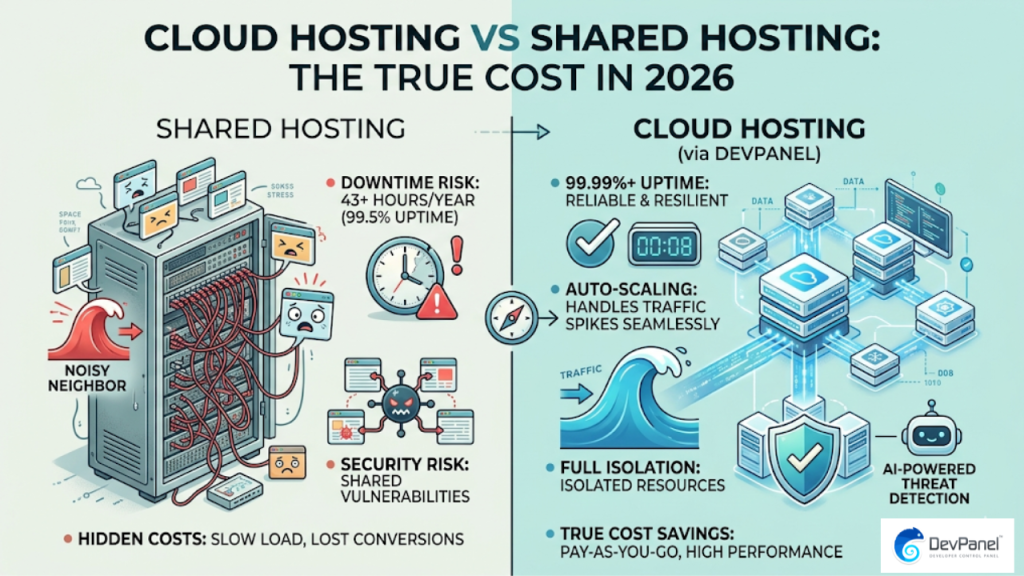
The infographic above shows exactly why cloud WordPress hosting consistently outperforms shared plans: 99.99%+ uptime, full resource isolation, auto-scaling for traffic spikes, and AI-powered threat detection. Shared hosting simply can’t match that reliability profile.
What to Look for in a WordPress Hosting Provider
Before you sign up for anything, know what actually moves the needle for WordPress performance and reliability. Here are the factors that matter most.
Performance and Speed
Server-side speed, measured by Time to First Byte (TTFB), is the single clearest indicator of WordPress hosting quality. A good cloud setup should target sub-200ms TTFB consistently, even under load.
Look for built-in support for Redis, Memcached, Varnish, and CDN integration. Those components aren’t optional extras for serious WordPress hosting; they’re table stakes.
Uptime Guarantees
99.9% uptime sounds great until you realize it allows for over 8 hours of downtime per year. Enterprise-grade WordPress hosting should come with a 99.99% uptime SLA, automatic failover, and multi-region deployment options.
Security Embedded at Every Stage
Security shouldn’t be an afterthought or a bolt-on add-on. The best WordPress hosting platforms embed security checks throughout every stage, from development environment to production deployment.
That means automated SSL, file permission controls, firewall rules, DDoS mitigation, and encryption as defaults, not upgrades.
Developer Experience
Your hosting environment should support your dev team’s workflow, not fight it. Browser-based cloud dev environments with Git-based workflows, per-branch testing environments, and a built-in VS Code IDE mean your team can develop from anywhere without painful local setup.
Did You Know?
55% of hosting providers say website speed is the #1 reason WordPress customers choose them over competitors.
Source: HostingAdvice (CloudLinux + WebPros Web Hosting Trends Report 2026)
Right. Speed isn’t just a nice-to-have; it’s the primary decision driver for WordPress hosting buyers in 2026. If your current host is slow, your users already know it, even if your dashboard doesn’t.
Cloud WordPress Hosting vs. Managed WordPress Hosting: The Real Difference
This comparison trips up a lot of teams. Here’s a clean breakdown.
| Factor | Managed WordPress Hosting | Cloud WordPress Hosting (BYOC) |
|---|---|---|
| Cost | High monthly subscriptions, often with page-view limits | Pay your cloud provider directly; save up to 80% |
| Data Ownership | Provider controls where your data lives | Full data sovereignty; everything runs in your account |
| Lock-in | High; proprietary stack with migration friction | No lock-in; use AWS, Azure, or DigitalOcean |
| Scalability | Limited by plan tier; upgrades cost more | Auto-scaling with no artificial ceiling |
| Compliance | Varies by provider; often limited | HIPAA, FedRAMP, GDPR, SOC2, ISO 27001 ready |
| Dev Workflow | Often opinionated; limited customization | GitOps, CI/CD, Blue/Green deployments supported |
The pattern is clear. Traditional managed WordPress hosting trades control for convenience. BYOC cloud hosting gives you both convenience (through automation) and control (through ownership). That’s the “third path” between fully managed PaaS and raw DIY servers.
WordPress Hosting on Your Own Cloud: The BYOC Advantage
Here’s a straightforward truth: the reason most teams overpay for WordPress hosting is that they’re renting someone else’s infrastructure instead of using their own cloud account.
With a BYOC approach, your WordPress sites run inside your own AWS, Azure, or DigitalOcean account. An orchestration layer handles automation, security, and deployments, but the bill goes directly to you, and every resource stays under your control.
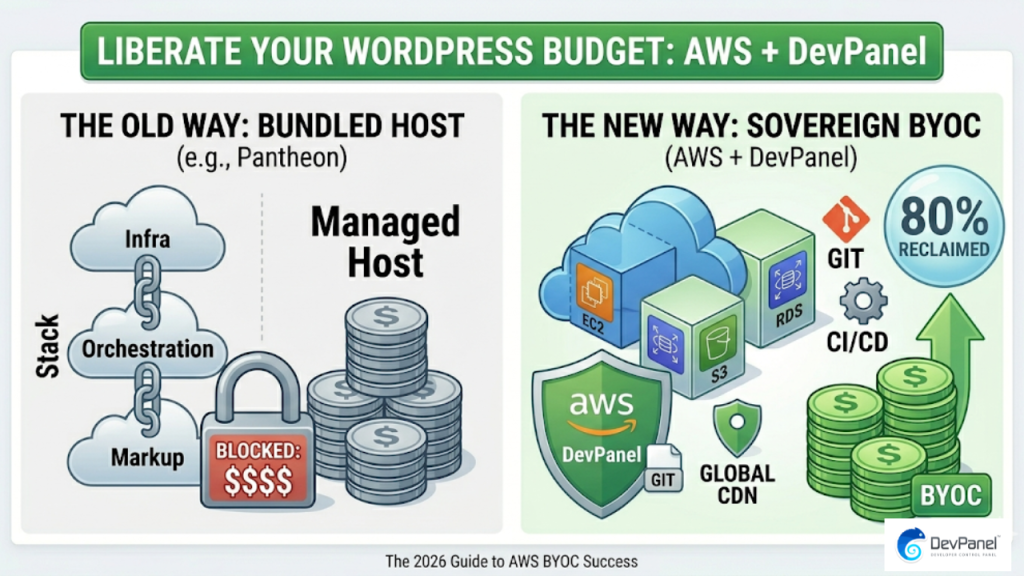
The infographic above illustrates how unbundling your WordPress infrastructure components from a traditional managed host can reclaim up to 80% of your hosting budget. That’s not a rounding error; it’s a structural cost difference.
“Launch over 30 websites to AWS in a day, without knowing anything about AWS!” — Justin Keiser, DevPanel user
That’s the power of automating 99% of infrastructure tasks. You don’t need to be an AWS expert to run WordPress hosting at scale on your own cloud. You just need the right tooling.
WordPress Hosting Performance: Speed, Uptime, and Auto-Scaling
Performance is where most WordPress hosting decisions get made or broken. Let’s get specific about what good looks like.
Time to First Byte (TTFB)
TTFB measures how quickly your server starts responding to a browser request. In 2026 benchmarks, top-tier cloud WordPress hosting targets sub-200ms TTFB even under concurrent user load.
Shared hosting commonly delivers 400ms to 1000ms+ TTFB, especially during traffic peaks. That single number explains most “my site feels slow” complaints.
Auto-Scaling for Traffic Spikes
Voice of America handles 1.2 billion hits per month and 1 million hit spikes per minute through a DevPanel-managed AWS setup. That kind of resilience isn’t possible on shared or basic managed WordPress hosting plans.
Auto-scaling means your WordPress hosting infrastructure expands automatically when traffic surges, and contracts again when it normalizes, so you only pay for what you actually use.
Uptime SLA
Enterprise-grade WordPress hosting should come with up to 99.99% uptime SLA. That translates to less than one hour of total downtime per year, with optional multi-region automatic failover for critical sites.
WordPress Hosting Security: What “Built-In” Actually Means
Security in WordPress hosting is one of the most misused marketing terms out there. “Secure hosting” listed as a bullet point on a shared plan doesn’t mean the same thing as security embedded into every stage of development and deployment.
Real security for WordPress hosting in 2026 looks like this:
- Automated SSL provisioned at deployment, not as an afterthought
- Firewall and DDoS protection at the infrastructure level, not just an app plugin
- Secure file permissions configured automatically during deployment
- Encrypted storage and transfer as defaults, not optional add-ons
- Automated backups on a defined schedule with easy restore workflows
- Compliance alignment with HIPAA, FedRAMP, GDPR, SOC2, and ISO 27001 for regulated industries
The key principle is that security needs to be a design characteristic of your WordPress hosting platform, not a feature checklist you add after launch.
Did You Know?
45% of hosting providers report that customer support quality is a top reason WordPress customers choose their platform.
Source: HostingAdvice (CloudLinux + WebPros Web Hosting Trends Report 2026)
Support matters, especially when you hit a plugin conflict at 2am before a product launch. That’s why we offer 24×7 support on Slack, SMS, email, and Zoom, plus round-the-clock coverage for AWS, infrastructure, and operations. We’ve got you covered.
WordPress Hosting for Different Industries
The requirements for WordPress hosting vary significantly depending on your industry. Here’s what each sector typically needs.
Government and Public Sector
Government WordPress hosting requires FedRAMP alignment, strict data sovereignty controls, and the ability to run inside a government-owned cloud account (like a US Gov AWS environment). Compliance isn’t optional here; it’s a procurement requirement.
Healthcare
Healthcare WordPress hosting means HIPAA compliance, encrypted data handling, and audit-ready infrastructure. The HHS team reduced a workflow that used to take a week down to 17 minutes using DevPanel automation. That’s the kind of operational gain compliance-ready hosting enables.
Higher Education
Higher education WordPress deployments often need multi-site management, the ability to deploy hundreds of sites from a single codebase, and environments accessible from any device, including Chromebooks, iPads, and campus computers. Browser-based VS Code makes that frictionless.
Small and Medium Businesses
SMBs using WordPress hosting need reliable uptime, manageable costs, and a platform that doesn’t require a dedicated DevOps team to operate. Auto-scaling and automated security handle the heavy lifting so your team can focus on the business, not the servers.
Non-Profits
Non-profit WordPress hosting comes down to cost efficiency and mission focus. No page-view limits, no hidden fees, and cloud dev environments that your volunteer teams can actually use without deep technical backgrounds.
WordPress Hosting Costs: What You’re Actually Paying For
Let’s talk numbers. Traditional managed WordPress hosting pricing can range from $30/month for small sites to $400+/month for higher-traffic properties, and that’s before you hit plan limits or need additional environments.
With a BYOC model, the orchestration platform itself is free (DevPanel Community Edition is 100% free to use), and you pay your cloud provider directly for actual compute, storage, and bandwidth. The math almost always works out significantly cheaper.
- DevPanel Community Edition (CE): Free forever. Unlimited users, unlimited projects and sites, CI/CD, GitOps, Blue/Green deployments, automated security and backups, SSL, and browser-based VS Code. You pay AWS, Azure, or DigitalOcean directly for infrastructure.
- Enterprise Plan: Single sign-on, SLA, compliance stack (HIPAA, FedRAMP, GDPR, SOC2, ISO 27001), priority support, DDoS mitigation, and a dedicated Technical Account Manager. Up to 99.99% uptime SLA.
- Expert Services (optional): Support staff starting at $85/hour, DevOps engineers at $150/hour, and Cloud Architects at $250/hour for CI/CD optimization, GitOps setup, security hardening, and HA/DR design.
The reason CE is genuinely free is simple: since it runs entirely inside your cloud account, the platform has no compute or storage costs to recover. No subscriptions. No hidden fees. No lock-in. That’s the BYOC economics model in plain English.
How to Set Up WordPress Hosting on AWS in 2026
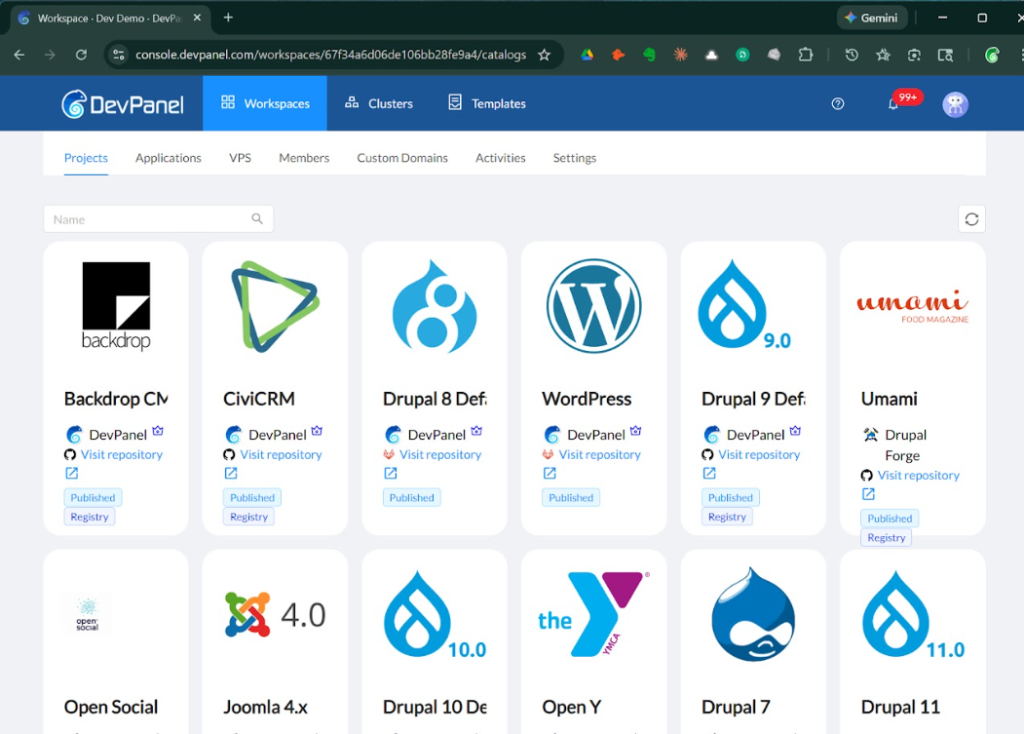
Setting up WordPress hosting on AWS used to require deep infrastructure knowledge. In 2026, with the right automation layer, it’s achievable in a single session, even without prior AWS experience.
Here’s the general workflow:
- Connect your cloud account: Link your AWS, Azure, or DigitalOcean account to DevPanel. Terraform and Ansible handle infrastructure provisioning automatically.
- Choose your WordPress template or deploy from scratch: Preconfigured WordPress templates include themes, plugins, and sample content to accelerate the process.
- Configure your environments: Set up Dev, Test, and Live environments with branch-based deployment from your Git provider (GitHub, GitLab, or Bitbucket).
- Secure the deployment: Automated SSL, file permissions, and firewall rules are applied as part of the deployment process, not as separate manual steps.
- Review and deploy: Blue/Green deployment ensures zero-downtime releases, with rollback capability if anything unexpected comes up.
Yes, issues will come up at some point. That’s why the platform provides instant previews, per-branch testing environments, and 24×7 support access. You’re never left troubleshooting in the dark.
WordPress Hosting Features Worth Demanding in 2026
Use this list as your checklist when evaluating any WordPress hosting provider. These aren’t premium extras; they’re baseline requirements for serious work.
- Auto-scaling and resource optimization with no manual intervention
- CI/CD pipeline integration with GitHub Actions, GitLab CI/CD, or Jenkins
- Blue/Green deployments for zero-downtime releases
- Browser-based IDE (VS Code, PhpMyAdmin) accessible from any device
- Per-branch dev environments for testing before merging to production
- Automated SSL, backups, and security patching
- Multi-cloud support (AWS, Azure, DigitalOcean, Kubernetes)
- Centralized dashboard for managing all WordPress sites in one place
- CDN, Redis, Memcached, and Varnish support for performance caching layers
- Role-based access control for teams and collaborators
The full DevPanel features list covers all of the above, plus integrations with Splunk, SOLR, and custom CI/CD pipelines, inside a platform that was designed to complement your existing dev tools, not replace them.
Conclusion
Choosing the right WordPress hosting in 2026 comes down to one core question: are you renting someone else’s infrastructure at a premium, or are you running WordPress on your own cloud with automation handling the heavy lifting?
Traditional managed WordPress hosting locks you in, charges you monthly subscriptions regardless of actual usage, and puts your data on someone else’s servers. BYOC cloud WordPress hosting flips that model: you keep ownership, you save up to 80% on costs, and you get the same (or better) performance, security, and uptime.
The right WordPress hosting platform automates 99% of infrastructure tasks, embeds security at every stage, scales without manual intervention, and supports your development workflow rather than fighting it. See how DevPanel’s Community Edition makes all of that free, with no subscriptions, no hidden fees, and no lock-in, starting today.
Frequently Asked Questions
What is the best WordPress hosting for a small business in 2026?
For small businesses in 2026, cloud-based WordPress hosting with a BYOC model offers the best combination of cost, performance, and control. Platforms like DevPanel’s Community Edition are free to use and run WordPress on your own AWS or DigitalOcean account, keeping infrastructure costs low and removing page-view limits that constrain traditional managed plans.
Is managed WordPress hosting worth it compared to cloud hosting?
Managed WordPress hosting trades control for convenience, often at a significant cost premium. If your team is comfortable using an automation layer for deployments, cloud WordPress hosting on your own cloud account delivers better value, better data sovereignty, and comparable (or better) uptime guarantees without the vendor lock-in.
How much does good WordPress hosting actually cost per month?
Managed WordPress hosting plans typically range from $30 to $400+ per month depending on traffic and features. With a BYOC cloud model, you pay your cloud provider (AWS, Azure, DigitalOcean) directly for actual compute and storage, which can reduce costs by up to 80% compared to a traditional managed platform subscription.
What is the fastest WordPress hosting available in 2026?
The fastest WordPress hosting in 2026 uses dedicated cloud resources with Redis or Memcached caching, CDN integration, and auto-scaling, rather than shared server environments. Top-tier cloud WordPress setups consistently deliver sub-200ms TTFB even under concurrent load, compared to 400-1000ms+ on shared plans.
Can I host WordPress on AWS without knowing AWS?
Yes. Platforms that use Terraform and Ansible automation (like DevPanel) let you deploy WordPress hosting on AWS through a centralized dashboard without manually configuring EC2 instances, VPCs, or security groups. One user successfully launched over 30 WordPress sites to AWS in a single day without prior AWS experience.
Is WordPress hosting on shared servers safe in 2026?
Shared WordPress hosting carries meaningful security risks in 2026 because a vulnerability on one account on the same server can potentially affect neighboring sites. For sites handling sensitive data, e-commerce transactions, or compliance requirements, cloud hosting with isolated resources and embedded security controls is the safer choice by a significant margin.
What WordPress hosting is best for HIPAA or government compliance?
Compliance-ready WordPress hosting for HIPAA, FedRAMP, or GDPR requires a platform with encryption at rest and in transit, audit logging, role-based access control, and the ability to run inside a government or enterprise-owned cloud account. DevPanel’s Enterprise plan explicitly supports HIPAA, FedRAMP, GDPR, SOC2, and ISO 27001 compliance frameworks, with the entire stack running inside your own cloud account for full data sovereignty.