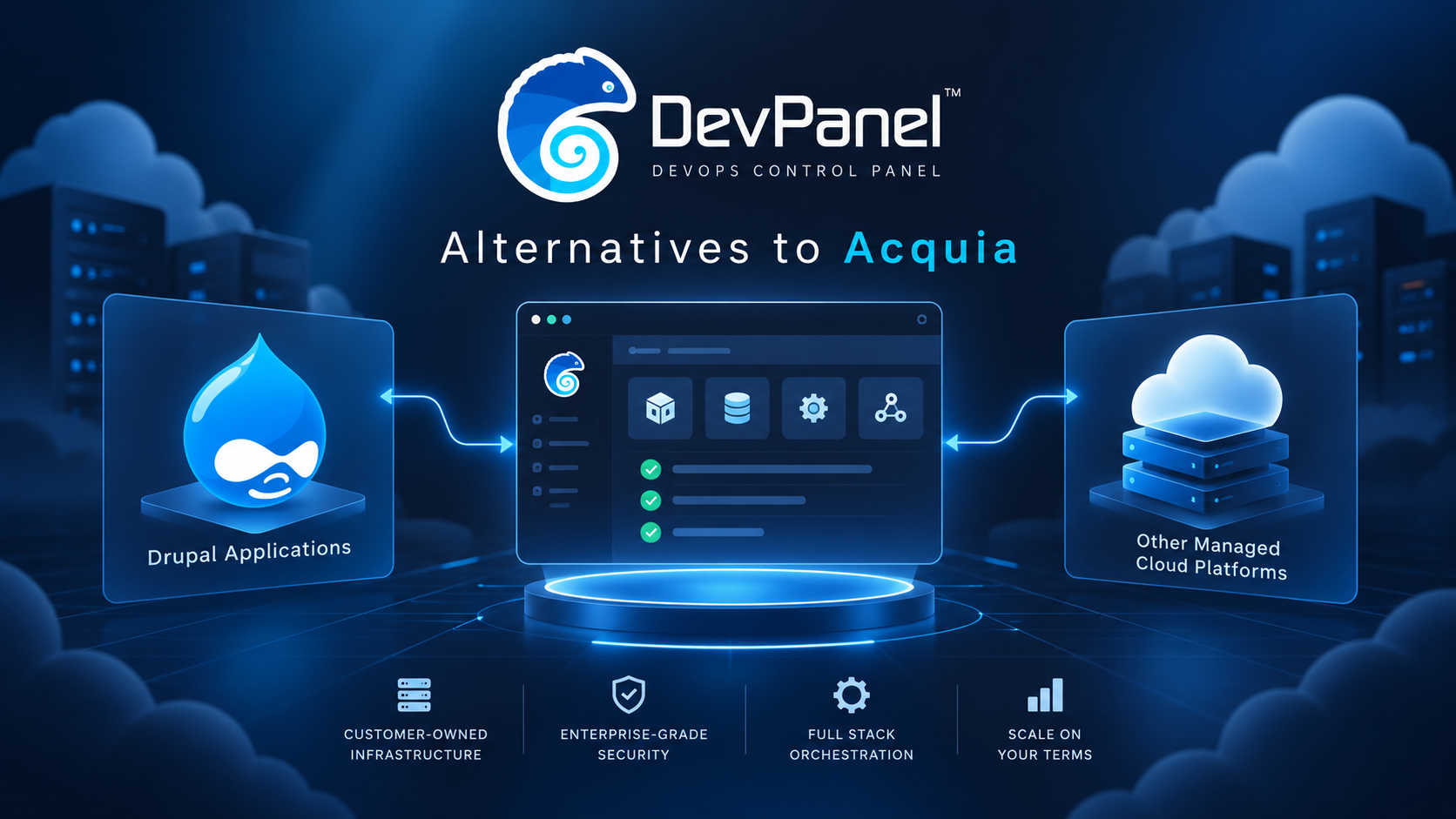
Alternatives to Acquia for Hosting and Managing Drupal Applications
Acquia is one of the best-known platforms in the Drupal ecosystem.
That makes sense. Acquia has deep roots in Drupal and is often considered when organizations need managed Drupal hosting, governance, support, and enterprise platform services.
But Acquia is not the only way to host and manage Drupal applications.
For many organizations, the real question is not simply:
“What is the best Acquia alternative?”
The better question is:
“Where do we want operational control to sit?”
That question changes the comparison.
Drupal is the CMS. Acquia is one platform for hosting and managing Drupal. Other options may provide managed hosting, raw cloud infrastructure, agency-managed services, or customer-owned cloud with an orchestration layer.
Each model comes with tradeoffs.
Some teams want a managed platform where the provider handles more of the operational burden.
Some teams want direct cloud ownership.
Some teams want stronger portability.
Some teams want better development workflows.
Some teams want multi-site management, Composer-based deployments, branch environments, and cloud development tools.
Some teams want to run Drupal inside their own AWS, Azure, DigitalOcean, or other cloud account while still getting a modern management experience.
That is where DevPanel fits.
DevPanel gives Drupal teams a way to manage applications in customer-owned cloud infrastructure while supporting development environments, deployments, cloning, Workspaces, templates, and operational workflows.
It is not just another hosting provider.
It is an application orchestration platform for teams that want more control over where their Drupal applications run and how their delivery workflows operate.
Platform Reference Marks
The comparison below discusses Acquia and DevPanel as different platform models. The official marks are included here only as brand references; the explanatory visuals in this article are original AI-generated artwork.
| Acquia | DevPanel |
 |  |
Start by Separating Drupal From the Hosting Platform
Drupal and Acquia are not the same thing.
Drupal is the open-source content management system your application runs on.
Acquia is a commercial platform built around Drupal hosting, management, and related enterprise services.
That distinction matters because many teams compare platforms too loosely.
They ask whether a platform “supports Drupal,” but that is only the starting point.
A serious Drupal hosting comparison should ask:
•Who owns the infrastructure?
•How are dev, test, staging, and production environments managed?
•How does code move from development to release?
•How are Composer dependencies deployed?
•How are databases and files handled?
•How are backups retained and restored?
•Who is responsible during an incident?
•How does support work?
•Can the platform support multisite or multi-application operations?
•How portable is the application if the team wants to move later?
A platform can support Drupal and still be a poor fit for the way your team operates.
The best Acquia alternative is the one that matches your preferred operating model.
Managed Drupal Hosting vs Customer-Owned Cloud
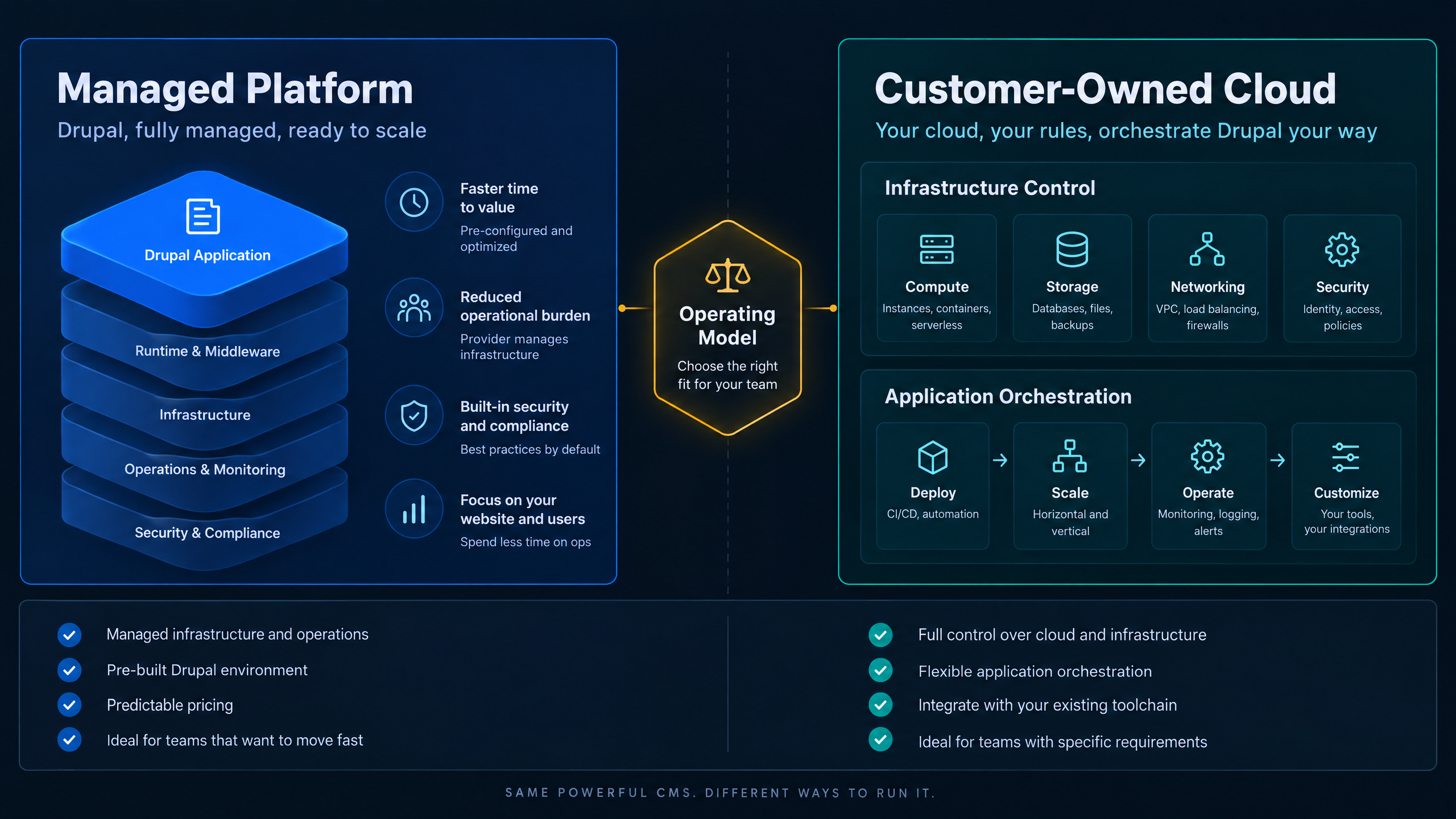
The central comparison is not only feature depth—it is where operational control sits.
Managed Drupal hosting can be a strong fit for organizations that want to delegate more infrastructure responsibility to a provider.
That can include hosting operations, backups, platform updates, monitoring, support, and managed environment workflows.
For teams with strict governance requirements, centralized oversight, and limited internal cloud capacity, managed hosting may be the right choice.
But managed hosting also involves tradeoffs.
The provider usually owns the infrastructure model. Your team works inside the provider’s platform. That can simplify operations, but it may also limit direct infrastructure control, portability, and cloud-level flexibility.
Customer-owned cloud takes a different approach.
In a customer-owned cloud model, the organization owns the AWS, Azure, DigitalOcean, or other cloud account where the application runs. The platform provides tooling and orchestration on top of that infrastructure.
This gives teams more control over the cloud account, data location, security boundaries, and long-term portability.
But cloud ownership does not remove operational work.
Your team still needs a plan for provisioning, monitoring, recovery, patching, scaling, access control, and incident response.
That is why customer-owned cloud works best when paired with an orchestration layer like DevPanel.
DevPanel helps teams use their own cloud infrastructure while giving them a management layer for applications, environments, deployments, and workflows.
What an Acquia Alternative Needs to Replace
When comparing alternatives to Acquia, do not compare only homepage features.
Compare the operational responsibilities.
A serious alternative should help your team answer several questions clearly.
Who manages infrastructure?
Who handles backups?
Who restores the application when something goes wrong?
How are deployment workflows handled?
How are Drupal configuration changes deployed?
How are Composer dependencies built and released?
How are databases and files copied between environments?
How are development, staging, and production separated?
How are users, teams, and permissions managed?
What support is included?
What happens if your team wants to move later?
The right choice depends on what you expect the platform to do.
If your organization wants a fully managed Drupal platform, the evaluation will look one way.
If your organization wants direct cloud ownership with modern application tooling, the evaluation will look different.
DevPanel is strongest for teams that want customer-owned cloud infrastructure with a reusable application management layer.
Drupal Development Workflows Matter
Drupal hosting is not only about where the site runs.
It is also about how the team builds and releases changes.
A Drupal team needs more than production hosting.
It needs a reliable development workflow.
That usually includes:
•Development environments
•Testing environments
•Staging environments
•Production environments
•Composer-based dependency management
•Configuration management
•Database and file handling
•Branch-based workflows
•Deployment approvals
•Rollback planning
•Access control across teams
Drupal projects can become operationally complex because code, configuration, content, databases, files, modules, integrations, and deployment steps all interact.
A platform that only provides a live server is not enough for serious Drupal delivery.
Teams should evaluate whether the platform supports the full release process.
Can developers work efficiently?
Can branches be tested?
Can staging mirror production closely enough?
Can configuration changes be reviewed?
Can Composer updates move cleanly through environments?
Can teams deploy without relying on one person’s memory?
DevPanel helps Drupal teams by supporting cloud development environments, deploy and clone workflows, Git-based patterns, Workspaces, and environment management.
That makes it a strong fit for teams that want repeatable Drupal operations in infrastructure they control.
Composer Deployments Need a Real Process
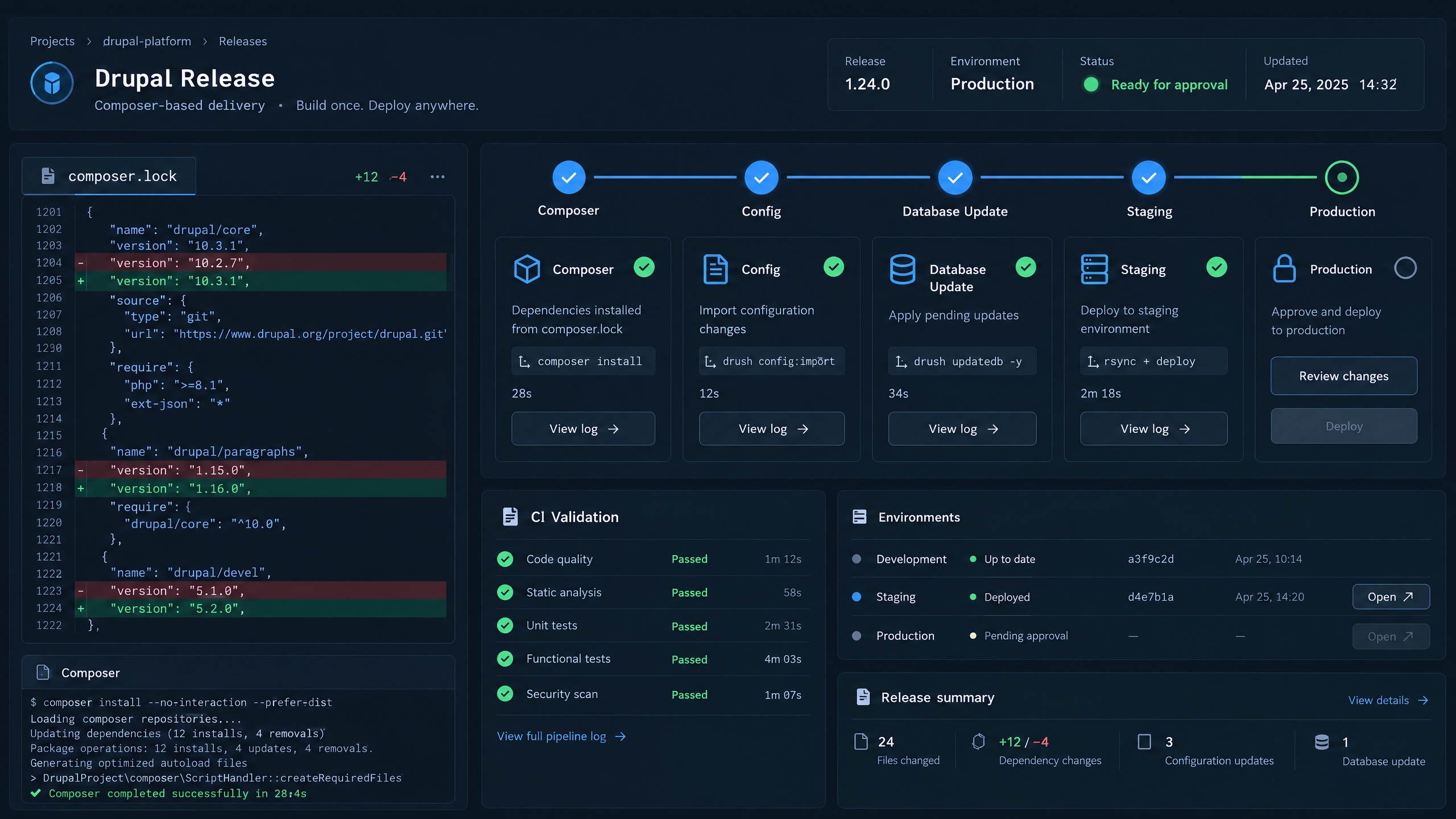
Composer changes need a controlled release process that respects dependencies, configuration, and database updates.
Composer is central to modern Drupal development.
That means the hosting platform needs to support more than file uploads.
A reliable Drupal platform should help teams manage dependencies, build processes, and deployment workflows in a predictable way.
Composer updates can affect contributed modules, Drupal core, custom code, patches, and dependency versions.
Those changes should move through a controlled process.
A strong workflow should answer:
•Where are Composer dependencies installed?
•Is the lock file respected?
•Are builds repeatable?
•Are dependency changes tested before production?
•How are configuration updates applied?
•How are database updates handled?
•What happens if a deployment fails?
This is one of the areas where basic hosting can break down.
Drupal needs a platform model that respects the application lifecycle.
DevPanel supports the operational side of that lifecycle by helping teams manage environments, deploy applications, and reduce manual release steps.
Multisite and Multi-Application Management
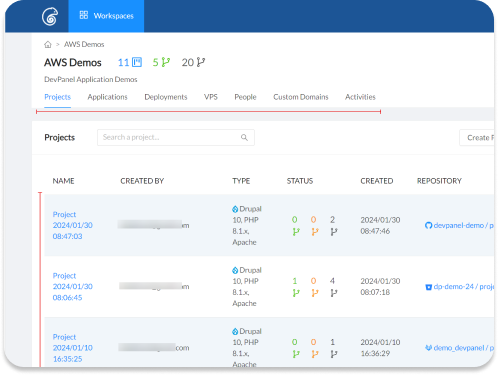
Workspaces help teams manage many Drupal applications without mixing projects or access boundaries.
Many Drupal teams manage more than one site.
An organization may run department sites, campaign sites, intranets, public websites, knowledge bases, portals, or multisite installations.
An agency may manage dozens of Drupal applications for different clients.
A university may manage sites across colleges, programs, labs, and departments.
A nonprofit may manage campaign and program sites.
In these cases, the platform must do more than run one Drupal site well.
It needs to support operational consistency across many applications.
Teams should compare:
•How sites are organized
•How access is separated
•How shared code is managed
•How environments are cloned
•How releases are coordinated
•How backups are handled
•How performance is monitored
•How teams avoid cross-site disruption
DevPanel’s Workspace model is useful here because it gives teams a way to organize applications, clients, projects, and access boundaries.
For teams managing multiple Drupal applications, that structure matters.
It helps reduce confusion and gives teams a more scalable operating model.
Security, Patching, and Responsibility Boundaries
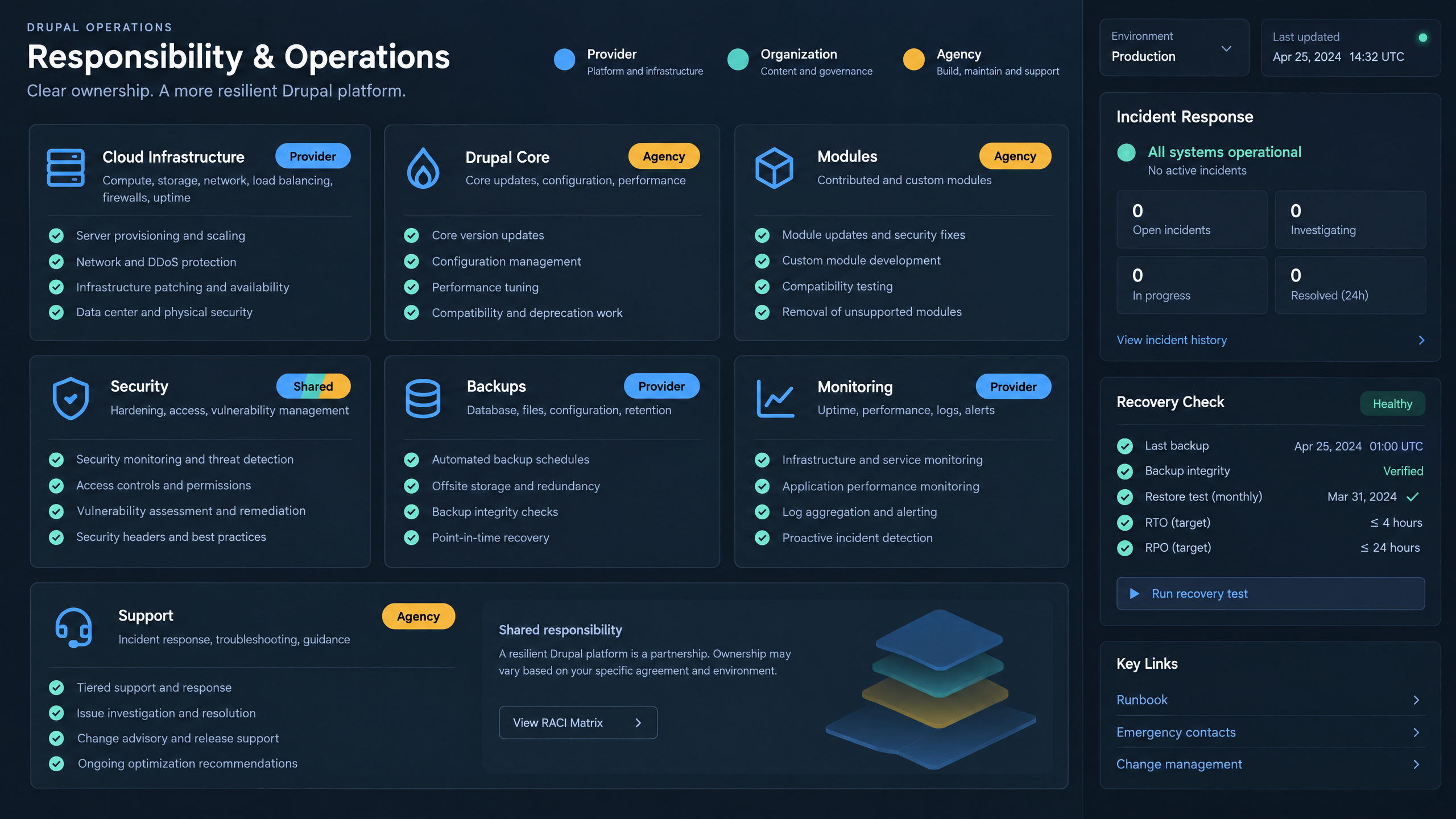
A platform comparison should make responsibility boundaries explicit before an incident occurs.
Security is not only a hosting feature.
It is a responsibility model.
A provider may secure the infrastructure, but that does not automatically secure custom Drupal code, contributed modules, integrations, credentials, user permissions, or application configuration.
Before choosing an Acquia alternative, teams should define who is responsible for each layer.
That includes:
•Cloud infrastructure
•Operating system updates
•Drupal core updates
•Contributed module updates
•Custom code vulnerabilities
•Configuration mistakes
•Web application firewall rules
•Backup validation
•Access control
•Incident response
•Monitoring and alert handling
A managed hosting provider may cover some areas and not others.
A customer-owned cloud model may give more control but also require more explicit ownership.
DevPanel helps teams manage Drupal applications in their own cloud environment, but teams still need a clear security and support plan.
The value is that DevPanel gives organizations more control over the infrastructure model while supporting application-level workflows that reduce operational friction.
Backup and Recovery Should Be Tested
A backup is not the same as a recovery plan.
A Drupal hosting platform should make backup and recovery expectations clear.
Teams should ask:
•How often are backups created?
•How long are backups retained?
•Are files and databases backed up together?
•Can backups be restored to a non-production environment?
•How often are recovery procedures tested?
•Who performs the restore?
•What is the recovery time expectation?
•What happens if a deployment breaks production?
This matters because Drupal applications often include both code and state.
The repository is not enough.
A real recovery process needs databases, files, configuration, dependencies, and infrastructure to work together.
DevPanel’s deploy and clone workflows can help teams create more practical environment and recovery patterns, especially when paired with a clear backup and monitoring strategy.
Performance and Scaling Depend on the Operating Model
Drupal performance depends on more than server size.
Caching, database design, file storage, CDN strategy, PHP configuration, background jobs, application architecture, and traffic patterns all matter.
When comparing Acquia alternatives, teams should understand how each platform handles performance and scaling.
Can the platform support traffic spikes?
Can caching be tuned?
Can database performance be monitored?
Can teams see errors and bottlenecks?
Can environments scale when needed?
Can the infrastructure model support the application’s growth?
Managed platforms may bundle many of these capabilities.
Customer-owned cloud may give teams more direct control over the architecture.
DevPanel supports a customer-owned cloud model where teams can use cloud infrastructure under their control while managing applications through a centralized orchestration layer.
That gives teams more flexibility when performance needs change.
Support Scope Matters
Support is often where platform comparisons become unclear.
A provider may advertise 24/7 support, but teams still need to know what that support covers.
Does support include infrastructure?
Does it include Drupal application issues?
Does it include custom modules?
Does it include contributed module conflicts?
Does it include deployment troubleshooting?
Does it include performance tuning?
Does it include emergency recovery?
Does it include cloud provider issues?
These details matter.
When production fails, a feature checklist does not answer the ticket.
A good comparison should define support boundaries before the team commits.
For teams using DevPanel, support can be part of the service model, but teams should still define who owns application updates, incident response, performance tuning, and long-term maintenance.
Total Operating Cost Is Bigger Than the Hosting Bill
Drupal hosting cost is not only the monthly platform price.
A real total cost comparison should include:
•Platform fees
•Cloud infrastructure
•Storage
•Backups
•Data transfer
•Managed database costs
•Monitoring
•Security tools
•Developer time
•DevOps effort
•Incident response
•Migration work
•Support coverage
•Maintenance
•Staff training
•Future portability
A lower infrastructure bill may not be cheaper if it requires more engineering effort.
A managed platform may cost more monthly but reduce internal operational burden.
Customer-owned cloud may provide greater control and portability but requires a clear operating model.
DevPanel gives teams a way to separate infrastructure ownership from application management tooling.
That can make the cost model easier to understand.
The organization pays for cloud infrastructure in its own account and uses DevPanel to manage application workflows on top.
Portability Is More Than Downloading Code
Many teams think portability means having access to the code repository.
That is only part of the picture.
A Drupal application also includes databases, files, configuration, cron jobs, secrets, integrations, search services, email services, CDN configuration, queues, and other infrastructure dependencies.
Before choosing a platform, teams should ask how hard it would be to move later.
Can we export the database?
Can we access files?
Can we reproduce the environment?
Can we move configuration?
Can we identify cloud-specific services?
Can we recreate scheduled tasks?
Can we maintain DNS and domain control?
Can we test migration before production cutover?
Customer-owned cloud improves portability because the infrastructure is already in an account the organization controls.
DevPanel strengthens that model by giving teams application management tooling without forcing the application into a closed hosting environment.
That gives teams more long-term flexibility.
Migration Planning Should Happen Before Platform Selection
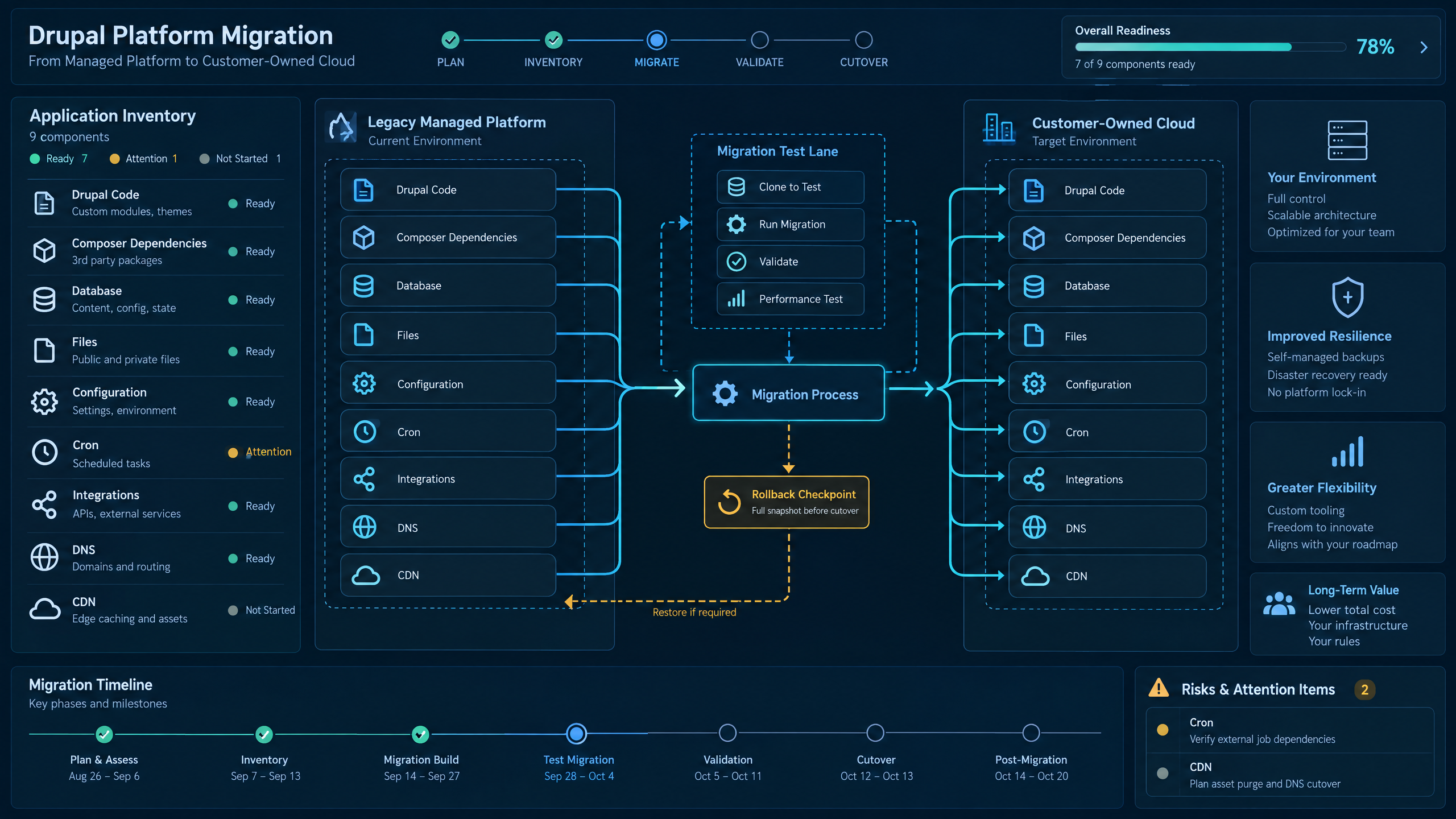
Portability requires planning for the full application system—not just the code repository.
A migration should not begin after the platform is selected.
It should be part of the selection process.
Before moving from Acquia or another Drupal hosting platform, teams should inventory:
•Drupal core version
•Contributed modules
•Custom modules
•Themes
•Composer dependencies
•Databases
•Files
•Configuration
•Cron jobs
•Integrations
•Search services
•Caching layers
•CDN settings
•DNS
•Email delivery
•Analytics
•Authentication systems
•Deployment workflows
Then teams should test a representative migration in a non-production environment.
They should confirm that code, database, files, configuration, and integrations work correctly.
They should test performance.
They should test deployment.
They should test rollback.
They should decide who owns each responsibility after launch.
This avoids surprises when production traffic moves.
DevPanel is a strong fit for teams that want to test and operate Drupal applications in customer-owned cloud infrastructure while maintaining a modern workflow layer.
When DevPanel Is a Strong Acquia Alternative
DevPanel is a strong alternative when your organization wants more control over infrastructure ownership while still needing a platform for application delivery.
It is especially relevant when teams want:
•Customer-owned cloud infrastructure
•Drupal application management
•Development, staging, and production workflows
•Cloud development environments
•Git-based deployment patterns
•Deploy and clone workflows
•Workspaces for teams and projects
•Multi-application management
•Templates
•Portability
•Reduced vendor lock-in
•A platform layer that works across more than one application type
DevPanel is not trying to be “Drupal only.”
That is part of the value.
Many organizations manage Drupal alongside WordPress, Laravel, Node.js, and other applications. A broader application orchestration platform can help teams standardize operations across different web workloads.
For organizations that want customer-owned cloud and repeatable application workflows, DevPanel offers a practical path.
When a Managed Drupal Platform May Still Be the Better Fit
DevPanel will not be the best fit for every team.
Some organizations may prefer a fully managed Drupal-specific platform where more responsibility is delegated to the provider.
That may be the right fit when the team does not want cloud-account ownership, does not have the internal skills to manage operational responsibilities, or prefers a platform deeply specialized around Drupal-only governance.
That is why the comparison should not be framed as one platform always being better than another.
The better question is fit.
If the priority is maximum delegation to a Drupal-managed platform, Acquia or another managed provider may be the right choice.
If the priority is infrastructure ownership, application portability, multi-application operations, and workflow control, DevPanel becomes a stronger option.
A Practical Evaluation Checklist
Before choosing an Acquia alternative, teams should evaluate the following:
Who owns the infrastructure?
Who manages backups and recovery?
How are Drupal code and Composer dependencies deployed?
How are databases and files handled?
How are configuration changes promoted?
How are dev, test, staging, and production environments managed?
How are branches and pull requests reviewed?
How is access controlled?
How are multisite or multi-application portfolios organized?
What support is included?
What happens during an incident?
How is performance monitored?
How portable is the application later?
What is the full operating cost?
Has a representative migration been tested?
These questions will reveal whether a platform fits your Drupal application and your team’s operating model.
FAQ
Is Acquia the same as Drupal?
No. Drupal is the open-source CMS your site runs on. Acquia is a commercial platform built around Drupal hosting, management, governance, and related services.
What should teams look for in an Acquia alternative?
Teams should look at hosting model, infrastructure ownership, development workflows, Composer deployments, configuration management, backups, recovery, support scope, total operating cost, and portability.
Can Drupal run in customer-owned cloud?
Yes. Drupal can run in customer-owned cloud infrastructure when the environment supports the required PHP runtime, database, web server, extensions, Composer workflow, file handling, and operational controls.
How does DevPanel support Drupal applications?
DevPanel helps teams manage Drupal applications in customer-owned cloud infrastructure through environments, cloud development tools, deploy and clone workflows, Workspaces, Git-based workflows, and application orchestration.
Is customer-owned cloud always cheaper?
Not always. Customer-owned cloud can improve control and portability, but teams must include infrastructure, staff time, monitoring, maintenance, security, support, and incident response in the total cost comparison.
Why does portability matter for Drupal hosting?
Portability matters because Drupal applications depend on more than code. Teams need access to databases, files, configuration, scheduled tasks, integrations, and infrastructure dependencies if they want the ability to move later.
Should teams test migration before choosing a platform?
Yes. A representative migration test helps reveal issues with code, Composer dependencies, databases, files, configuration, integrations, performance, deployment workflows, and rollback planning.
Conclusion: Choose the Drupal Platform That Matches Your Operating Model
The best Acquia alternative depends on what your team wants to control.
Managed Drupal hosting can be a strong fit when the organization wants to delegate more operational responsibility to a provider.
Customer-owned cloud can be a strong fit when the organization wants infrastructure ownership, portability, and more direct control.
DevPanel gives Drupal teams a third path.
Run Drupal in your own cloud account.
Use DevPanel as the application orchestration layer.
Manage environments, deployments, cloning, Workspaces, and workflows from a platform designed for customer-owned cloud.
That model gives teams more control than traditional managed hosting and more usability than raw cloud infrastructure alone.
For organizations that want serious Drupal operations without giving up infrastructure ownership, DevPanel is a strong alternative to consider.