
Affordable WordPress Hosting With Good Performance: The Smart Buyer’s Guide for 2026
Executive summary
Affordable WordPress hosting should not be judged by the lowest first-year promotional price alone. The better question is whether the platform keeps your WordPress site fast, secure, scalable, recoverable, and easy to manage after launch. WordPress is used by 43.2% of all websites and by 60.4% of websites with a known content management system, which means the hosting market is crowded with low-cost offers that look similar at first glance. Yet the cheapest plan is often not the best value once you account for renewal pricing, slow admin dashboards, missing staging environments, limited backups, weak scaling, and developer time.
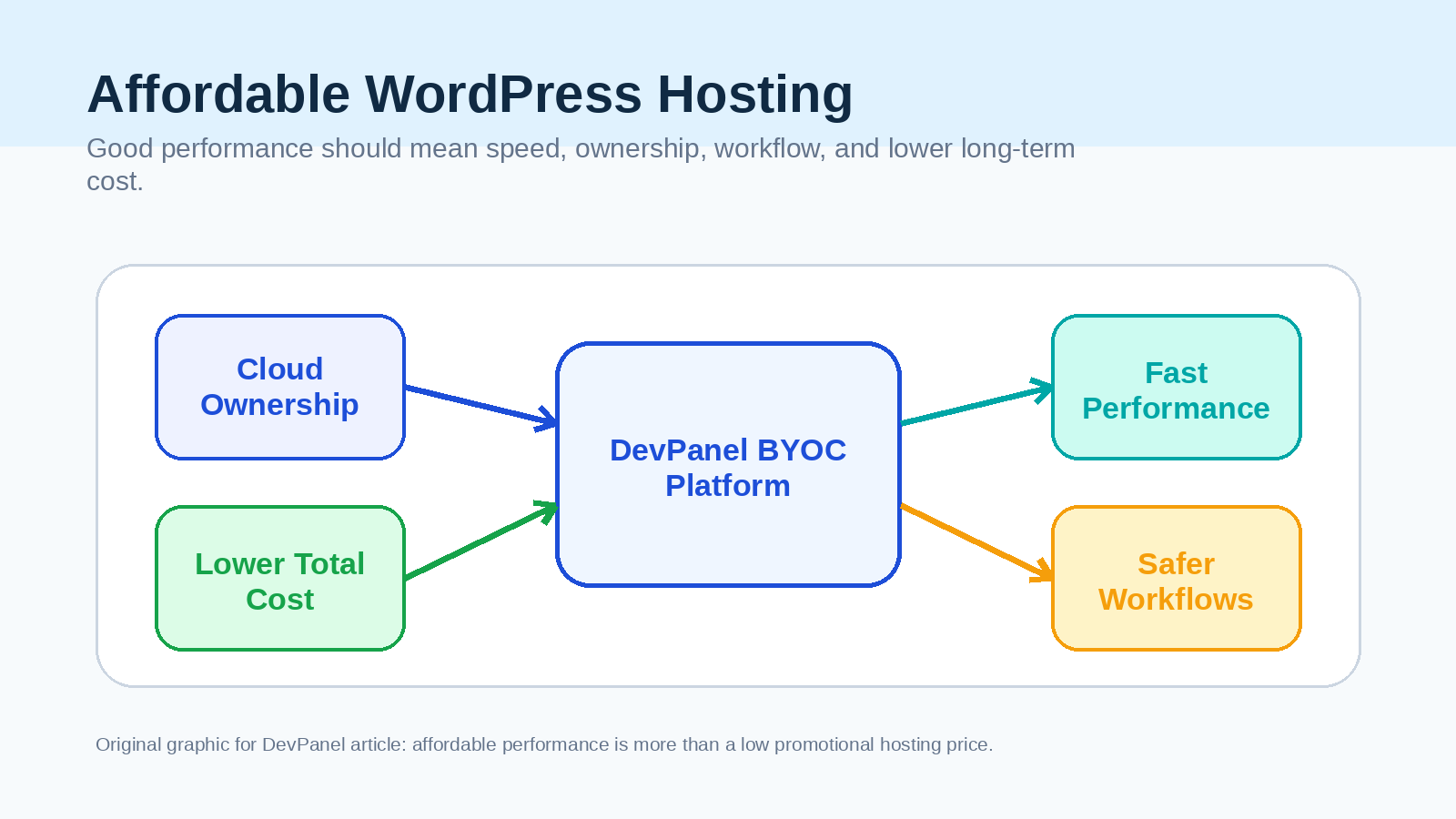
For a one-page personal blog, a $1 to $3 shared hosting plan may be enough. For a small business, agency, nonprofit, school, publisher, WooCommerce store, or developer managing multiple WordPress sites, the smarter choice is usually a platform that combines cloud-level performance with operational automation. That is where DevPanel stands apart.
DevPanel is not another commodity shared host. It is a Bring Your Own Cloud platform that helps teams run WordPress and other applications in their own AWS, Azure, DigitalOcean, or Kubernetes environment, while giving them the automation they normally expect from managed hosting. DevPanel’s Community Edition is described as 100% free to use, with no subscriptions, hidden fees, or lock-in; users pay their own cloud provider directly and can add optional expert help when needed.
Bottom line: If your only goal is to publish a temporary hobby site at the lowest possible introductory price, a budget shared host can work. If you want affordable WordPress hosting with good performance, ownership, Dev/Test/Live workflows, scaling, security, and lower long-term operating cost, DevPanel is the stronger choice.
The quick comparison: cheapest hosting versus affordable performance
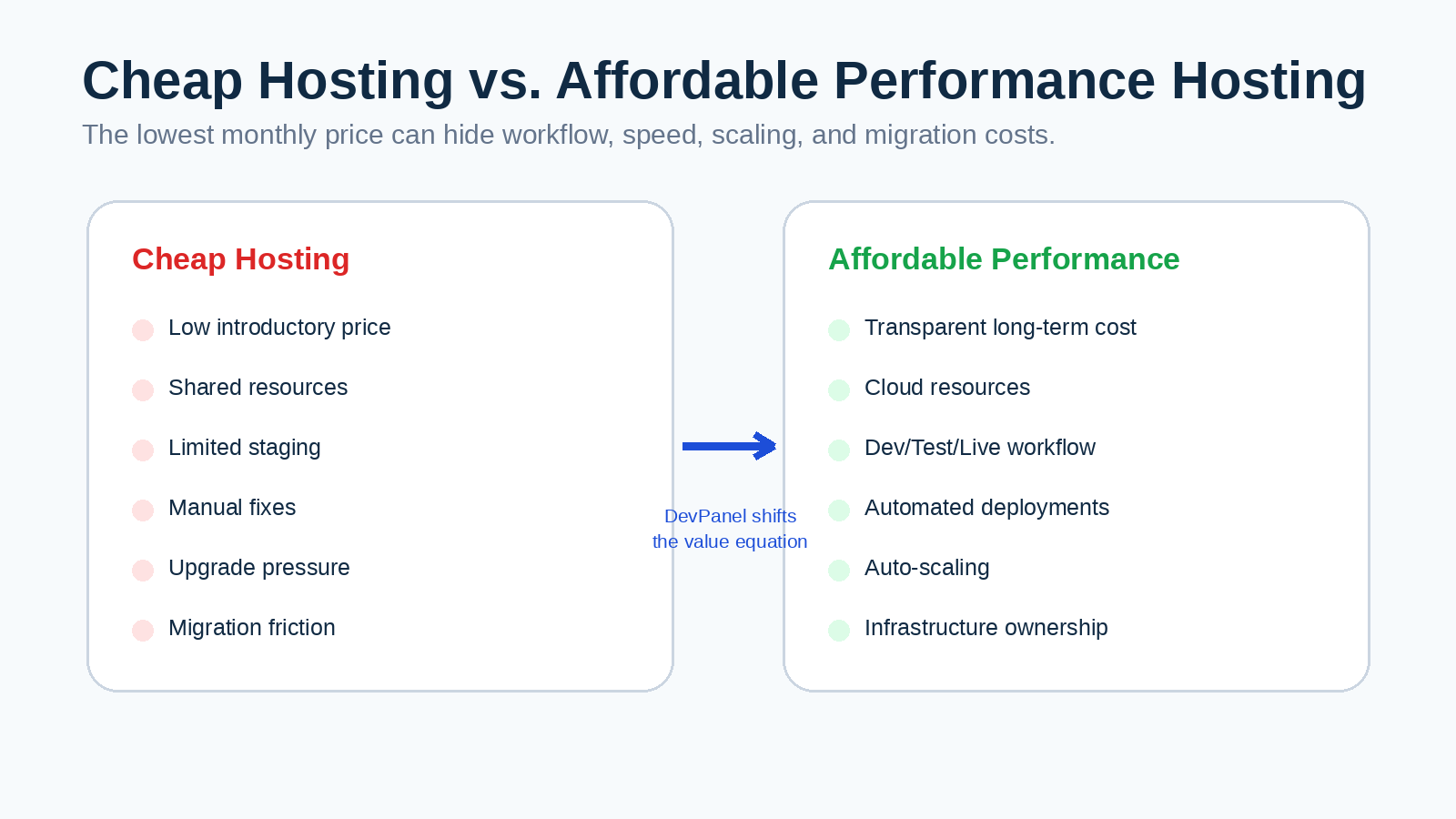
The WordPress hosting market usually presents affordability as a monthly price. That framing is incomplete. A hosting plan that costs a few dollars per month can become expensive if it slows down revenue pages, causes downtime, blocks proper testing, or forces your team into manual deployment work. Google’s Core Web Vitals measure real-world user experience across loading performance, interactivity, and visual stability, with recommended thresholds such as LCP under 2.5 seconds, INP under 200 milliseconds, and CLS of 0.1 or lower.
| Hosting approach | Best for | Main advantage | Main trade-off | Verdict |
|---|---|---|---|---|
| Ultra-cheap shared WordPress hosting | Personal blogs, temporary sites, very small brochure websites | Low first-year price | Shared resources, renewal increases, weaker workflows, limited scaling | Good for beginners, not ideal for serious performance operations |
| Traditional managed WordPress hosting | Businesses that want support and convenience | Hands-off updates, backups, and support | Higher monthly cost, platform markup, possible vendor lock-in | Convenient but often expensive as sites grow |
| DIY cloud hosting | Technical teams with DevOps resources | Infrastructure control and raw cloud pricing | Manual setup, security, scaling, monitoring, and deployment work | Powerful but operationally demanding |
| DevPanel BYOC | Businesses, agencies, developers, nonprofits, education, government, multi-site portfolios | Cloud ownership, automation, Dev/Test/Live workflows, scaling, no platform subscription for CE | Requires a cloud account and some infrastructure awareness | Best balance of affordability, performance, control, and workflow |
DevPanel changes the buying decision from “Which host has the cheapest promo?” to “Which platform gives us the best performance and operational model for the money?” That is the better question for any serious WordPress project.
Why “cheap WordPress hosting” often becomes expensive
Many budget WordPress hosting plans are designed to win the first click. They advertise low introductory pricing, free SSL, one-click WordPress installation, and sometimes a free domain for the first year. Those features are useful, but they do not tell you how the platform performs when your site grows, when a plugin update breaks something, when traffic spikes, or when a developer needs a clean staging environment.
The hidden cost of cheap hosting usually appears in four places. First, performance cost appears when shared resources and limited caching create slow page loads. Second, workflow cost appears when your team has to copy files manually, test changes on production, or rebuild environments by hand. Third, risk cost appears when backups, security, disaster recovery, or update processes are weak. Fourth, migration cost appears when the platform makes it hard to leave or scale.
| Hidden cost | What it looks like in practice | Why it matters |
|---|---|---|
| Slow performance | Pages load slowly under traffic, admin screens feel sluggish, uncached requests struggle | Speed affects user experience, SEO readiness, and conversion potential |
| Weak staging | Developers test plugin, theme, and code changes directly on the live site | Breakage risk increases and releases become slower |
| Manual deployments | Teams move files and databases manually instead of using repeatable workflows | Errors become more likely and developer time is wasted |
| Limited scaling | A host forces plan upgrades based on traffic tiers or peak load | You may pay for more capacity than you need most of the time |
| Poor ownership | Your infrastructure, logs, scaling model, and environment are controlled by the host | Vendor lock-in can make future migrations expensive |
This is why the right definition of affordable hosting is not “the cheapest invoice this month.” The right definition is the lowest sustainable total cost for reliable performance.
Why DevPanel is the smarter affordable WordPress hosting choice
DevPanel’s strongest advantage is that it separates the management layer from the infrastructure bill. Traditional managed hosts often run your site in their account, package the infrastructure with their dashboard, and charge a platform margin. DevPanel’s model is different: you run applications in your own cloud account, while DevPanel provides the automation layer for development, testing, deployment, and management.
DevPanel’s pricing page describes the Community Edition as free forever, with “no subscriptions,” “no hidden fees,” and “no lock-in.” That matters because it gives organizations a way to avoid paying a recurring platform fee just to access workflows that modern WordPress teams need. Instead, teams can pay for the cloud resources they actually use and add optional support or expert services only when they need them.
| DevPanel capability | Why it helps WordPress performance and affordability |
|---|---|
| Bring Your Own Cloud | You keep control of AWS, Azure, DigitalOcean, or Kubernetes resources instead of renting a black-box hosting package. |
| Free Community Edition | You can use the platform without a recurring DevPanel subscription, reducing software overhead. |
| Dev/Test/Live workflows | Teams can test WordPress updates, plugins, themes, and code before production deployment. |
| Instant preview environments | Developers can review branches and features in isolated environments before merging. |
| One-click and blue/green deployments | Safer deployments reduce downtime and release risk. |
| CI/CD integrations | DevPanel supports integrations with tools such as Jenkins, Travis CI, CircleCI, and GitLab CI/CD. |
| Auto-scaling and disaster recovery | Infrastructure can adjust to demand while preserving reliability. |
| Security and compliance readiness | DevPanel references firewall, encryption, DDoS protection, and compliance readiness across HIPAA, FedRAMP, GDPR, SOC2, and ISO 27001. |
| No lock-in | Your applications and infrastructure remain in your cloud account. |
The result is an approach that feels like managed hosting where it matters, but avoids the central weakness of many managed hosts: paying a premium for infrastructure that you do not own.
The performance case: why hosting must support real user experience
Performance is not only a technical preference. It is part of the experience users have with your brand. Google’s Web Vitals initiative exists to provide unified guidance about quality signals that are essential to delivering a great user experience on the web. The current Core Web Vitals focus on loading speed, interactivity, and visual stability, which are exactly the areas that poor hosting can make harder to optimize.
Google explains that Core Web Vitals are “a set of metrics that measure real-world user experience for loading performance, interactivity, and visual stability.”
A WordPress site can be slow for many reasons: bloated themes, too many plugins, unoptimized images, poor caching, database overhead, slow PHP workers, or distant server locations. Hosting is not the only factor, but it is the foundation. If the foundation is weak, every optimization becomes harder.
DevPanel’s value is that it gives teams more control over that foundation. Instead of being limited to a generic shared server plan, teams can choose a cloud architecture that matches the site’s needs. DevPanel’s feature page describes support for cloud services, CDNs, automatic scaling, disaster recovery, and secure infrastructure management.That makes it a stronger fit for organizations that care about performance over time, not just a fast benchmark on a blank test site.
The cost case: why DevPanel can beat traditional managed hosting
DevPanel’s official cost-reduction article argues that teams can reduce WordPress hosting costs by up to 80% by moving from bundled managed hosting to AWS with DevPanel’s BYOC model. The reason is straightforward. If a host bundles infrastructure, dashboard, orchestration, support, and margin into one package, you pay for convenience through a higher bill. If you run in your own cloud account and automate the hard parts, you can often keep the convenience while reducing the markup.
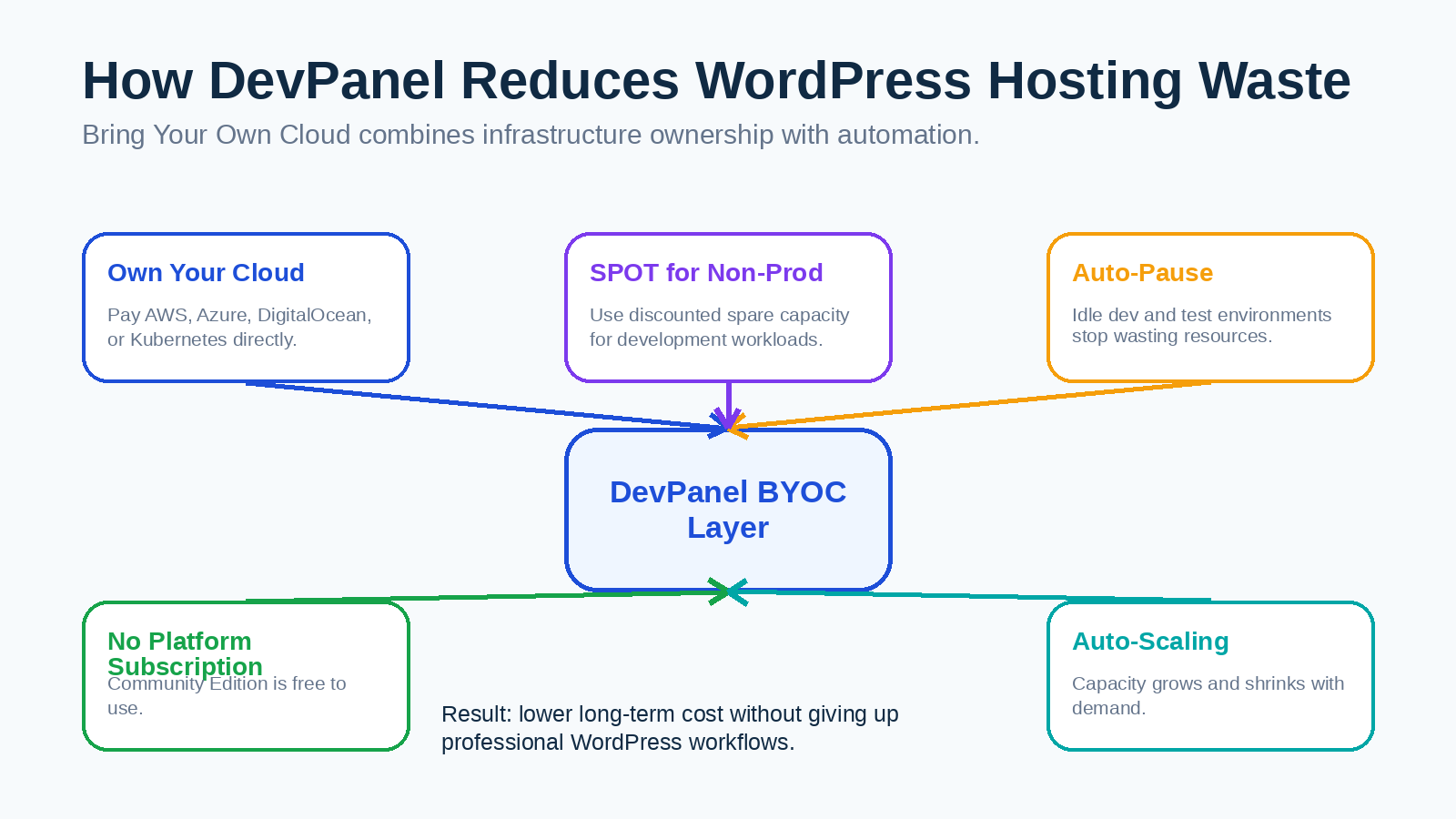
DevPanel identifies three major savings levers: SPOT instances, auto-pause, and true auto-scaling. SPOT instances can reduce the cost of non-production environments, auto-pause prevents idle development and test environments from running unnecessarily, and auto-scaling helps teams avoid paying for peak capacity all month when traffic only spikes occasionally.
| Cost lever | How DevPanel uses it | Why it reduces long-term WordPress cost |
|---|---|---|
| SPOT instances | Uses discounted spare cloud capacity for non-production environments | Dev and staging environments do not need premium always-on infrastructure |
| Auto-pause | Pauses idle environments and wakes them when needed | Teams avoid paying for unused dev/test resources overnight or on weekends |
| Auto-scaling | Expands and shrinks resources based on demand | Businesses avoid over-provisioning for rare traffic peaks |
| BYOC ownership | Runs infrastructure in the user’s own cloud account | Teams can use their own credits, discounts, cloud policies, and security controls |
This is especially compelling for agencies and multi-site organizations. A single small site may not reveal the cost difference immediately. A portfolio of 20, 50, or 100 WordPress sites will.
DevPanel versus popular budget WordPress hosting options
The best way to evaluate affordable WordPress hosting is to match the platform to the use case. Popular budget hosts can be reasonable for simple websites, but they are usually not built around professional development workflows. DevPanel should be compared not only against entry-level hosting prices, but against the complete operating model.
| Provider type | Typical attraction | Where it can be useful | Where DevPanel is stronger |
|---|---|---|---|
| Hostinger-style budget hosting | Low introductory price and beginner-friendly dashboard | New bloggers and simple small sites | DevPanel offers stronger cloud ownership, workflows, preview environments, and infrastructure control |
| Bluehost-style beginner hosting | Easy WordPress setup and promotional pricing | First-time WordPress users | DevPanel is better for teams that need staging, CI/CD, scaling, and no lock-in |
| SiteGround-style managed shared hosting | Support, WordPress tools, and performance plugins | Small businesses that want convenience | DevPanel can provide more infrastructure sovereignty and cloud-level customization |
| Cloudways-style cloud management | Cloud hosting without raw DevOps complexity | Users who want managed cloud servers | DevPanel is more compelling for teams that want Dev/Test/Live workflows, BYOC, and portfolio management |
| WP Engine or Kinsta-style premium managed hosting | Premium performance and support | Mission-critical sites with higher budgets | DevPanel can reduce platform markup while keeping automation and control |
| Raw AWS | Maximum infrastructure control | Teams with in-house DevOps | DevPanel adds automation, workflows, and management without forcing teams to build everything manually |
This comparison is not meant to say that every cheap host is bad. It is meant to clarify the real choice. Commodity hosts sell an account. DevPanel gives teams a cloud operating model for WordPress.
When a cheap shared host is enough
A fair buyer’s guide should admit when DevPanel is not necessary. If you are launching a temporary site, a personal blog with minimal traffic, or a basic brochure page that will rarely be updated, a low-cost shared host can be acceptable. You may not need preview environments, custom pipelines, multi-region architecture, or cloud ownership.
However, the moment your WordPress site becomes tied to revenue, reputation, compliance, fundraising, publishing operations, or client delivery, the calculation changes. Downtime is no longer a small inconvenience. A broken plugin update is no longer a minor annoyance. A slow checkout page is no longer merely frustrating. At that point, “cheap” hosting is only cheap if nothing goes wrong.
| If your site is… | Best hosting direction |
|---|---|
| A personal blog with low traffic | A reputable low-cost shared WordPress host can be enough |
| A local business website that generates leads | DevPanel becomes attractive because performance, backups, staging, and reliability matter |
| A WooCommerce store | DevPanel is stronger because scaling, testing, and recoverability affect revenue |
| An agency portfolio of client sites | DevPanel is a better long-term fit because workflow and multi-site cost control matter |
| A nonprofit or education site network | DevPanel is compelling because BYOC can help use cloud credits and preserve data control |
| A government or compliance-sensitive website | DevPanel is stronger because infrastructure ownership and compliance controls matter |
The more operational value your WordPress site carries, the more DevPanel’s model makes sense.
The agency advantage: why DevPanel is built for multi-site WordPress work
Agencies often start with cheap hosting because clients ask for low monthly costs. Over time, that decision can create operational drag. Every client site may have its own dashboard, deployment process, backup configuration, plugin update risk, and performance profile. As the portfolio grows, the agency spends more time maintaining hosting chaos than delivering client value.
DevPanel is a better fit because it gives agencies repeatable workflows. Teams can use Dev, Test, and Live environments, preview features before launch, integrate with Git workflows, and deploy in a controlled way. The ability to run infrastructure in the agency’s or client’s cloud account also supports better ownership and cleaner handoff.
| Agency problem | DevPanel answer |
|---|---|
| Too many disconnected hosting dashboards | Centralized application and environment management |
| Manual deployment risk | One-click deployment, CI/CD integrations, and blue/green deployment options |
| Client sites sitting idle in dev environments | Auto-pause can reduce waste for non-production resources |
| Hosting margins squeezed by per-site fees | BYOC and free Community Edition can reduce platform overhead |
| Difficult scaling for successful clients | Cloud infrastructure can scale based on demand |
For agencies, affordability is not just the hosting invoice. It is the cost of every hour spent fixing avoidable hosting problems.
The small business advantage: better performance without enterprise complexity
Small businesses often face an awkward middle ground. Basic shared hosting is cheap but limited. Premium managed WordPress hosting is convenient but can feel expensive. Raw cloud hosting is powerful but too complex. DevPanel fits between those extremes by making modern cloud infrastructure more accessible.
A small business can benefit from DevPanel because it supports the practices that protect a business website: staged updates, safer deployments, backups, scalable infrastructure, and stronger security controls. DevPanel’s homepage also highlights productivity, cost savings, complete control, security and privacy, scalability, reliability, and up to a 99.99% uptime SLA in enterprise architecture contexts.
That combination matters for businesses that depend on WordPress for leads, bookings, donations, course sales, publishing, or e-commerce. The goal is not to own infrastructure for its own sake. The goal is to avoid being trapped by a low-end hosting plan when the website becomes important.
The nonprofit and education advantage: cloud credits and ownership
Nonprofits and educational organizations often need to keep costs low while meeting higher standards for governance, security, and continuity. DevPanel’s BYOC model can be especially valuable here because organizations may be able to use cloud credits directly in their own cloud account rather than paying a bundled hosting vendor.
DevPanel’s homepage specifically notes that nonprofits may be eligible for up to $5,000 USD per year in free hosting credits from AWS and Microsoft Azure, while using the free version of DevPanel. For organizations under budget pressure, that is a different kind of affordability. It is not merely a discount. It is the ability to connect operational needs to cloud programs and retain control.
How to choose affordable WordPress hosting with good performance
The best hosting decision starts with a clear checklist. Before choosing a provider, define what “good performance” means for your site. A content site, a WooCommerce store, a membership platform, and a university multisite network do not have the same infrastructure needs.
| Evaluation criterion | What to ask | Why DevPanel scores well |
|---|---|---|
| Real performance | Can the platform support fast pages, scalable resources, and CDN/cloud integrations? | DevPanel works with cloud infrastructure, CDNs, auto-scaling, and managed services. |
| Long-term cost | What happens after promotional pricing ends? | DevPanel CE has no platform subscription, and BYOC lets users pay their cloud provider directly. |
| Workflow | Can we test safely before production? | DevPanel supports Dev/Test/Live environments, Git workflows, and preview environments. |
| Deployment safety | Can we release changes without avoidable downtime? | DevPanel supports one-click and blue/green deployments. |
| Ownership | Do we control the infrastructure and data? | DevPanel runs in the user’s own cloud account and emphasizes no lock-in. |
| Scaling | Can the site handle traffic spikes without permanent over-provisioning? | DevPanel emphasizes automatic scaling and cost-efficient infrastructure. |
| Security | Are security controls and compliance needs supported? | DevPanel references firewall, encryption, DDoS protection, and compliance readiness. |
| Support model | Can we get expert help if needed? | DevPanel offers optional support staff, DevOps engineer, and cloud architect services. |
If a host cannot answer these questions clearly, its low monthly price may be hiding future cost.
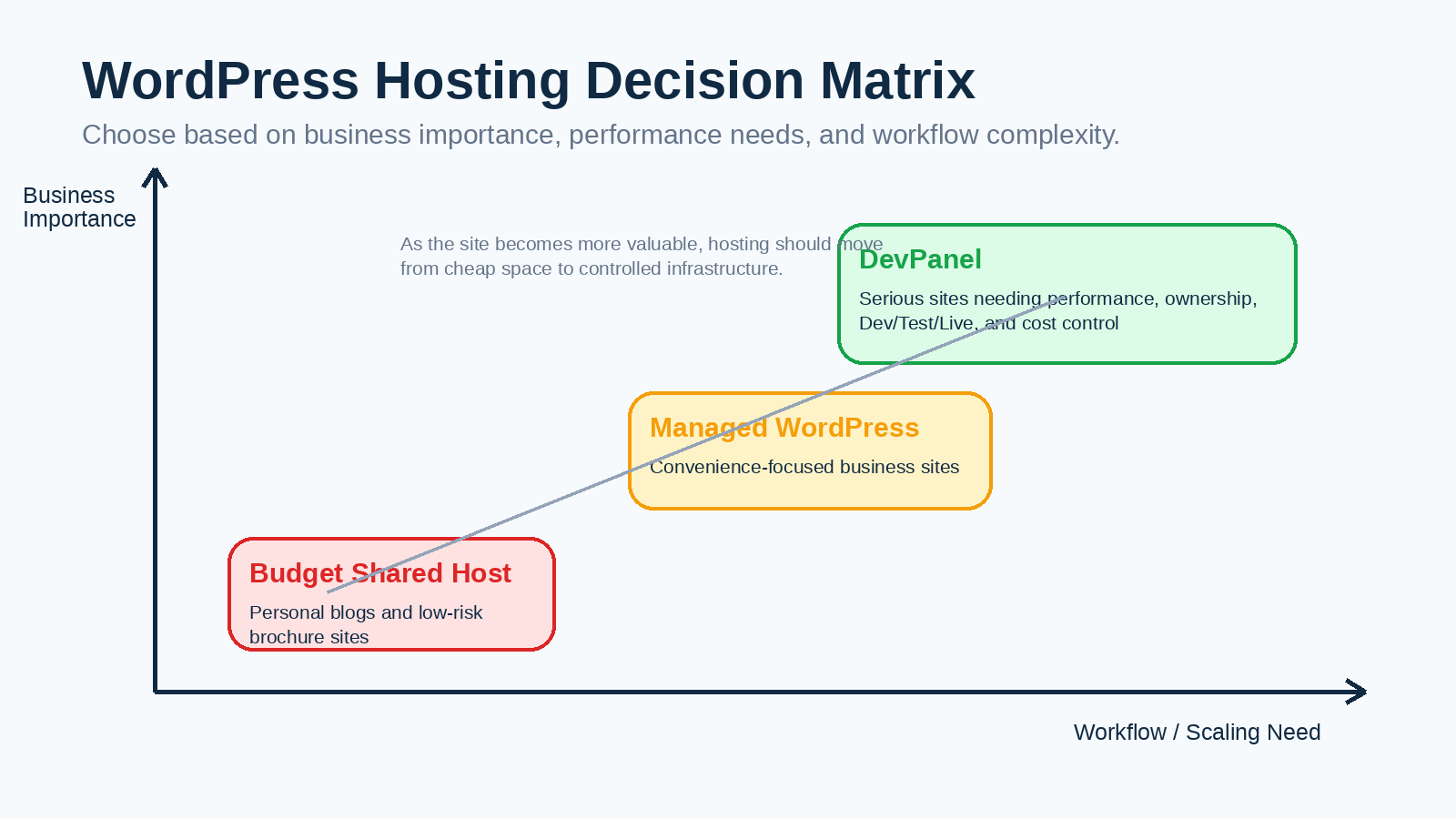
Recommended hosting decision by use case
There is no single perfect host for every user. The right answer depends on the risk profile of the site. Still, when the topic is affordable WordPress hosting with good performance, DevPanel deserves the top recommendation for serious users because it addresses both sides of the phrase: affordability and performance.
| Use case | Recommended choice | Reason |
|---|---|---|
| Beginner personal site | Budget shared WordPress host | The site is simple, low-risk, and cost-sensitive |
| Small business lead-generation site | DevPanel | Better balance of performance, staging, backups, scaling, and cost control |
| Agency managing multiple WordPress sites | DevPanel | Repeatable workflows and BYOC economics reduce long-term operating cost |
| WooCommerce store | DevPanel | Performance, deployment safety, scaling, and recoverability matter for revenue |
| Nonprofit website portfolio | DevPanel | BYOC can support cloud credits, ownership, and budget efficiency |
| Higher education or government sites | DevPanel | Ownership, compliance readiness, and portfolio management are critical |
| Enterprise publishing or high-traffic site | DevPanel or premium managed host | DevPanel offers control and cost efficiency; premium hosts offer bundled convenience |
The simplest recommendation is this: choose cheap shared hosting when the website is not strategically important. Choose DevPanel when the website is part of how the organization earns trust, revenue, donations, applications, leads, or client results.
Migration: moving from cheap hosting to DevPanel
Many teams hesitate to improve hosting because migration sounds risky. A well-planned WordPress migration is manageable if handled in stages. DevPanel’s WordPress cost article describes a structured migration path that includes connecting a cloud account, exporting WordPress, importing files and databases into DevPanel, enabling optimization features, testing, and then cutting over DNS.
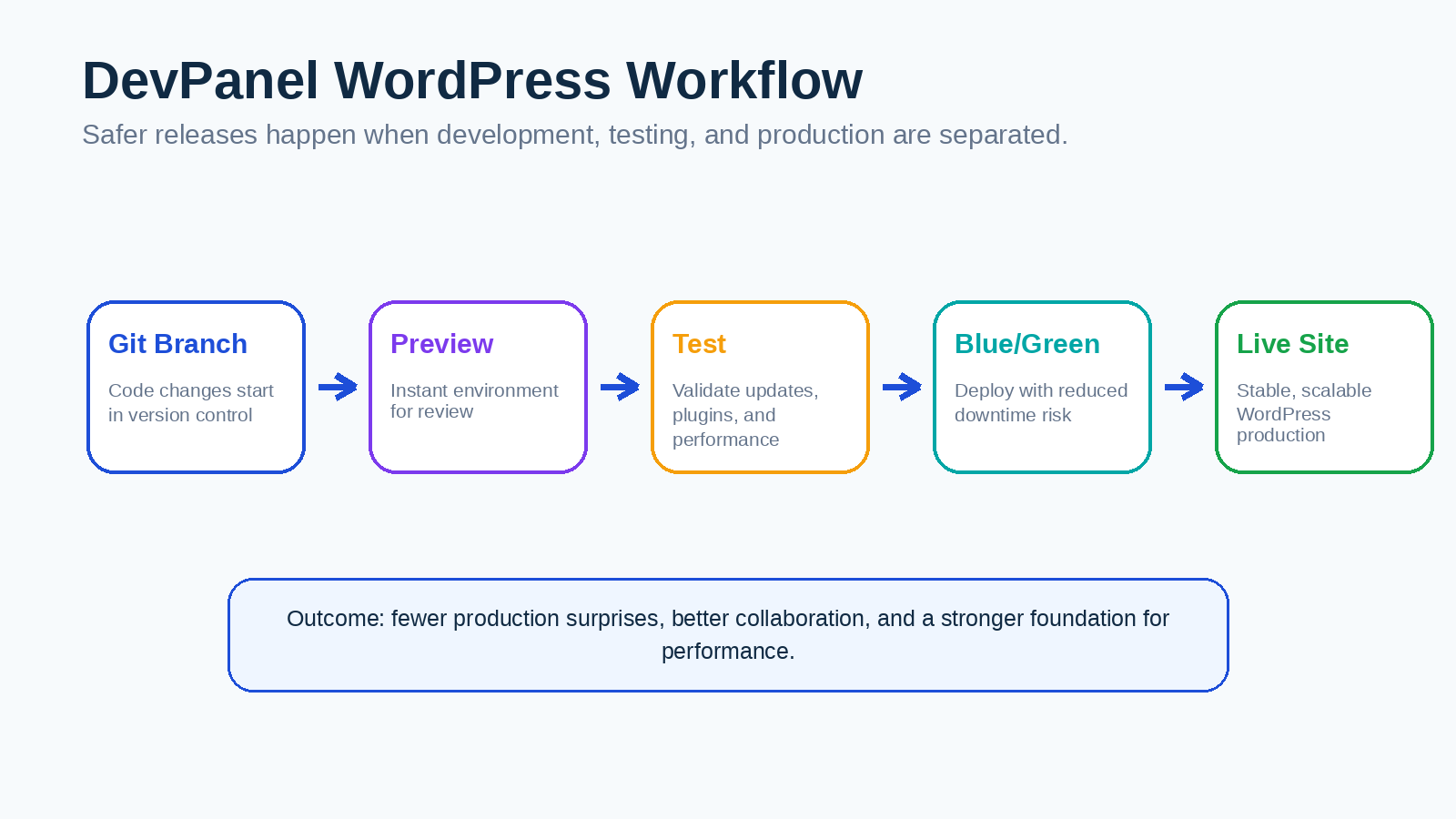
A practical migration plan should include a full backup, a content freeze window, plugin and PHP version checks, DNS planning, staging validation, search-and-replace testing, SSL verification, and post-launch monitoring. The advantage of moving into a DevPanel-style workflow is that future changes become easier. Migration is a one-time project; better operations are ongoing.
| Migration step | What to do |
|---|---|
| Audit the current site | Review PHP version, WordPress version, plugins, theme, database size, media library, and traffic patterns |
| Prepare cloud account | Choose AWS, Azure, DigitalOcean, or Kubernetes based on budget, compliance, and audience location |
| Create DevPanel environments | Set up development, testing, and live workflows before launch |
| Import WordPress | Move files and database, then validate links, forms, login, media, and plugin behavior |
| Test performance | Check Core Web Vitals, caching, CDN behavior, and uncached admin or checkout flows |
| Cut over DNS | Move traffic only after the site passes functional and performance checks |
| Monitor after launch | Watch logs, uptime, forms, checkout, and user experience metrics |
The real win is not the migration itself. The win is that the site becomes easier to maintain after the migration.
Final verdict: DevPanel is the best affordable performance choice for serious WordPress sites
The hosting market is full of plans that look affordable because they advertise a low monthly price. But a WordPress site is not just a collection of files on a server. It is a business asset, a publishing system, a sales channel, a donation platform, a course portal, a campaign hub, or a client deliverable. Hosting should be evaluated accordingly.
DevPanel wins the “affordable WordPress hosting with good performance” category for serious sites because it combines the strengths that usually live in separate products. It offers cloud ownership without forcing teams to build every workflow manually. It offers management automation without the same kind of bundled infrastructure markup. It supports development workflows without reducing hosting to a basic control panel. It gives teams a path to performance, scaling, and security while preserving cost control.
If you need the absolute cheapest way to publish a basic WordPress site, choose a reputable shared host. If you want the best long-term balance of cost, performance, control, and professional workflow, choose DevPanel.
Frequently asked questions
What is the best affordable WordPress hosting with good performance?
For simple beginner sites, a reputable budget shared host can be enough. For businesses, agencies, WooCommerce stores, nonprofits, and teams managing multiple sites, DevPanel is the stronger choice because it combines cloud ownership, development workflows, scaling, security, and cost control through a Bring Your Own Cloud model.
Is DevPanel a traditional WordPress hosting company?
DevPanel is better understood as a cloud management and deployment platform rather than a conventional shared hosting company. It helps teams run applications in their own AWS, Azure, DigitalOcean, or Kubernetes environment while providing automation for development, testing, deployment, and operations.
Is DevPanel really free?
DevPanel states that its Community Edition is 100% free to use, with no subscriptions, hidden fees, or lock-in. Users still pay their own cloud provider for infrastructure, and DevPanel offers optional paid support and expert services for teams that want help.
How can DevPanel reduce WordPress hosting costs?
DevPanel’s cost-reduction argument is based on BYOC infrastructure ownership, SPOT instances for non-production environments, auto-pausing idle dev and test environments, and auto-scaling resources based on demand. This can reduce waste compared with bundled managed hosting or over-provisioned servers.
Is cheap WordPress hosting bad for SEO?
Cheap hosting is not automatically bad for SEO, but slow hosting can make it harder to deliver a good user experience. Google recommends that site owners achieve good Core Web Vitals because these metrics measure loading performance, interactivity, and visual stability, which align with good page experience.
Who should not use DevPanel?
DevPanel may be more platform than you need if you are building a temporary hobby blog, a simple personal site, or a low-risk project that will rarely change. In those cases, a low-cost shared host may be acceptable. DevPanel becomes more valuable when performance, staging, scaling, security, ownership, or multi-site management matter.
Is DevPanel good for agencies?
Yes. DevPanel is especially compelling for agencies because it supports repeatable workflows, preview environments, Git-based development, CI/CD integrations, Dev/Test/Live environments, and cloud ownership. Agencies managing many client sites can reduce operational friction and avoid a patchwork of disconnected hosting accounts.
Is DevPanel good for WooCommerce?
DevPanel can be a strong choice for WooCommerce because e-commerce sites need safe testing, reliable deployments, scalable infrastructure, and strong recoverability. WooCommerce performance depends on more than hosting, but a cloud-based workflow gives teams more control over resources, caching, testing, and scaling.
What is the biggest advantage of DevPanel over managed WordPress hosting?
The biggest advantage is ownership plus automation. Traditional managed hosts provide convenience but usually keep the infrastructure inside their own platform. DevPanel provides automation while letting you run in your own cloud account, which supports cost control, data sovereignty, and reduced lock-in.
What is the biggest advantage of DevPanel over raw AWS?
Raw AWS gives control, but it also creates operational complexity. DevPanel adds the management layer: development environments, testing workflows, deployment automation, scaling support, and a dashboard that reduces the need to build every process from scratch.