
Best Budget Friendly AWS Plans for Small Business Sites: The Full 2026 Comparison
Finding the best budget friendly AWS plans for small business sites is no longer a niche problem for developers. It’s a survival question for any small business paying too much to keep a website online. The performance stakes are real: the gap between AWS hosting configurations that include an Edge CDN versus those that don’t is 3.1x, with average time-to-first-byte (TTFB) dropping from 478ms to 154ms. That gap costs you visitors, conversions, and credibility. This guide breaks down every major AWS option, compares it against managed platforms like Pantheon, and shows exactly where DevPanel changes the math for small businesses that don’t have a cloud architect on staff.
Key Takeaways
| Question | Answer |
|---|---|
| What is the cheapest way to host a small business site on AWS? | AWS Lightsail starts at roughly $3.50/month and is the lowest entry point. Adding CloudFront and DevPanel (free Community Edition) keeps costs low while delivering enterprise-grade performance. |
| Is AWS cheaper than Pantheon for WordPress hosting? | Yes, significantly. Pantheon’s entry WordPress plans start around $35/month and scale steeply. An equivalent AWS configuration with DevPanel can run under $20/month all-in. |
| Do I need to be an AWS expert to run a small business site on AWS? | Not if you use DevPanel. DevPanel for small businesses handles cloud orchestration, deployments, and monitoring without requiring deep AWS expertise. |
| What AWS services should a small business actually use? | Lightsail or EC2 t3.micro for compute, RDS or Aurora Serverless for database, CloudFront for CDN, and S3 for storage. DevPanel ties all of these together under one umbrella. |
| Is the AWS Free Tier actually usable for a real business site? | For the first 12 months, yes. EC2 t2.micro free tier covers low-traffic sites. After month 12, Lightsail’s $3.50-$7 tier or a t3.micro On-Demand instance is the logical next step. |
| Can AWS + DevPanel replace Pantheon for WordPress? | Yes. DevPanel essentially replaces expensive managed WordPress hosting with a self-managed, automated platform, without requiring your team to be AWS experts. |
| How much can a small business save by switching from Pantheon to AWS? | Savings routinely exceed 70-90%. Real-world cases show annual hosting bills dropping from thousands of dollars to under $200/year for WordPress sites using AWS + CloudFront + DevPanel. |
Why Small Businesses Are Overpaying for Hosting Right Now
The managed hosting market has done a remarkable job convincing small business owners that running a WordPress site requires a premium vendor. Platforms like Pantheon, WP Engine, and Kinsta charge $35 to $500/month for services that, underneath the branding, run on the same AWS infrastructure you could access directly.
The markup funds their support teams, sales departments, and investor returns. Not your uptime.
Moving to AWS directly typically requires:
- Deep cloud expertise
- Manual configuration
- DevOps knowledge
- Ongoing monitoring
- Infrastructure management
Most small businesses don’t have an AWS engineer. That’s the real problem. And that’s exactly the gap the best budget friendly AWS plans for small business sites need to solve.
Best Budget Friendly AWS Plans for Small Business Sites: The Full Breakdown
Here is every realistic AWS hosting option for a small business site in 2026, ranked from lowest to highest cost, with an honest read on what you actually get.
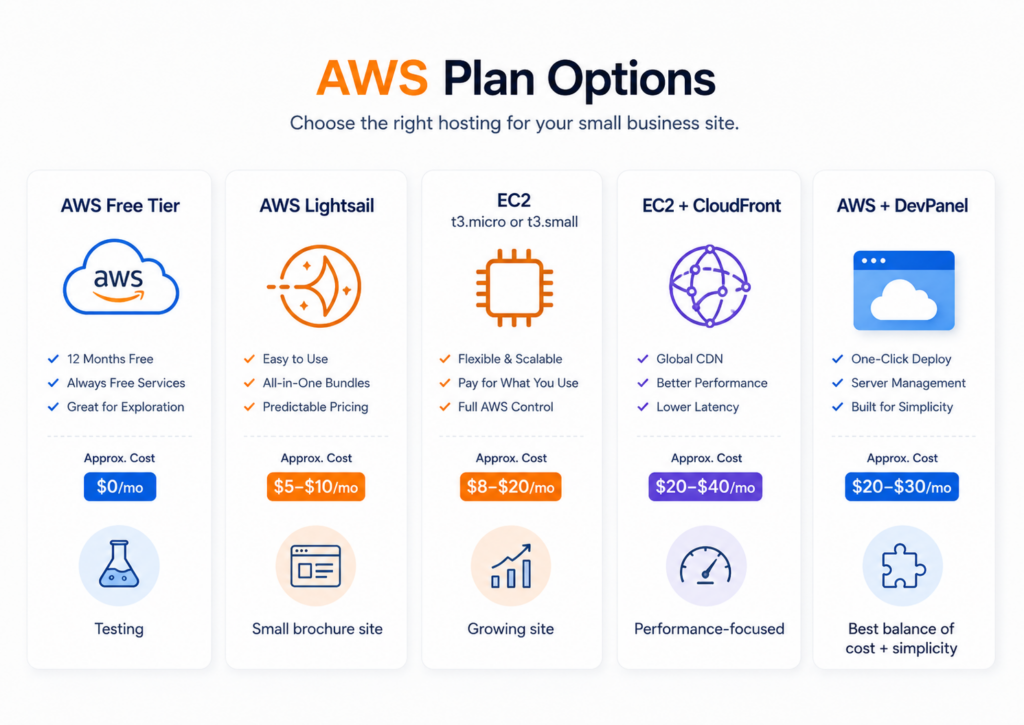
Option 1: AWS Free Tier (EC2 t2.micro)
Cost: $0 for the first 12 months (750 hours/month of EC2 t2.micro)
The AWS Free Tier is legitimate for brand-new sites with low traffic. You get 1 vCPU, 1GB RAM, and 30GB of EBS storage. It handles a basic WordPress install without plugins choking it. The catch: after 12 months, you’re billed at On-Demand rates, and t2.micro is slow under any real load.
Best for: Startups in their first year. Brand-new WordPress sites. Testing and staging environments.
Option 2: AWS Lightsail
Cost: $3.50/month (512MB), $7/month (1GB), $12/month (2GB)
Lightsail is Amazon’s answer to DigitalOcean. Fixed-price, predictable billing, SSD storage included, and a simplified console that doesn’t require AWS certification to navigate. The $7/month Lightsail plan (1GB RAM, 1 vCPU, 40GB SSD, 2TB transfer) handles most small business WordPress sites without breaking a sweat.
Best for: Brochure sites, small e-commerce stores under 500 daily visitors, early-stage startups.
Option 3: EC2 t3.micro or t3.small (On-Demand or Reserved)
Cost: ~$7.59/month (t3.micro On-Demand) or ~$4.75/month (1-year Reserved)
EC2 t3 instances use burstable CPU credits, which means they handle traffic spikes gracefully. A t3.micro gives you 2 vCPUs, 1GB RAM, and up to 5Gbps network. For a small business site with occasional traffic bursts (product launches, email campaigns), the t3 series outperforms Lightsail’s fixed compute without costing significantly more.
Best for: Growing businesses, WordPress with WooCommerce, sites that occasionally spike.
Option 4: EC2 + CloudFront (CDN Layer)
Cost: Add roughly $1-5/month for CloudFront at small business traffic volumes
This is where the math really changes. CloudFront caches your static assets at AWS edge locations globally, slashing server load and dramatically improving page load times. Combined with a t3.micro or Lightsail instance, this architecture outperforms most managed WordPress platforms at a fraction of the cost.
Best for: Any site where performance is critical. Any business serving visitors outside its primary geography.
Option 5: AWS + DevPanel (BYOC)
Cost: DevPanel Community Edition is 100% free. You pay only your AWS bill.
This is the secret ingredient. DevPanel sits on top of your AWS account and handles everything a managed host normally charges you for: automated deployments, Dev/Test/Live environment management, security hardening, CI/CD pipelines, and monitoring. All inside your own AWS account. No lock-in. No hidden fees. No subscriptions.
Best for: Any small business that wants AWS economics without needing to become an AWS expert.
This infographic compares five budget-friendly AWS plans ideal for small business websites, highlighting pricing, scalability, and use-case fit. Use it to choose a cost-effective hosting path on AWS.
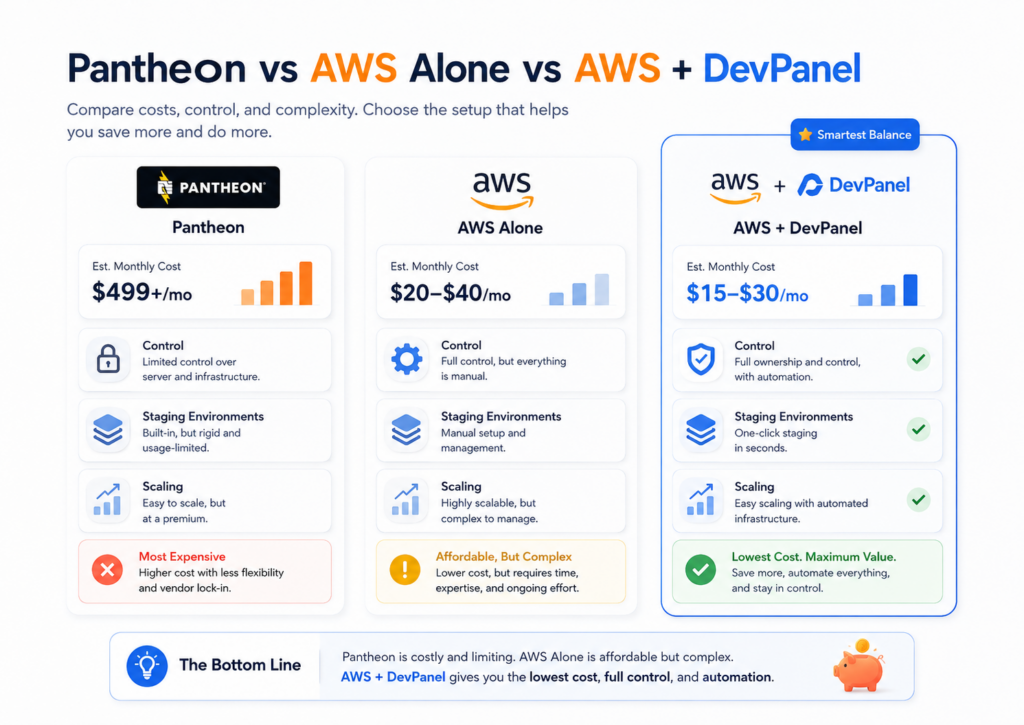
Pantheon vs AWS Alone vs AWS + DevPanel: The Cost Reality
This is the comparison that matters most for small business owners trying to cut their hosting bill without cutting their reliability.
| Platform | Monthly Cost (1 WordPress site) | You Own the Infrastructure? | Dev/Test Environments Included? | Scales Without Cost Shock? |
|---|---|---|---|---|
| Pantheon (Basic) | ~$35-$50/month | No | Yes (limited) | No — tier jumps are expensive |
| AWS Lightsail (Alone) | ~$7-$12/month | Yes | Only if you build manually | Partially |
| AWS EC2 + CloudFront (Alone) | ~$10-$20/month | Yes | Only if you build manually | Yes |
| AWS + DevPanel (BYOC) | ~$10-$20/month (AWS bill only) | Yes | Yes, unlimited | Yes, auto-scaling built in |
The math speaks for itself. Pantheon charges a platform premium every single month. AWS alone gives you the infrastructure but leaves the management overhead on your plate. AWS + DevPanel gives you both: infrastructure ownership and a managed-hosting experience, without the managed-hosting bill.
Did You Know?
100% of surveyed Amazon Lightsail and AWS users report they are willing to recommend the solution based on pricing and feature sets.
Source: PeerSpot 2026
Best Budget Friendly AWS Plans for Small Business Sites by Site Type
Not every small business site has the same needs. Here is how to match the right AWS plan to your actual situation.
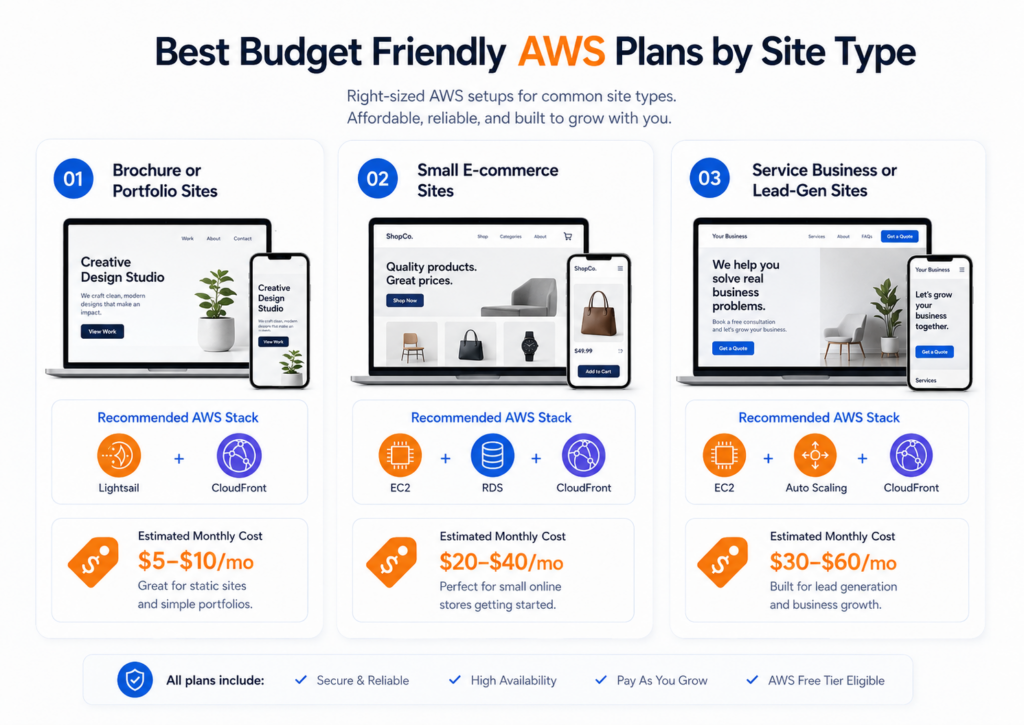
Brochure or Portfolio Sites (Under 1,000 Monthly Visitors)
- Recommended plan: AWS Lightsail $7/month + CloudFront
- Total estimated monthly cost: $8-$12
- Key AWS services: Lightsail instance, CloudFront, S3 for media
- DevPanel role: Manages the WordPress install, handles updates, creates staging environments for design changes
Small WooCommerce or E-Commerce Sites (1,000-10,000 Monthly Visitors)
- Recommended plan: EC2 t3.small + RDS db.t3.micro + CloudFront
- Total estimated monthly cost: $20-$35
- Key AWS services: EC2, RDS, CloudFront, S3, Certificate Manager
- DevPanel role: Automates Blue/Green deployments, embeds security checks, manages Dev/Test/Prod workflow so you’re never pushing untested code to a live store
Service Business or Lead-Gen Sites (10,000-50,000 Monthly Visitors)
- Recommended plan: EC2 t3.medium + RDS + Auto Scaling Group + CloudFront
- Total estimated monthly cost: $40-$80
- Key AWS services: EC2 Auto Scaling, ALB, RDS Multi-AZ (optional), CloudFront
- DevPanel role: Orchestrates the entire stack, handles CI/CD pipelines, provides a browser-based VS Code IDE for in-environment development, and monitors uptime without a dedicated DevOps hire
What Managed Platforms Don’t Tell You About Their “Budget” Tiers
Pantheon’s Basic plan sounds affordable until a traffic spike pushes you into the Performance tier. That jump alone adds $100-$200/month to your bill. Kinsta enforces hard visitor limits. WP Engine charges overage fees that can double your invoice without warning.
These platforms are not designed to scale with small businesses. They’re designed to upsell them.
AWS doesn’t work that way. You pay for what you use, and you control how resources scale. The challenge has always been that operating AWS directly requires expertise most small business owners don’t have time to develop. That’s the problem DevPanel was created to address.
DevPanel was never designed to replace the tools that developers depend on. It was designed as a platform to integrate all the development tools and processes and bring them under one umbrella, introduce automation, embed security checks, and eliminate bottlenecks so dev teams can deliver projects faster.
For a small business owner, that translates to: you get the economics of AWS without needing a cloud architect on staff.
How DevPanel Makes Budget Friendly AWS Plans Work Without Cloud Expertise
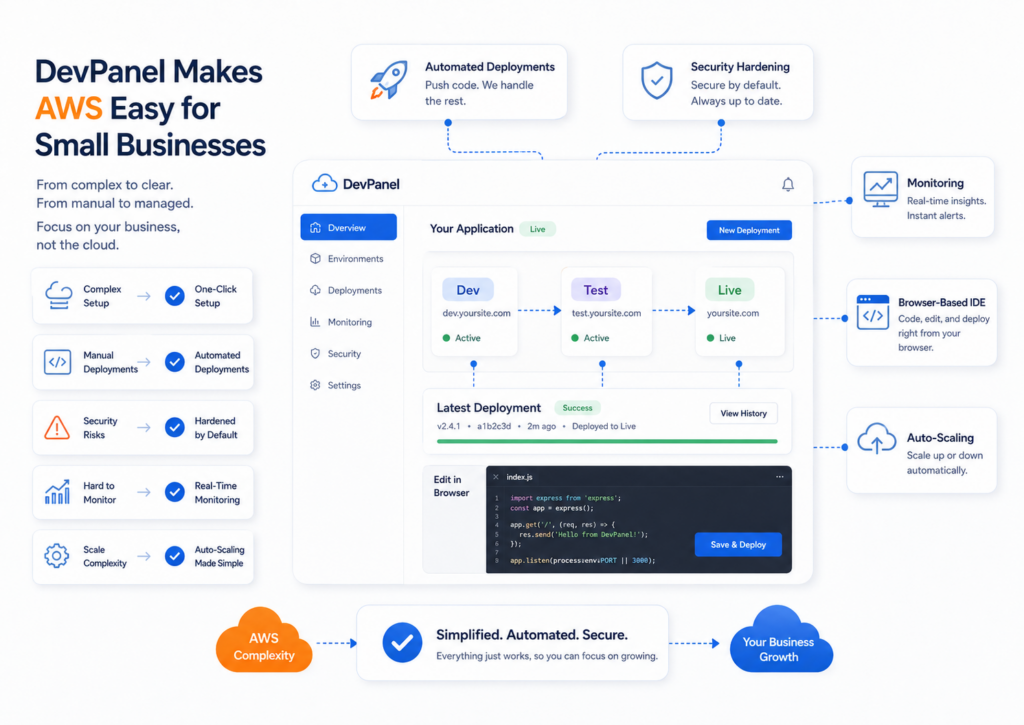
DevPanel was created to address real issues. The gap between “I want to use AWS” and “I actually can use AWS” is enormous for most small businesses. DevPanel closes that gap.
Here is what DevPanel handles that you would otherwise have to configure, manage, and monitor manually:
- Automated deployments: Blue/Green and rolling deployments built in, no scripting required
- Dev/Test/Live environments: Spin up unlimited staging environments with one click, directly inside your cloud-based development environment
- Security hardening: DDoS protection, WAF configuration, and encryption are embedded, not bolted on
- Monitoring and uptime: 24×7 peace of mind without hiring a DevOps engineer
- Browser-based IDE: VS Code in the browser means any team member can access the development environment from any device
- Auto-scaling: Traffic spikes don’t take your site down, and you’re not paying for peak capacity 24/7
When you subscribe to DevPanel, you get a lot more than just tools and software. Our platform isn’t just another tool in your tech stack. It’s your safety net, your guardian angel.
And critically: it’s free. The DevPanel Community Edition is 100% free to use, with no subscriptions, no hidden fees, and no lock-in. You bring your own cloud account. We bring the orchestration layer.
A Real-World Example: Budget AWS Hosting With 90% Cost Savings
Here is what the best budget friendly AWS plans for small business sites look like in practice, not in theory.
Parents Helping Parents (PHP), a nonprofit running a high-traffic WordPress site, was paying a premium managed hosting bill to keep their site online. The team didn’t have AWS engineers. They didn’t have a DevOps department. They had a mission and a budget that was shrinking.
DevPanel essentially replaced expensive “managed WordPress hosting” with a self-managed, automated platform, without requiring PHP’s team to be AWS experts.
The result: over 90% cost savings, improved uptime, better performance, and a development workflow that the team could actually manage. This is the real “nonprofit hosting hack.” And it applies to any small business in the same position.
The architecture that delivered those results:
- AWS EC2 instance (right-sized for actual traffic)
- CloudFront for global CDN distribution
- S3 for static assets and backups
- DevPanel managing the entire stack, deployments, and environments
No AWS engineer required. No managed hosting premium. Just AWS infrastructure costs, with DevPanel handling everything else.
Did You Know?
The performance gap between hosts using an Edge CDN and those without is 3.1x, with average TTFB dropping from 478ms to 154ms.
Source: Hostingstep 2026
Best Budget Friendly AWS Plans for Small Business Sites: The Security Angle
Budget doesn’t have to mean exposed. One of the biggest misconceptions about low-cost AWS hosting is that cutting the managed hosting bill also cuts security. It doesn’t have to.
DevPanel embeds security checks at every stage of the development and deployment workflow. This means vulnerabilities get caught before code reaches production, not after your site appears in a breach headline.
The platform features include:
- DDoS protection at the infrastructure level
- Web Application Firewall (WAF) configuration built in
- Encrypted environments and audit trails
- Automated security scanning in the CI/CD pipeline
- Role-based access control across all team members and workspaces
Pantheon offers security, but you pay for it inside their platform margin. AWS offers security services, but you configure them manually. DevPanel automates all of it inside your own AWS account, with no vendor sitting between you and your infrastructure.
How to Choose the Right Budget AWS Plan for Your Small Business Site
Use this decision framework before you spin up an instance:
- Estimate your traffic: Under 1,000 monthly visitors starts at Lightsail $7. Over 10,000 monthly visitors moves to EC2 t3.small or higher.
- Assess your team’s cloud skills: No AWS expertise on staff? DevPanel is not optional, it’s the solution. With it, you get AWS economics without AWS complexity.
- Factor in CloudFront from day one: The 3.1x performance gap between CDN and non-CDN configurations is too significant to ignore. CloudFront at small business scale adds $1-5/month and transforms your site’s speed.
- Plan for Dev/Test environments: Any site that gets updated (every site) needs a staging environment. DevPanel creates unlimited Dev/Test/Prod environments inside your AWS account. Pantheon charges for this. DevPanel does not.
- Right-size your database: RDS db.t3.micro runs under $15/month and handles the database needs of most small business WordPress sites. Aurora Serverless is an option if traffic is highly variable.
The DevPanel platform handles the orchestration of all these components. You connect your AWS account. DevPanel brings everything else under one umbrella.
Conclusion
The best budget friendly AWS plans for small business sites in 2026 are not hidden. They’ve always been there: Lightsail, EC2 t3 instances, CloudFront, RDS. The barrier was always operational, not financial. Managing AWS without expertise is where small businesses got stuck and where managed hosting platforms extracted their premium.
DevPanel eliminates that barrier. Community Edition is free. Your AWS bill stays yours. And the managed-hosting experience, automated deployments, Dev/Test/Live environments, security hardening, CI/CD pipelines, all of it runs inside your own AWS account.
Stop paying $35-$200/month to a managed host for infrastructure you could own outright. The best budget friendly AWS plans for small business sites, combined with DevPanel, deliver enterprise-grade reliability at a fraction of what platforms like Pantheon charge. The math is not complicated. The setup does not require an AWS engineer. And the savings are real.
Explore how DevPanel was built to solve exactly this problem and see why the Community Edition is the only “easy button” a small business needs to get onto AWS the right way.
Frequently Asked Questions
What is the cheapest AWS plan for a small business WordPress site in 2026?
AWS Lightsail at $7/month is the most cost-effective entry point for a WordPress small business site with real traffic. Adding CloudFront brings the total to approximately $8-$12/month, significantly cheaper than any managed WordPress host while delivering comparable or better performance.
Is AWS Lightsail good enough for a small business website?
Yes, for most small business sites. The $7/month Lightsail plan handles sites with up to several thousand daily visitors without issue. Pair it with CloudFront for CDN caching and DevPanel for automated management, and you have a production-ready hosting stack for under $15/month.
How do I run WordPress on AWS without being a cloud expert?
DevPanel’s Community Edition (free) connects to your AWS account and manages everything: deployments, staging environments, security configuration, and monitoring. DevPanel essentially replaced expensive managed WordPress hosting with a self-managed, automated platform, without requiring your team to be AWS experts.
Is AWS hosting cheaper than Pantheon for small business sites in 2026?
Yes, substantially. Pantheon’s entry plans for WordPress start around $35-$50/month and scale steeply with traffic. An equivalent AWS configuration running EC2 t3.micro or Lightsail with CloudFront costs $10-$20/month, with no tier penalties and no overage charges.
What AWS services does a small business actually need for WordPress hosting?
The core stack is: one EC2 instance or Lightsail instance for compute, CloudFront for CDN, S3 for media storage and backups, and optionally RDS for a managed database. DevPanel integrates all of these services under one dashboard so you’re not configuring each component manually.
Can a small business move from Pantheon to AWS and save money in 2026?
Yes, and the savings are often dramatic. Real-world cases show annual hosting costs dropping by 70-90% when moving from managed platforms to AWS with DevPanel handling the operational layer. The switch typically takes days, not weeks, using DevPanel’s migration tooling.
Does running WordPress on AWS on a budget sacrifice security or uptime?
Not with the right architecture. AWS’s infrastructure has native DDoS protection, CloudFront provides edge-level security, and DevPanel embeds security hardening and automated security checks into every deployment. Budget AWS plans for small business sites can match or exceed the security posture of expensive managed hosts when configured correctly.