
Best Cloud IDEs for WordPress Development Teams in 2026
WordPress still powers approximately 41.5% of all websites as of June 23, 2026. Yet many WordPress development teams continue to rely on local environments that are difficult to configure, inconsistent across developers, and disconnected from production infrastructure.
The best cloud IDEs for WordPress solve this problem by giving developers a complete browser-based development environment with the code, database, command-line tools, dependencies, and computing resources needed to work on a project.
Instead of spending hours installing PHP, MySQL, Docker, Composer, WP-CLI, and project-specific dependencies on every laptop, teams can open a browser and begin working in a standardized environment.
This guide compares five genuine cloud development platforms:
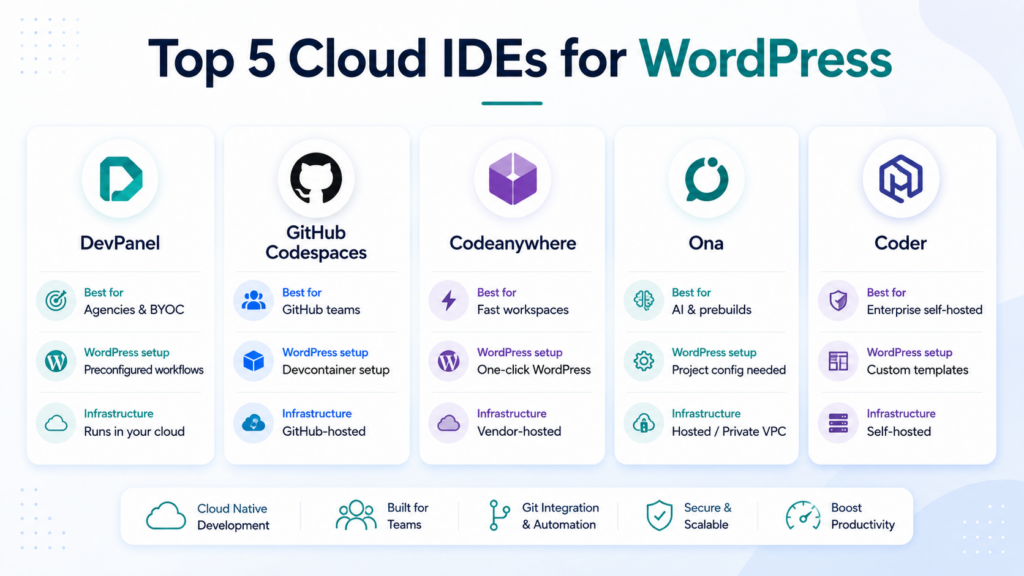
Each platform serves a different type of WordPress team. The right choice depends on whether you prioritize WordPress readiness, GitHub integration, infrastructure ownership, enterprise governance, collaboration, or AI-assisted development.
Key takeaways
| Question | Quick answer |
|---|---|
| What is the best cloud IDE for WordPress agencies? | DevPanel is the strongest option for agencies that need WordPress environments, branch-based workflows, deployments, and infrastructure management in one platform. |
| Which option is best for GitHub teams? | GitHub Codespaces provides the most direct integration with GitHub repositories and pull-request workflows. |
| Which platform offers a quick hosted WordPress workspace? | Codeanywhere provides a one-click WordPress container and browser-based VS Code environment. |
| Which platform is strongest for AI agents and prebuilt environments? | Ona combines cloud development environments, prebuilds, and AI coding agents. |
| Which option is best for self-hosted enterprise environments? | Coder gives platform teams extensive control over infrastructure, workspace templates, security policies, and IDE access. |
| Can a cloud IDE run inside your own cloud account? | Yes. DevPanel and Coder are designed around customer-controlled infrastructure, while Ona offers private VPC deployment through its Enterprise plan. |
What is a cloud IDE for WordPress?
A cloud IDE is a development workspace that runs on remote infrastructure rather than entirely on a developer’s computer.
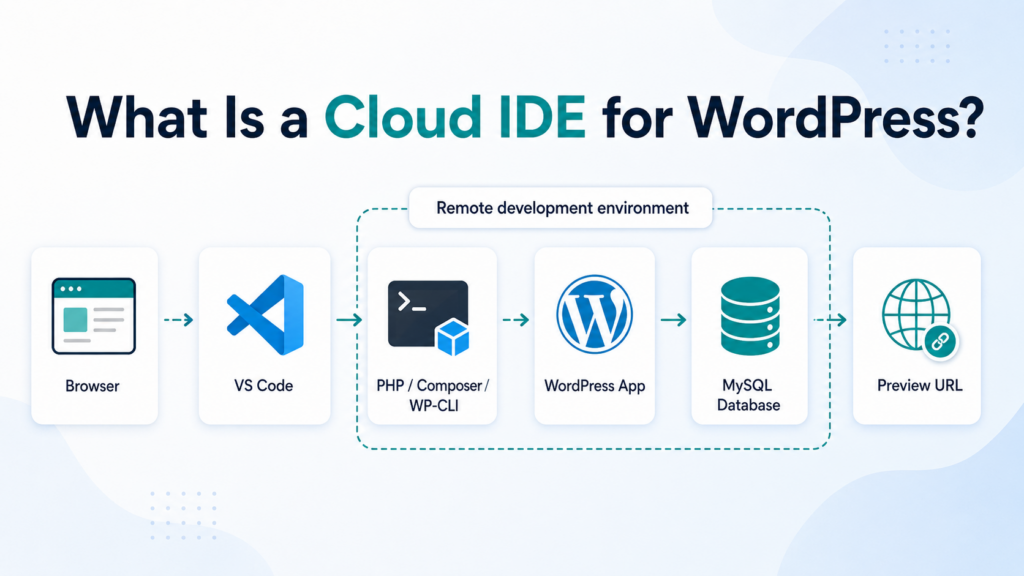
Developers usually access it through a browser-based editor such as VS Code. The environment can include:
- The correct PHP version
- WordPress core
- MySQL or MariaDB
- Composer
- WP-CLI
- Git
- Node.js and build tools
- Project-specific plugins and dependencies
- A preview URL
- Database management tools
- Secrets and environment variables
VS Code is particularly important because it remains the most widely used development environment. In the 2025 Stack Overflow Developer Survey, 75.9% of respondents reported using Visual Studio Code.
A cloud IDE is often part of a broader cloud development environment, or CDE. The IDE is the editor developers interact with, while the CDE also includes the operating system, application runtime, storage, database connections, networking, and project configuration.
Why WordPress teams are moving away from local development
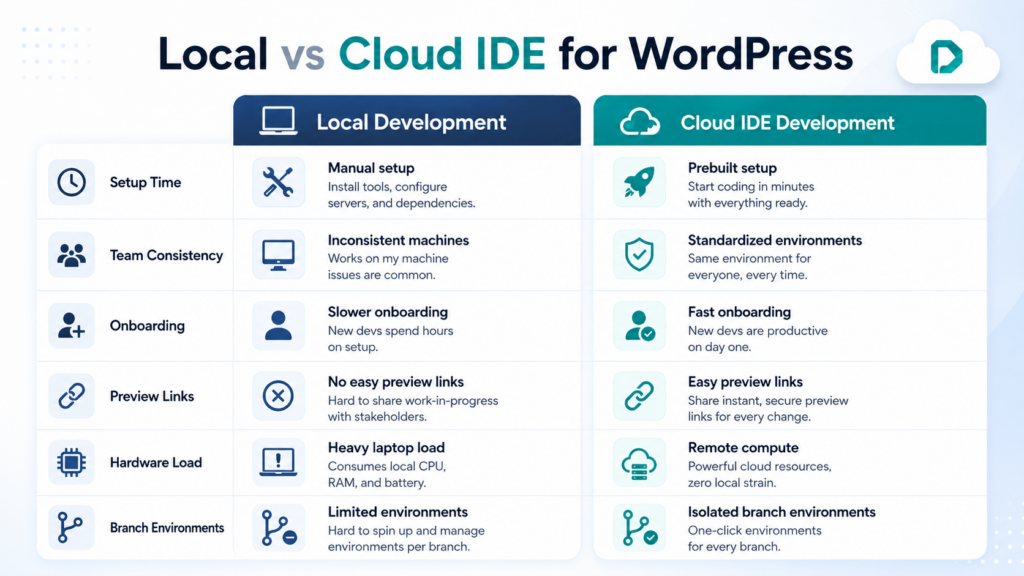
Local WordPress development works reasonably well for individual developers. It becomes much harder to manage across a distributed agency or enterprise team.
Every developer may have a different:
- Operating system
- PHP version
- Database configuration
- Docker configuration
- Node.js version
- Set of global packages
- Local SSL setup
- Plugin configuration
These differences create the familiar “it works on my machine” problem.
Cloud environments replace those individual configurations with standardized workspaces. Every developer works with the same application stack, and the team can create new environments from approved templates.
That produces several practical advantages.
Faster onboarding
A new developer does not need to spend several days configuring a laptop before working on the project. Access can be granted to an existing environment or a new workspace can be created from the project template.
Consistent WordPress environments
The same PHP version, database configuration, Composer dependencies, WP-CLI commands, and configuration files can be used across the team.
Isolated feature development
A branch can have its own WordPress environment, database, and preview URL. Developers can test plugins, themes, migrations, and upgrades without interfering with the shared staging site.
Easier client reviews
Agencies can provide clients and project managers with temporary preview URLs instead of repeatedly deploying unfinished work to a central staging environment.
Less dependence on developer hardware
The application executes on remote infrastructure. A developer’s laptop mainly provides access to the environment rather than running every container, database, build process, and indexing service locally.
How we evaluated the best cloud IDEs for WordPress
This comparison focuses on the capabilities that matter specifically for professional WordPress teams.
WordPress stack readiness
Does the platform provide WordPress, PHP, MySQL, Composer, WP-CLI, and database tools out of the box, or must the team configure everything?
Reproducible environments
Can the team define a consistent environment and recreate it for every developer, repository, or branch?
Branch and preview workflows
Can developers create isolated environments and share working preview URLs with clients, testers, and project managers?
Infrastructure ownership
Does the platform run inside infrastructure controlled by the customer, or is the environment hosted exclusively by the vendor?
Deployment capabilities
Does the platform only provide a workspace, or can it also help move code through development, testing, staging, and production?
Cost visibility
Can the team distinguish between platform fees, workspace usage, storage, and the underlying infrastructure cost?
Best cloud IDEs for WordPress compared
| Platform | Best for | WordPress setup | Infrastructure model | Main limitation |
|---|---|---|---|---|
| DevPanel | WordPress agencies, multi-site teams, and BYOC environments | Preconfigured WordPress workflows and browser-based tools | Runs in your AWS, Azure, or DigitalOcean account | Requires an underlying cloud account |
| GitHub Codespaces | GitHub-centric development teams | Requires a devcontainer and WordPress stack configuration | Hosted and metered through GitHub | Deployment and production management are separate |
| Codeanywhere | Fast hosted WordPress workspaces and collaboration | One-click WordPress container | Vendor-hosted cloud environment | Less control over the underlying infrastructure |
| Ona | AI-enabled development, prebuilds, and parallel workspaces | Requires project configuration | Ona Cloud or private VPC on Enterprise | Not specifically designed around WordPress operations |
| Coder | Large enterprises with internal platform teams | Built through custom Terraform templates | Fully self-hosted | Requires DevOps or platform engineering expertise |
1. DevPanel
DevPanel is the strongest overall option for WordPress teams that want a cloud IDE connected to the entire application lifecycle.
It includes browser-based VS Code and PhpMyAdmin, but it goes beyond editing code. Teams can create and clone applications, branches, sites, and databases while managing development, staging, and production environments from the same platform.
DevPanel’s Community Edition includes:
- Unlimited users and teams
- Unlimited projects and sites
- Browser-based VS Code
- PhpMyAdmin
- Support for AWS, Azure, and DigitalOcean
- CI/CD and GitOps workflows
- Blue/green deployments
- Automated backups
- SSL management
- Security and resource automation
The Community Edition is free, while the organization pays the cloud provider directly for the infrastructure it consumes. Optional support currently starts at $85 per hour, DevOps engineering starts at $150 per hour, and cloud architecture services start at $250 per hour.
Why DevPanel works well for WordPress
Most cloud IDEs give developers an editor and a remote container. DevPanel connects that environment to WordPress site management and deployment.
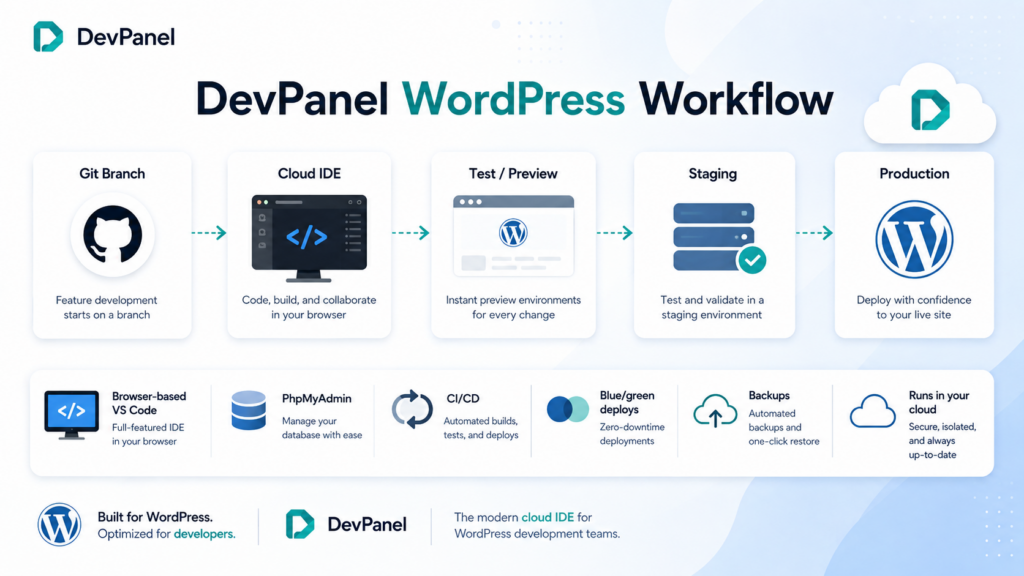
A WordPress agency can create a new client environment, clone a database, check out a branch, work inside browser-based VS Code, share a preview URL, and later promote the application through the deployment workflow.
This is especially useful for teams managing:
- Multiple client websites
- WordPress multisite installations
- Plugin and theme development
- Major WordPress upgrades
- PHP version upgrades
- Website migrations
- Dev, test, stage, and production environments
Running in your own cloud
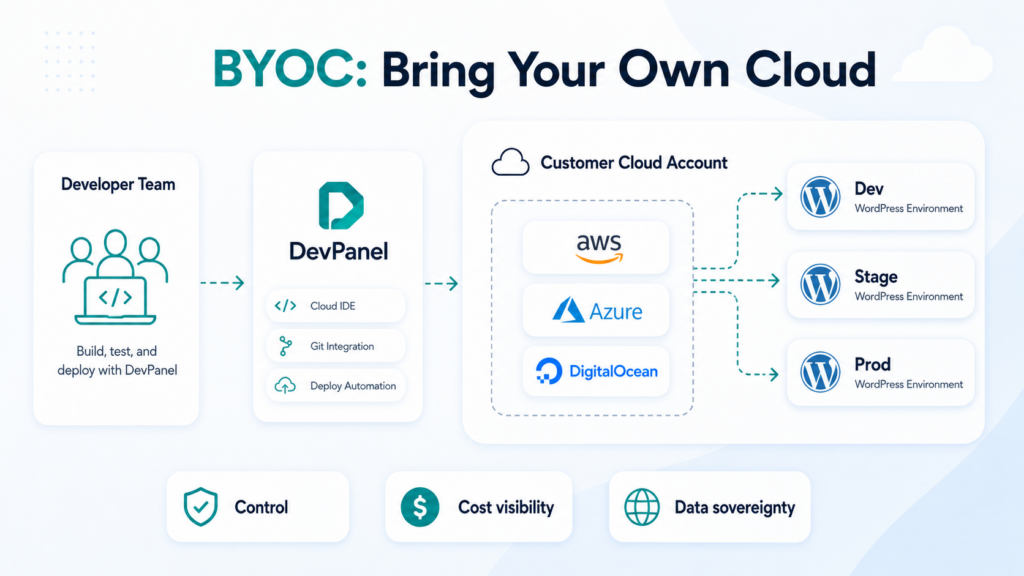
DevPanel uses a Bring Your Own Cloud model. The application infrastructure runs inside the customer’s AWS, Azure, or DigitalOcean account rather than being hidden inside a proprietary hosting platform.
This gives the organization more control over:
- Infrastructure access
- Cloud spending
- Security tools
- Networking
- Storage
- Backups
- Scaling
- Compliance requirements
- Data location
It also means that the customer can see the underlying cloud bill instead of receiving a single bundled hosting invoice.
Real WordPress example
Parents Helping Parents migrated its WordPress website from WP Engine to AWS using DevPanel. The organization moved from a single staging environment to multiple development and staging environments, while giving its volunteer developers access to browser-based VS Code and a preconfigured WordPress stack.
DevPanel has also been used by the Academy of Model Aeronautics to manage more than 30 websites across WordPress, Drupal, and Backdrop through one dashboard. According to the case study, one person could manage the organization’s web operations after the migration.
Best for
DevPanel is best for:
- WordPress agencies
- Organizations managing many websites
- Teams moving away from managed hosting platforms
- Teams that want WordPress in their own cloud
- Organizations that need development and deployment in one platform
- Teams that want cloud control without building an internal DevOps platform
2. GitHub Codespaces
GitHub Codespaces is an excellent choice for teams whose development workflow already revolves around GitHub.
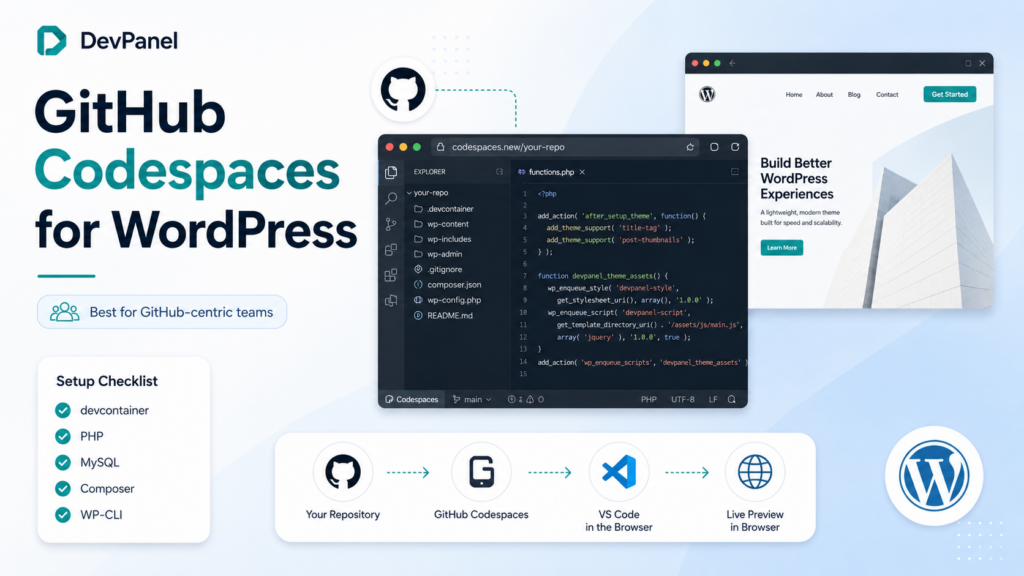
A codespace is created directly from a GitHub repository and can be opened in a browser-based version of VS Code or connected to a local editor.
The environment is defined through a devcontainer configuration. This allows the team to specify the operating system, extensions, packages, ports, startup commands, and services needed by the project.
WordPress configuration
GitHub Codespaces does not provide a complete WordPress environment automatically. The team must create and maintain a development container that includes:
- PHP
- A web server
- MySQL or MariaDB
- Composer
- WP-CLI
- Node.js
- WordPress configuration
- Database initialization
- File permissions
- Port forwarding
Once that work has been completed, the result can be highly repeatable.
Pricing considerations
GitHub personal accounts currently include a monthly Codespaces allowance. GitHub Free personal accounts receive 120 compute hours and 15 GB-month of storage, while GitHub Pro accounts receive 180 compute hours and 20 GB-month of storage.
GitHub organization and enterprise plans do not automatically include a free Codespaces quota. Their usage is billed according to compute time and storage.
Limitations for WordPress teams
Codespaces is a development environment rather than a full WordPress operations platform.
Teams still need separate systems for:
- Hosting
- Production deployments
- Database synchronization
- Backups
- SSL
- Application monitoring
- Blue/green releases
- Cloud infrastructure management
It is an excellent developer workspace, but it does not replace a hosting platform or application orchestration layer.
Best for
GitHub Codespaces is best for:
- Teams standardized on GitHub
- Developers comfortable with devcontainers
- Open-source WordPress plugin projects
- Teams that already have separate deployment infrastructure
- Organizations seeking tight pull-request integration
3. Codeanywhere
Codeanywhere is one of the most approachable options for teams that want a hosted WordPress development environment without configuring their own cloud account.
Its WordPress environment includes a one-click WordPress container, browser-based VS Code, preview environments, and team collaboration features.
Codeanywhere states that its WordPress container can be launched on its infrastructure in approximately 45 seconds. It also supports real-time pair programming, shared terminal sessions, preview URLs, and deployment to cloud providers such as AWS, Azure, Google Cloud, and DigitalOcean.
Why it is useful for WordPress
Codeanywhere is designed to minimize setup.
Developers can quickly create an environment for:
- Theme development
- Plugin development
- WordPress training
- Client demonstrations
- Debugging
- Short-term testing
- Pair programming
Its browser interface is based on VS Code, which reduces the learning curve for developers already familiar with the editor.
Tradeoffs
The environment is primarily hosted and managed by Codeanywhere. This makes it easier to get started, but it provides less direct infrastructure control than a BYOC or self-hosted platform.
It is also more focused on development workspaces than on managing the full WordPress lifecycle across production infrastructure.
Best for
Codeanywhere is best for:
- Freelancers
- Small agencies
- Training environments
- Teams that want one-click WordPress workspaces
- Developers who value real-time collaboration
- Short-lived WordPress projects and demonstrations
4. Ona
Ona is the platform that evolved from Gitpod. It combines cloud development environments, prebuilt workspaces, and background AI coding agents.
Its Core plan currently starts at $20 per month and supports up to 100 team members, unlimited parallel environments, environment prebuilds, role-based access, project sharing, and machines with up to 32 CPU cores and 128 GB of memory.
The Core plan runs on Ona’s AWS infrastructure. Enterprise customers can use a private, Ona-managed VPC deployment in AWS or Google Cloud.
Why Ona stands out
Ona’s strongest feature is the combination of development environments and AI-agent workflows.
Teams can:
- Prebuild environments before a developer opens them
- Run multiple workspaces in parallel
- Share project environments
- Use AI agents inside controlled development environments
- Standardize commands and policies
- Manage access at the organization level
WordPress considerations
Ona is not built specifically for WordPress. A team will still need to create a project configuration containing PHP, MySQL, Composer, WP-CLI, WordPress, and its supporting services.
Its Core environments are also automatically deleted after seven days of inactivity, so teams must understand how persistent data, databases, uploads, and backups are handled.
For a WordPress engineering team already interested in AI agents and prebuilt workspaces, that configuration work may be worthwhile.
Best for
Ona is best for:
- AI-assisted development teams
- Teams that value workspace prebuilds
- Organizations running many parallel development tasks
- Engineering teams working across several frameworks
- Enterprises that want private VPC environments
5. Coder
Coder is a self-hosted cloud development platform designed for organizations that want extensive control over infrastructure, workspace policies, and developer access.
Coder workspaces are defined through Terraform and can run on virtual machines, Kubernetes pods, or containers. Developers can connect using browser-based IDEs, VS Code, JetBrains products, Cursor, SSH, remote desktop, or terminals.
Workspaces can also shut down automatically when idle to reduce infrastructure costs.
Why enterprises choose Coder
Coder is well suited to organizations that already have a platform engineering or DevOps team.
Administrators can define:
- Approved workspace templates
- Cloud resources
- Operating systems
- CPU and memory limits
- Security policies
- Network access
- Identity-provider integration
- IDE choices
- Automatic shutdown behavior
This flexibility is valuable for regulated enterprises and organizations with strict infrastructure requirements.
WordPress considerations
Coder does not include a ready-made WordPress operations workflow. The organization must create and maintain its own WordPress templates, including:
- PHP
- Web server configuration
- Database services
- WordPress files
- WP-CLI
- Composer
- Storage
- Preview networking
- Database initialization
- Secrets
Coder is also self-hosted rather than a fully managed SaaS product. The organization remains responsible for operating the platform.
Best for
Coder is best for:
- Large enterprises
- Organizations with internal platform teams
- Regulated environments
- Teams requiring self-hosted workspaces
- Organizations supporting several programming languages and IDEs
- Companies willing to build their own WordPress development platform
Why Cursor and Claude Code are not on this list
Cursor and Claude Code are powerful development tools, but they do not belong in the same category as complete cloud development environments.
Cursor is an AI-enabled editor. Claude Code is an AI coding agent that works through a terminal and other interfaces.
Neither automatically provides the full WordPress environment, including PHP, MySQL, a web server, storage, networking, preview URLs, database tools, and environment lifecycle management.
They can still be used with cloud environments.
For example:
- Cursor can connect to a Coder workspace.
- Claude Code can run inside a DevPanel, Codespaces, Ona, or Coder environment.
- AI agents can modify themes and plugins inside the same standardized environment used by the development team.
The cloud IDE provides the workspace. The AI tool assists with the work performed inside it.
BYOC versus vendor-hosted cloud IDEs
One of the most important differences between these platforms is where the development environment runs.
Vendor-hosted environments
GitHub Codespaces, Codeanywhere, and Ona Core run primarily on vendor-managed infrastructure.
Advantages include:
- Faster initial setup
- Less infrastructure management
- Simple usage-based billing
- No cloud account required
Potential disadvantages include:
- Less infrastructure control
- Vendor-specific storage and networking
- Usage pricing that can increase as the team grows
- More separation between development and production
Bring Your Own Cloud and self-hosted environments
DevPanel and Coder run on infrastructure controlled by the customer. Ona also offers private VPC deployment through its Enterprise tier.
Advantages include:
- Direct infrastructure access
- Greater control over data location
- Clearer cloud cost visibility
- Integration with existing security tools
- More control over networking and compliance
- Easier alignment between development and production infrastructure
Potential disadvantages include:
- A cloud account is required
- The organization carries more infrastructure responsibility
- Some teams may need implementation or DevOps support
How to choose the best cloud IDE for your WordPress team
The right platform depends on the problem you are trying to solve.
Choose DevPanel when:
- You manage multiple WordPress websites.
- You want development, deployment, backups, and infrastructure management together.
- You want to run applications in your own AWS, Azure, or DigitalOcean account.
- You are moving away from a managed WordPress hosting provider.
- You do not want to build your own cloud development platform.
Choose GitHub Codespaces when:
- All project code already lives on GitHub.
- Your team understands devcontainers.
- You already have a separate hosting and deployment system.
- Tight repository and pull-request integration matters most.
Choose Codeanywhere when:
- You want a quick hosted WordPress workspace.
- Real-time pair programming is important.
- You do not want to manage cloud infrastructure.
- Your projects are relatively small or temporary.
Choose Ona when:
- AI coding agents are central to your development strategy.
- You want workspace prebuilds and parallel environments.
- Your team develops more than WordPress.
- You are comfortable configuring the WordPress stack.
Choose Coder when:
- You have a platform engineering team.
- Every development environment must run in infrastructure you control.
- You need custom workspace policies and enterprise governance.
- You are prepared to build and operate your own WordPress templates.
Pricing comparison
| Platform | Pricing approach |
|---|---|
| DevPanel | Community Edition is free; customers pay their cloud provider directly. Optional support and engineering services are available. |
| GitHub Codespaces | Usage-based billing for compute and storage, with monthly allowances for personal accounts. |
| Codeanywhere | Limited free access and paid per-member workspace plans. |
| Ona | Core starts at $20 per month and uses Ona Compute Units; Enterprise pricing is customized. |
| Coder | Self-hosted platform with infrastructure, operations, and enterprise costs managed by the customer. |
Pricing should not be evaluated in isolation.
A platform that appears inexpensive per developer can become costly if the team needs many continuously running environments. Conversely, a self-hosted platform can have low licensing costs but require considerable engineering time to implement and operate.
The most useful calculation is the total cost of:
- Platform fees
- Cloud compute
- Storage
- Idle environments
- Setup
- DevOps maintenance
- Developer onboarding
- Deployment tooling
- Backups
- Support
- Security administration
Conclusion
The best cloud IDEs for WordPress do more than move a code editor into a browser. They provide consistent, reproducible environments that help developers onboard faster, isolate changes, collaborate remotely, and reduce the configuration differences that slow teams down.
GitHub Codespaces is a strong choice for GitHub-centered development. Codeanywhere offers an accessible one-click WordPress workspace. Ona combines development environments with AI agents and prebuilds. Coder gives enterprises the tools to create a fully self-hosted development platform.
DevPanel stands apart for WordPress agencies and organizations that want the cloud IDE, application environments, deployment workflow, and infrastructure orchestration in one platform.
Instead of separating development from hosting and operations, DevPanel connects the entire workflow while allowing the organization to retain control of its own cloud account.
Build WordPress in the browser. Deploy it to your own cloud. Manage the complete application lifecycle from one platform.
Frequently asked questions
What are the best cloud IDEs for WordPress in 2026?
The best cloud IDEs for WordPress are DevPanel, GitHub Codespaces, Codeanywhere, Ona, and Coder. DevPanel is best suited to WordPress agencies and BYOC environments, while the other platforms serve GitHub, hosted workspace, AI-agent, and self-hosted enterprise use cases.
Which cloud IDE is best for WordPress agencies?
DevPanel is the strongest option for agencies managing multiple WordPress websites because it combines browser-based VS Code with application cloning, database tools, branch workflows, CI/CD, blue/green deployments, backups, and customer-owned cloud infrastructure.
Codeanywhere is also useful for smaller agencies that primarily need fast hosted WordPress workspaces and real-time collaboration.
Is a cloud IDE better than local WordPress development?
For teams, a cloud IDE often provides greater consistency. Every developer can work with the same PHP version, database configuration, dependencies, tools, and project settings.
Local environments can still work well for individual developers who prefer complete offline control.
Can WordPress cloud IDEs support Composer and WP-CLI?
Yes. A properly configured WordPress cloud environment can include Composer, WP-CLI, Git, Node.js, npm, database tools, and shell access.
DevPanel includes a preconfigured WordPress workflow, while platforms such as Codespaces, Ona, and Coder require the team to define these tools in the project or workspace template.
Can a WordPress cloud IDE run inside my AWS or Azure account?
Yes. DevPanel can run WordPress applications and development environments in your AWS, Azure, or DigitalOcean account.
Coder can also be self-hosted on cloud infrastructure controlled by your organization. Ona provides private VPC deployment through its Enterprise offering.
Are Cursor and Claude Code cloud IDEs?
Not by themselves. Cursor is an AI-enabled editor, while Claude Code is an AI coding agent. They can be used inside or alongside a cloud development environment, but they do not automatically provide the complete PHP, database, networking, storage, and WordPress application stack.
How much does a WordPress cloud IDE cost?
The cost varies by platform.
DevPanel’s Community Edition is free, with the customer paying for the underlying cloud infrastructure. GitHub Codespaces charges for compute and storage after included personal-account allowances. Codeanywhere uses workspace subscriptions, Ona combines subscription pricing with compute credits, and Coder is self-hosted.
The total cost should include infrastructure, platform fees, support, setup, and ongoing DevOps work.