Best WordPress Website Setup on AWS: Choosing the Right Stack in 2026
Running a WordPress website on AWS gives you more control than traditional managed hosting, but AWS alone does not automatically make a site secure, efficient, or easy to manage.
That is the real question in 2026: not whether WordPress can run on AWS, but what operational layer sits between your WordPress site and the raw cloud.
A good WordPress-on-AWS setup should give your team infrastructure ownership, lower hosting costs, secure workflows, Dev/Test/Stage/Production environments, automated deployments, backups, monitoring, and a practical way for developers to work without becoming AWS experts.
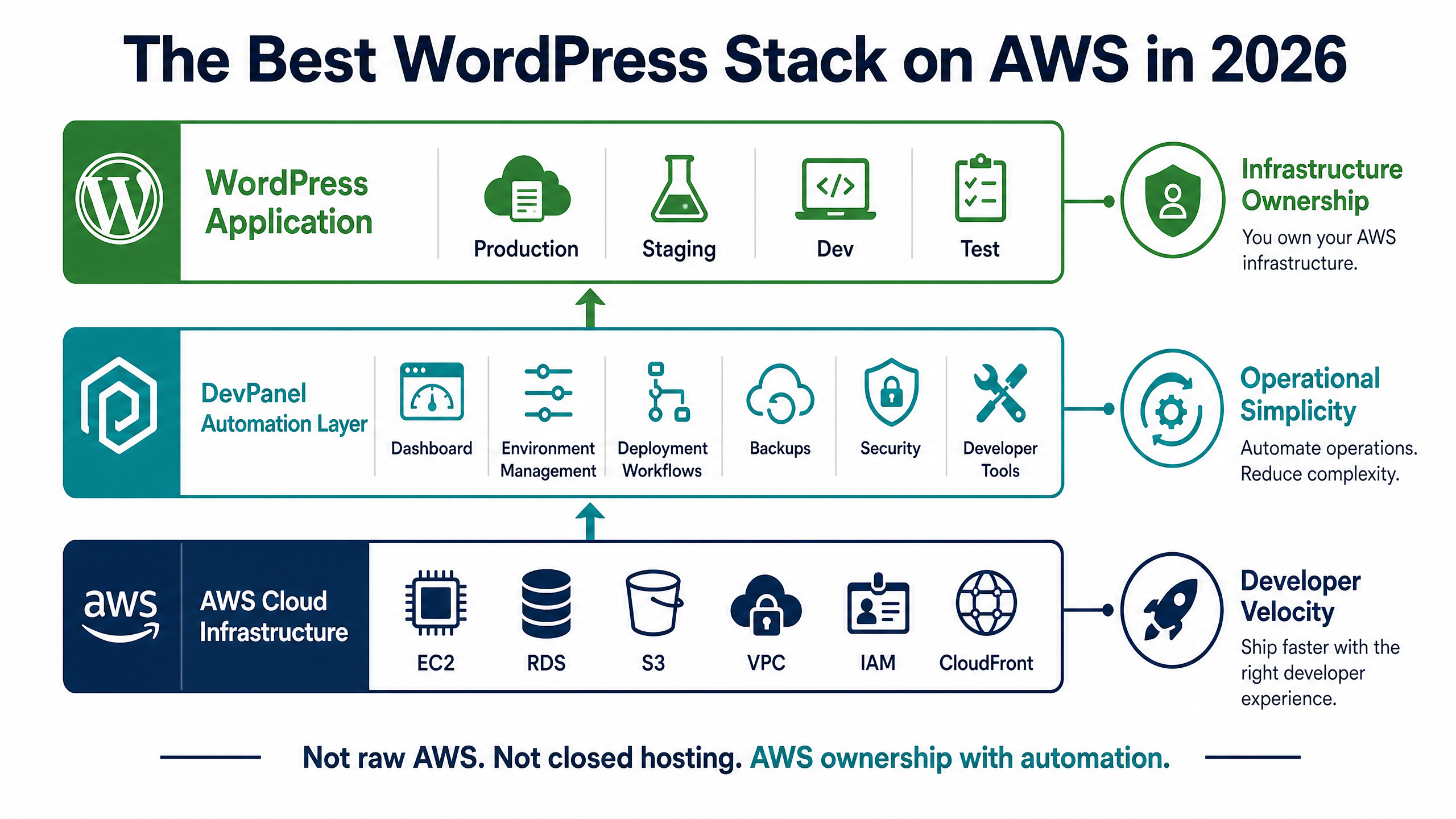
That is where DevPanel fits. DevPanel is not a traditional managed host. It is a cloud orchestration and development platform that helps teams run WordPress, Drupal, Laravel, Node.js, and custom applications inside their own AWS, Azure, DigitalOcean, or Kubernetes environment.
Key Takeaways
| Question | Short Answer |
| Is a WordPress website on AWS cheaper than managed hosting? | Often, yes. A BYOC setup lets you pay your cloud provider directly instead of paying a bundled managed-hosting markup. |
| Who is WordPress on AWS best for? | Agencies, nonprofits, startups, enterprises, and teams that need repeatable Dev/Test/Stage/Production workflows. |
| Do I need a DevOps team to run WordPress on AWS? | Not necessarily. DevPanel automates much of the provisioning, deployment, security, backup, and environment-management work. |
| Can I manage multiple WordPress sites from one place? | Yes. DevPanel gives teams a centralized dashboard for managing multiple apps, sites, teams, and environments. |
| Is WordPress on AWS secure by default? | No. AWS gives you infrastructure primitives, but WordPress still needs hardening, updates, access control, backups, monitoring, and operational discipline. |
| Does DevPanel create vendor lock-in? | No. In a BYOC model, your apps, servers, clusters, and data stay inside your own cloud account. |
| Is DevPanel Community Edition free? | Yes. DevPanel Community Edition is free to use inside your own cloud account; you pay your cloud provider directly for infrastructure usage. |
Why Run a WordPress Website on AWS Instead of Traditional Hosting?
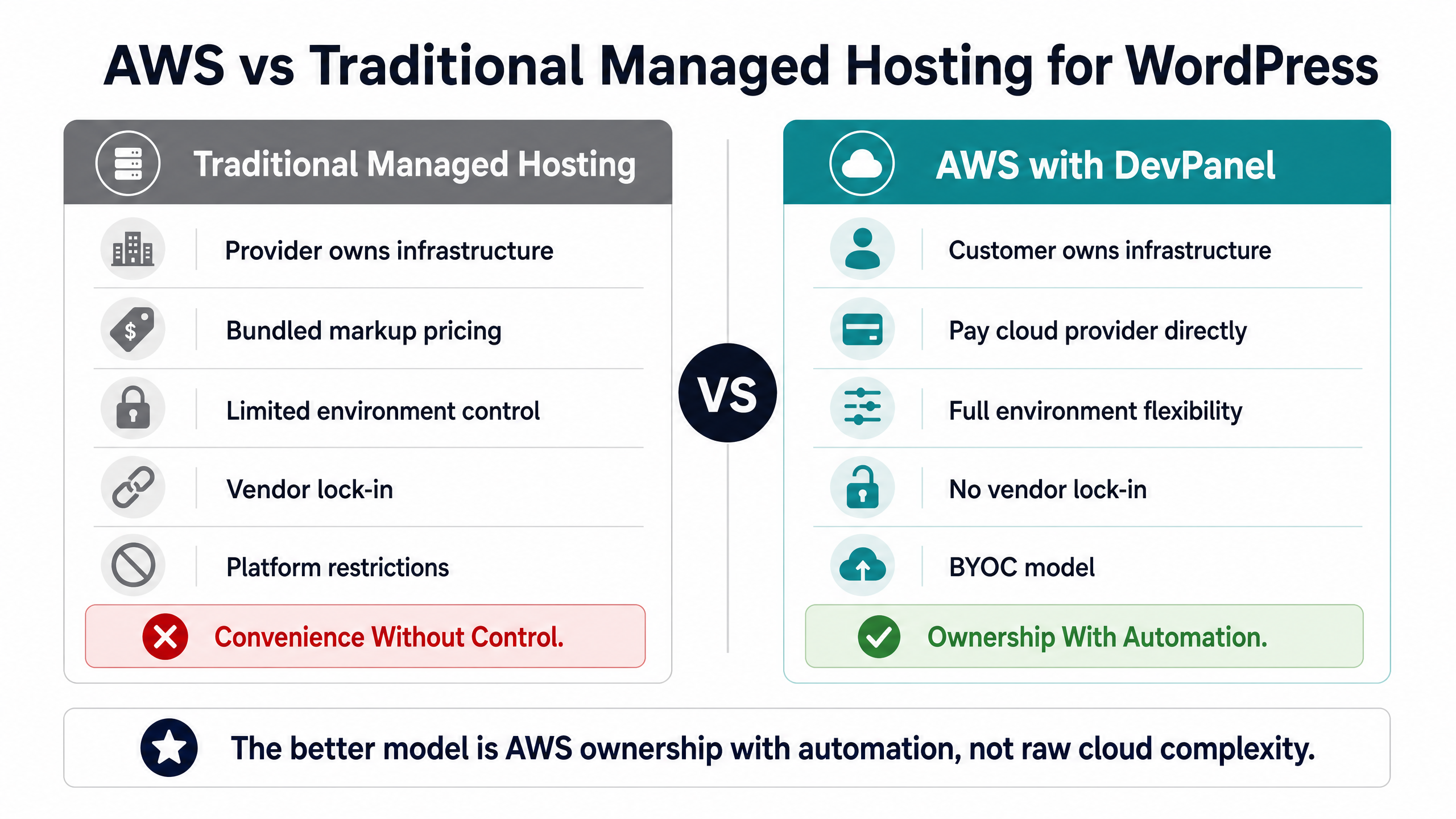
Traditional managed WordPress hosts sell convenience. For many teams, that convenience is useful at first. The problem appears later, when the site grows, the team needs more environments, the agency needs more control, or the monthly bill starts to look disconnected from the actual cost of compute.
AWS gives you direct access to the underlying infrastructure. You control the compute, database, storage, networking, scaling, and security architecture. That gives you more flexibility than a closed managed-hosting platform.
But raw AWS also creates complexity.
Without the right operational layer, your team may need to manage EC2, RDS, S3, VPCs, IAM, SSL, load balancing, backups, monitoring, deployment pipelines, and security hardening. That is too much for many WordPress teams, especially agencies and nonprofits that do not have dedicated cloud engineers.
The better model is not “raw AWS with no help.” The better model is AWS ownership with automation.
DevPanel gives teams a dashboard and automation layer for running WordPress on cloud infrastructure they control. That means teams can get the cost and ownership benefits of AWS without forcing every developer or site owner to learn cloud operations from scratch.
Best for Agencies Managing Multiple WordPress Websites
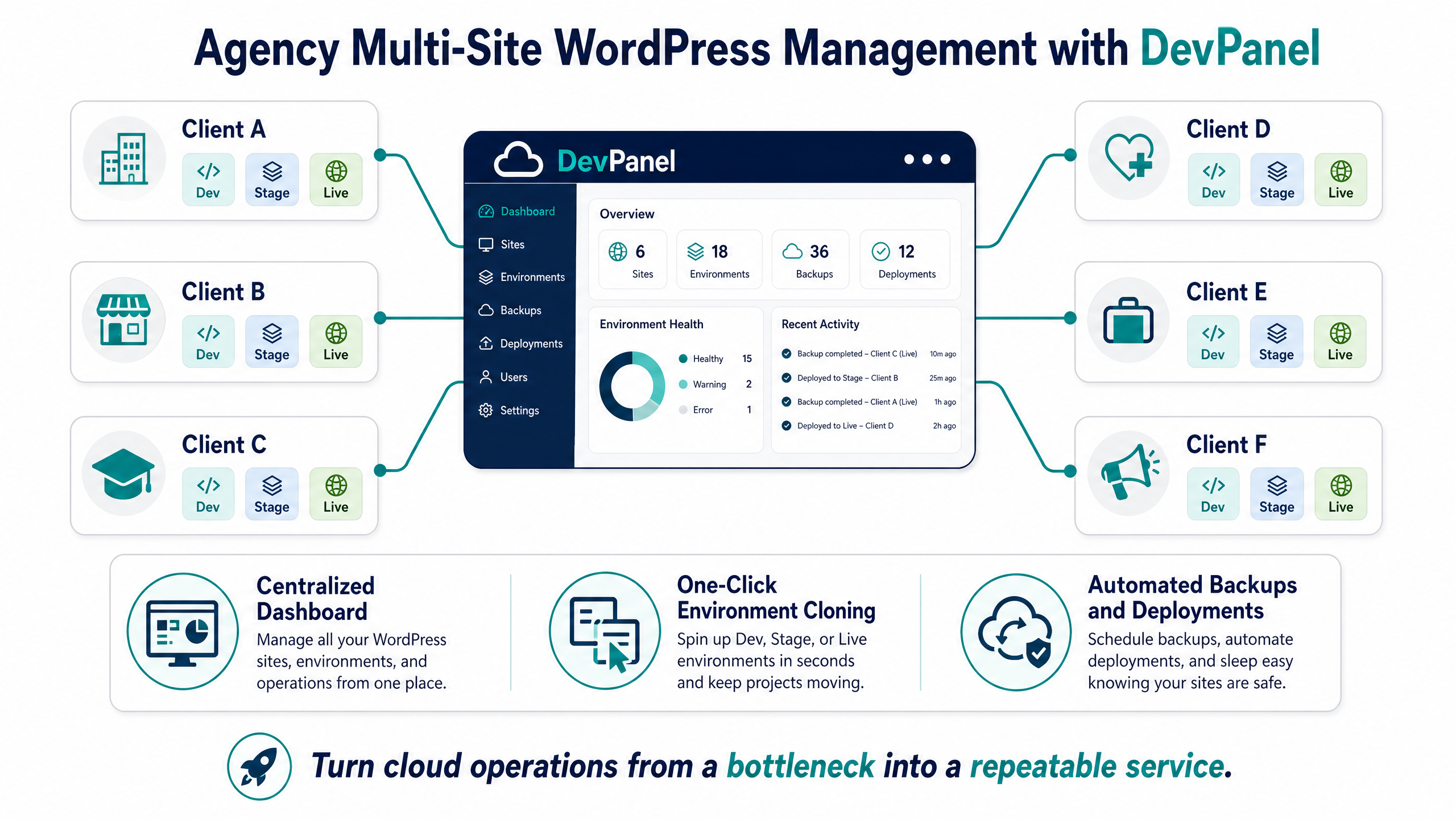
Agencies often manage many WordPress sites across many clients. Each client may need its own production site, staging site, backups, access rules, deployment process, and review workflow.
A single shared staging environment is not enough. A single overworked developer manually cloning sites is not sustainable. A hosting provider that charges per site can become expensive quickly.
With DevPanel, agencies can manage multiple sites and environments from a centralized dashboard. Teams can create Dev, Test, Stage, and Live environments, clone applications, manage branches, and give developers browser-based access to the tools they need.
This is especially valuable for agencies that want to offer enterprise-grade cloud operations without hiring a full internal DevOps team.
The Academy of Model Aeronautics case study shows this pattern clearly. AMA manages 30+ websites across Drupal, WordPress, and Backdrop. Before DevPanel, simple tasks such as creating development or staging environments required coordination with vendors. After DevPanel, one person could manage the web portfolio through a unified dashboard, with automated environment creation, security configuration, and lifecycle management.
That is the agency lesson: the right platform can turn cloud operations from a bottleneck into a repeatable service.
Best for Startups and Nonprofits Maximizing Cloud Credits
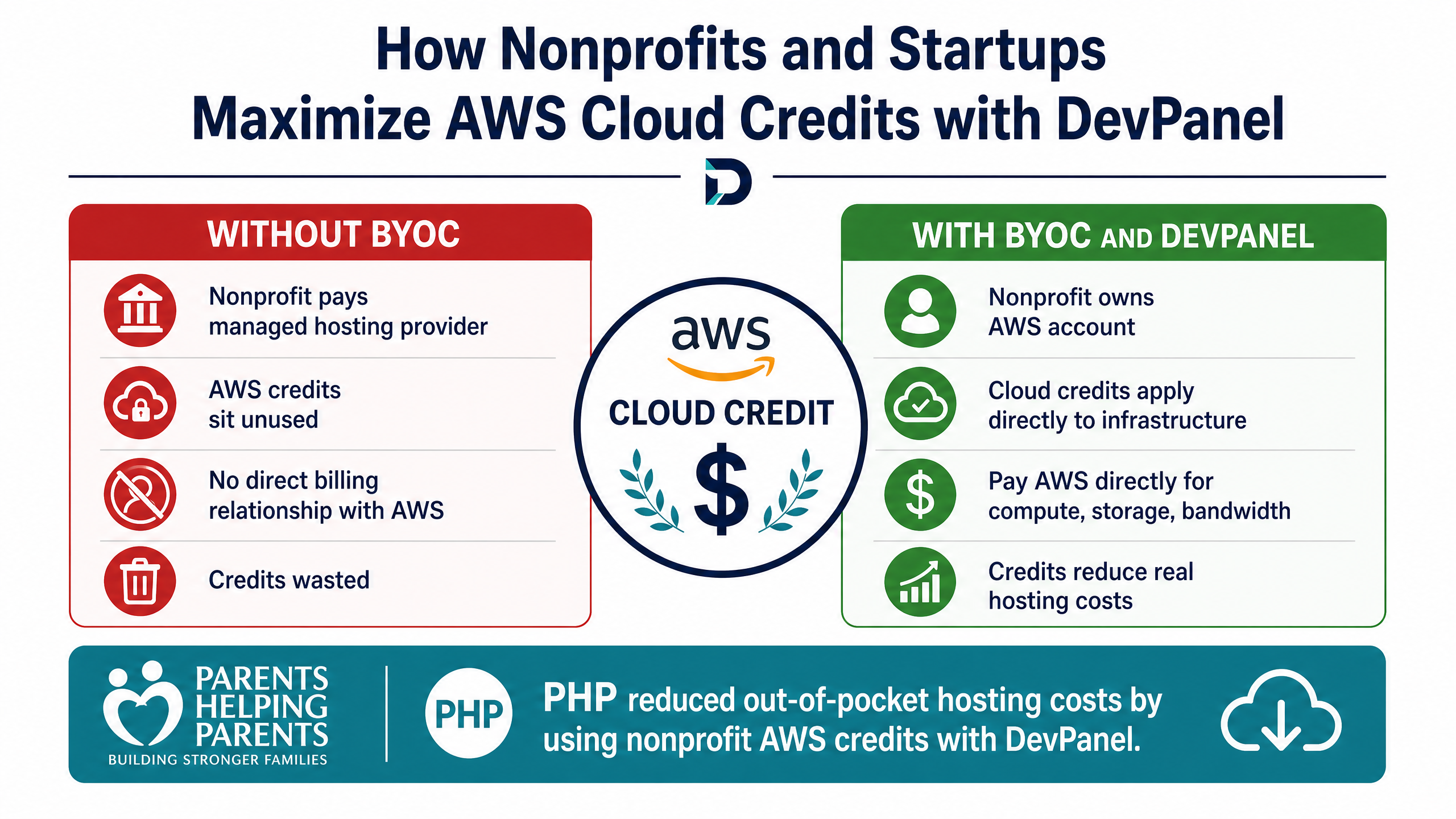
Startups and nonprofits often have access to cloud credits, but those credits only help if the workload actually runs inside the organization’s own cloud account.
If a nonprofit or startup hosts WordPress on a managed platform that does not use its own AWS billing account, those credits may not reduce the real hosting bill. The organization still pays the managed host, while cloud credits sit unused or underused.
Running WordPress on AWS changes that. Eligible organizations can apply cloud credits directly against compute, storage, bandwidth, and related infrastructure costs.
The Parents Helping Parents case study is a strong example. PHP migrated its WordPress site from WP Engine to AWS using DevPanel as the orchestration platform. The organization reduced out-of-pocket hosting costs by using nonprofit AWS credits, gained more development and staging flexibility, and improved its workflow with browser-based VS Code, Cloudflare CDN integration, and a built-in Web Application Firewall.
For nonprofits, this matters because every dollar saved on infrastructure can be redirected toward the mission. For startups, it means cloud credits can support real application infrastructure instead of being wasted while the team pays a separate managed-hosting bill.
Best for Reducing WordPress Hosting Costs
The “platform markup” problem is simple: many managed hosting platforms bundle infrastructure, tooling, support, and margin into one monthly fee. That can be convenient, but it can also make hosting far more expensive than the underlying cloud resources.
A BYOC model separates those costs.
With DevPanel Community Edition, the platform itself is free to use inside your own cloud account. You pay AWS, Azure, DigitalOcean, or your Kubernetes provider directly for the infrastructure you consume. If you need help, DevPanel offers optional implementation, consulting, support, and managed services.
This gives teams a more transparent cost model.
The Voice of America case study is not WordPress-specific, but it shows the same economic pattern at enterprise scale. A U.S. government news agency evaluated DevPanel on AWS and found more than 75% lower annual hosting cost compared to a managed-platform scenario, while gaining more infrastructure control and faster performance.
For WordPress teams, the same principle applies: the more sites and environments you manage, the more important it becomes to separate platform tooling from marked-up infrastructure.
Best for Teams That Need Dev, Test, Stage, and Production Workflows
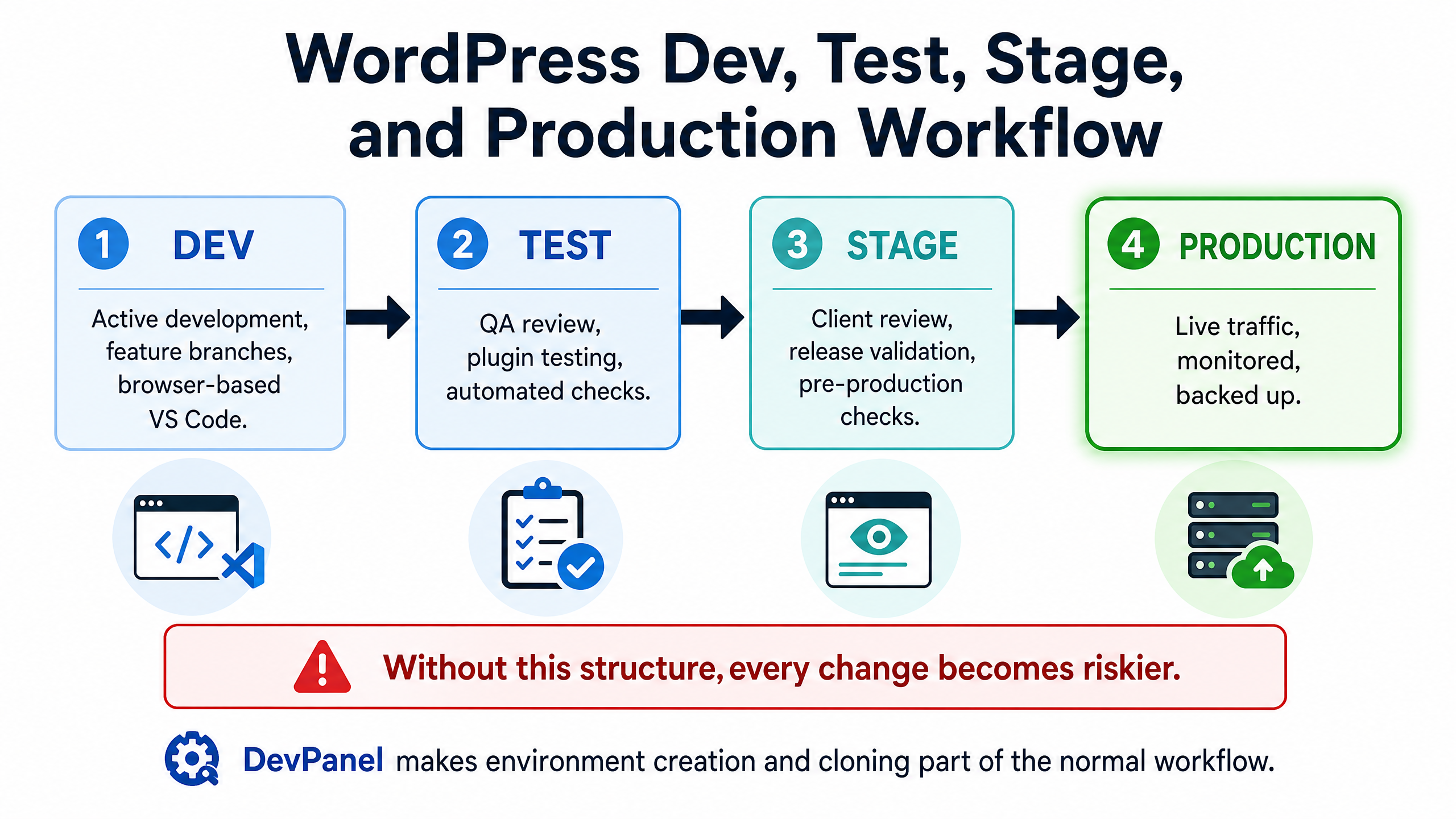
A serious WordPress workflow needs more than production and one staging site.
Teams need development environments for active work, testing environments for QA, staging environments for release review, and production environments for live traffic. Without that structure, every change becomes riskier.
A single-environment WordPress setup creates predictable problems:
•Developers test changes on production.
•QA has no clean place to review work.
•Plugin updates are delayed because nobody wants to break the live site.
•Client reviews happen on incomplete or unstable environments.
•Multiple developers overwrite each other’s changes.
DevPanel helps solve this by making environment creation and cloning part of the normal workflow. Teams can clone code, files, and databases into controlled environments, connect those environments to Git workflows, and promote changes with more confidence.
For WordPress agencies, this is critical. It means plugin updates, theme changes, new integrations, and performance improvements can be tested before they reach production.
Best for Developers Who Want Cloud IDEs Without Local Setup
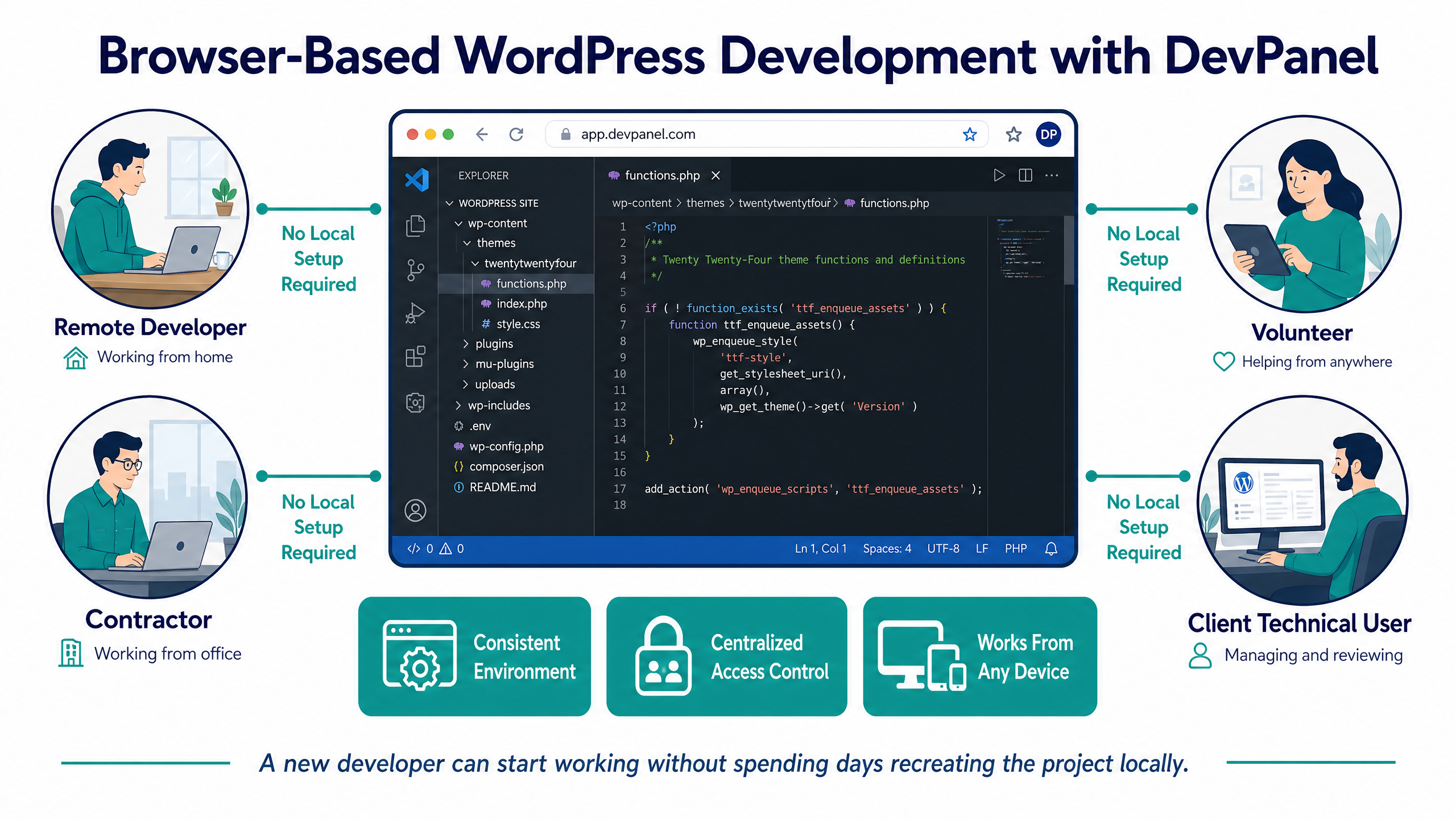
Local WordPress development is often slower than it should be.
A developer may need to install PHP, MySQL, Node.js, Composer, WP-CLI, Docker, SSL certificates, local database tools, and project-specific configuration before touching the actual work.
Cloud development environments reduce that friction.
With DevPanel, developers can access browser-based VS Code and supporting tools from the cloud environment. That means a new developer, contractor, or volunteer can start working without spending days recreating the project locally.
This is especially useful for distributed teams and agencies. A developer can work from any machine with a browser. The project environment stays consistent. The team avoids “works on my machine” problems. Access can be granted and revoked centrally.
For WordPress projects with rotating contractors, volunteers, or client-side technical users, this can save significant time.
Best for Security-First WordPress Teams
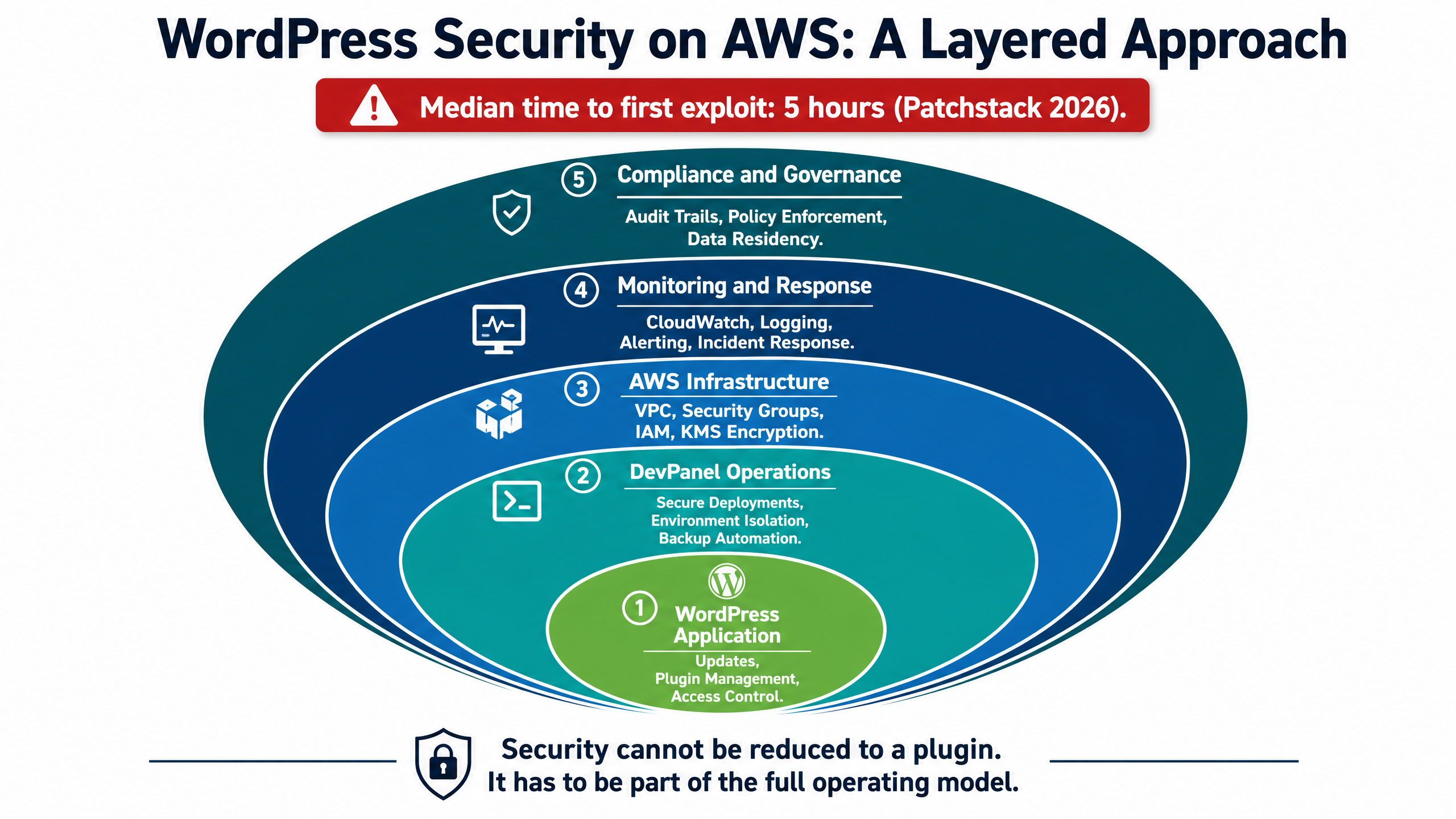
Running WordPress on AWS does not automatically make WordPress secure.
AWS gives teams powerful infrastructure controls: VPCs, security groups, IAM, managed databases, object storage, logging, monitoring, and firewall options. But those controls still have to be configured correctly. WordPress itself still needs updates, plugin management, backups, access controls, and monitoring.
Security also has to move fast. Patchstack’s 2026 WordPress security research found that the weighted median time to first exploit was 5 hours. That means many vulnerable WordPress sites have very little time between public disclosure and real-world attack attempts.
Patchstack also found that in a hosting-security test, 87.8% of vulnerability attacks bypassed hosting-layer defenses before being blocked at the application layer. The lesson is not that hosting security is useless. The lesson is that WordPress security needs layers: infrastructure controls, application hardening, vulnerability monitoring, patching workflows, backups, and operational response.
DevPanel helps by giving teams a more controlled operating model. Teams can isolate environments, manage access, automate backups, use secure deployment workflows, and connect WordPress operations to cloud-native security practices.
For enterprise, government, education, and nonprofit teams, this matters because security cannot be reduced to a plugin. It has to be part of the full operating model.
Best for Enterprise and Government WordPress Deployments
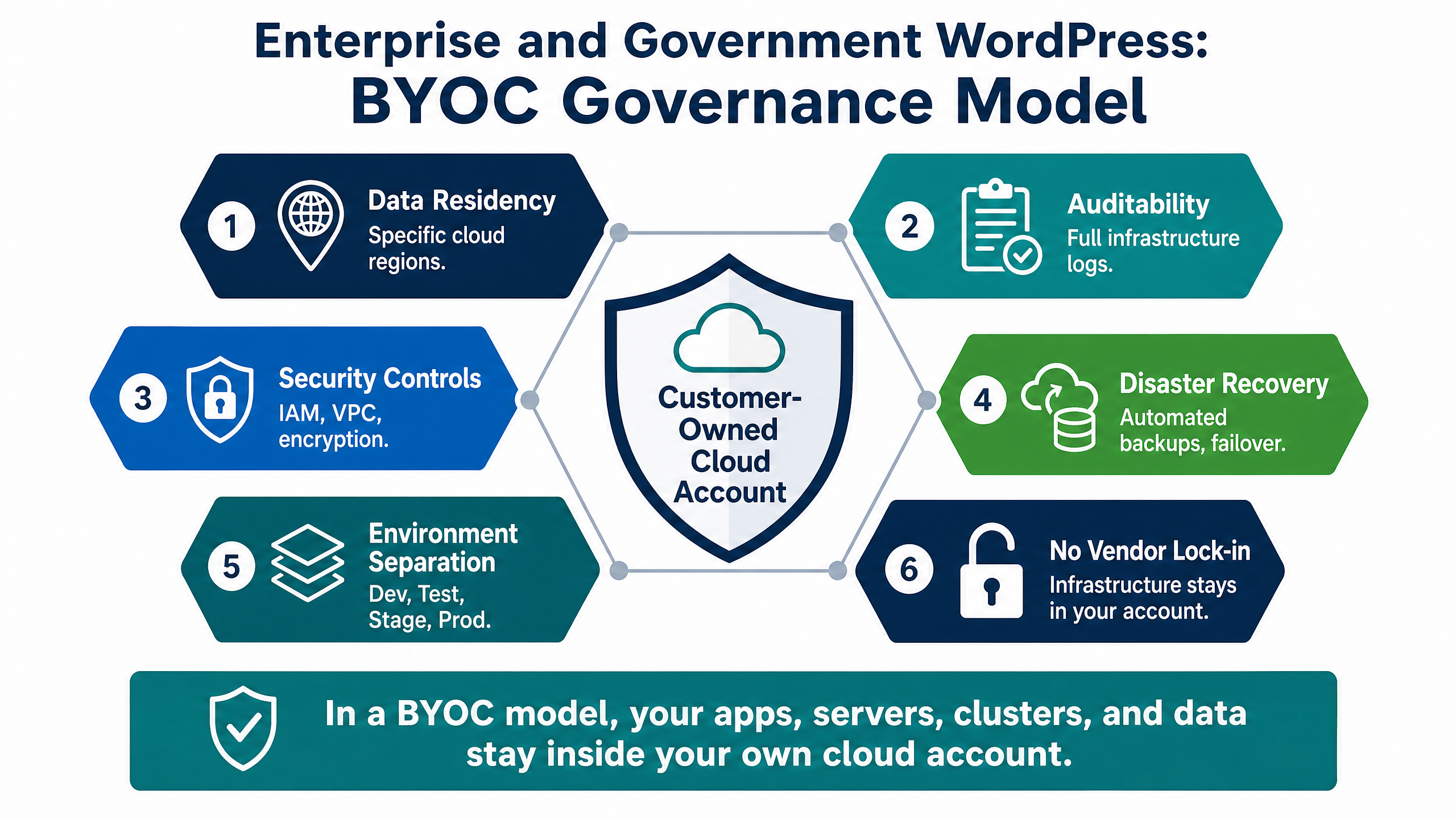
Enterprise and government teams have different requirements than small brochure sites.
They may need data residency, auditability, security controls, disaster recovery planning, environment separation, high availability, and documented deployment workflows. They may also need to avoid vendor lock-in because infrastructure ownership is part of their governance model.
This is where DevPanel’s BYOC approach becomes important.
With BYOC, the cloud account belongs to the organization. The servers, clusters, databases, files, and applications remain inside that account. DevPanel provides the management and automation layer, but the organization keeps ownership of the infrastructure and data.
That is different from a closed managed-hosting platform where the provider controls the underlying account and the customer only sees the dashboard.
For compliance-sensitive teams, ownership matters. It allows infrastructure decisions to be tied to specific cloud services, regions, security policies, and organizational controls.
DevPanel Is Not Traditional WordPress Hosting
DevPanel should not be understood as just another WordPress host.
Traditional hosting usually means your site runs inside the vendor’s infrastructure, on the vendor’s terms, with the vendor’s pricing model.
DevPanel’s core model is different. DevPanel runs in your cloud account. You use your own AWS, Azure, DigitalOcean, or Kubernetes infrastructure. You pay your cloud provider directly. DevPanel provides the automation, dashboard, workflows, deployment tooling, and operational layer.
For teams that want hands-on help, DevPanel also offers optional support and managed services. That makes the model flexible: self-managed when you want control, supported when you need help, and managed when you want DevPanel’s team involved operationally.
Conclusion
The best WordPress website setup on AWS is not raw cloud infrastructure by itself. It is cloud infrastructure you own, paired with an automation layer that makes it practical to use.
For agencies, that means managing more client sites without multiplying operational overhead.
For startups and nonprofits, it means using cloud credits more effectively.
For developers, it means browser-based workspaces instead of fragile local setup.
For security-first teams, it means stronger control over environments, access, backups, and deployment workflows.
For enterprise and government organizations, it means infrastructure ownership without giving up modern platform convenience.
DevPanel brings those pieces together. It gives WordPress teams a way to run on AWS and other cloud providers without turning every website project into a manual DevOps project.
The goal is not just to host WordPress on AWS.
The goal is to run WordPress on infrastructure you control, with the automation your team needs to move faster and operate safely.
Frequently Asked Questions
Is hosting a WordPress website on AWS worth it in 2026?
Yes, for teams that need more control, better development workflows, and clearer infrastructure ownership than traditional managed hosting provides. AWS gives you the infrastructure, while a platform like DevPanel helps make it easier to manage.
Do I need AWS experience to run WordPress on AWS with DevPanel?
No. DevPanel automates much of the provisioning, deployment, cloning, backup, and environment-management work. Technical teams still benefit from understanding the architecture, but they do not need to manually configure EC2 instances or VPCs.
Is WordPress on AWS cheaper than managed hosting?
It can be, especially when managing multiple sites or using cloud credits. A BYOC model lets you pay your cloud provider directly instead of paying a bundled managed-hosting markup.
Can agencies manage multiple WordPress sites with DevPanel?
Yes. DevPanel supports multiple apps, sites, teams, projects, and environments from a centralized dashboard. This makes it useful for agencies managing client portfolios.
Is WordPress on AWS secure by default?
No. AWS provides strong infrastructure tools, but WordPress still needs hardening, updates, backups, access control, monitoring, and security workflows. DevPanel helps teams operationalize those practices.
Can nonprofits use AWS credits for WordPress hosting?
Yes, when eligible and when the workload runs inside their own AWS account. The Parents Helping Parents case study shows how a nonprofit used AWS and DevPanel to reduce out-of-pocket hosting costs while improving development flexibility.
What happens if I stop using DevPanel?
In a BYOC setup, your infrastructure and data remain inside your own cloud account. Your servers, clusters, databases, files, and code are not trapped inside a vendor-owned hosting account.