
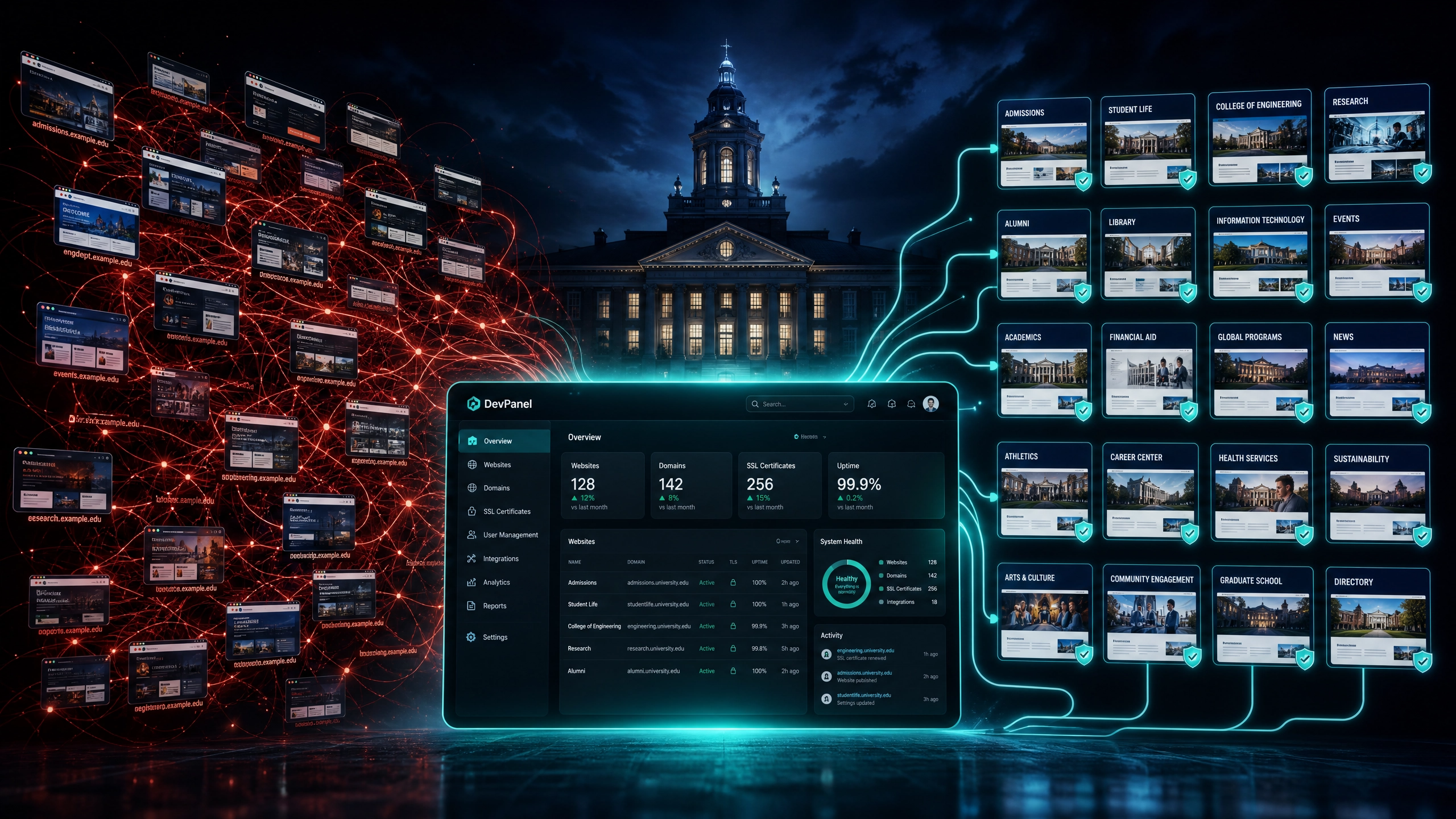
How Higher Ed IT Teams Eliminate Subdomain & Departmental Website Sprawl
Introduction: The Invisible Crisis Across Campus Workstations
Walk into almost any university or college web operations office, and you will find a skilled team fighting an exhausting, continuous battle against digital sprawl.
What begins as a single, beautifully architected institutional web portal eventually fractures over years of growth. A college of engineering wants its own distinct look. A newly funded medical research lab needs an immediate web presence for a grant deadline. An athletics booster club hires a local agency to launch a custom portal. A student alumni association sets up an isolated blogging platform on a personal credit card.
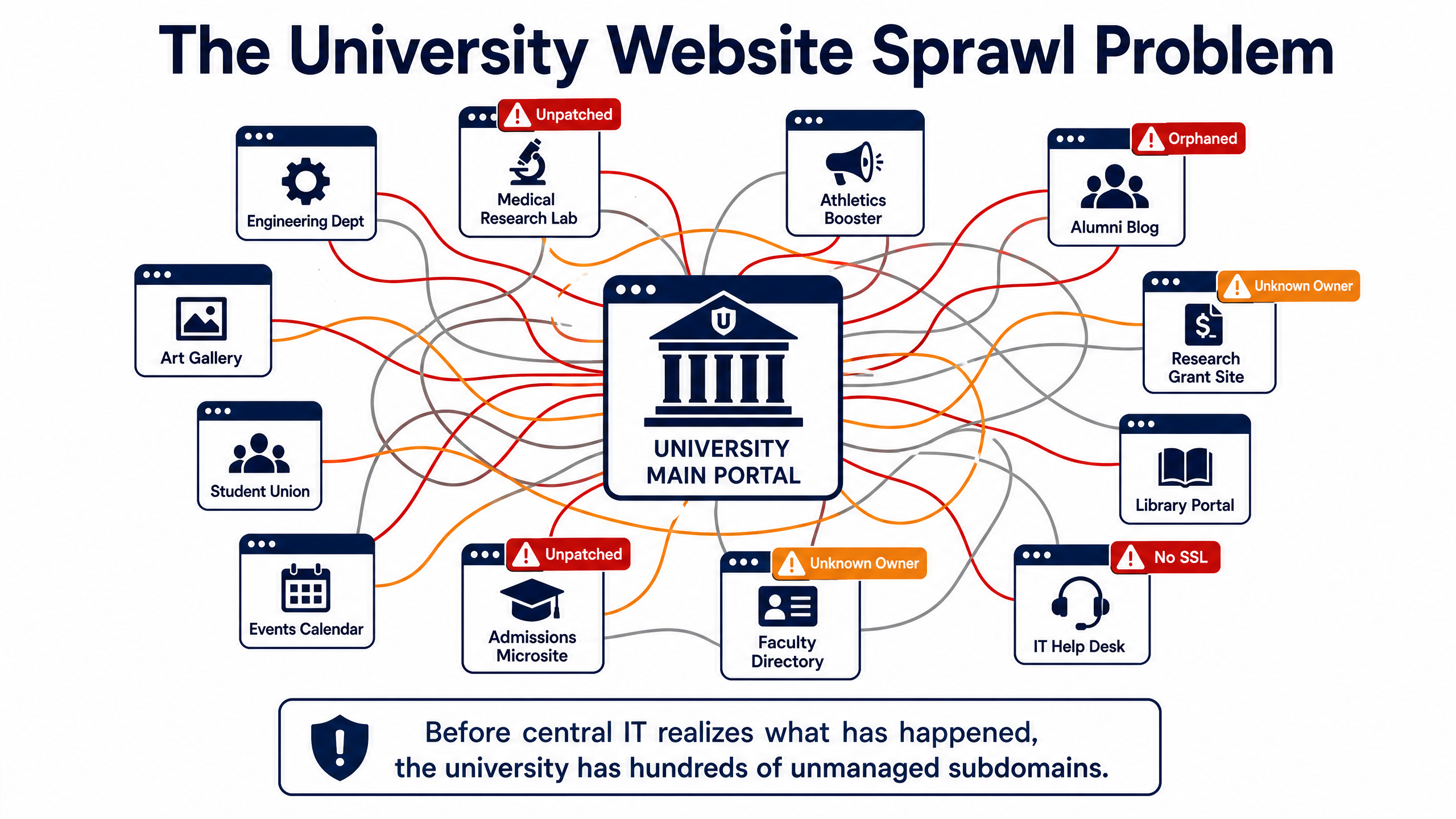
Before central IT realizes what has happened, the university’s digital footprint has expanded into a chaotic maze of hundreds of subdomains, orphaned microsites, abandoned staging environments, and unmonitored third-party hosting accounts.
Central IT loses visibility over basic operational questions:
•Who owns the domain registration for that departmental site?
•What version of PHP or Drupal core is running on that research server?
•Is that alumni microsite compliant with federal web accessibility standards?
•How much total money is the university spending across disparate cloud hosting vendors?
When departments bypass central IT—a phenomenon commonly known as Shadow IT—they rarely do so out of malice. They do it out of a need for speed. However, the resulting sprawl places the entire university at risk. Reclaiming control does not mean locking down campus servers so tightly that academic innovation grinds to a halt. Instead, modern higher education web teams are adopting a modern governance model: centralized infrastructure control paired with distributed content autonomy.
The True Cost of Higher Ed Website Sprawl
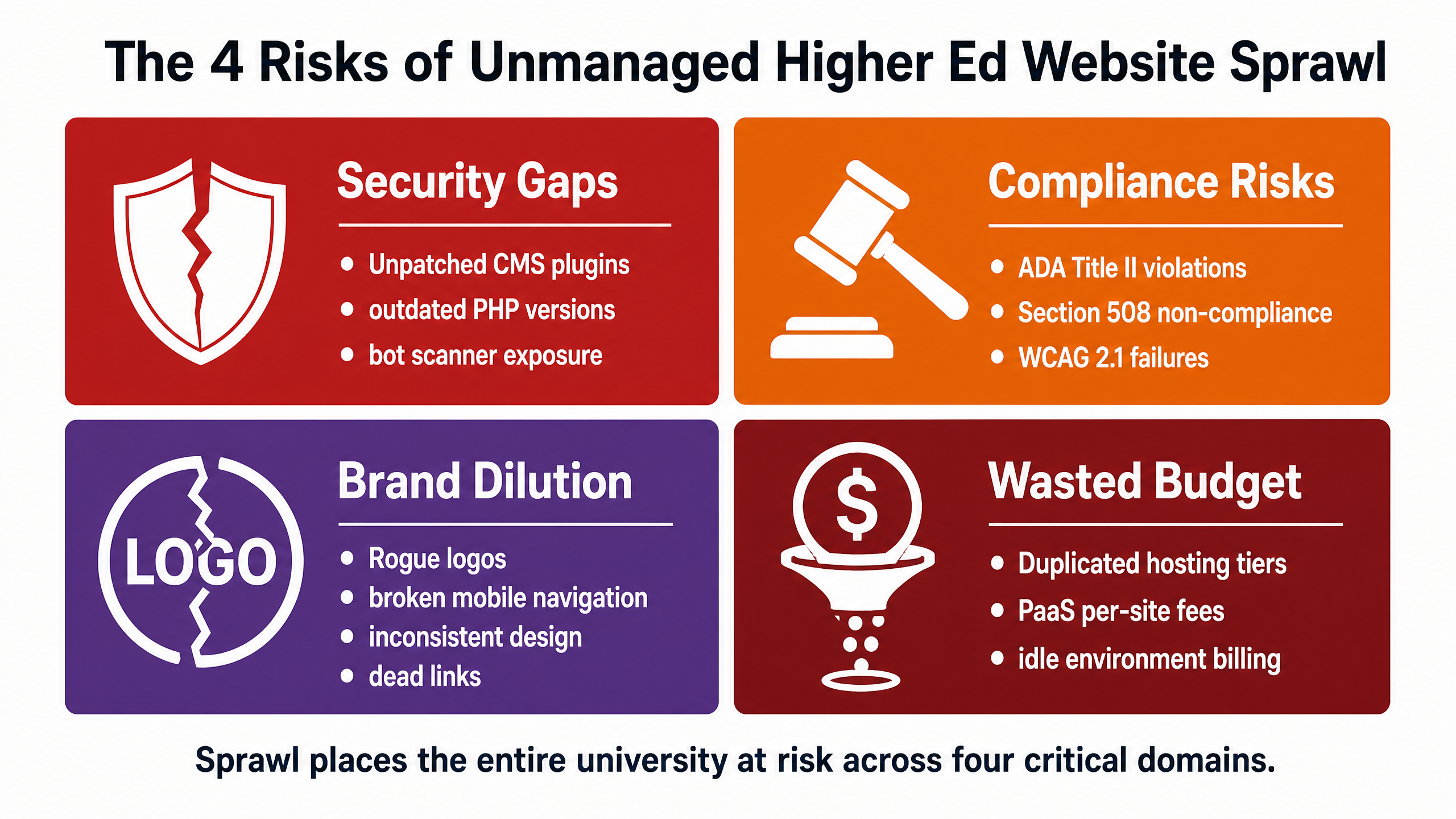
Allowing departmental microsites to proliferate without central oversight creates systemic risks across four major domains:
1. Severe Security & Vulnerability Exposure
Unmanaged departmental sites are primary entry points for malicious actors. A research lab site built five years ago on an unpatched content management system may sit forgotten by its original creators, but it remains visible to automated bot scanners. A single unpatched plugin or outdated server runtime on an obscure subdomain (labs.university.edu) can expose the institution’s core domain reputation to blacklist databases, open internal networks to lateral movement, or result in stolen student and faculty data.
2. Legal & Accessibility Liabilities (ADA Title II & Section 508)
Higher education institutions face stringent legal requirements regarding digital accessibility. Federal mandates, including ADA Title II enforcement and Section 508 regulations, require public and private educational web properties to meet WCAG 2.1 Level AA accessibility standards.
When an isolated department hires an external contractor to build a standalone site, accessibility is frequently treated as an afterthought. Non-compliant color contrasts, missing ARIA landmarks, uncaptioned video streams, and untagged PDF downloads on a single obscure department page expose the entire university to costly civil rights complaints, legal audits, and mandatory remediation consent decrees.
3. Brand Fragmentation and Broken User Experience
Prospective students, current researchers, and donors do not distinguish between the university’s main homepage and a secondary departmental microsite. To the user, it is all one institution. When a user navigates from a polished main site into a departmental page that features outdated logos, broken mobile navigation, non-responsive design, and dead links, trust deteriorates immediately. Sprawl destroys institutional brand equity.
4. Financial Inflation and Proprietary PaaS Multipliers
Managing dozens or hundreds of standalone website hosting contracts on traditional Platform-as-a-Service (PaaS) providers—such as Acquia Site Factory or Pantheon—results in staggering financial waste. Proprietary PaaS vendors routinely structure their pricing around fixed tier brackets or per-site fees.
As a university’s site count grows into the hundreds, hosting budgets explode. Central IT departments often find themselves paying enterprise-level PaaS fees for low-traffic departmental sites that sit completely static for 10 months out of the year.
The Modern Governance Blueprint: “Centralized Guardrails, Distributed Freedom”
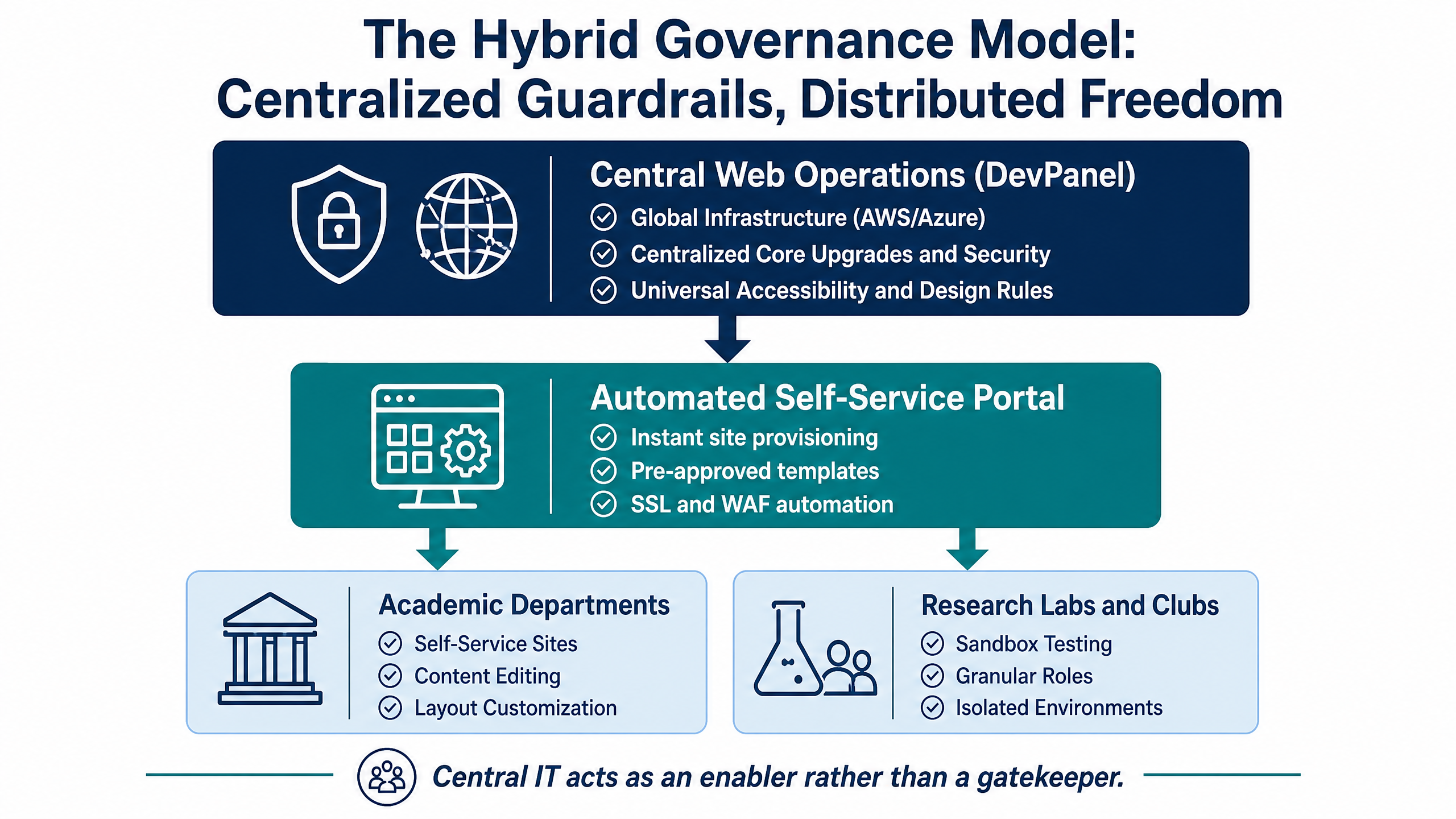
The traditional IT reaction to sprawl is strict enforcement: forcing every department to submit tickets for simple text changes, shutting down microsites, and locking down permissions. Predictably, this creates bottlenecks, frustrates faculty, and drives departments right back to shadow hosting setups.
The modern solution is hybrid digital governance. Central IT acts as an enabler rather than a gatekeeper by creating an internal cloud platform where departments can self-provision pre-approved, highly customizable web spaces instantly.
Step 1: Replace Shadow IT with Automated Self-Service Provisioning
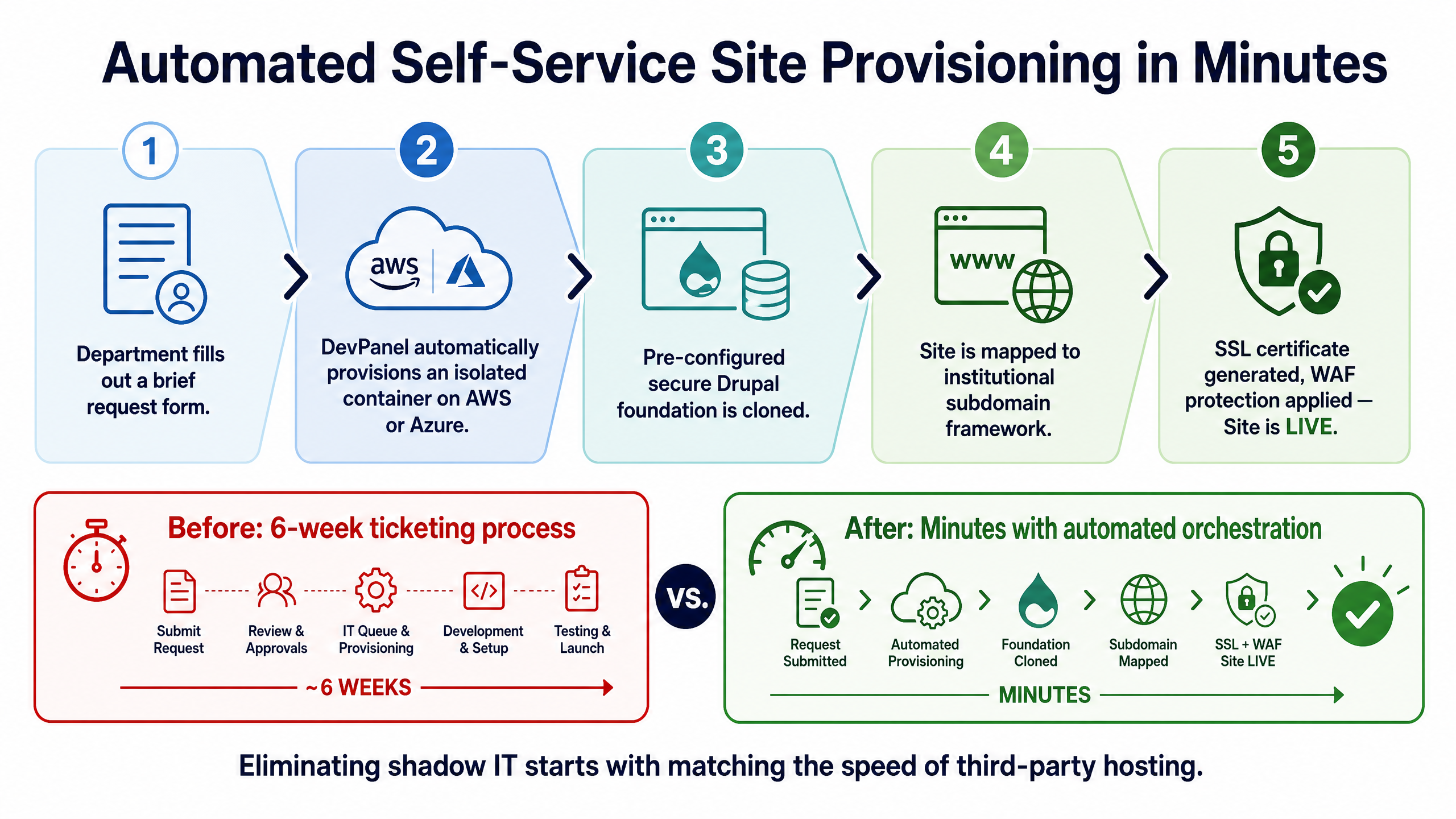
Departments turn to external hosts because central IT processes take too long. If requesting a new project microsite involves a six-week ticketing process and lengthy infrastructure provisioning delays, department heads will use a departmental credit card to purchase third-party hosting in ten minutes.
To eliminate shadow hosting, central IT must match that speed while retaining infrastructure control.
By implementing an automated multi-site orchestration layer, IT can provide an internal self-service portal. When a department requires a new web presence, an administrative user fills out a brief request form. The central management panel automatically:
•Provisions an isolated container on the university’s managed cloud infrastructure (AWS or Azure).
•Clones a pre-configured, secure Drupal foundation complete with core security modules.
•Maps the site automatically to a standardized institutional subdomain framework.
•Generates SSL certificates and applies standard Web Application Firewall (WAF) protection rules.
What previously took weeks of manual sysadmin work is completed in minutes, eliminating the motivation for shadow IT.
Step 2: Implement Component-Based “Atomic” Site Architecture
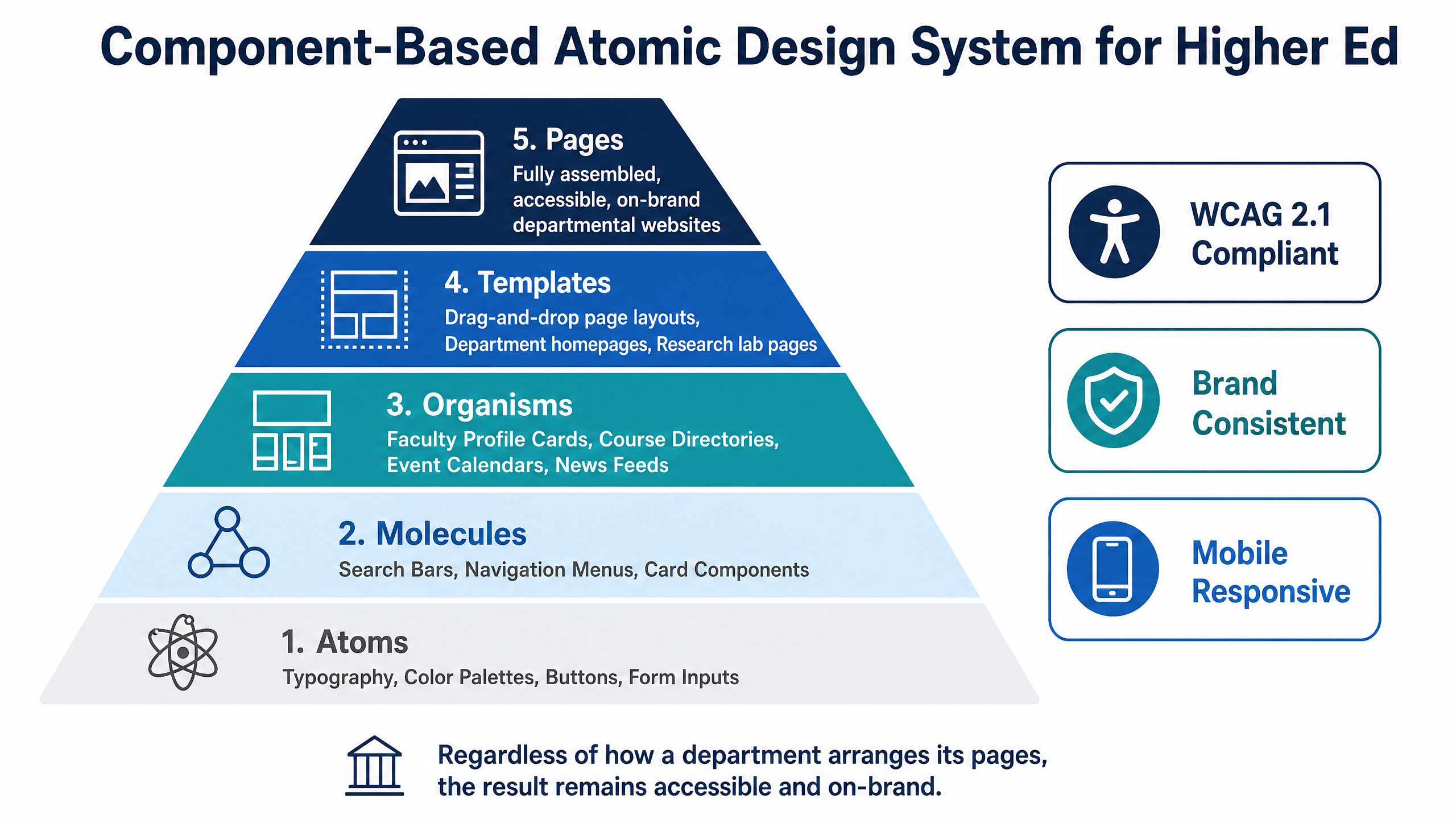
Centralizing site deployment does not mean forcing every department into a rigid visual box. Academic departments have distinct communication goals: an art department requires rich visual galleries, while an engineering department requires code syntax highlighting and data tables.
Drupal excels in higher education environments specifically because of its ability to support modular, component-based design systems. Central IT can construct a master design system using atomic design principles:
•Atoms & Molecules: Base typographic hierarchies, accessible color palettes, brand-approved buttons, and form inputs built directly into the core theme.
•Organisms & Components: Pre-built, accessible functional blocks—such as faculty profile cards, course directories, event calendars, news feeds, and hero banners.
•Templates & Layouts: Drag-and-drop page templates that allow content creators to structure unique layouts without touching backend code or altering master CSS.
By supplying departments with an extensive library of pre-tested, accessible components, central IT guarantees that regardless of how a department arranges its pages, the resulting layout remains fully responsive, accessible, and on-brand.
Step 3: Decouple Cloud Infrastructure Management from Content Editing
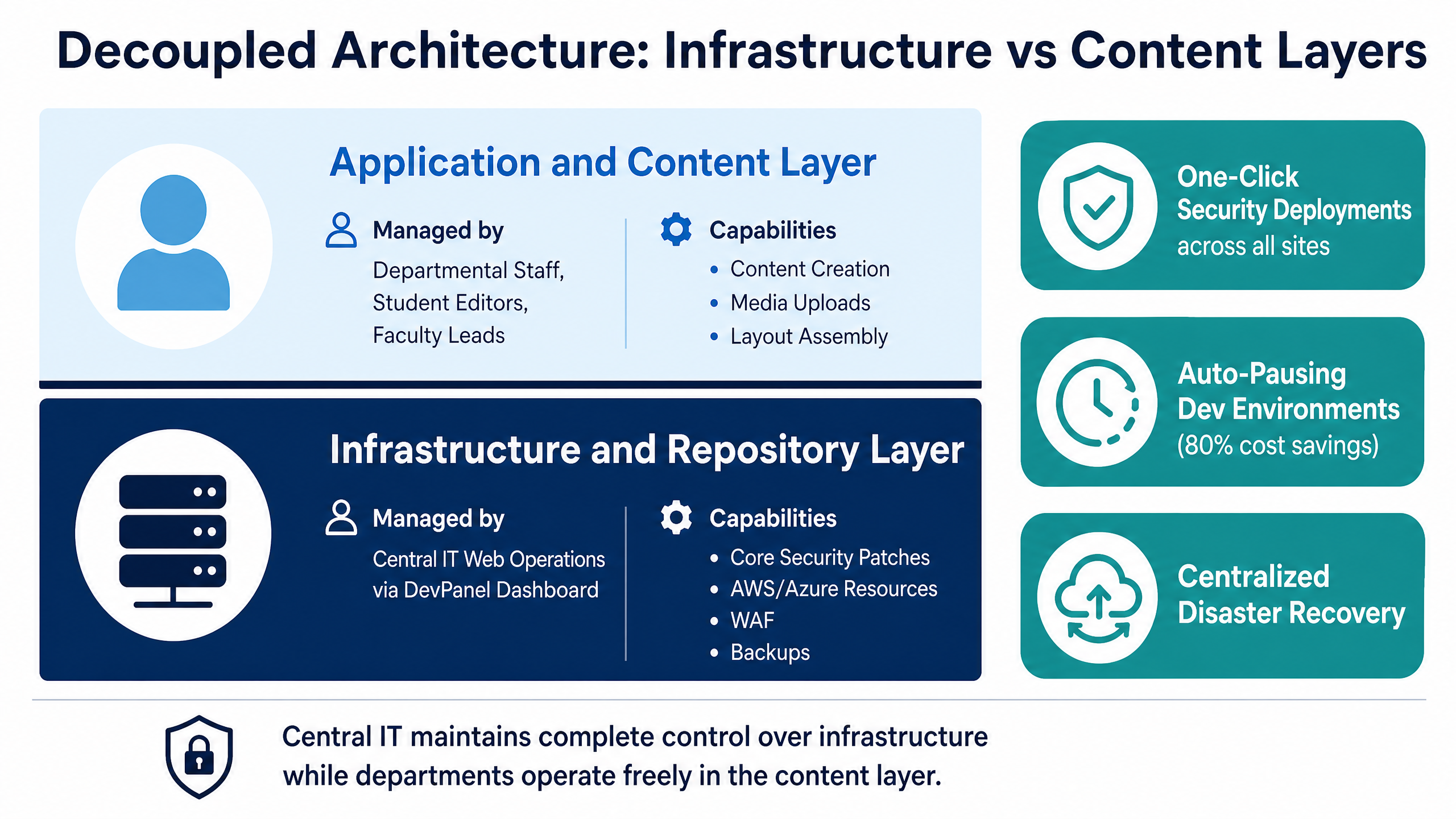
A core driver of website sprawl overhead is the operational cost of maintenance. In a decentralized ecosystem, updating a critical security patch across 150 separate Drupal installations requires an engineer to log into 150 different environments, run updates, test database migrations, and verify deployments manually.
Modern web governance decouples infrastructure administration from day-to-day content publishing. Central IT maintains complete control over the underlying code repository, cloud infrastructure, and core updates, while departmental teams operate strictly within the application layer.
With a unified management control panel:
•One-Click Security Deployments: Security patches and module updates are tested once in a staging environment and pushed across all 150 departmental sites simultaneously.
•Automated Cloud Cost Optimization: Development, staging, and sandbox environments used by departmental creators auto-pause outside of regular business hours, drastically lowering cloud compute consumption on AWS or Azure.
•Centralized Disaster Recovery: Automated snapshot backups and multi-region failovers occur at the infrastructure level across all institutional sites, removing backup responsibilities from individual departments.
Step 4: Enforce Granular Permission Scopes and Audit Workflows
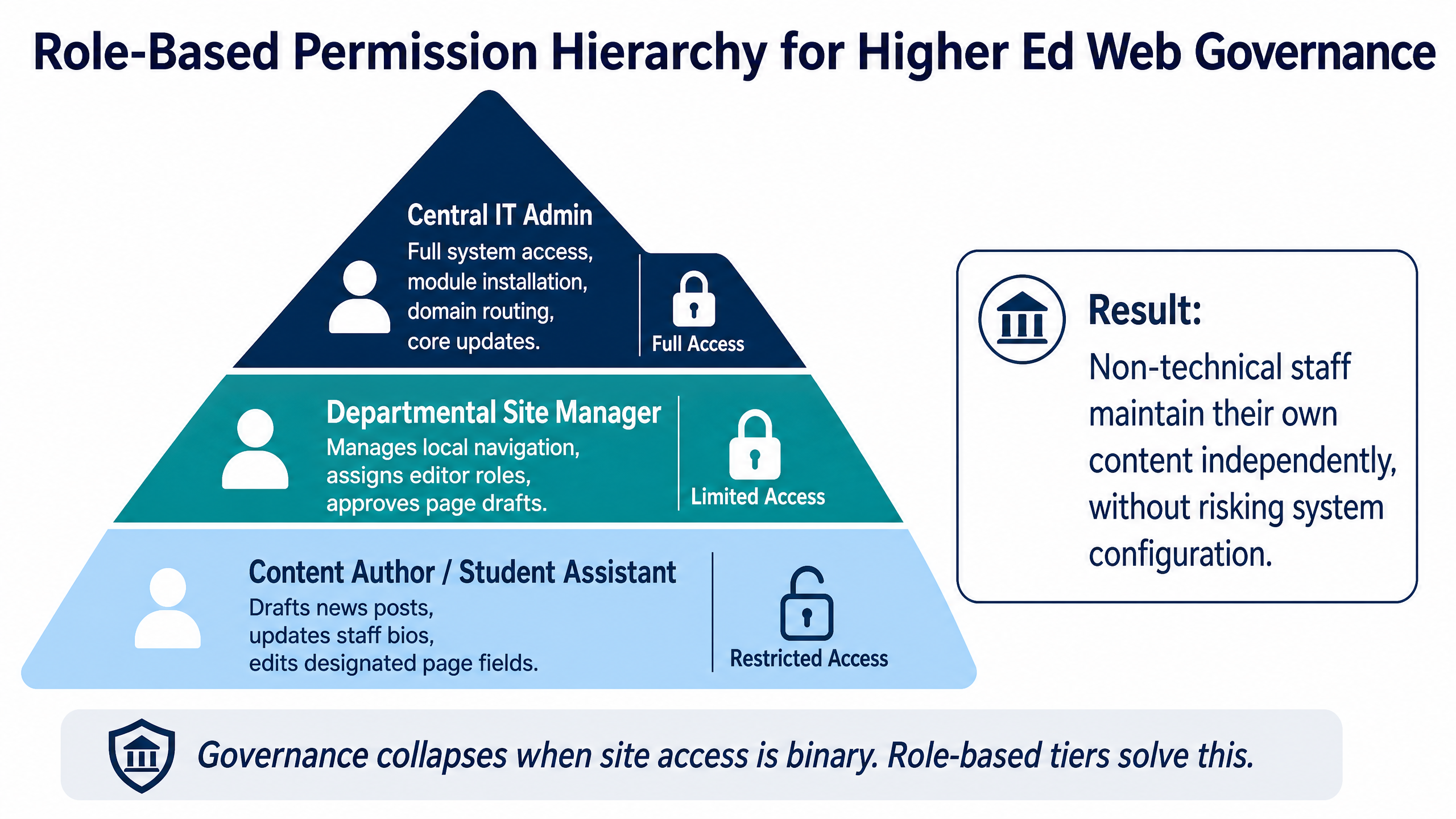
Governance collapses when site access is binary—either a user has zero access or full administrative rights. Over-privileged departmental users frequently install unvetted third-party modules, alter critical system configurations, or corrupt site layouts.
A structured governance model defines explicit, role-based permission tiers within the CMS:
•Central IT Admin: Full system access, module installation, domain routing, core updates.
•Departmental Site Manager: Manages local navigation, assigns editor roles, approves page drafts.
•Content Author / Student Assistant: Drafts news posts, updates staff bios, edits designated page fields.
By enforcing role-based access, central IT eliminates the risk of accidental configuration breakages while empowering non-technical staff to maintain their own web content independently.
Comparison: Traditional PaaS vs. Centralized Cloud Governance
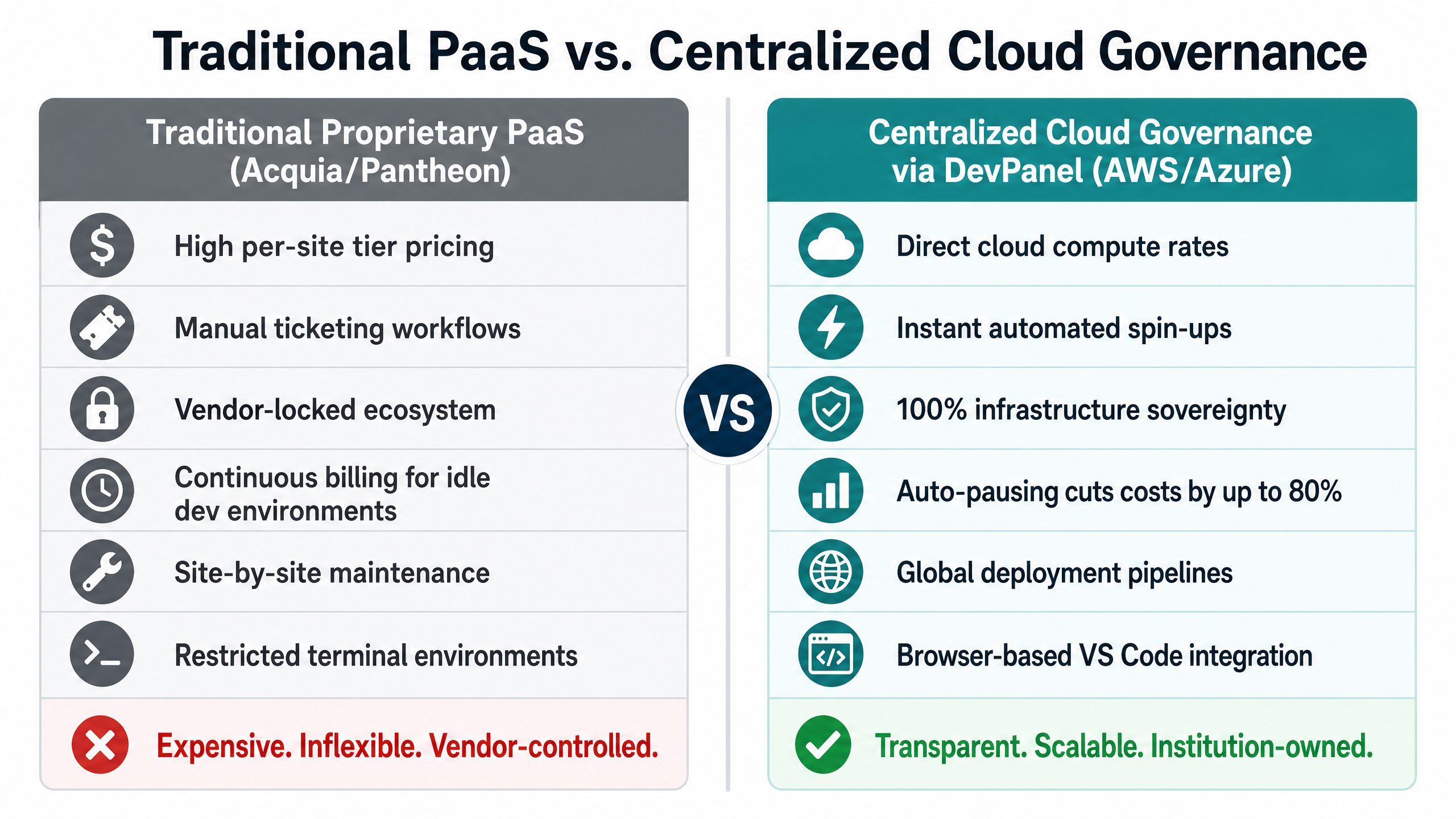
To understand the financial and operational advantage of moving away from fragmented hosting setups or expensive proprietary PaaS platforms, consider how the two approaches compare:
| Governance Criteria | Traditional Proprietary PaaS (Acquia/Pantheon) | Centralized Cloud Governance via DevPanel (AWS/Azure) |
| Hosting Cost Structure | High per-site tier pricing; costs scale rapidly with site count. | Direct cloud compute rates; pay only for actual AWS/Azure resource usage. |
| Site Provisioning | Manual ticketing or complex platform-specific workflows. | Instant automated spin-ups via visual control panel templates. |
| Cloud Infrastructure Ownership | Vendor-locked ecosystem; restricted access to underlying cloud logs. | 100% infrastructure sovereignty; hosting runs directly inside your institutional AWS/Azure account. |
| Dev Environment Savings | Continuous billing for idle dev/staging environments. | Auto-pausing functionality shuts down inactive dev instances, cutting costs by up to 80%. |
| Security & Patching | Site-by-site maintenance or expensive add-on governance tools. | Global deployment pipelines push updates across all departmental sites simultaneously. |
| Developer Flexibility | Restricted terminal environments and proprietary CLI tooling. | Browser-based VS Code integration allowing instant access for internal staff or agencies. |
Operational Blueprint: Taming Sprawl in 90 Days
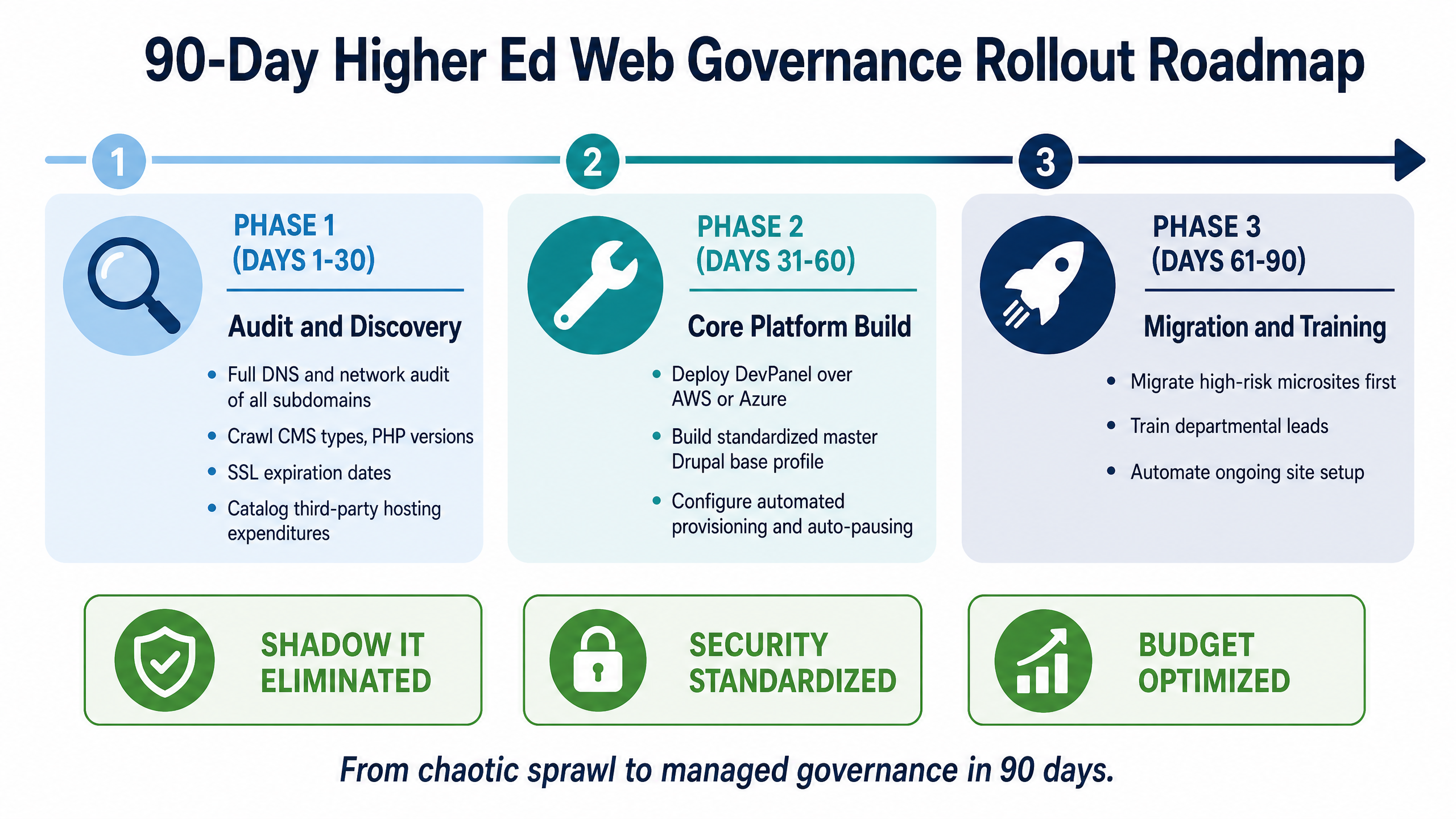
Transitioning an institution from chaotic site sprawl to a managed governance framework requires a structured rollout. Here is a recommended 90-day execution roadmap:
Phase 1: Audit & Discovery (Days 1–30)
•Conduct a full DNS and network audit to identify every live subdomain associated with the primary university domain.
•Crawl identified subdomains to map CMS types, active plugins, PHP runtime versions, and SSL expiration dates.
•Catalog third-party hosting expenditures across all academic units to calculate total institutional spend on shadow infrastructure.
Phase 2: Core Platform Setup & Template Standardization (Days 31–60)
•Deploy DevPanel over the university’s existing cloud infrastructure (AWS or Azure).
•Build the standardized master Drupal base profile, incorporating accessibility compliance rules, security modules, and brand themes.
•Configure automated provisioning workflows and set up auto-pausing schedules for non-production environments.
Phase 3: Migration & Training (Days 61–90)
•Migrate high-risk microsites first.
•Train departmental leads on the new content management workflows.
•Automate ongoing site setup to ensure shadow IT does not return.
By moving from fragmented sprawl to centralized governance, higher education IT teams can protect their brand, secure their data, and empower their academic departments to build better digital experiences.