

The Ultimate Guide to Higher Ed Web Hosting: Security, Scalability, and Cloud Governance
University websites are no longer a single website managed by a single web team.
Modern colleges and universities operate sprawling digital ecosystems made up of institutional websites, academic departments, research centers, faculty projects, admissions portals, athletics sites, event sites, student services, campaign microsites, and dozens—or hundreds—of other web properties.
Some run Drupal. Others run WordPress. Some are maintained by central IT, while others are managed by agencies, contractors, communications teams, or individual departments.
That creates a difficult problem for university IT leaders.
Central IT is ultimately responsible for security, reliability, compliance, access, and infrastructure costs—but it may not control how every website is created or operated.
Traditional higher ed web hosting does not fully solve this problem. Managed hosting can simplify infrastructure, but it often puts the infrastructure inside the hosting vendor’s platform. Running directly on AWS or Azure gives universities more control, but introduces networking, Kubernetes, database, security, monitoring, backup, and DevOps complexity.
There is another model:
Customer-owned cloud with an application orchestration layer.
With this approach, the university owns and controls the cloud infrastructure while a platform such as DevPanel automates development environments, deployment workflows, application management, and day-to-day cloud operations.
The result is an infrastructure model designed around three things universities increasingly need at the same time:
Central governance. Developer self-service. Institutional ownership.
This guide explains how that model changes higher ed web hosting and how universities can modernize their infrastructure without simply replacing one hosting vendor with another.
Why Higher Ed Web Infrastructure Is Different
A corporate website might consist of one primary site and a few supporting applications.
A university can have hundreds.
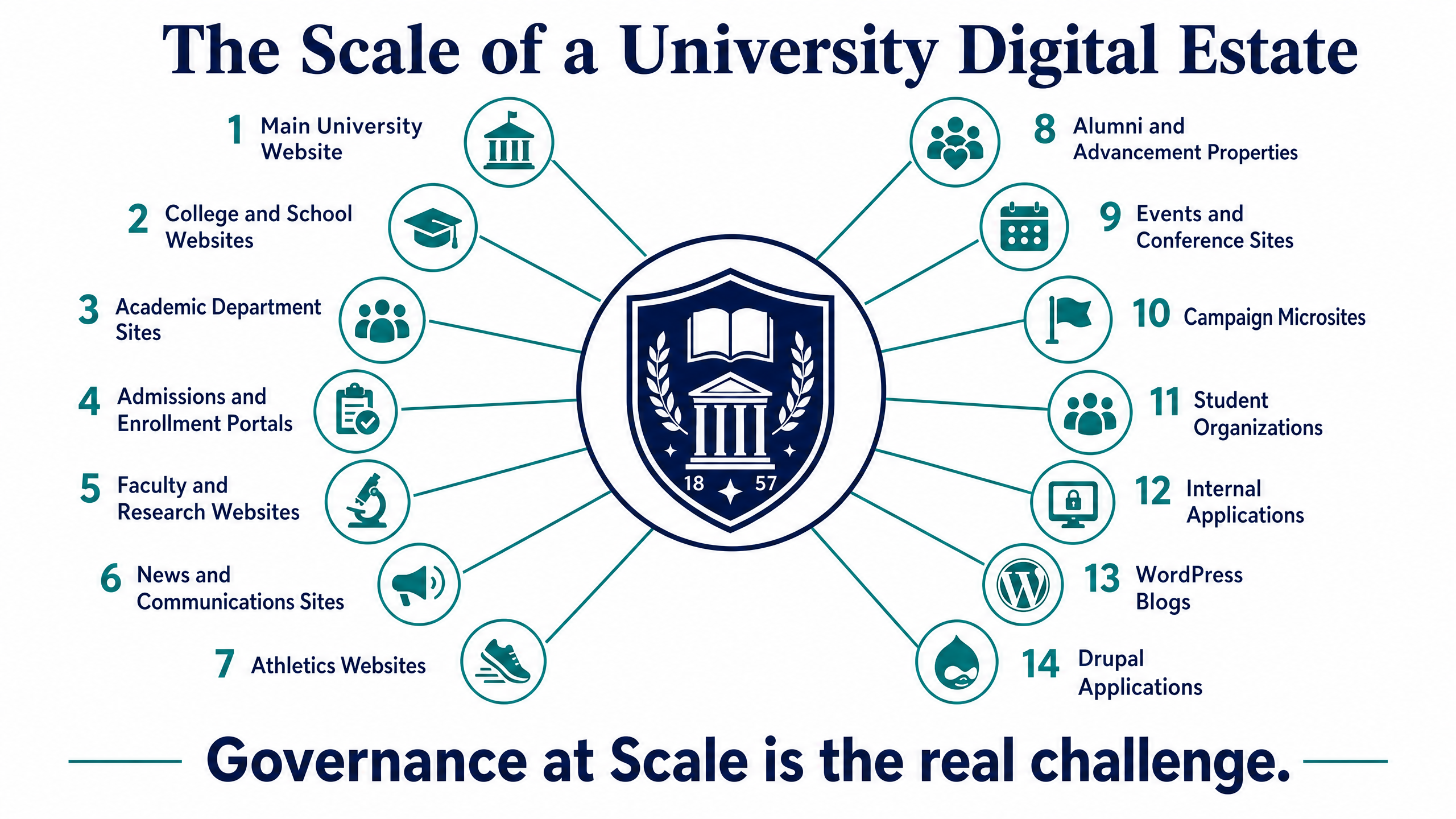
A typical higher education digital estate might include:
- The main university website
- College and school websites
- Academic department sites
- Admissions and enrollment portals
- Faculty and research websites
- News and communications sites
- Athletics websites
- Alumni and advancement properties
- Events and conference sites
- Campaign and marketing microsites
- Student organizations
- Internal applications
- WordPress blogs
- Drupal applications
- Legacy websites still supporting active programs
This scale creates infrastructure problems that extend far beyond finding a place to host websites.
The real challenge is governance at scale.
Central IT needs visibility and control, while departments need enough independence to move quickly.
That tension shapes almost every infrastructure decision in higher education.
The 5 Biggest Infrastructure Challenges Facing University IT Teams
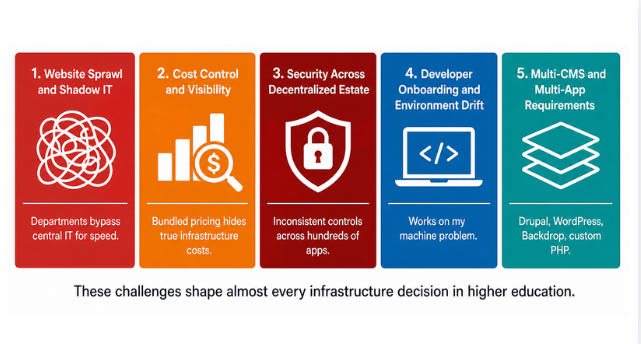
1. Website Sprawl and Shadow IT
Website sprawl usually does not happen because departments deliberately ignore central IT.
It happens because departments need to move quickly.
A new research initiative receives funding and needs a website immediately. A conference launches in three weeks. An academic department hires an outside agency. A faculty project starts a WordPress site using a departmental credit card.
Each decision may make sense individually. Collectively, they create Shadow IT.
Central IT may eventually discover dozens of websites hosted across unrelated providers, built with different CMS versions, maintained by different vendors, and protected by inconsistent security policies.
The challenge becomes:How do you give departments self-service without losing institutional governance?
The answer is not necessarily more restrictions. It is providing an approved platform that is easier to use than going around central IT.
2. Cost Control and Infrastructure Visibility
Higher education IT organizations often operate under tight annual budgets while supporting unpredictable demand.
Admissions campaigns, commencement, major announcements, athletics events, emergency communications, and other high-visibility events can create sudden traffic spikes.
With traditional managed hosting, infrastructure costs are frequently bundled into platform pricing. Depending on the provider and contract, pricing may be affected by application counts, environments, traffic levels, page views, support tiers, or other capacity limits.
Customer-owned cloud changes the economics.
Instead of purchasing infrastructure indirectly through a hosting provider, institutions can maintain a direct relationship with providers such as AWS, Microsoft Azure, or DigitalOcean.
That can allow universities to take advantage of:
- Existing institutional cloud agreements
- Cloud credits
- Committed-use discounts
- Reserved capacity
- Resource optimization
- Existing security tooling
- Existing cloud governance policies
Most importantly, the institution gets greater visibility into what infrastructure it is actually consuming.
DevPanel adds the operational layer needed to make that infrastructure usable without requiring every developer or web administrator to understand raw cloud services.
3. Security Across a Decentralized Digital Estate
Universities present unusually complex security environments.
They combine:
- Large and constantly changing user populations
- Public-facing applications
- Distributed administrative responsibility
- Third-party agencies and contractors
- Research systems
- Student and faculty data
- Legacy applications
- Multiple CMS platforms
- Large numbers of domains and subdomains
The challenge is not simply installing a firewall. It is applying security controls consistently across an entire portfolio of applications.
A modern higher ed web platform should make it easier to standardize:
- HTTPS and certificate management
- Access controls
- Secrets management
- Network policies
- Web Application Firewall integration
- DDoS protection
- Logging
- Monitoring
- Backups
- Deployment processes
- Infrastructure configurations
DevPanel works with the institution’s cloud and security architecture rather than replacing it.
That means universities can combine DevPanel automation with cloud-native and third-party security services such as AWS or Azure security tooling, Cloudflare, monitoring platforms, identity providers, and institutional security systems.
This also creates a stronger foundation for supporting institutional compliance obligations, whether those involve FERPA, HIPAA, accessibility requirements, internal security standards, or other regulatory frameworks.
A platform alone does not make an institution compliant. But a standardized, customer-controlled architecture can make compliance controls easier to implement, document, monitor, and audit.
4. Developer Onboarding and Environment Drift
Higher education development teams are rarely static.
Universities frequently work with:
- Internal developers
- Student developers
- External agencies
- Contractors
- Temporary project teams
- Distributed contributors
Traditional local development makes onboarding these groups unnecessarily difficult.
One developer might use a different PHP version. Another has a different database configuration. Another cannot get Docker running. Someone else’s local environment no longer matches production.
The result is the familiar: “It works on my machine.”
Cloud Development Environments solve this by moving the development workspace into the cloud.
With DevPanel, developers can work in browser-based VS Code environments with project tools and runtimes already available.
Instead of sending a new contractor a multi-page local setup guide, the university can give them access to a standardized environment.
Code remains in Git. Applications run in controlled cloud infrastructure. Developers work against environments that can more closely match staging and production.
That significantly reduces environment drift and onboarding friction.
5. Multi-CMS and Multi-Application Requirements
Higher education rarely standardizes on one CMS forever.
A university may use:
- Drupal for institutional sites
- WordPress for departments and faculty
- Backdrop for legacy applications
- Custom PHP applications
- Decoupled front ends
- APIs and supporting services
Trying to operate each application category through a different hosting platform introduces additional complexity.
DevPanel provides a common operational layer for managing multiple web application stacks.
Instead of thinking: “Where do we host our Drupal sites?” universities can ask a more strategic question: “How do we operate our entire web application portfolio?”
That shift—from individual hosting accounts to an institutional application platform—is important.
Traditional Higher Ed Hosting vs. Customer-Owned Cloud
Higher education organizations generally have three infrastructure paths.
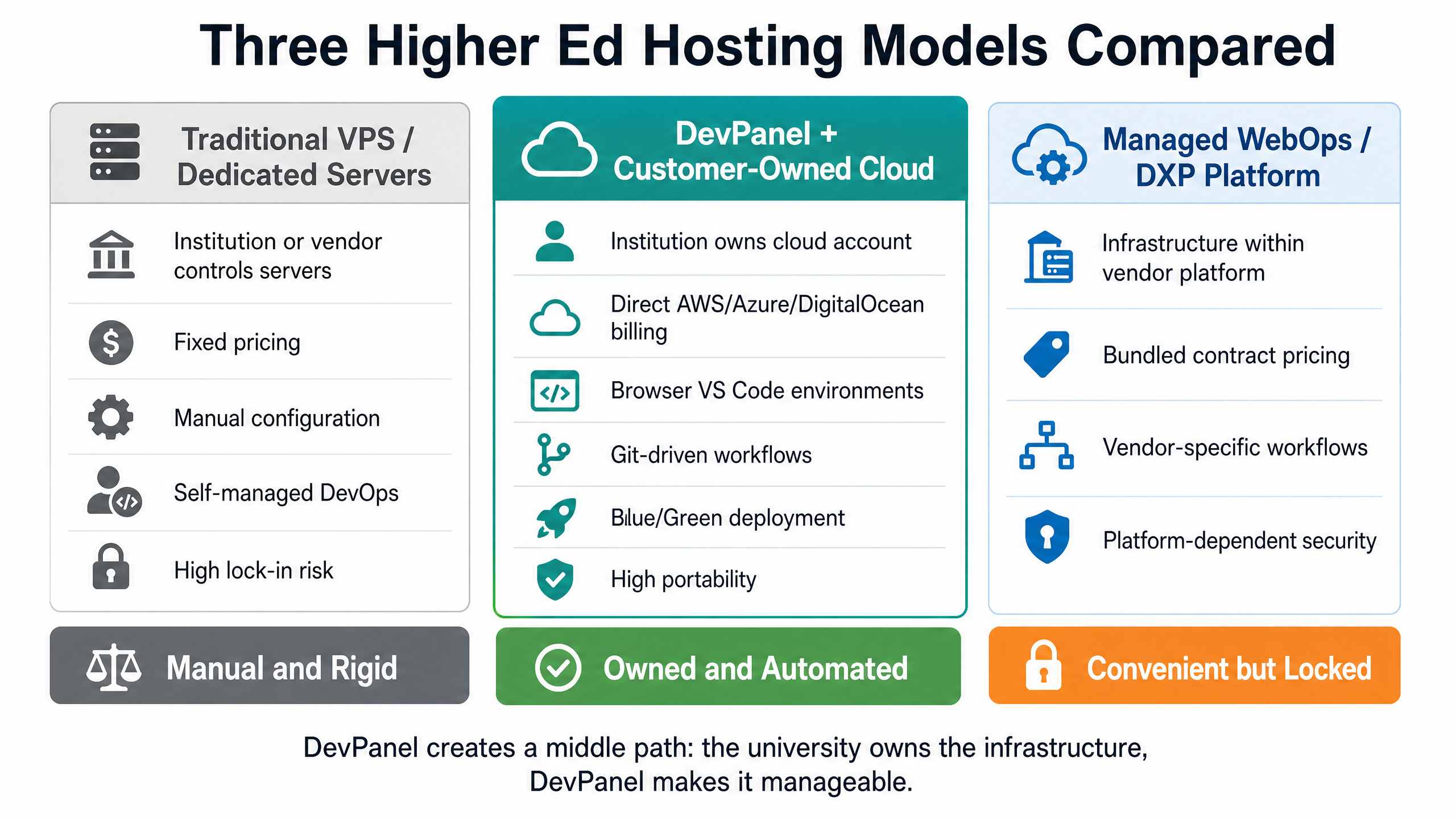
| Architectural Feature | DevPanel + Customer-Owned Cloud | Managed WebOps / DXP Platform | Traditional VPS / Dedicated Servers |
|---|---|---|---|
| Infrastructure Ownership | Institution owns the cloud account | Infrastructure operated within vendor platform | Institution or hosting vendor controls servers |
| Cloud Options | AWS, Azure, DigitalOcean and supported infrastructure | Determined by platform provider | Depends on provider |
| Infrastructure Billing | Direct relationship with cloud provider | Bundled into platform contract | Fixed server/VPS pricing |
| Drupal & WordPress | Managed through a common operational layer | Depends on platform | Manually configured |
| Development Environments | Browser VS Code and branch-based cloud environments | Vendor-specific workflows | Usually self-managed |
| Git Workflows | Integrated Git-driven workflows | Platform-specific | Manually configured |
| Blue/Green Deployment | Supported | Depends on platform | Must be engineered manually |
| Infrastructure Access | Institution retains cloud control | Platform-dependent | Usually available |
| Security Architecture | Institution chooses cloud and security services | Defined largely by vendor | Institution must configure |
| Scaling | Cloud-native infrastructure and automation | Managed by provider | Typically manual |
| Infrastructure Portability | High because institution owns infrastructure and applications | Platform-dependent | Generally high |
| Operations | DevPanel orchestration + automation + support | Managed by platform | Primarily internal responsibility |
The important distinction is not whether one model is “managed” and another is “unmanaged.”
DevPanel creates a middle path.
The university owns the infrastructure. DevPanel makes it manageable.
Build a University Web Platform, Not Another Hosting Account
Traditional hosting asks: “Where should this website run?”
Modern higher education infrastructure needs to answer a bigger question: “How should the university build, operate, secure, and govern all of its web applications?”
That requires a platform approach.
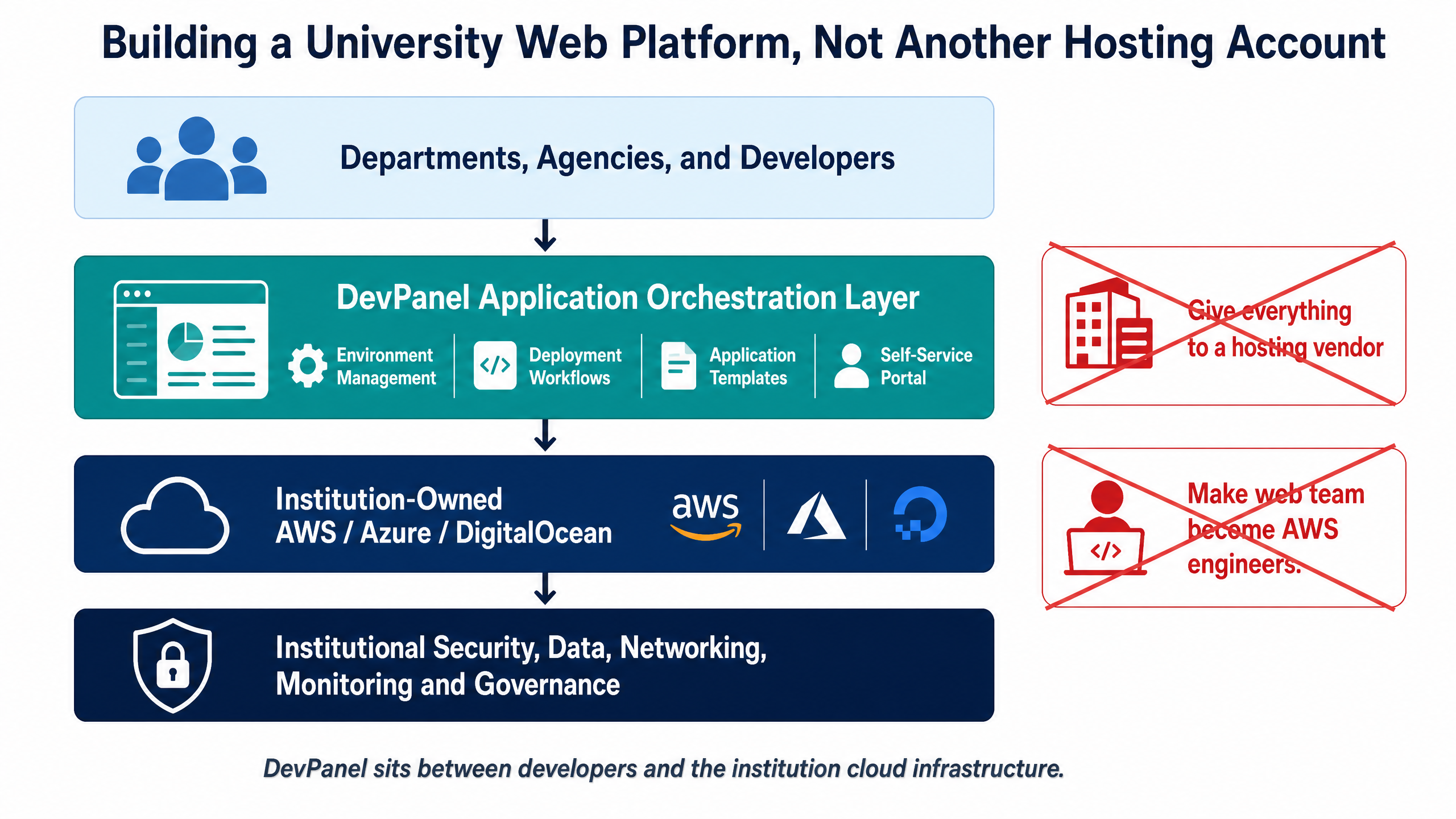
DevPanel sits between developers and the institution’s cloud infrastructure.
A simplified model looks like this:
Departments + Agencies + Developers↓DevPanel Application Orchestration Layer↓Institution-Owned AWS / Azure / DigitalOcean↓Institutional Security, Data, Networking, Monitoring and Governance
The university maintains ownership of the cloud account and infrastructure strategy. DevPanel provides the interface and automation layer developers and operations teams use to work with it.
This eliminates the false choice between: “Give everything to a hosting vendor” and “Make our web team become AWS engineers.”
Centralized Governance Without Central Bottlenecks
This may be the most important benefit of the model for higher education.
Centralization traditionally creates a bottleneck.
A department needs a staging environment. Submit a ticket.An agency needs access. Submit a ticket.A research group needs another application. Submit a ticket.A developer needs a test database. Submit another ticket.
Eventually, departments stop waiting and find their own solutions. That is how Shadow IT grows.
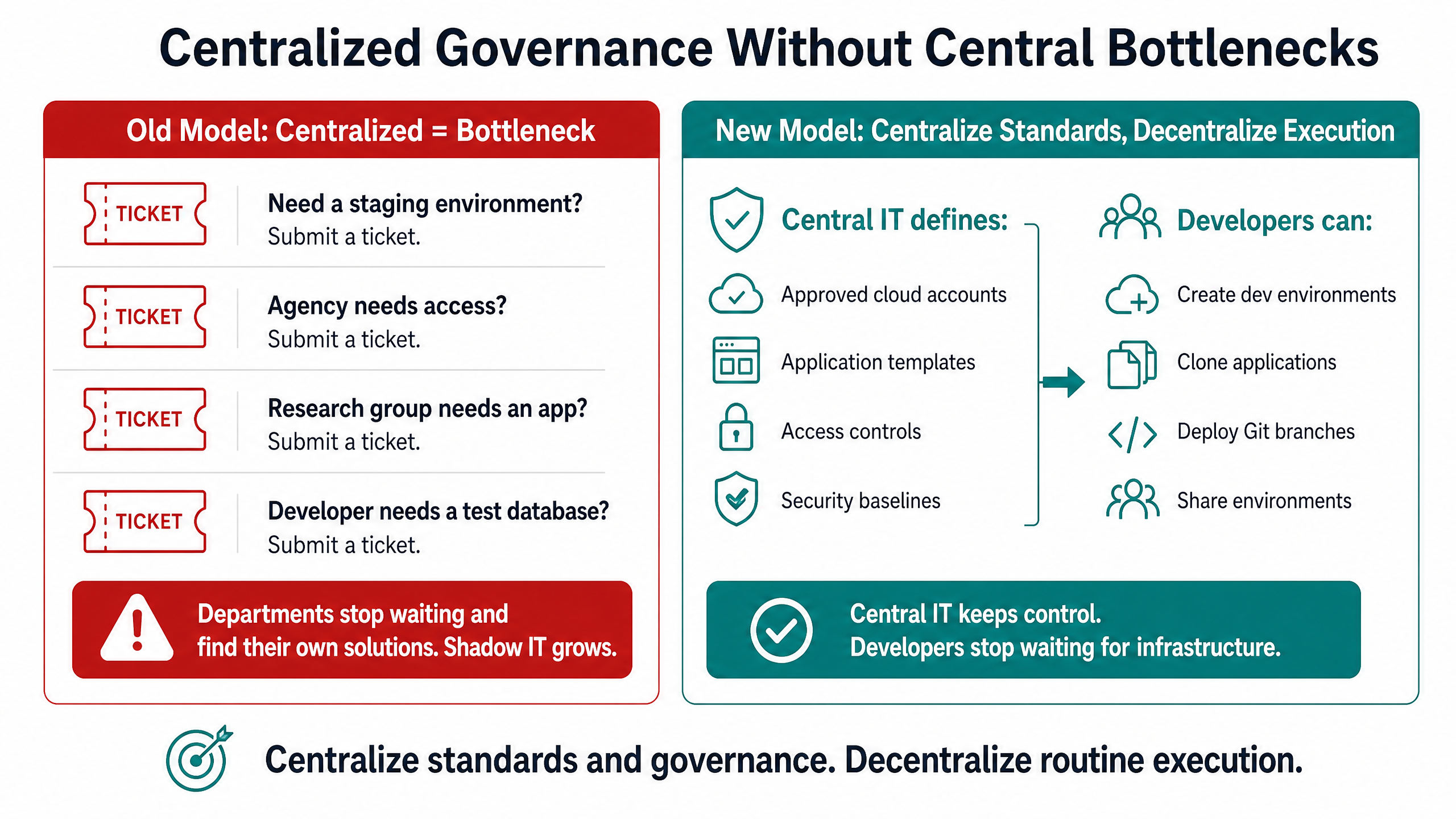
A better model is to centralize standards and governance while decentralizing routine execution.
Central IT can establish the approved platform, cloud infrastructure, access model, application templates, deployment processes, backup policies, and security architecture.
Developers and departments can then perform approved operations through self-service workflows.
For example, central IT can define:
- Approved cloud accounts
- Standard Drupal and WordPress application patterns
- Git repositories
- Access controls
- Development workflows
- Staging and production promotion processes
- Backup policies
- Infrastructure security baselines
- Logging and monitoring requirements
Developers can then:
- Create development environments
- Clone applications
- Work in browser-based VS Code
- Deploy Git branches
- Test changes
- Share environments with stakeholders
- Move approved changes toward production
Central IT keeps control of the platform. Developers stop waiting for infrastructure.
That is very different from giving every department unrestricted cloud access.
Cloud Sovereignty Through Customer-Owned Infrastructure
One of DevPanel’s most important architectural differences is that applications can run in infrastructure controlled by the customer.
For universities, that means infrastructure can live inside the institution’s own AWS, Azure, or DigitalOcean environment rather than inside a black-box hosting account.
The institution maintains greater control over:
- Cloud accounts
- Data
- Regions
- Networking
- Access
- Security services
- Monitoring
- Cloud spend
- Architecture
- Backup strategy
- Long-term infrastructure decisions
DevPanel acts as the control layer on top.
This model is especially valuable for institutions that already have cloud infrastructure standards. Instead of introducing another isolated hosting vendor, the web platform can become part of the university’s existing cloud strategy.
Give Developers Cloud Development Environments
Local development environments create hidden operational costs.
Every developer laptop becomes another environment IT does not fully control. Configuration drifts. Software versions diverge. Onboarding instructions become outdated.
Cloud Development Environments move the workspace into centrally controlled infrastructure.
DevPanel provides browser-based VS Code environments with development tools already available. Developers can work from Windows PCs, Macs, Linux workstations, Chromebooks, or remote devices with a modern browser without rebuilding the entire development stack locally.
Branch-Based Environments
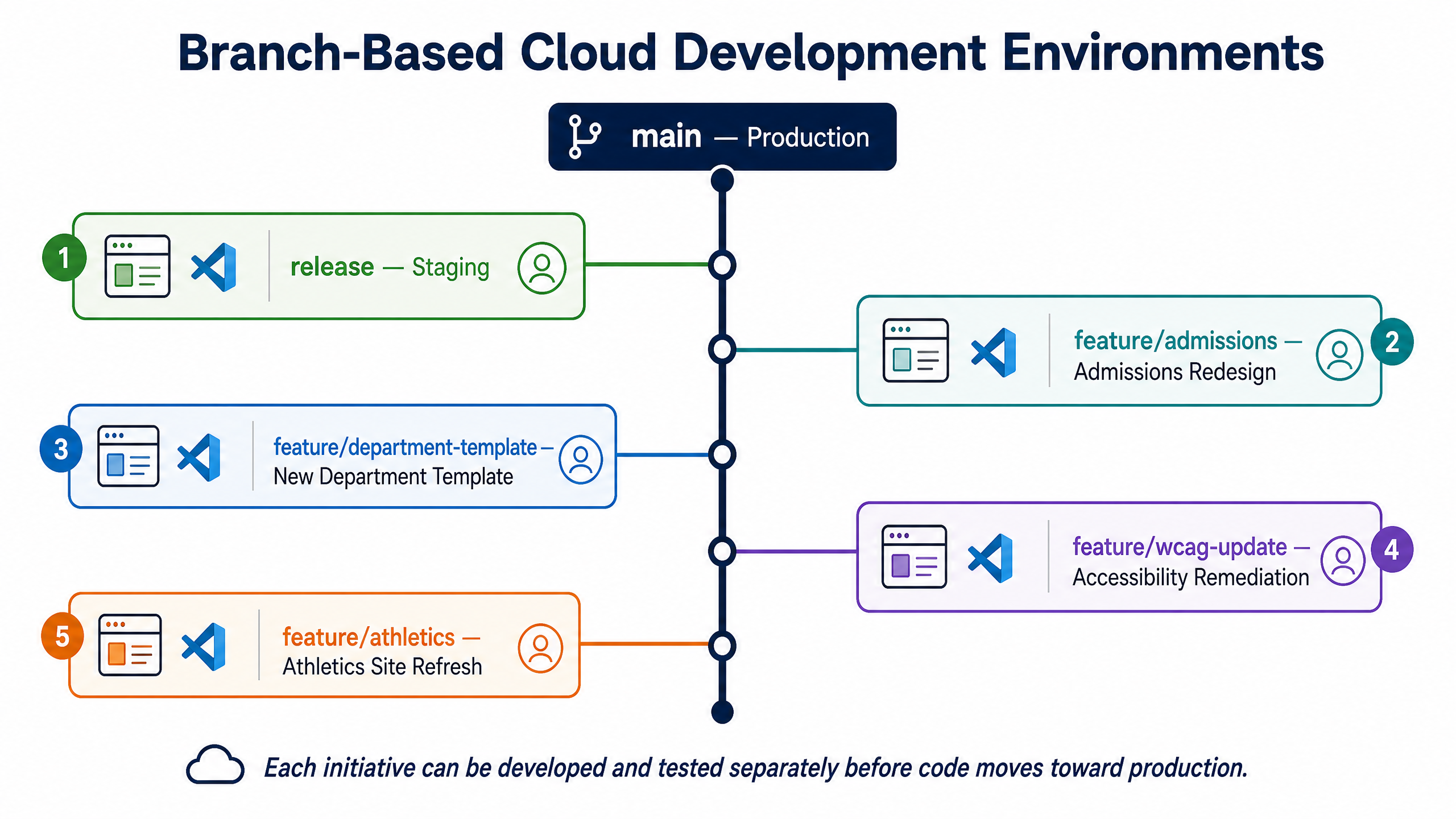
DevPanel can create environments around Git branches so different teams can work independently.
For example:
- Production:
main - Staging:
release - Admissions redesign:
feature/admissions - New department template:
feature/department-template - Accessibility remediation:
feature/wcag-update
Each initiative can be developed and tested separately before code moves toward production.
This enables developers, QA teams, content stakeholders, agencies, and project owners to review work without competing for one shared staging environment.
Standardize Drupal, WordPress, and Other Web Applications
A university platform does not need every department to use exactly the same application.
It needs every application to operate within an approved framework.
DevPanel can provide a common operational layer across Drupal, WordPress, Backdrop, PHP applications, and other compatible web workloads.
That creates opportunities to establish reusable application templates.
For example, a university could maintain approved patterns for:
University Department Site
- Approved Drupal configuration
- Institutional theme
- Accessibility components
- Analytics
- Security configuration
- Standard content types
Research Project Site
- Lightweight WordPress or Drupal build
- University branding
- Research team profiles
- Publication content
- Approved integrations
Campaign Microsite
- Pre-approved frontend
- Analytics
- Git repository
- Standard deployment pipeline
- Defined lifecycle policy
Instead of rebuilding infrastructure every time someone asks for a new website, IT provides repeatable application patterns.
The result is faster delivery with less variation.
Security and Compliance-Friendly Architecture
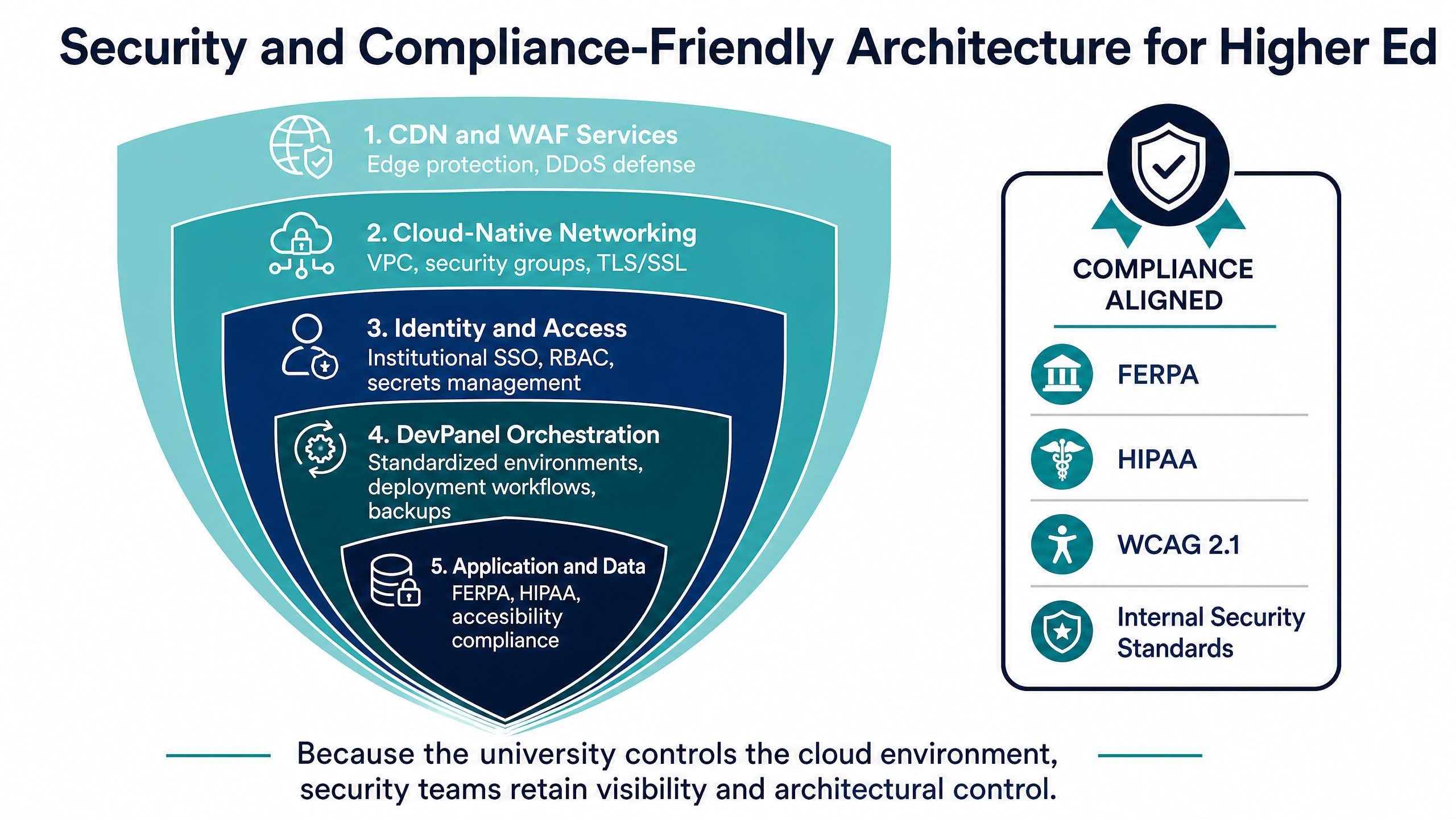
Security in DevPanel should be understood as a layered architecture.
The institution’s cloud provider handles part of the stack. Network controls handle another part. CDN and WAF services can protect applications at the edge. Identity providers control user access. Monitoring systems provide visibility.
DevPanel helps orchestrate and standardize the environments and workflows connecting those layers.
Depending on the architecture, universities can integrate capabilities such as:
- Web Application Firewalls
- DDoS protection
- TLS/SSL
- Cloud-native networking
- Secrets management
- Role-based access
- Institutional SSO
- Logging
- Monitoring
- Alerting
- Automated backups
- Disaster recovery processes
Because the university controls the cloud environment, security teams retain visibility and architectural control instead of having to accept whatever controls a proprietary hosting environment exposes.
For institutions with strict governance requirements, this distinction matters.
Reduce Infrastructure Lock-In
Vendor lock-in is not only about whether you can download your code.
The more important question is: Who controls the infrastructure underneath the application?
In a customer-owned cloud model, the institution maintains its cloud relationship, applications, data, and architecture.
DevPanel provides the orchestration layer without requiring the university to surrender ownership of the underlying infrastructure.
That gives universities greater flexibility when their requirements change. They can adopt new cloud services, integrate institutional tooling, change infrastructure configurations, or evolve their architecture without having to migrate away from a completely opaque hosting environment first.
A Real Example: Managing 30+ Websites With a Small Team
Multi-site governance is not just theoretical.
The Academy of Model Aeronautics used DevPanel to move and manage more than 30 websites across Drupal, WordPress, and Backdrop on AWS.
The organization wanted the control and economics of AWS but did not have a large internal cloud operations team.
With DevPanel providing the management and automation layer, one person was able to manage the web portfolio through a centralized platform while developers gained self-service access to development, test, and staging environments.
The lesson is particularly relevant to higher education.
The goal is not to make every web administrator an AWS expert. The goal is to give a small central team enough automation and governance to operate a much larger digital estate.
A 5-Step Framework for Modernizing Higher Ed Web Infrastructure
Moving a university website portfolio to customer-owned cloud infrastructure should be treated as a platform initiative, not simply a hosting migration.
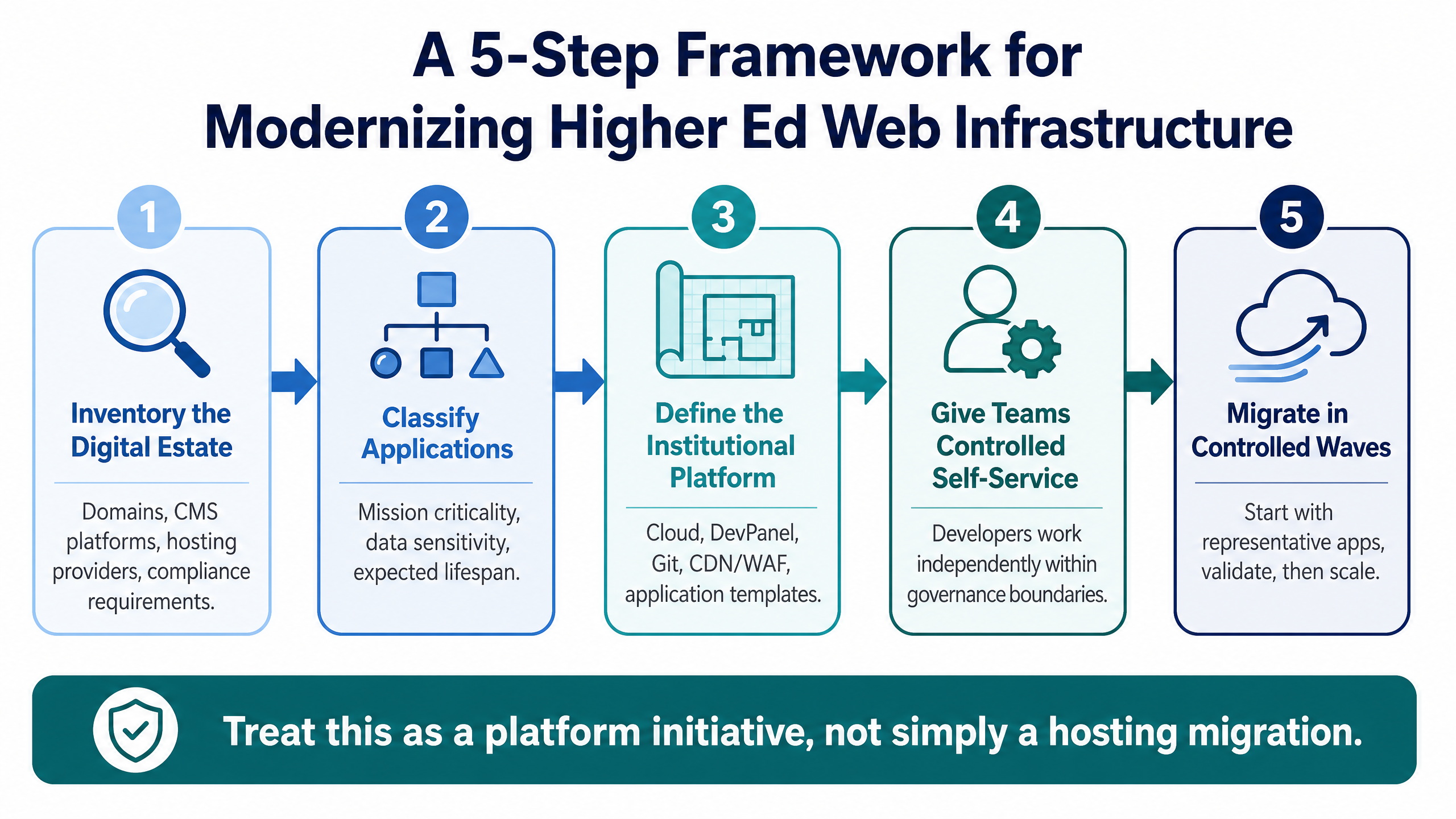
Step 1: Inventory the Digital Estate
Start by identifying domains, CMS platforms, application owners, hosting providers, Git repositories, databases, third-party integrations, authentication systems, traffic profiles, backup requirements, compliance requirements, and end-of-life applications. This exercise often exposes Shadow IT that central teams did not know existed.
Step 2: Classify Applications
Not every site needs the same architecture. Classify applications based on mission criticality, traffic, data sensitivity, CMS, development activity, compliance requirements, and expected lifespan. A temporary research microsite should not necessarily have the same architecture as the university’s main website.
Step 3: Define the Institutional Platform
Establish the approved environment. That may include AWS/Azure infrastructure, DevPanel, Git provider, Identity provider, CDN/WAF, monitoring, backup strategy, DNS, security policies, Drupal/WordPress application templates, and development workflow. The goal is to create a reusable platform rather than redesign infrastructure for every project.
Step 4: Give Teams Controlled Self-Service
Once standards exist, departments should not need a ticket for every routine task. Allow authorized teams to create and manage approved development environments through DevPanel. Developers can work independently while central IT maintains the infrastructure and governance boundaries. This reduces both ticket volume and Shadow IT.
Step 5: Migrate in Controlled Waves
Do not move hundreds of university websites at once. Start with representative applications (e.g., one Drupal site, one WordPress site, one departmental site, one high-traffic application). Validate development workflows, backups, security controls, performance, monitoring, deployment, and rollback processes. Then migrate additional groups using the standardized model.
What Should Higher Ed Leaders Look for in a Web Platform?
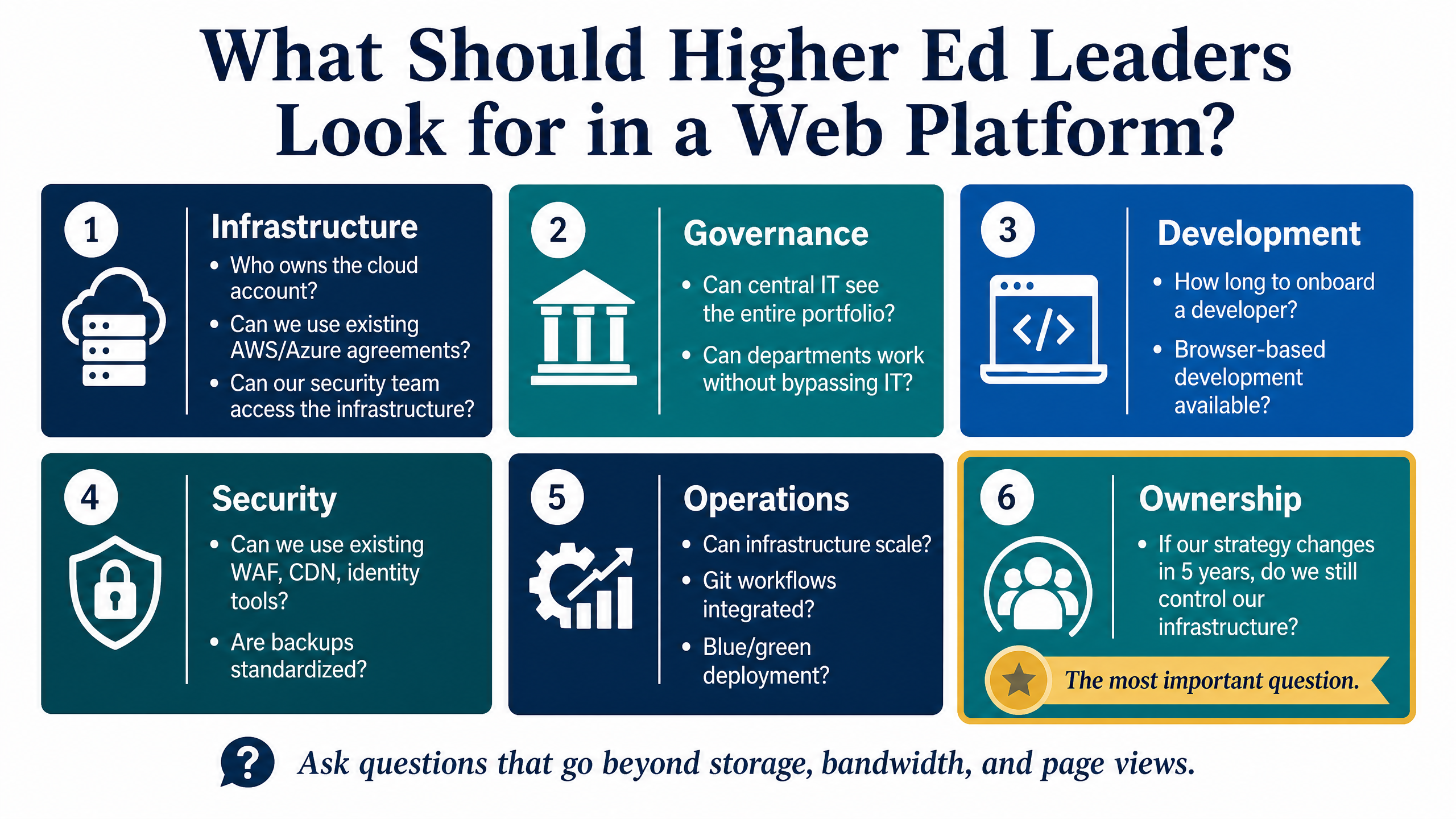
When evaluating higher ed web hosting or application platforms, ask questions that go beyond storage, bandwidth, and page views.
Infrastructure
- Who owns the cloud account?
- Where does institutional data live?
- Can we use our existing AWS or Azure agreements?
- Can our security team access the infrastructure?
Governance
- Can central IT see and manage the entire application portfolio?
- Can departments work without bypassing IT?
- Can we standardize application templates?
Development
- How long does it take to onboard a developer?
- Can developers create isolated environments?
- Is browser-based development available?
- Can multiple teams work in parallel?
Security
- Can we use our existing WAF, CDN, identity, logging, and monitoring tools?
- Can access be centrally controlled?
- Are backups and recovery processes standardized?
Operations
- Can infrastructure scale when traffic changes?
- Can applications be cloned?
- Are Git workflows integrated?
- Can we use blue/green deployment strategies?
- Can we automate repetitive operational work?
Ownership
- If our strategy changes in five years, do we still control our infrastructure and applications?
That final question may be one of the most important.
The Future of Higher Ed Web Hosting Is Customer-Owned Cloud
Higher education institutions do not need another isolated hosting account.
They need an institutional web platform.
They need central IT to maintain governance without becoming a bottleneck.
They need developers and agencies to move quickly without creating Shadow IT.
They need cloud flexibility without requiring every team member to become a cloud engineer.
And they need infrastructure ownership without giving up automation.
That is where DevPanel fits.
DevPanel acts as the control and orchestration layer between university development teams and customer-owned cloud infrastructure.
The institution owns the cloud.
DevPanel helps operate it.
That model gives universities a practical path between two extremes: restrictive vendor-controlled hosting and complex do-it-yourself cloud infrastructure.
For higher education organizations managing dozens or hundreds of digital properties, that distinction can transform web operations from a collection of hosting accounts into a governed, scalable application platform.
Own the cloud. Standardize the platform. Give developers self-service. Keep central IT in control.