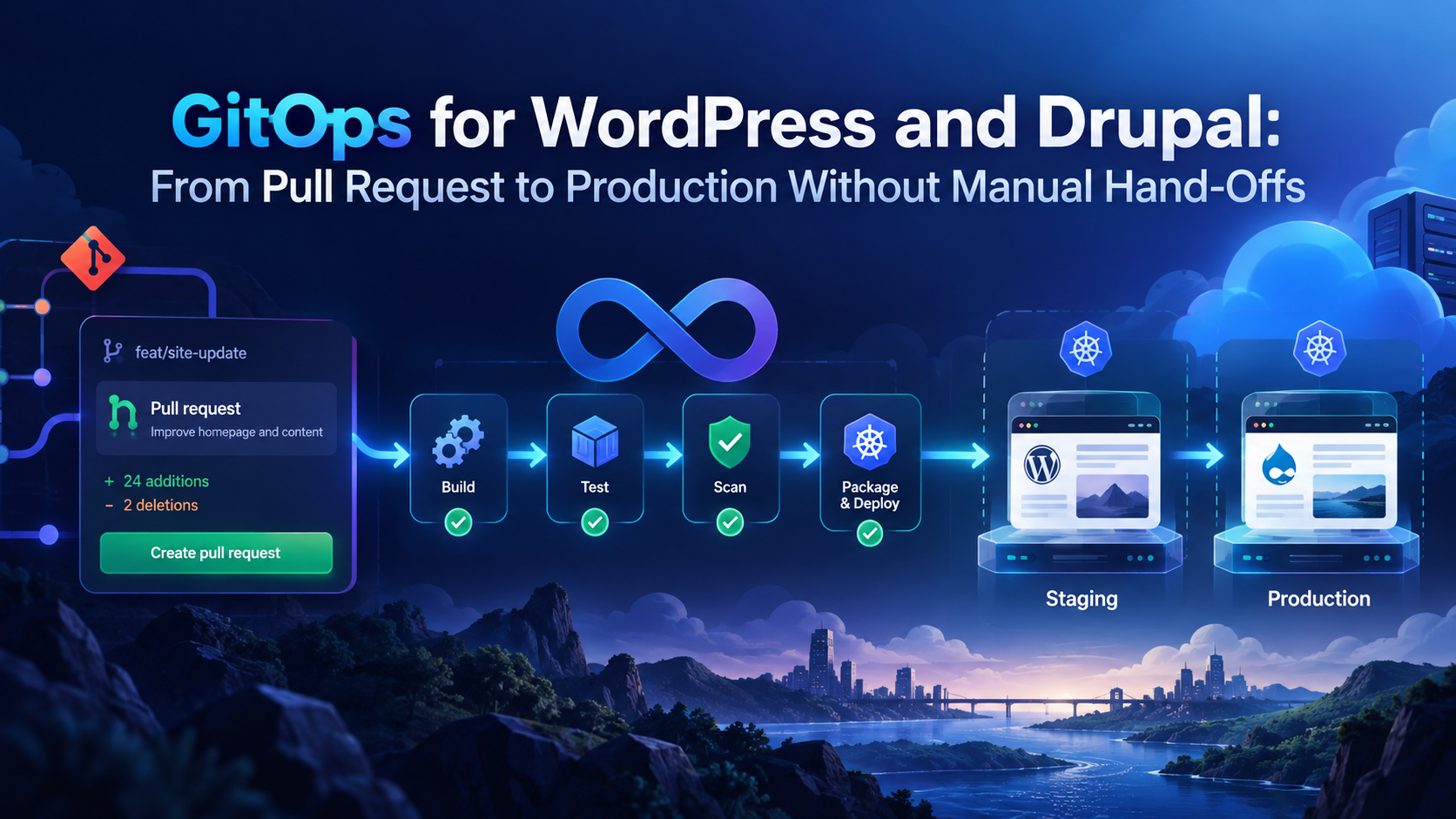
GitOps for WordPress and Drupal: From Pull Request to Production Without Manual Hand-Offs
WordPress and Drupal teams often begin with simple deployment habits.
A developer updates code. Someone uploads files. Someone runs a command. Someone checks staging. Someone remembers the production steps. Someone else waits for approval in Slack.
That may work for a small site with a small team.
It does not work well when the site becomes important, the team grows, or the organization manages many CMS projects at once.
Manual hand-offs create risk.
They slow releases. They make staging inconsistent. They hide important deployment steps inside people’s heads. They make it harder to know exactly what changed, who approved it, and whether production matches what was reviewed.
For WordPress and Drupal teams, the better model is a Git-based delivery workflow that connects pull requests, validation, preview environments, staging, and production deployment into one repeatable path.
That is where GitOps becomes useful.
GitOps for WordPress and Drupal means using Git as the source of truth for application delivery, while automation handles the movement from approved change to running environment. The goal is not to remove human review. The goal is to remove fragile manual hand-offs.
For teams using DevPanel, this becomes practical because DevPanel acts as the orchestration layer between Git workflows, cloud development environments, branch previews, deployment automation, and customer-owned cloud infrastructure.
The result is a cleaner path from pull request to production.
Why Manual CMS Deployments Break Down
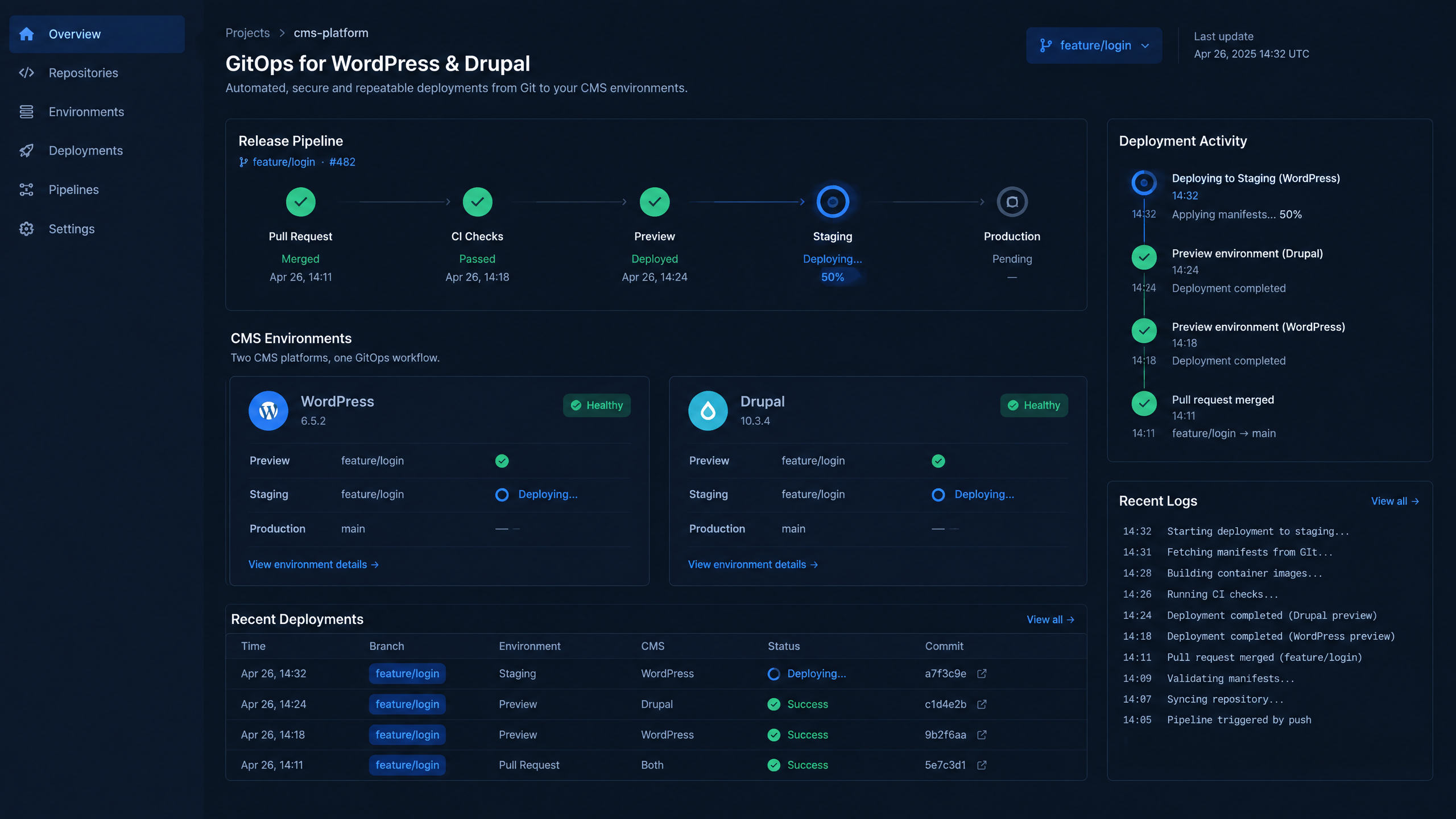
A visible release pipeline replaces fragile manual hand-offs with a repeatable path to production.
Manual deployment workflows usually do not fail all at once.
They fail slowly.
At first, one developer knows how to deploy. Then another person learns the process. Then a staging site is added. Then a production hotfix is needed. Then a plugin update needs testing. Then a Drupal module update requires a database change. Then the client wants a preview URL. Then another developer joins. Then multiple branches are active at the same time.
The process becomes harder to trust.
For WordPress and Drupal teams, the common problems are familiar:
•Files are uploaded manually through FTP or SFTP.
•Production changes are made through SSH.
•Staging does not match production.
•Plugin, theme, or module updates are handled inconsistently.
•Database changes are not clearly tied to code changes.
•Deployment steps depend on one person’s memory.
•Rollback plans are unclear.
•Review happens outside the deployment workflow.
•Developers wait on hand-offs instead of moving work forward.
This is not just inconvenient.
It creates operational risk.
If the team cannot prove what changed, when it changed, who approved it, and how it moved into production, then the deployment process is not mature enough for a business-critical CMS.
GitOps Is More Than “Using Git”
Many teams already use Git.
That does not automatically mean they are using GitOps.
A Git-based workflow usually means code is stored in Git and developers use branches, commits, and pull requests. That is a good foundation, but it does not guarantee that environments match what is in the repository.
CI, or continuous integration, adds automated checks. A team may run tests, linting, dependency checks, Composer validation, build steps, and security scans.
Continuous delivery adds release automation. It helps teams prepare changes for deployment and move faster through controlled release stages.
GitOps goes further by making the repository the source of truth for the desired state of the application environment.
For WordPress and Drupal, that usually means the delivery process should connect:
1.A developer creates a branch.
2.The branch is pushed to Git.
3.A pull request is opened.
4.Automated checks run.
5.A preview environment is created.
6.Reviewers test the change.
7.The change is approved.
8.Staging is updated.
9.Production is deployed through a controlled process.
GitOps does not mean every merge automatically goes to production without review.
For CMS teams, that would be risky.
WordPress and Drupal deployments may include code, configuration, dependencies, database updates, user-generated files, and runtime settings. Those changes need validation and gates.
A strong GitOps workflow keeps humans in the right places and removes manual work from the wrong places.
The Pull Request Becomes the Delivery Starting Point
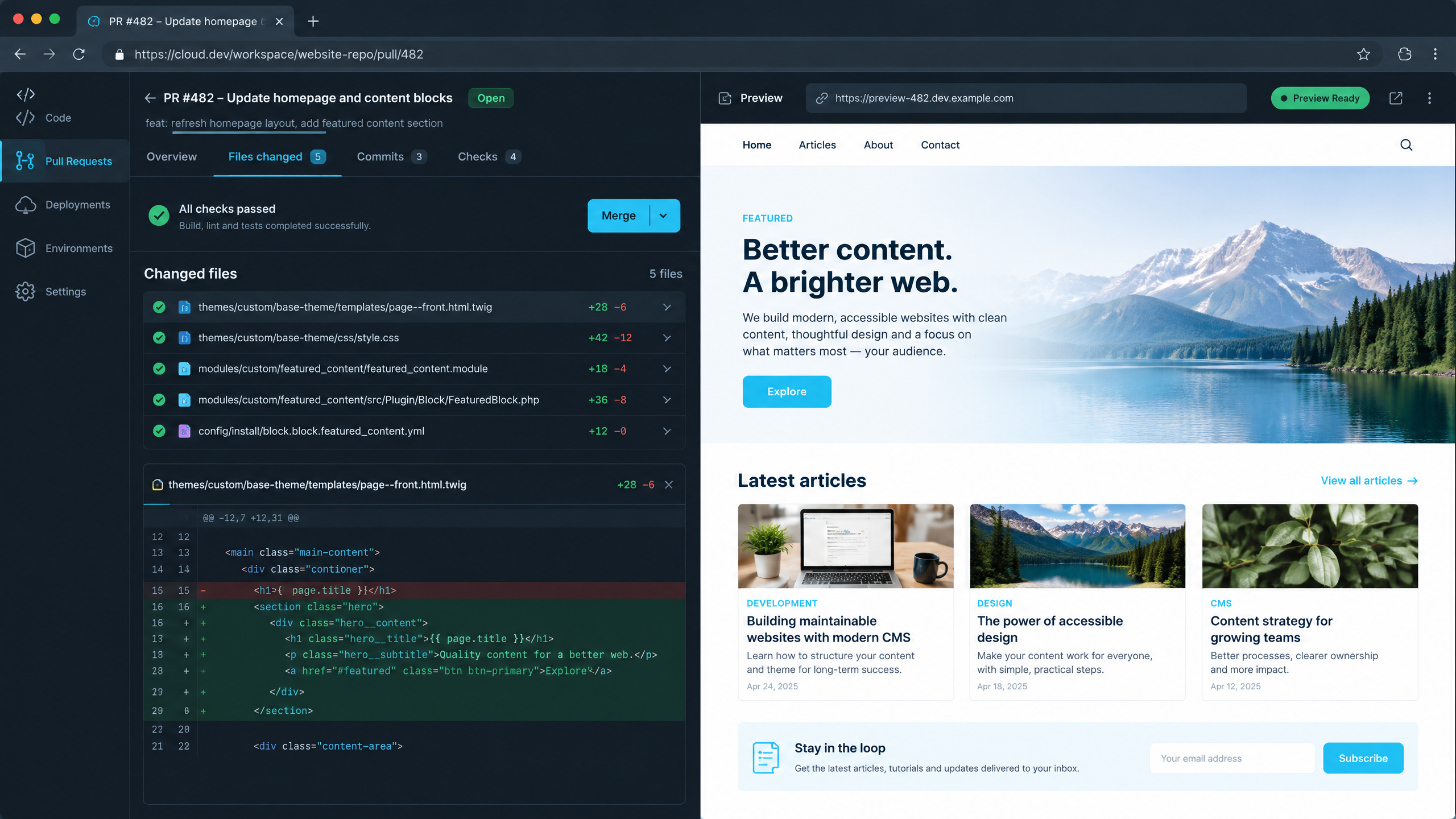
Branch previews let reviewers test a proposed CMS change in a real environment before it reaches staging.
A pull request should be more than a code review screen.
For WordPress and Drupal teams, the pull request can become the starting point for the entire delivery process.
A developer creates a branch for a feature, bug fix, theme update, plugin update, module update, or configuration change. The pull request shows the difference between the proposed change and the current approved codebase.
From there, automation can begin.
The system can run checks. It can build dependencies. It can prepare artifacts. It can create a branch environment. It can give reviewers a URL where they can test the change in a real CMS environment instead of guessing from screenshots.
That changes how teams collaborate.
Developers do not need to explain every change manually.
Reviewers do not need to wait for someone to create a test site.
Project managers do not need to chase environment status.
QA teams do not need to test against stale staging environments.
The pull request becomes the visible, reviewable, testable unit of change.
This is one of the biggest practical benefits of GitOps for WordPress and Drupal.
Branch Environments Reduce Staging Drift
Staging drift is one of the most common problems in CMS delivery.
A change works locally but fails in staging.
A change works in staging but fails in production.
A staging site has different PHP settings, different dependencies, different environment variables, different content, or different configuration. Over time, the team stops trusting staging because staging no longer reflects reality.
Branch environments help reduce that problem.
Instead of forcing every change into one shared staging environment, teams can create isolated environments tied to specific branches or pull requests.
That gives reviewers a live place to test the change.
It also makes collaboration easier.
A designer can review a theme update.
A content manager can test a new layout.
A developer can validate a module change.
A client can approve functionality before it reaches staging or production.
DevPanel supports this style of workflow through cloud development environments and branch-based application workflows. Teams can work with real environments instead of relying only on local setups or shared staging instances.
For WordPress and Drupal teams, this is especially valuable because CMS behavior often depends on runtime context.
A branch preview gives the team a better way to see what the change actually does.
CI/CD Still Matters
GitOps does not replace CI/CD.
It depends on it.
CI helps validate the change before it moves forward. For WordPress and Drupal projects, CI may include:
•PHP syntax checks
•Coding standard checks
•Composer validation
•Dependency checks
•Static analysis
•Build steps
•Front-end asset compilation
•Security checks
•Automated tests where available
Not every CMS risk can be caught by automated testing. Plugins, themes, modules, configuration changes, and database updates may still need human review.
But CI reduces the number of obvious problems that reach reviewers.
It also gives the team a consistent baseline.
Instead of asking, “Did someone remember to run the checks?” the pull request shows what passed, what failed, and what needs attention.
Continuous delivery then helps move approved changes through staging and production in a controlled way.
A mature workflow uses CI/CD and GitOps together.
CI validates the change.
GitOps helps reconcile the approved change into the right environment.
DevPanel helps orchestrate the environments and deployment workflows around that process.
WordPress Deployment Automation Needs More Than File Sync
WordPress deployment is often treated as file movement.
Upload the theme.
Update the plugin.
Replace the custom code.
Clear the cache.
Check the site.
That approach is too fragile for growing teams.
A modern WordPress deployment workflow needs to account for more than files.
It should consider:
•Theme changes
•Plugin updates
•Composer-managed dependencies, when used
•Database update routines
•Media and uploads
•Environment variables
•Cache behavior
•User roles and permissions
•Staging validation
•Rollback readiness
Some parts of WordPress fit Git well. Custom themes, custom plugins, build files, and configuration templates can live in the repository.
Other parts require orchestration. User-generated media, database state, secrets, and runtime settings need careful handling.
That is why WordPress teams should not think of GitOps as “put everything in Git.”
A better way to think about it is:
Git defines the approved application state, and the platform orchestrates the steps required to make the environment match that state safely.
DevPanel helps by connecting Git-based workflows with environments, deployment processes, and cloud infrastructure operations.
Drupal CI/CD Requires Configuration Discipline
Drupal teams often have a stronger built-in path for configuration management, but that does not make deployment automatic by itself.
Drupal projects usually involve Composer dependencies, custom modules, configuration exports, database updates, and environment-specific settings.
A reliable Drupal CI/CD workflow should validate dependency changes, check configuration changes, run appropriate update steps, and confirm that staging behaves as expected before production deployment.
This is where GitOps can be especially valuable.
Configuration can be reviewed in Git.
Composer changes can be validated before merge.
Branch environments can show how the site behaves with the proposed change.
Staging can confirm the update path.
Production can be deployed through a controlled release process.
The workflow becomes more predictable because the team is not relying on a developer to remember every manual step.
DevPanel supports this kind of delivery model by helping teams manage Drupal environments, branch workflows, cloning, and deployment automation.
For Drupal teams managing many projects, this can reduce the repetitive operational work that often slows agencies and enterprise teams down.
Database Changes Need Controlled Gates
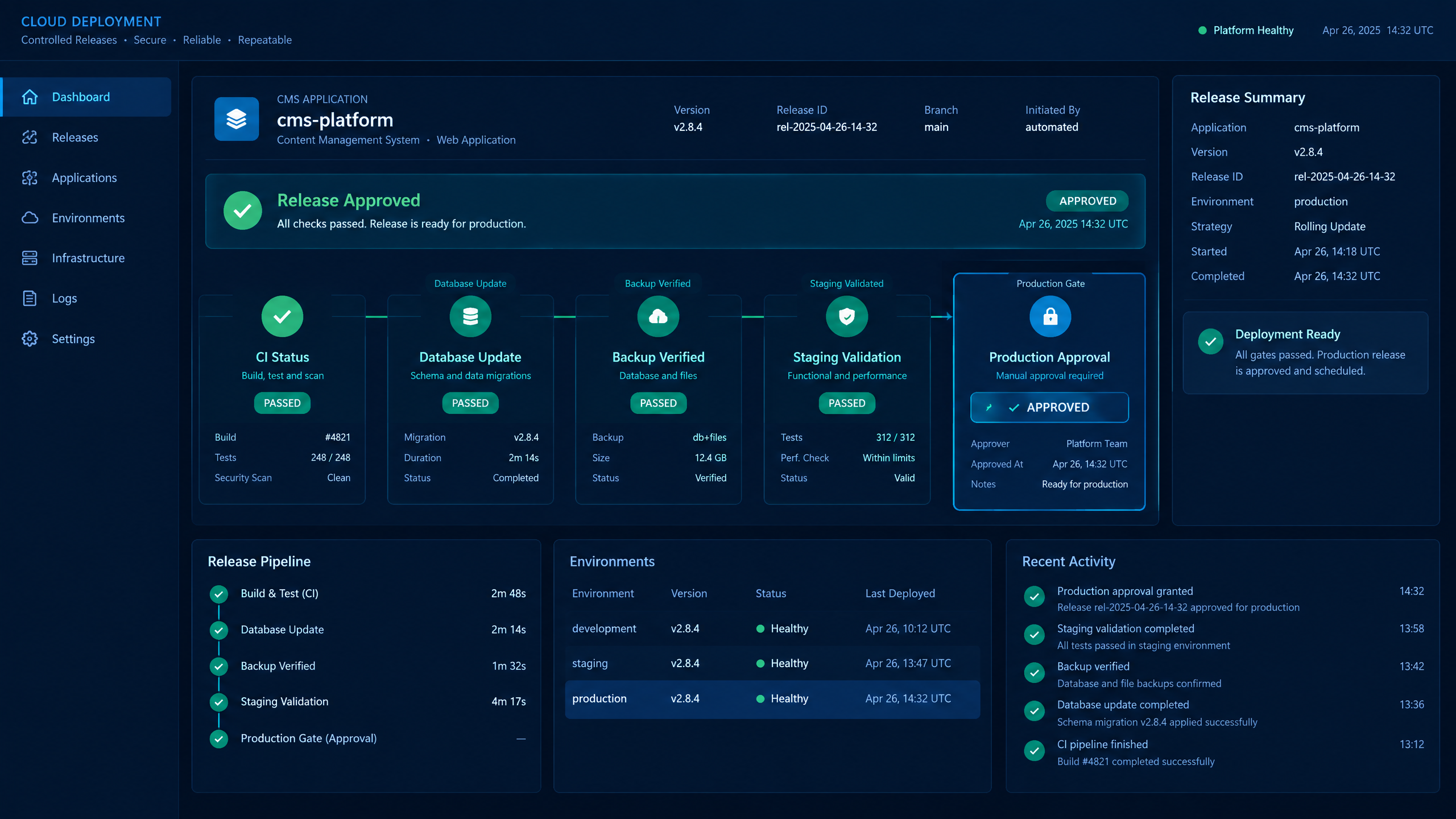
Database-sensitive changes need explicit validation, backup checks, and approval gates.
The database is one of the most sensitive parts of CMS delivery.
Both WordPress and Drupal depend heavily on database state. A deployment may include code changes, but the impact often depends on database content, configuration, or update routines.
That means database operations should be treated as explicit deployment stages.
A safe workflow should answer:
•Does this change require a database update?
•Has the update been tested in a staging environment?
•Can the change be rolled back?
•Are backups available?
•Is the deployment window appropriate?
•Has the team validated the change after deployment?
GitOps does not remove the need for database discipline.
It makes the discipline easier to enforce.
Instead of treating database updates as manual afterthoughts, teams can include them as part of the release workflow.
DevPanel helps by giving teams a more structured way to manage environments and deployment processes, so database-sensitive changes are not handled through one-off manual actions.
Cloud Development Environments Improve Developer Productivity
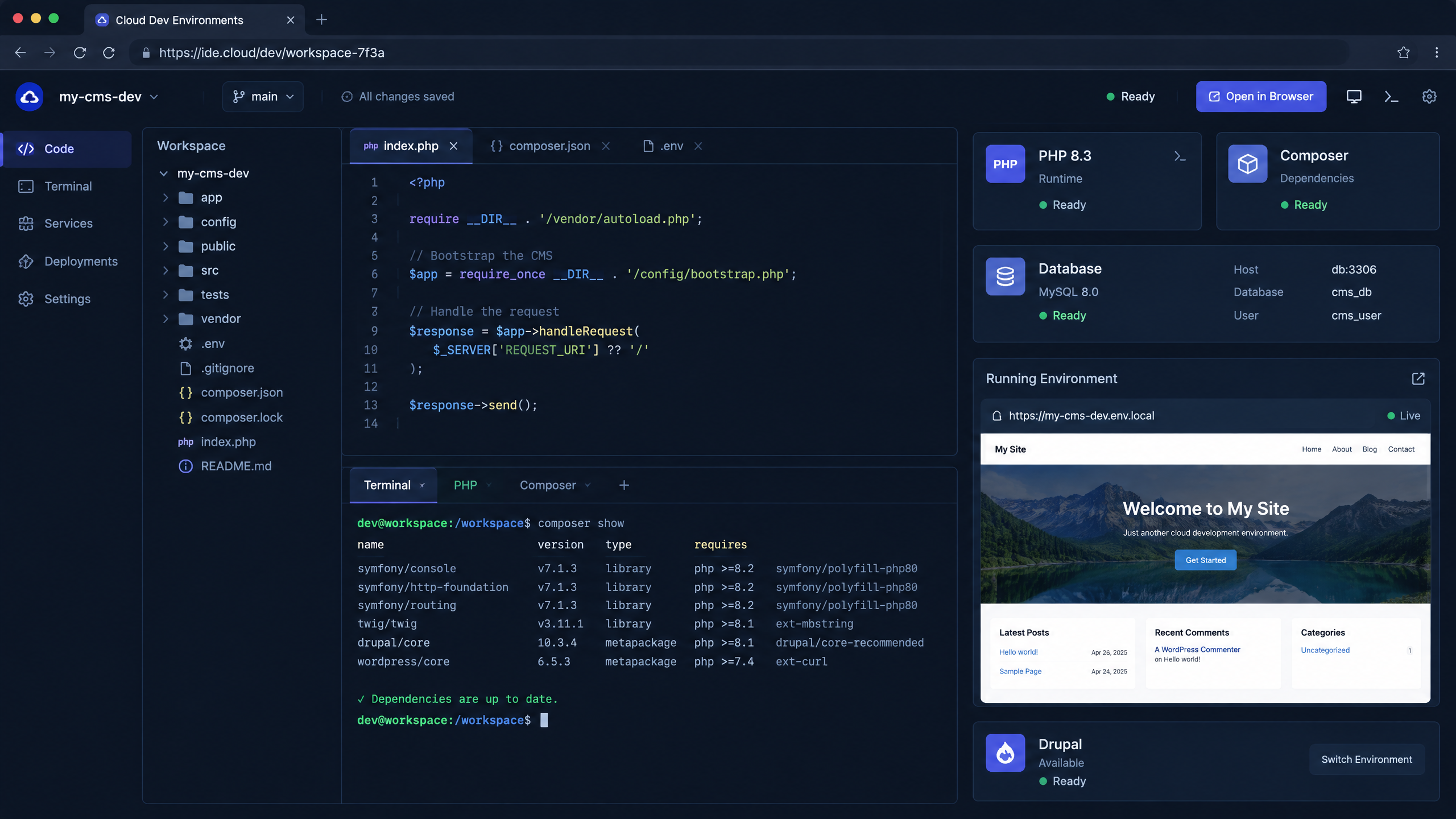
Cloud development environments help teams work closer to the real CMS application context.
Local development is often one of the hidden sources of delay in WordPress and Drupal teams.
A new developer joins and spends hours or days setting up a local environment. A contractor needs access to one project. A branch requires a specific dependency version. A bug appears in staging but cannot be reproduced locally.
Cloud development environments reduce that friction.
Instead of requiring every developer to recreate the stack on their own machine, the platform can provide ready-to-use development environments in the cloud.
This is especially useful for CMS teams because WordPress and Drupal projects often involve specific PHP versions, extensions, databases, file permissions, build tools, and environment variables.
DevPanel supports cloud development environments so developers can work closer to the real application context.
That helps teams move faster.
It also reduces the “works on my machine” problem.
When development, review, staging, and production are connected through a more consistent workflow, releases become easier to trust.
DevPanel as the Orchestration Layer
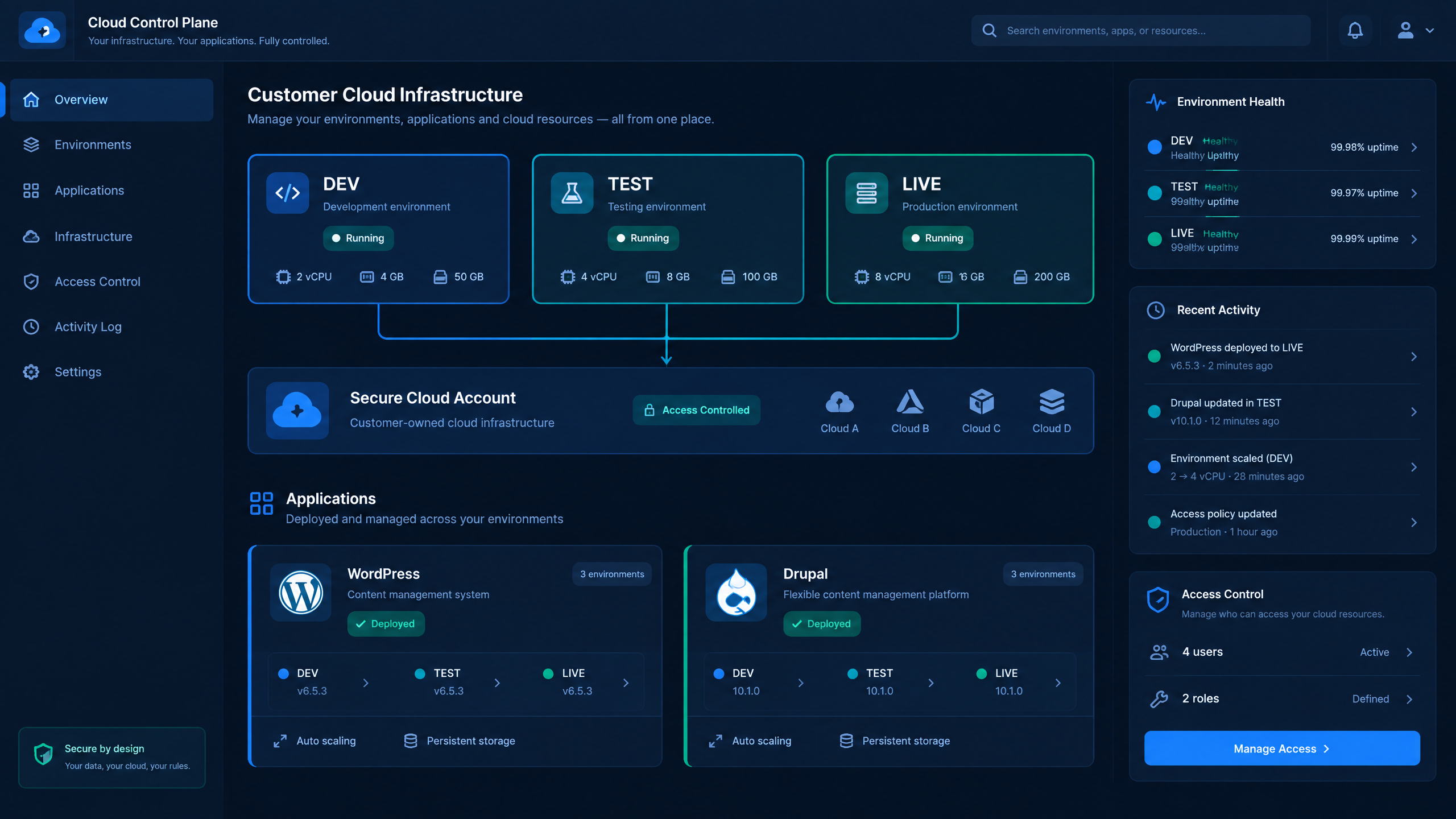
An orchestration layer connects Git workflows to development, test, and live environments.
GitOps needs orchestration.
Git stores the desired change.
CI validates it.
But something still has to create environments, connect branches, manage deployments, coordinate cloning, support access control, and operate against cloud infrastructure.
That is where DevPanel fits.
DevPanel acts as the orchestration layer for application delivery. It helps teams manage cloud development environments, branch workflows, deploy and clone actions, Workspaces, and cloud infrastructure connections.
For WordPress and Drupal teams, DevPanel provides a practical path from Git workflow to application operations.
Teams can use DevPanel to support:
•Cloud development environments
•Branch-based workflows
•Preview environments
•Staging and production workflows
•Deploy and clone processes
•Workspace-based team organization
•Customer-owned cloud infrastructure
•Multi-cloud flexibility
•Git-based deployment patterns
This gives teams a more complete delivery model than Git alone.
It also gives agencies and organizations a repeatable way to manage many CMS projects without turning every deployment into a custom process.
Customer-Owned Cloud Keeps Teams in Control
DevPanel is built around customer-owned cloud.
That means applications can run in the customer’s own cloud account while DevPanel provides the control layer and automation.
This is different from a traditional hosting model where the provider owns the infrastructure and the customer operates inside the provider’s environment.
For WordPress and Drupal teams, customer-owned cloud matters because it keeps the foundation under the organization’s control.
The team can use AWS, Azure, DigitalOcean, or another supported cloud provider. The infrastructure belongs to the customer or organization. DevPanel helps manage the workflows around that infrastructure.
This model is useful for agencies, enterprise teams, nonprofits, higher education, healthcare organizations, and government teams that need more control over where applications run and how operations are managed.
It also supports long-term flexibility.
If the organization changes strategy later, the infrastructure is not trapped inside a closed hosting platform.
Agencies Need Repeatable CMS Delivery
Agencies are a natural fit for GitOps-style WordPress and Drupal delivery.
They manage multiple clients.
They repeat similar workflows across projects.
They need predictable releases.
They need staging and preview environments.
They need to onboard developers quickly.
They need to protect production.
They need to reduce support emergencies.
A manual deployment process may work for one or two sites, but it becomes expensive across dozens of client projects.
GitOps gives agencies a more scalable delivery model.
DevPanel strengthens that model by giving agencies the platform layer for environments, Workspaces, templates, cloning, and customer-owned cloud operations.
This helps agencies standardize the way they deliver CMS projects.
Instead of reinventing the deployment process for each client, the agency can create a consistent operational foundation.
That supports better margins, better delivery quality, and a stronger recurring services model.
Enterprise Teams Need Governance Without Bottlenecks
Enterprise WordPress and Drupal teams face a different version of the same problem.
They need governance, but they cannot afford slow delivery.
Security teams need visibility.
Developers need speed.
Marketing teams need updates.
IT teams need control.
Leadership needs reliability.
A manual process often creates conflict between these needs. If governance depends on tickets and hand-offs, teams look for shortcuts. If speed bypasses controls, risk increases.
GitOps helps by making the workflow visible and reviewable.
Pull requests show the change.
CI shows validation.
Branch environments support review.
Staging provides a controlled checkpoint.
Production deployment happens through an approved process.
DevPanel supports this by giving enterprise teams a platform for managing environments and deployments in a more standardized way.
The goal is not to slow teams down.
The goal is to make the approved path faster and safer than the manual workaround.
Templates Help Standardize Delivery
Many WordPress and Drupal projects share patterns.
Agencies may build similar client sites.
Universities may build department sites.
Nonprofits may build campaign sites.
Enterprises may build microsites, documentation portals, or marketing properties.
Templates help teams avoid starting from scratch every time.
A template can include approved application structure, configuration, dependencies, development workflows, deployment patterns, and operational defaults.
When templates are paired with GitOps and DevPanel, teams can create repeatable launch paths.
That means faster onboarding, fewer mistakes, and more consistent delivery.
Templates also help teams scale governance.
Instead of asking every project to interpret best practices differently, teams can start from a known good foundation.
A Practical GitOps Rollout Plan
Teams do not need to change everything at once.
A practical rollout can happen in stages.
First, move active development into Git-based workflows if that is not already standard.
Second, require pull requests for meaningful changes.
Third, connect CI checks to pull requests.
Fourth, create branch or preview environments so reviewers can test changes before they reach staging.
Fifth, standardize staging deployments.
Sixth, add controlled production gates.
Seventh, document rollback and recovery steps.
Eighth, turn common project patterns into templates.
This staged approach helps teams improve delivery without overwhelming developers or stakeholders.
The goal is progress, not perfection on day one.
DevPanel can support this transition by giving teams the environment and deployment foundation needed to move from manual steps to repeatable workflows.
What Teams Should Evaluate
Before adopting a GitOps workflow for WordPress or Drupal, teams should ask practical questions.
Can every meaningful change start from a pull request?
Can CI validate the most common failure points?
Can reviewers test changes in real environments?
Can staging be updated consistently?
Can production deployment require the right approvals?
Can database changes be handled safely?
Can developers work in cloud environments without long local setup?
Can the process support WordPress and Drupal?
Can the same workflow scale across many projects?
Can the infrastructure remain in the organization’s own cloud account?
Can templates reduce repetitive setup?
These questions help teams separate basic Git usage from a real delivery platform.
FAQ
What is GitOps for WordPress and Drupal?
GitOps for WordPress and Drupal is a delivery model where approved changes move from Git into application environments through automated, reviewable workflows. It connects pull requests, CI checks, preview environments, staging validation, and controlled production deployments.
Is GitOps the same as using Git?
No. Using Git means your code is stored in a repository. GitOps goes further by connecting the repository to the desired state of the application environment and using automation to make environments match approved changes.
Do WordPress teams need GitOps?
WordPress teams benefit from GitOps when they need safer releases, branch previews, staging validation, deployment consistency, and fewer manual hand-offs. It is especially useful for teams managing business-critical sites or multiple client projects.
Do Drupal teams need CI/CD if they use GitOps?
Yes. CI/CD and GitOps solve related but different problems. CI/CD validates, builds, and prepares changes. GitOps helps move approved changes into environments in a controlled and repeatable way.
How does DevPanel help with GitOps for WordPress and Drupal?
DevPanel helps by providing the orchestration layer for cloud development environments, branch workflows, deployment and clone processes, Workspaces, templates, and customer-owned cloud infrastructure.
Can GitOps handle database changes?
GitOps can support database-sensitive workflows, but database changes still need explicit stages, backups, validation, and rollback planning. WordPress and Drupal teams should treat database operations as controlled deployment steps.
Is GitOps only for enterprise teams?
No. GitOps is useful for agencies, small teams, nonprofits, higher education, and enterprise teams. Any team that wants safer CMS deployments and fewer manual hand-offs can benefit from a more repeatable Git-based delivery workflow.
Conclusion: From Pull Request to Production With Less Risk
WordPress and Drupal teams do not need more manual deployment steps.
They need a better delivery system.
GitOps gives teams a way to connect pull requests, validation, preview environments, staging, and production into a more reliable workflow.
DevPanel makes that workflow practical by providing the orchestration layer around cloud development environments, branch workflows, deployments, cloning, Workspaces, templates, and customer-owned cloud infrastructure.
The result is a cleaner path from pull request to production.
Less guesswork.
Fewer manual hand-offs.
More consistent environments.
Better review.
Safer releases.
For teams managing serious WordPress and Drupal projects, that is the foundation for modern CMS delivery.