
Secure WordPress Hosting in 2026: Why Standard Platforms Are Failing You
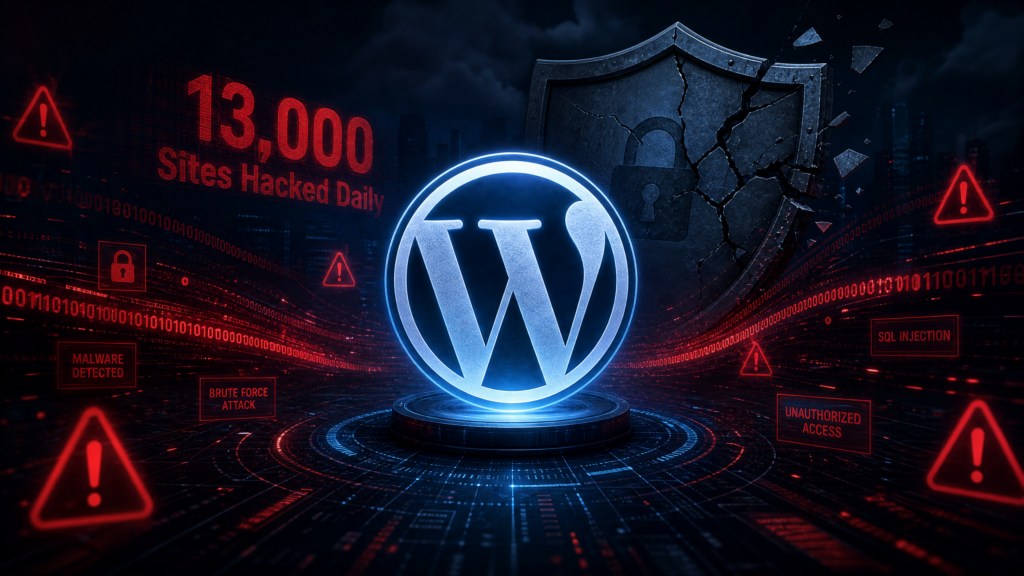
Approximately 13,000 WordPress sites are successfully hacked every single day. When you’re running mission-critical work on WordPress, that number should keep you up at night. Secure WordPress hosting isn’t just a nice-to-have checkbox on your infrastructure requirements list. It is the difference between your site surviving a viral spike and becoming a cautionary tale in someone’s incident report.
What Is Secure WordPress Hosting in 2026?
Secure WordPress hosting is not your grandfather’s shared hosting with an SSL certificate bolted on. In 2026, the threat landscape has evolved to a point where basic infrastructure defenses are practically decorative. Standard hosting solutions crumble under this pressure.
The real question is: what does “secure” actually mean when 87.8% of WordPress-specific exploits can bypass standard hosting firewalls? It means your hosting provider needs to think beyond the network layer. They need to understand WordPress at the application level, including how plugins interact with the core, how file permissions should be configured, and how to isolate environments so a compromise in staging doesn’t cascade into production.
Secure WordPress hosting in 2026 means having granular control over your infrastructure. It means you can define security controls that match your specific risk profile instead of accepting a vendor’s interpretation of how your WordPress stack should run. It means your hosting environment supports rapid patching, one-click rollback when something breaks, and zero downtime deployments so you can ship security fixes without taking your site offline.
But here’s what most providers won’t tell you. The security of your WordPress hosting is directly tied to how much control you actually have over the infrastructure. When you hand that control to a managed platform, you’re also handing them the responsibility for your security posture. And you’re paying a premium for it.
In traditional Managed PaaS models like Pantheon, approximately 80% of a $1,000 hosting bill is platform markup. With only $200 actually going toward raw compute resources. That markup is supposed to buy you security, convenience, and peace of mind. But what happens when the platform’s security model doesn’t align with your actual threat surface?
Why Standard Hosting Defenses Are No Longer Enough
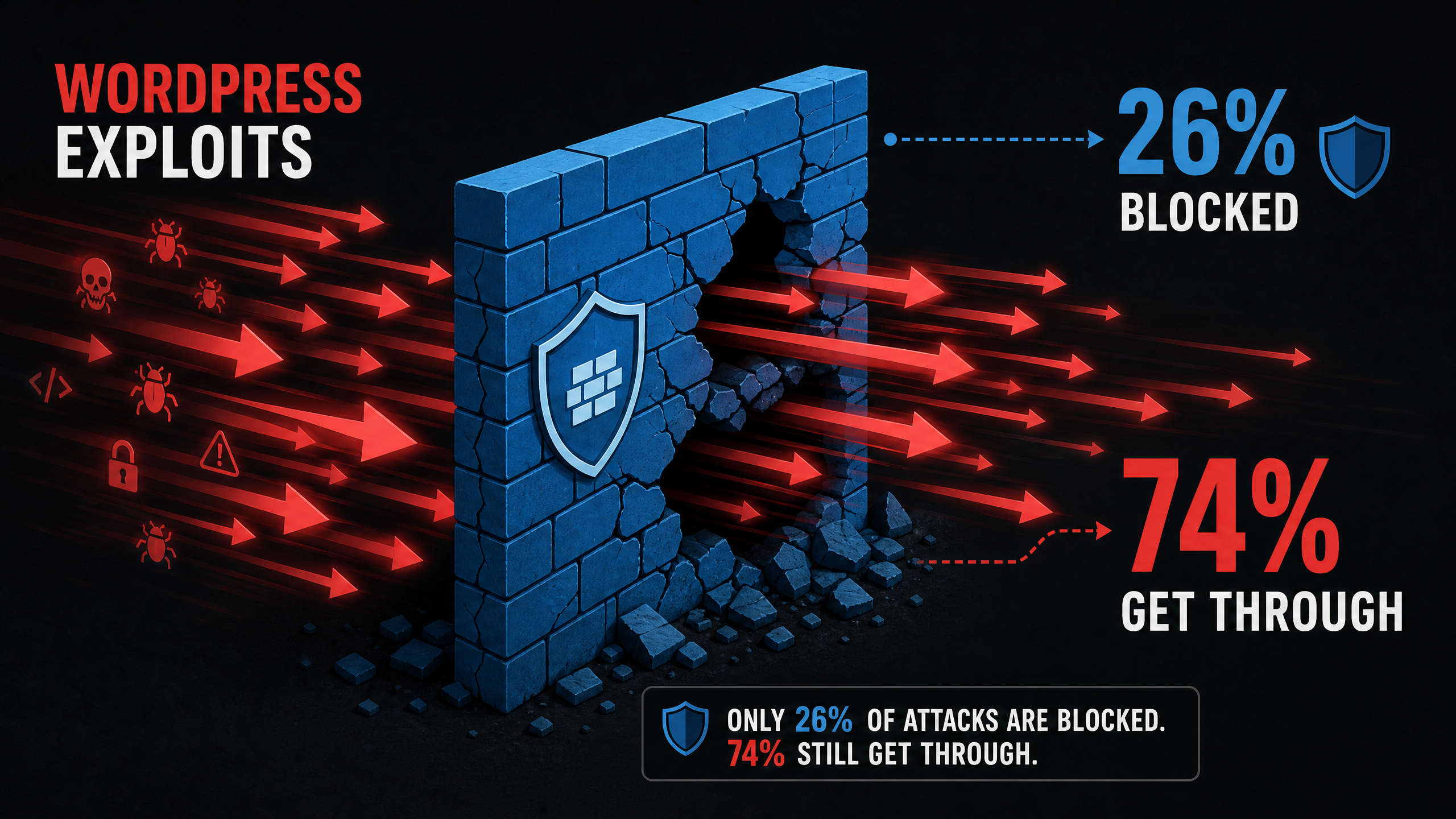
Let’s look at the numbers. Standard hosting defenses block only about 26% of exploits targeting WordPress. That means nearly three out of four attacks sail right through the typical hosting firewall. If you’re relying on your $20/month shared hosting plan to protect a business-critical WordPress site, you’re sitting on a full-blown crisis waiting to happen.
The problem is structural. Most hosting providers build their security at the network perimeter. They configure WAF rules, set up rate limiting, maybe throw in some IP blocking. But WordPress attacks don’t work like traditional network attacks. They exploit vulnerabilities in plugins, themes, and the core itself. They use legitimate HTTP requests. They authenticate as real users. They look like normal traffic until they don’t.
Did You Know?


The weighted median time from a vulnerability's public disclosure to its first mass exploitation is just 5 hours, making rapid response or virtual patching critical.


Source: dev.to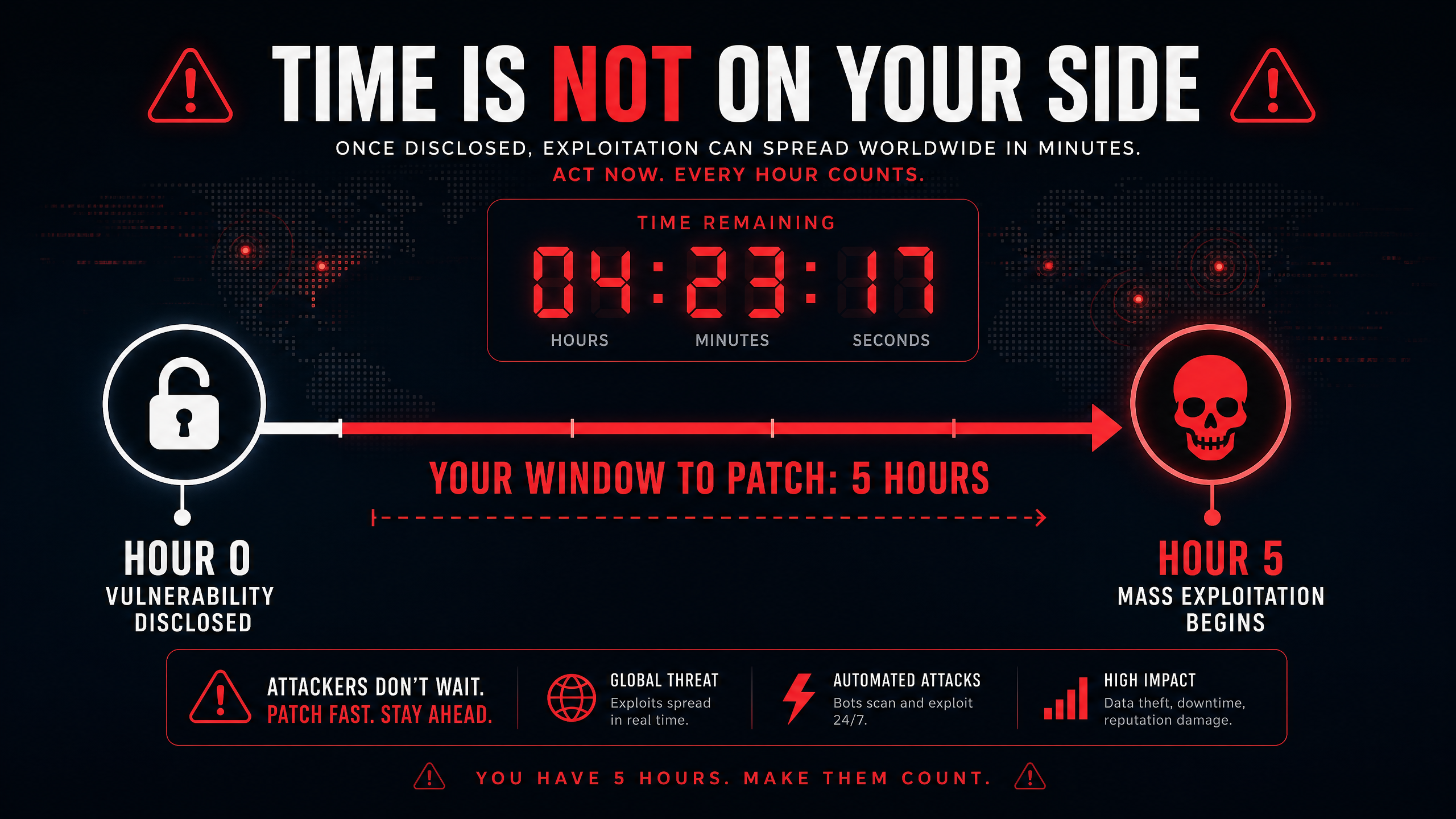
Five hours. That’s the window you have between a vulnerability being publicly disclosed and attackers weaponizing it at scale. When you’re on a managed platform where you can’t directly access your servers, can’t apply virtual patches immediately, and have to submit a support ticket to change a PHP configuration, five hours is not enough time. You need infrastructure that lets you move at the speed of the threat.
This is where infrastructure ownership becomes a security decision, not just a cost decision. When you own the infrastructure layer, you can implement virtual patching at the WAF level the moment a CVE drops. You can push a hotfix to your codebase through your CI/CD pipeline without waiting for a platform vendor to approve your deployment. You can isolate the affected environment and roll back to a known-good state with a one-click rollback.
The True Cost of “Secure” Managed WordPress Hosting
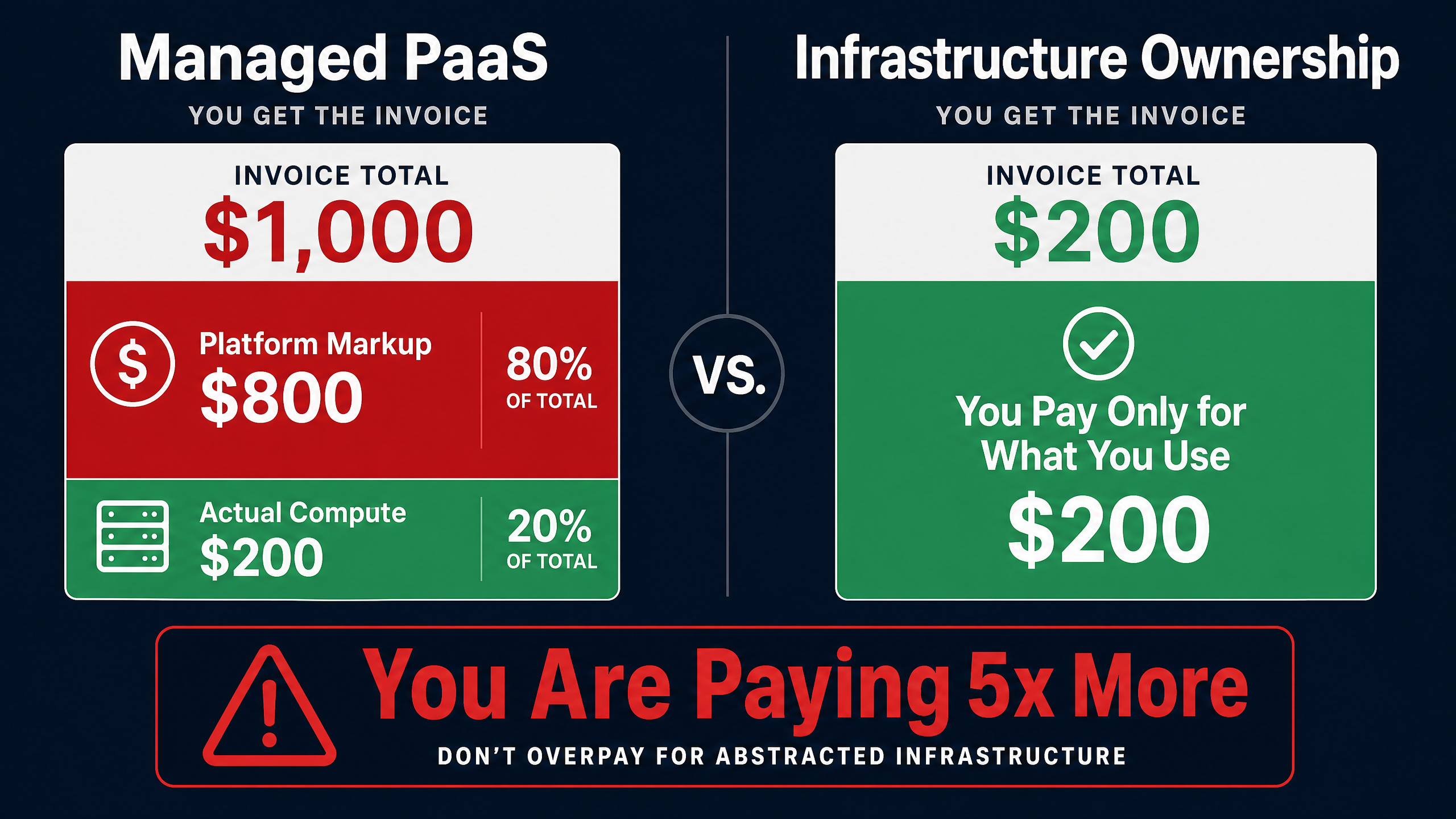
Managed WordPress hosting providers market security as a premium feature. They’ll tell you about their enterprise-grade firewalls, their DDoS protection, their automated backups. And those things matter. But what they don’t tell you is that you’re paying for security through vendor lock-in and inflated pricing.
Consider the economics. A managed PaaS provider charges you $1,000 per month for what amounts to $200 of actual cloud infrastructure. That $800 difference is platform markup. Some of that markup goes toward the platform’s security tooling. But how much of that security tooling is actually tailored to your specific WordPress environment?
The answer is: very little. Managed platforms apply the same security posture to every customer. They have to, because they’re running a multi-tenant infrastructure where customization breaks their operational model. So you get a one-size-fits-all security configuration that blocks 26% of attacks while costing you 80% more than running the same infrastructure yourself.
The vast majority of WordPress sites carry exploitable weaknesses, and attackers know it.
Instead of accepting a vendor’s interpretation of how your WordPress stack should run, you define the infrastructure behaviors, deployment mechanics, and security controls in a way that matches your team and your applications. That’s the core of infrastructure ownership. And it’s not just about saving money. It’s about having the agility to respond to security incidents on your own terms.
When you can align environments, deployments, and scaling with how your team actually ships, your cloud spend becomes a strategy, not a surprise. The same applies to security. When you control the infrastructure, you control the response time. You control the patching cadence. You control the isolation boundaries. You don’t wait for a support ticket to be escalated. You don’t hope the platform’s automated systems catch the attack before it reaches your database.
The Plugin Problem: Why Secure WordPress Hosting Must Go Deeper
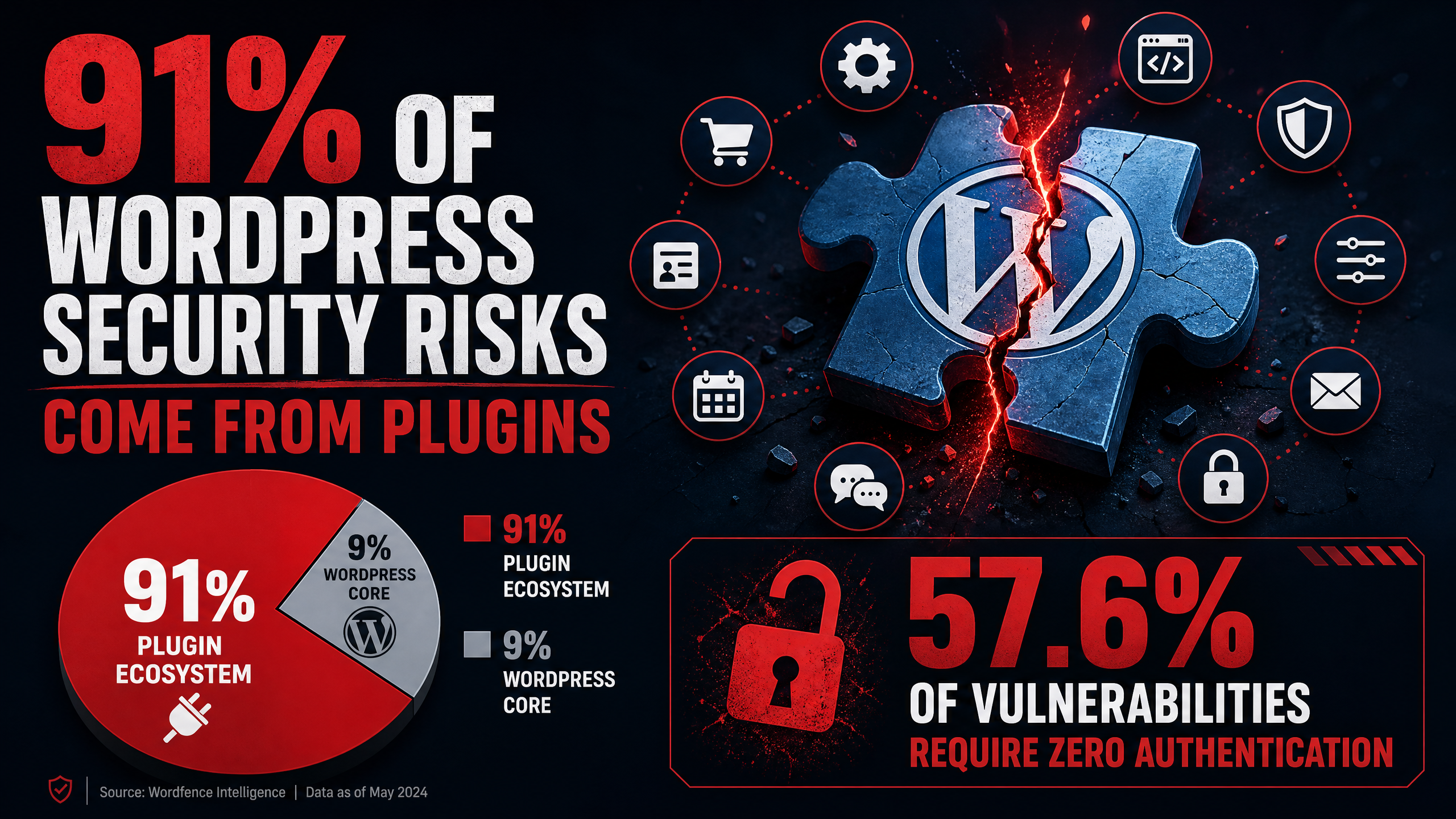
Here’s a statistic that should reframe how you think about WordPress security: 91% of security risks originate from the plugin ecosystem rather than the WordPress core. Your hosting provider’s network firewall is not going to protect you from a vulnerable contact form plugin that allows SQL injection through a legitimate POST request.
Secure WordPress hosting has to account for the plugin layer. That means:
File integrity monitoring that detects unauthorized changes to plugin files, even when the attacker uses legitimate WordPress admin credentials.
PHP runtime protection that can identify and block malicious code execution patterns in real time, not just after the fact.
Isolated environments so a compromised staging site with experimental plugins can’t pivot to production.
Automated vulnerability scanning that checks every plugin against known CVE databases before deployment, not after.
In the first half of 2025, more than 57.6% of WordPress vulnerabilities could be exploited by any site visitor without requiring any prior access or login credentials. These are unauthenticated attacks. They don’t need a compromised admin account. They don’t need a stolen password. They just need your site to be reachable on the internet and running a vulnerable plugin.
Nearly half of the WordPress vulnerabilities disclosed in 2025 had no fix available at the time they were made public. So even if you’re monitoring vulnerability feeds and patching aggressively, you can have a window of exposure where the only protection is virtual patching at the infrastructure layer. That requires a WAF you actually control, not one that’s shared across a platform’s entire customer base.
Did You Know?
A staggering 87.8% of WordPress-specific exploits are able to bypass standard hosting firewalls, highlighting the need for specialized security layers.


Source: dev.to
Infrastructure Ownership: The Foundation of Secure WordPress Hosting
So what does a genuinely secure WordPress hosting architecture look like in 2026? It starts with owning your infrastructure. Not renting it from a platform that owns the servers, the configurations, and the security rules. Owning it.
When you run your WordPress sites on raw cloud infrastructure like AWS, Azure, or DigitalOcean, you get direct access to the security primitives that actually matter. You can configure VPCs, security groups, and network ACLs to create defense-in-depth architectures that match your specific threat model. You can implement WAF rules that are custom-tuned to your plugin stack, not generic rules shared across thousands of tenants.
But raw cloud infrastructure is hard. That’s the legitimate objection. AWS doesn’t give you a dashboard for managing WordPress deployments. It gives you EC2, RDS, EFS, and a console full of services that assume you know what you’re doing. For most DevOps teams, achieving this level of resilience isn’t just a “stretch goal.” It is a full-blown crisis waiting to happen.
That’s where orchestration tools come in. DevPanel is like training wheels for AWS. It sits inside your own cloud account and gives you the management layer you need to run secure WordPress hosting without becoming an AWS certified solutions architect.
Building Your Secure WordPress Hosting Stack
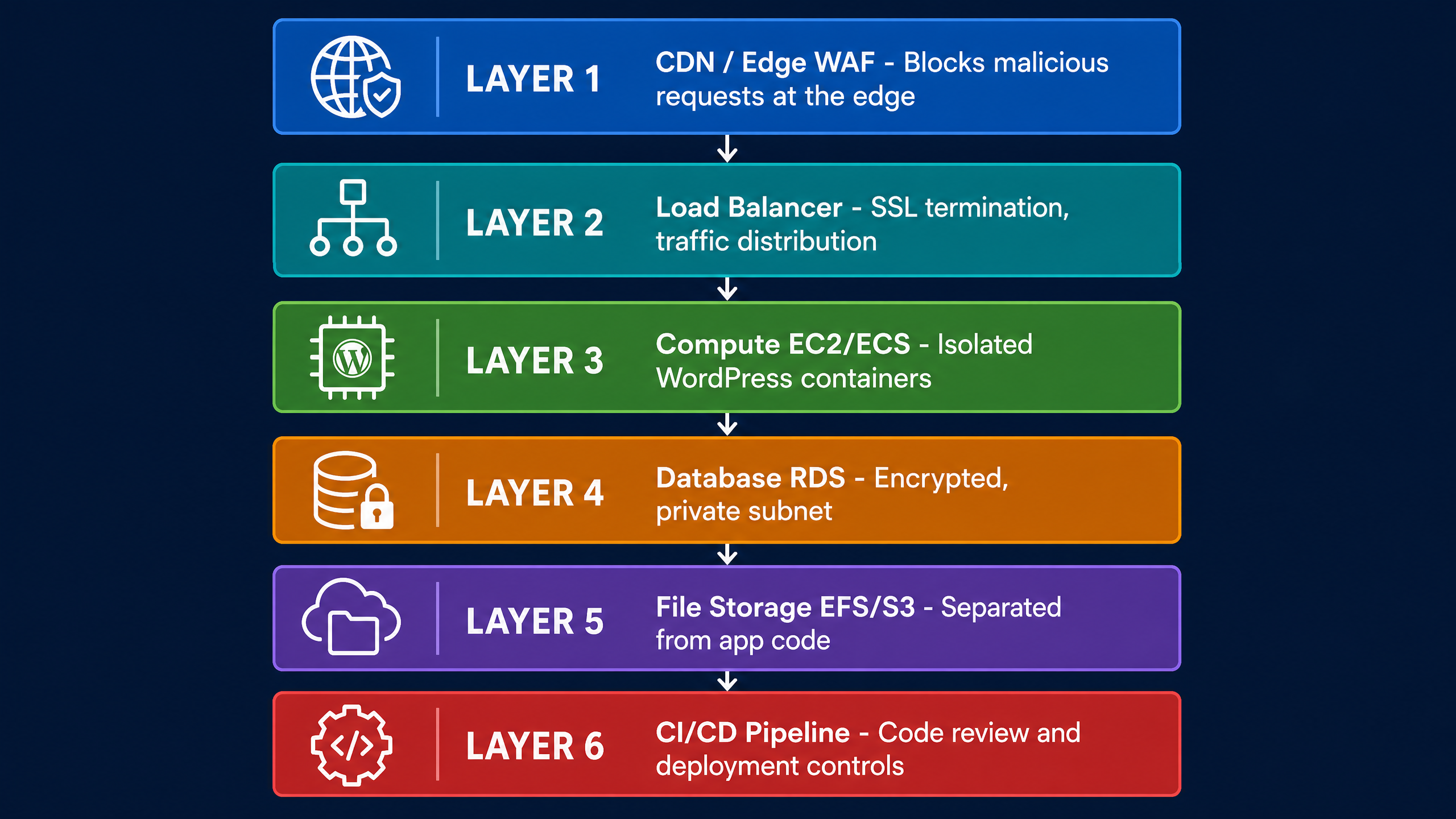
A proper secure WordPress hosting stack on raw cloud infrastructure includes several layers. Each layer serves a specific security purpose:
  Layer
  Security Function
  Why It Matters


  CDN / Edge WAF
  Blocks malicious requests before they reach your origin
  The efficiency of your CDN determines whether your origin servers survive a viral spike or a coordinated attack.


  Load Balancer
  Distributes traffic and provides SSL termination
  Ensures no single server becomes a bottleneck or single point of failure during traffic surges.


  Compute (EC2/ECS)
  Runs WordPress in isolated containers or instances
  Isolation prevents cross-site contamination when one WordPress instance is compromised.


  Database (RDS)
  Managed database with encryption at rest and in transit
  Keeps your data in a private subnet, inaccessible from the public internet.


  File Storage (EFS/S3)
  Stores uploads and static assets with access controls
  Separates user-generated content from application code, reducing the attack surface.


  CI/CD Pipeline
  Enforces code review, automated testing, and deployment controls
  Prevents unreviewed code from reaching production, closing the dev-to-production flow gap.
Each of these layers is something you control when you own the infrastructure. On a managed platform, you get whatever the vendor decided to include in their package. On your own cloud account, with an orchestration tool like DevPanel managing the complexity, you get to choose.
CDN Configuration for Secure WordPress Hosting
Your CDN is your shield. But a misconfigured CDN is worse than no CDN at all because it creates a false sense of security. A properly configured CDN for secure WordPress hosting needs to do more than cache static assets.
It needs to implement WAF rules that understand WordPress traffic patterns. It needs to block requests targeting known vulnerable plugin endpoints. It needs to rate-limit authentication attempts and XML-RPC requests. It needs to challenge suspicious traffic with CAPTCHAs before it reaches your origin servers.
The Edge-to-Origin Ratio matters here. The efficiency of your CDN determines whether your origin servers survive a viral spike. If your CDN is passing 70% of requests through to your origin, your servers will fold under load. If it’s caching and blocking correctly, it should absorb 90% or more of traffic at the edge, leaving your origin servers to handle only legitimate, unique requests.
When you own your infrastructure, you can configure your CDN rules to match your specific WordPress setup. You can whitelist the exact endpoints your plugins need. You can block everything else. On a managed platform, you’re stuck with whatever generic WAF rules the vendor applies across all customers.
Zero Downtime Deployments and Security Patching
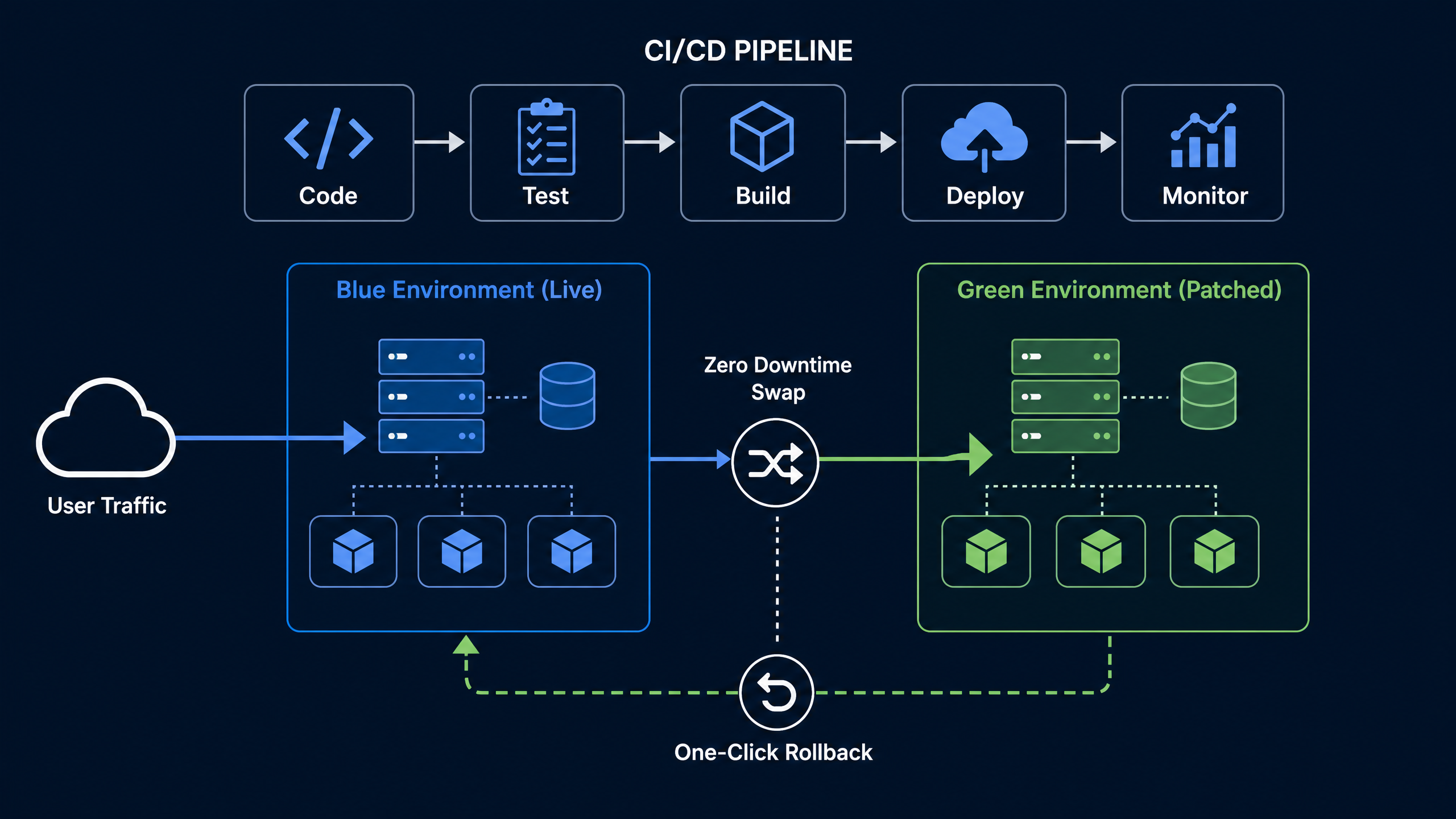
Security patching is where most hosting setups fail in practice. You know a vulnerability exists. You have the patch ready. But deploying it requires taking your site offline, which means scheduling a maintenance window, which means waiting, which means your site is exposed for hours or days longer than necessary.
Zero downtime deployments solve this. When your hosting infrastructure supports blue-green deployments or rolling updates, you can push security patches without any user-facing downtime. Your CI/CD pipeline builds the new environment, runs automated tests, and then swaps traffic over to the patched version. If something breaks, you trigger a one-click rollback.
This is what the dev-to-production flow should look like. Your developers write code. Your CI/CD pipeline tests it. Your infrastructure deploys it. Your monitoring watches it. Your rollback saves you when something goes wrong. All of this happens within your own cloud account, under your control, on infrastructure you own.
Breaking news does not announce itself. When a critical vulnerability drops, you need to be able to patch and deploy in minutes, not schedule a maintenance window for next Tuesday. Zero downtime deployments aren’t just about developer convenience. They’re a security requirement.
Cost Efficiency Without Compromising Security
Here’s the decision that every team running WordPress at scale eventually faces. The decision ultimately comes down to one core trade-off: operational simplicity vs. cost efficiency and infrastructure control.
Managed platforms give you operational simplicity. You don’t have to think about servers, networks, or security configurations. But you pay for it with an 80% platform markup and limited control over your security posture.
Raw cloud infrastructure gives you cost efficiency and complete control. But it comes with operational complexity that can overwhelm teams without deep DevOps expertise.
The middle ground is orchestration. Tools like DevPanel sit inside your AWS account and handle the operational complexity while giving you the cost savings and control of raw cloud infrastructure. You get the security of owning your infrastructure without the burden of building everything from scratch.
When you own the infrastructure layer, you can take advantage of choices like Graviton processors to align performance and cost without paying a managed platform premium. You can scale horizontally during traffic spikes and scale back down when the spike passes. You can choose your own instance types, your own database configurations, your own WAF rules.
If one person can manage 30+ sites on AWS, so can you, with DevPanel. That’s not a marketing claim. That’s the operational reality of having the right orchestration layer on top of raw cloud infrastructure.
Data Sovereignty and Compliance in Secure WordPress Hosting
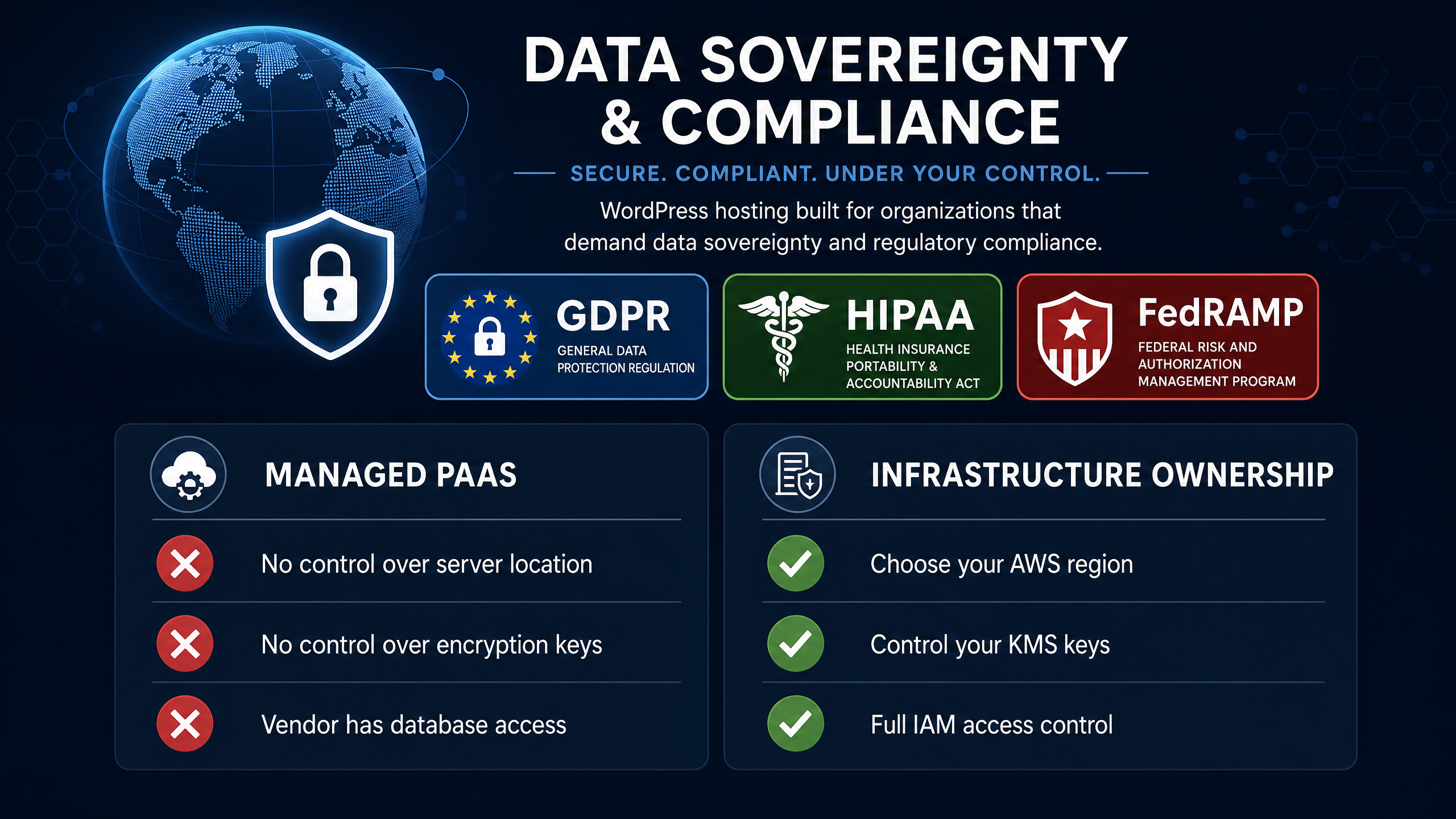
For organizations operating under regulatory frameworks like GDPR, HIPAA, or FedRAMP, secure WordPress hosting extends beyond attack prevention. It includes data sovereignty requirements that dictate where your data is stored, how it’s encrypted, and who can access it.
When your WordPress site runs on a managed PaaS, your data lives in the platform’s infrastructure. You don’t control the physical location of the servers. You don’t control the encryption keys. You don’t control who at the vendor has access to your database. For many compliance frameworks, that’s a problem.
When you own your infrastructure, you choose the AWS region. You control the KMS encryption keys. You configure the IAM policies that determine who can access what. You can satisfy auditor requirements by showing exactly where data resides and who has access, because it’s all in your account.
This is particularly relevant for nonprofits, government agencies, and healthcare organizations that need predictable flat-rate hosting costs without compromising on compliance or security. The institutional knowledge dependencies that build up around a managed platform’s proprietary tooling become a risk factor when auditors ask questions you can’t answer about your own infrastructure.
Performance as a Security Feature
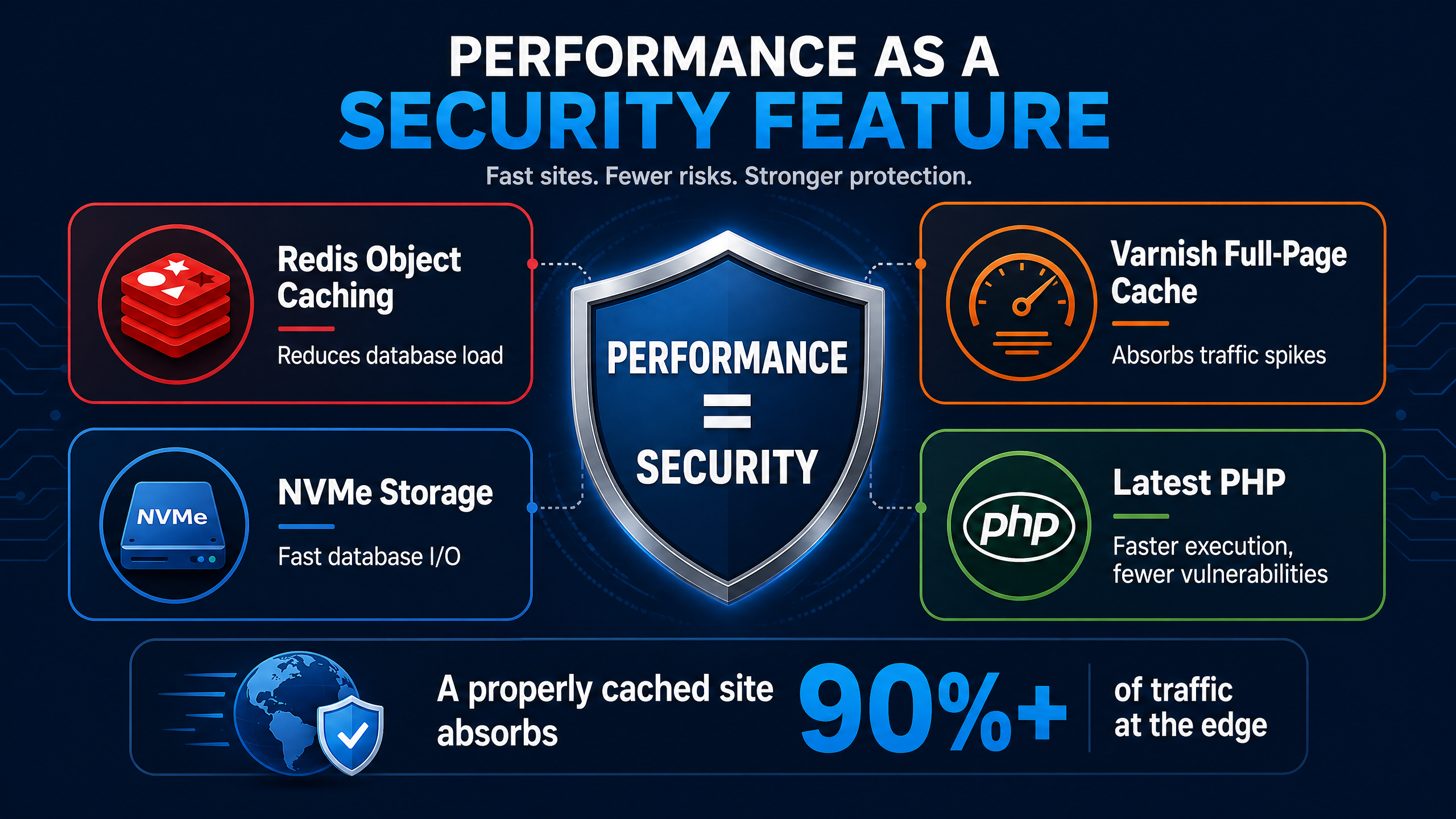
Performance and security are not separate concerns in WordPress hosting. A site that goes down under load is a site that’s vulnerable to denial-of-service attacks, whether intentional or accidental. Your infrastructure’s ability to handle traffic spikes is a core component of your security posture.
A performant WordPress hosting stack includes Redis for object caching, Varnish for full-page caching, NVMe storage for fast database I/O, and the latest PHP version for improved execution speed. These aren’t just performance optimizations. They’re security controls. A fast site can handle more requests, which means it can absorb more attack traffic before degrading. A site with aggressive caching serves fewer requests to the origin, which means fewer opportunities for attackers to reach vulnerable code.
What do you do when your website needs to handle 11 million hits per day? You build infrastructure that scales horizontally, caches aggressively at the edge, and isolates components so failure in one layer doesn’t cascade. You build for resilience, not just for speed.
Conclusion
Secure WordPress hosting in 2026 is not a product you buy from a vendor. It is an architecture you build, configure, and control. The statistics are clear: 13,000 sites hacked daily, 87.8% of exploits bypassing standard firewalls, a 5-hour window between disclosure and mass exploitation. The threat landscape demands infrastructure ownership, not platform dependence.
The managed PaaS model charges you 80% markup for security controls that block only 26% of attacks. Raw cloud infrastructure gives you the control and cost efficiency to build genuinely secure WordPress hosting, but it requires operational expertise. The solution is orchestration: tools that run inside your own cloud account, giving you the management layer of a platform without the platform tax.
When you own your infrastructure, you control your security posture. You patch on your timeline. You configure WAF rules for your specific plugin stack. You deploy with zero downtime and roll back with one click. You choose your CDN, your caching layer, your database configuration. You make the decisions that matter, because you’re the one who understands your threat surface.
If one person can manage 30+ secure WordPress sites on AWS with DevPanel, there’s no reason your team can’t do the same. The tools exist. The infrastructure is waiting. The only question is whether you’ll keep paying for someone else’s interpretation of security or start owning yours.
Frequently Asked Questions
What is the most secure WordPress hosting in 2026?
The most secure WordPress hosting in 2026 is infrastructure you own and control, typically on AWS or Azure, with an orchestration layer like DevPanel. This gives you application-layer WAF rules, isolated environments, and rapid patching capabilities that managed platforms can’t match. Standard hosting defenses block only 26% of WordPress exploits, so true security requires infrastructure ownership.
Is shared WordPress hosting secure enough for a business website?
No. Shared hosting is not secure WordPress hosting for any business-critical site. With 13,000 WordPress sites hacked daily and 87.8% of exploits bypassing standard firewalls, shared hosting provides minimal isolation and no application-layer protection. Business sites need dedicated infrastructure with configurable security controls.
How much does secure WordPress hosting cost?
Secure WordPress hosting on raw cloud infrastructure costs roughly 80% less than equivalent managed PaaS plans. A $1,000 managed platform bill typically represents only $200 of actual compute resources. With DevPanel orchestrating AWS infrastructure, you pay for raw cloud resources plus a predictable flat-rate management tool, eliminating the 80% platform markup.
Can I make my existing WordPress hosting more secure?
Yes, but only up to a point. You can add WAF plugins, implement strong passwords, and keep plugins updated. But if your hosting blocks only 26% of exploits and you can’t control the infrastructure layer, you’re limited. Moving to infrastructure you own, with a CDN, isolated environments, and CI/CD pipelines for rapid patching, is the most effective security upgrade.
How fast do I need to patch WordPress vulnerabilities?
You need to patch within hours, not days. The median time from vulnerability disclosure to mass exploitation is just 5 hours. Secure WordPress hosting must support virtual patching at the WAF layer and zero downtime deployments through CI/CD pipelines so you can respond before attackers weaponize the vulnerability.
Is AWS secure for WordPress hosting?
AWS provides the security primitives needed for genuinely secure WordPress hosting: VPCs, security groups, KMS encryption, WAF, and IAM controls. The challenge is operational complexity. Tools like DevPanel act as training wheels for AWS, giving you the orchestration layer to manage secure WordPress deployments without deep AWS expertise. One person can manage 30+ sites this way.
What’s the difference between managed WordPress hosting and owning your infrastructure?
Managed WordPress hosting gives you operational simplicity but charges 80% markup and limits your security controls to the platform’s shared configurations. Owning your infrastructure gives you complete control over security, cost efficiency, and compliance, but requires DevOps expertise. Orchestration tools like DevPanel bridge this gap by running inside your own cloud account.